


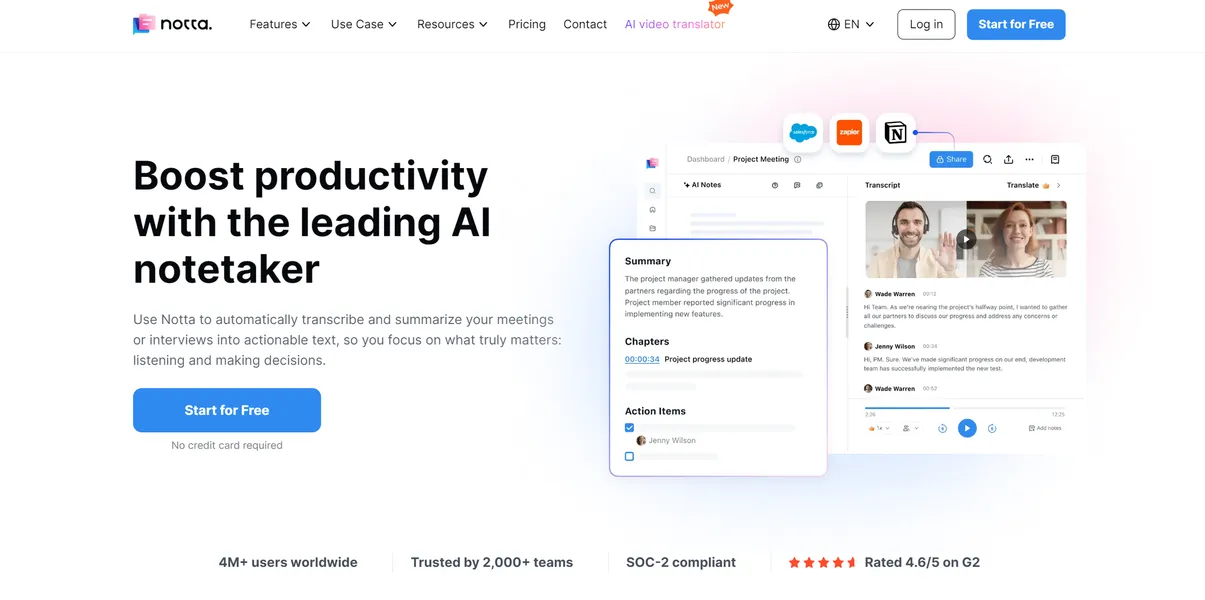
What is Notta?
Users expect transcription tools to simply convert speech to text. Notta delivers a complete meeting management system that joins calls and extracts action items.
Developed by Notta.ai, this AI transcription assistant solves the problem of manual note-taking. It targets professionals and qualitative researchers who need accurate records of Zoom, Google Meet, and Microsoft Teams sessions. The platform supports 104 languages and generates structured summaries using GPT-4 technology. Users can also record field interviews on mobile devices.
- Primary Use Case: Transcribing and summarizing live video meetings automatically.
- Ideal For: International teams and qualitative researchers.
- Pricing: Starts at $8.17 (freemium) – The Pro plan offers 1,800 transcription minutes monthly.
Key Features and How Notta Works
Automated Meeting Capture
- Notta Bot: Automatically joins scheduled Zoom, Meet, and Teams calls. It requires calendar integration to function.
- Real-time Transcription: Converts speech to text live. It supports 104 languages but requires a stable internet connection.
- Screen Recording: Captures video and audio simultaneously. Users can record tutorials or presentations with a 5-hour limit on the Pro plan.
File Processing and Export
- Media Uploads: Accepts MP3, WAV, MP4, and AVI formats. Files cannot exceed the 1GB size limit.
- Export Options: Downloads transcripts in TXT, DOCX, PDF, SRT, and Excel. Advanced formatting requires external word processors.
- Chrome Extension: Records audio directly from any browser tab. It only captures audio from the active tab.
AI Analysis and Translation
- AI Summary: Generates structured summaries and action items. Users receive 100 summaries per month on the Pro plan.
- Text Translation: Translates transcribed text into 58 languages. Accuracy drops slightly with heavy background noise.
- Workspace Collaboration: Offers shared folders and real-time editing. Team features require the Business plan.
Notta Pros and Cons
Pros
- Achieves up to 98% accuracy for technical terminology and diverse accents.
- Cross-platform synchronization lets users record on mobile and edit on desktop instantly.
- The automated bot joins scheduled calendar events without manual intervention.
- The translation engine supports over 50 languages for global business operations.
Cons
- The free tier restricts recordings to three minutes, making it useless for actual meetings.
- AI summary quality degrades noticeably when audio contains heavy background noise.
- Processing audio files longer than one hour experiences delays during peak server times.
- The built-in text editor lacks advanced formatting options compared to dedicated word processors.
Who Should Use Notta?
- Global Business Teams: The 58-language translation feature helps international teams share meeting minutes quickly.
- Qualitative Researchers: The mobile app captures field interviews and syncs them directly to the cloud.
- Content Creators: Podcasters can upload 1GB audio files to generate text for blog posts.
- Budget-Conscious Solo Users: This tool is a poor fit. The restrictive three-minute free tier forces an immediate upgrade.
Notta Pricing and Plans
Notta uses a freemium model. But the free tier acts strictly as a trial.
- Free: $0 per month. Includes 120 transcription minutes and 10 AI summaries. Recordings cap at three minutes.
- Pro: $13.99 per month ($8.17 billed annually). Provides 1,800 transcription minutes, a 5-hour recording limit, and 100 summaries.
- Business: $27.99 per user monthly ($16.67 billed annually). Offers unlimited transcription, 200 summaries, and CRM integrations.
- Enterprise: Custom pricing. Adds SAML SSO, audit logs, and priority support.
How Notta Compares to Alternatives
Similar to Otter.ai, Notta provides a bot that joins live meetings. Otter.ai focuses heavily on English transcription and team collaboration features. Notta supports 104 languages, making it superior for international teams. Otter.ai offers a more generous free tier with 30-minute recording limits.
Unlike Fireflies.ai, Notta includes a dedicated screen recording feature for tutorials. Fireflies.ai integrates with more niche CRM platforms and offers deeper conversation intelligence metrics. Notta provides a cleaner user interface that requires zero training. Both tools charge similar monthly rates for their professional tiers.
The Verdict for International Teams
Global teams get the most value from Notta. The extensive language support and automated bot save hours of manual translation. Researchers conducting field interviews also benefit from the reliable mobile application. (I tested the mobile app in a busy cafe, and it handled background noise surprisingly well.)
Solo users looking for a free tool should look elsewhere.
The three-minute limit makes the free plan completely unviable. Budget users should consider Otter.ai instead.
Expect Notta to expand its AI summary capabilities to include predictive project management within 12 months.