



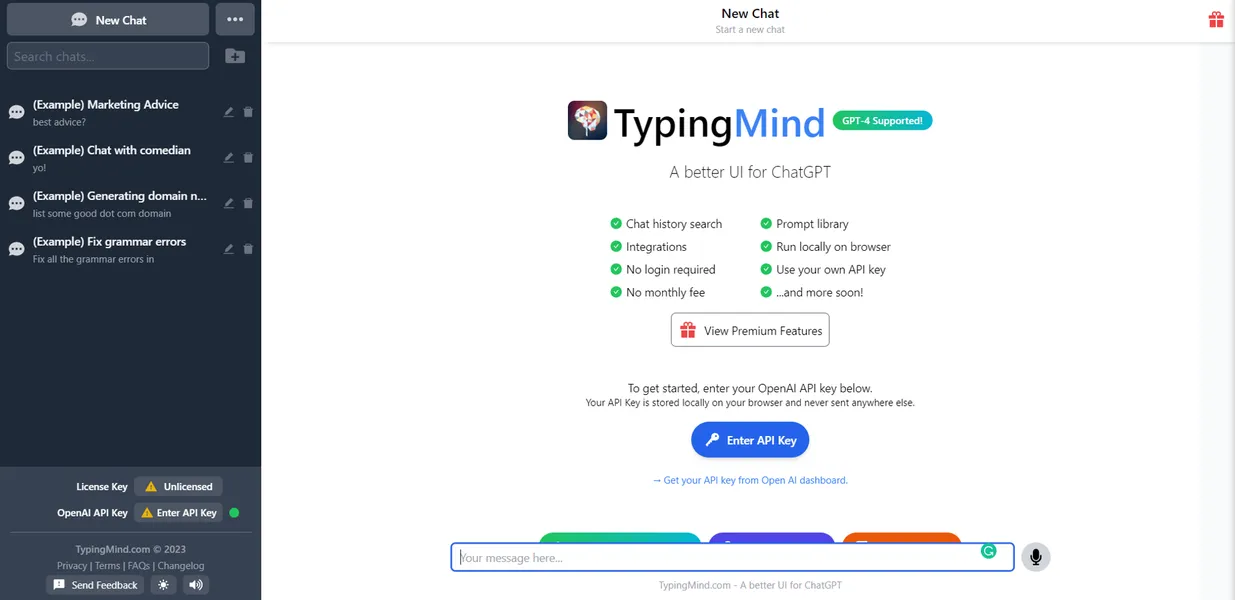
What is TypingMind?
The most striking aspect of TypingMind is how much faster it responds compared to the official ChatGPT web application. By bypassing bloated consumer interfaces, this tool connects directly to raw AI endpoints. Users experience zero lag during text generation.
Developed by Dev-VN, TypingMind is an AI chat interface that solves the problem of paying multiple $20 monthly subscriptions. It targets developers and researchers who want to use OpenAI, Anthropic, and Google models in one place. Users supply their own API keys to chat with these models.
- Primary Use Case: Chatting with multiple AI models using personal API keys in a unified workspace.
- Ideal For: Advanced users and developers who manage high-volume AI interactions.
- Pricing: Starts at $39 (Lifetime) : A single payment replaces recurring monthly AI subscriptions.
Key Features and How TypingMind Works
Model Management and Integration
- Multi-Model Support: Connect API keys for OpenAI, Anthropic, Google, Mistral, and Groq simultaneously. Limit: Requires active, funded API accounts for each provider.
- Multi-Chat View: Compare responses from two different AI models side-by-side in a single window. Limit: Heavy usage of two premium models doubles the API cost per query.
Customization and Workflow
- AI Agents: Create custom personas with unique system prompts and temperature settings. Limit: Agents do not share context across different chat sessions.
- Prompt Library: Access 100 pre-built professional prompts and save custom snippets. Limit: Organizing hundreds of custom prompts becomes difficult without advanced folder search.
Advanced Capabilities
- Knowledge Base: Upload PDF, TXT, or CSV files for RAG-based document querying. Limit: File uploads are capped at 50MB per document.
- Plugin System: Access 50 plugins including Web Search and WolframAlpha. Limit: Some advanced plugins require separate third-party API keys to function.
TypingMind Pros and Cons
Pros
- Users pay only for raw API usage, which costs less than standard $20 monthly subscriptions.
- The interface loads faster than the official ChatGPT web application.
- One-time payment options eliminate the burden of recurring monthly software fees.
- API keys are stored locally or encrypted, keeping user data away from the developer.
Cons
- Users must manually generate and manage API keys from various AI providers.
- Heavy usage of premium models causes unpredictable monthly bills from API providers.
- The platform lacks dedicated iOS or Android apps, relying on web-responsive design.
Who Should Use TypingMind?
- Budget-conscious power users: Those who use AI occasionally save money by paying only for exact API usage instead of flat monthly fees.
- Prompt engineers: Professionals who need to compare outputs from GPT-4o and Claude 3.5 side-by-side benefit from the multi-chat view.
- Privacy-focused teams: Companies that want to keep chat data out of consumer AI training sets use enterprise API endpoints.
- Non-technical beginners (Not Recommended): Users who want a simple login-and-chat experience will struggle with the API key setup process.
TypingMind Pricing and Plans
The Free tier costs $0 but acts as a trial. It includes basic chat features but does not save chat history and shows periodic popups.
The Standard plan costs a $39 one-time fee. It includes AI agents, a prompt library, and cloud sync for one user.
The Extended plan costs a $79 one-time fee. It adds Web Search, DALL-E integration, and Text-to-Speech capabilities.
The Premium plan costs a $129 one-time fee. It unlocks all plugins, multi-model chats, and project folders.
Teams Starter costs $99 per month. It includes 5 seats, unlimited agents, and basic chat frontend features.
Teams Growth costs $199 per month. It adds a knowledge base for RAG and project folders for 5 users.
Teams Professional costs $299 per month. It provides reports, analytics, SSO, and user roles for 5 seats.
Teams Business offers custom pricing starting at $7,000 per year. It includes volume discounts and dedicated support.
How TypingMind Compares to Alternatives
Similar to LibreChat, TypingMind offers a unified interface for multiple AI models. LibreChat is open-source and free to self-host. TypingMind charges a premium for its hosted version but provides a smoother onboarding experience. LibreChat requires Docker knowledge to set up.
Unlike Poe, this tool does not charge a flat monthly subscription for access to premium models. Poe gives users a daily compute allowance for a set fee. TypingMind requires users to bring their own API keys. This means TypingMind users face uncapped costs if they run thousands of queries.
The Verdict for API-Savvy Professionals
TypingMind delivers massive value for users who already understand how AI APIs work. The lifetime license pays for itself within two months if it replaces a ChatGPT Plus subscription.
The interface speed alone makes it a worthy upgrade.
However, the setup friction is real. (I spent twenty minutes just generating and testing API keys before sending my first message). Users who want a simple subscription should look elsewhere.
Poe remains a better choice for users who want access to multiple models without managing API billing limits.
The honest limit of TypingMind is mobile access. Until the developer releases native mobile apps, heavy phone users will find the web interface clunky on small screens.