

What is Video Candy?
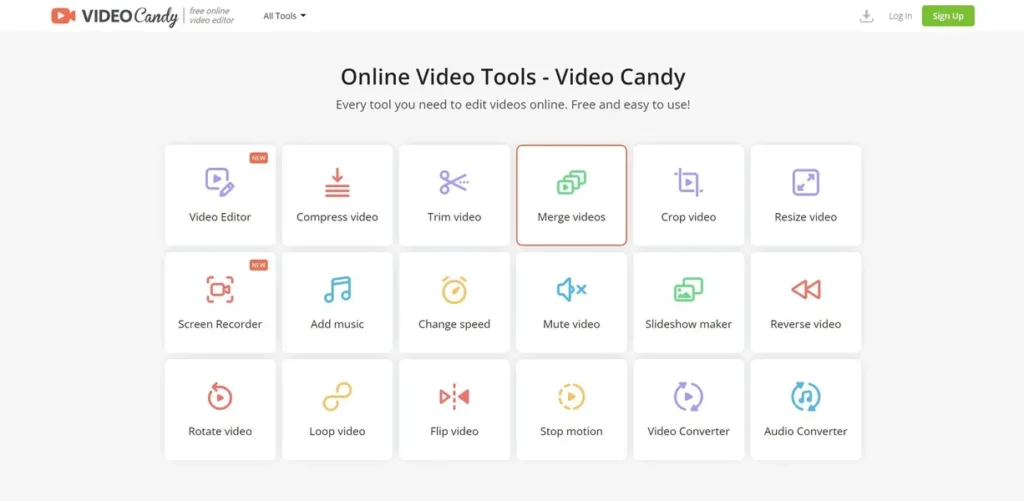
Video Candy is an online, browser-based video editing platform designed for efficiency. For a small business owner or marketing professional, it presents itself as a toolkit for handling common video tasks without the overhead of complex, desktop-based software. The platform leverages AI to simplify processes, but its core value lies in providing a wide array of functional tools in one accessible location. Its purpose is to streamline the creation of marketing materials, social media content, and internal communications by making video editing less of a technical hurdle and more of a straightforward business task.
Key Features and How It Works
The platform operates on a simple upload-edit-download model. Users select a specific tool, upload their video file, make adjustments, and then process the output. For a business, this workflow translates into tangible benefits across several key features:
- Video Compression: Reduces video file sizes for faster website loading and easier sharing via email, a critical factor for maintaining user engagement and optimizing web performance.
- Trimming & Merging: Allows for quick extraction of key moments for social media clips or the combination of multiple takes for a promotional video. This is essential for repurposing content efficiently.
- Screen Recorder: A practical tool for creating software demos for sales teams, tutorials for customer support, or internal training modules, directly from your browser.
- Audio Tools: The ability to add background music, remove original audio, or adjust speed provides the basic controls needed to give marketing videos a professional finish without hiring an audio engineer.
- Format Conversion: Easily convert video files to different formats, ensuring compatibility across various platforms and devices.
Pros and Cons
Evaluating Video Candy requires a pragmatic look at its business advantages and potential drawbacks.
Pros
- No Software Installation: Being entirely browser-based eliminates IT overhead, software licensing issues, and compatibility conflicts. Any team member with a browser can use it.
- Generous File Limits: The ability to upload files up to 4 GB (on paid plans) means you can work with high-quality source footage without excessive pre-compression.
- Watermark-Free Exports: The Pro plan allows for videos without a watermark, which is non-negotiable for maintaining brand professionalism in external-facing content.
- Comprehensive Toolset: With over 40 tools, the platform can handle a vast majority of common video editing tasks, reducing the need for multiple single-purpose applications.
Cons
- Processing Time Limits: Even paid plans have a 20-minute processing limit, which could be a bottleneck for longer, more complex projects like webinars or detailed presentations.
- Subscription Required for Business Use: While a free tier exists, any serious business application will require a paid subscription to remove watermarks and access priority processing.
- Potential Learning Curve: The sheer number of tools, while a strength, can initially be overwhelming. Team members will require some time to become familiar with the full capabilities.
Who Should Consider Video Candy?
Video Candy is a strong fit for businesses and professionals who need agility and functionality over advanced cinematic effects. Consider this tool if you are:
- A Small Business Owner: You need to create professional-looking videos for your website or social media but lack a dedicated video production team or budget.
- A Marketing Professional: Your role involves rapidly creating and iterating on video ads, social media stories, and promotional content. The speed and accessibility are key benefits.
- An Educator or Trainer: You create educational presentations or training modules and need simple tools for screen recording, trimming, and adding audio.
However, professional video editors or production houses requiring advanced features like multi-track timeline editing, complex color grading, or special effects will find the platform too simplistic for their needs.
Pricing and Plans
Video Candy operates on a freemium model, allowing businesses to test the platform’s core functionality before a financial commitment. For any professional use, a paid plan is essential.
- Free Tier: This plan offers basic access to the tools but comes with limitations, such as watermarked videos and standard processing queues. It’s best suited for evaluating the platform or for occasional, non-critical personal use.
- Pro Plan: Priced at $10 per month, this tier is designed for business and professional use. It unlocks the platform’s full value by providing watermark-free exports, high-priority processing to reduce wait times, and support for larger file sizes. This is the recommended plan for any organization intending to use the output for branding or marketing.
What makes Video Candy great?
Video Candy’s greatest strength is its comprehensive suite of over 40 editing tools accessible directly from a web browser, eliminating the need for software installation. This singular feature delivers immediate value to a business by drastically lowering the barrier to entry for video production. There are no powerful computers to procure, no software licenses to manage, and no complex installation processes. This accessibility means marketing, sales, and training teams can produce necessary video assets independently and quickly. It centralizes a wide range of functions—from compression and trimming to adding music and screen recording—into one convenient, pay-as-you-go service. For a small business, this translates directly into saved time, reduced operational complexity, and lower costs compared to traditional video editing workflows.
Frequently Asked Questions
- Do I need to install any software to use Video Candy?
- No, Video Candy is a fully browser-based platform. All tools and features are accessible online without requiring any downloads or installation, making it ideal for teams and individuals who need to work from different devices.
- Can I remove the Video Candy watermark?
- Watermark removal is a premium feature. To export videos without a watermark, you must subscribe to the Pro plan. The free version will include a watermark on all processed videos.
- What file formats are supported?
- Video Candy supports a wide array of common video and audio file formats for uploading and conversion. This broad compatibility minimizes issues with source files from different cameras or software.
- Is my business content secure on the platform?
- The platform has a high rating for data privacy and security. While it is suitable for general marketing and business content, companies should always review the privacy policy and exercise caution when uploading highly sensitive or proprietary information to any cloud-based service.