

What is FuseBase AI?
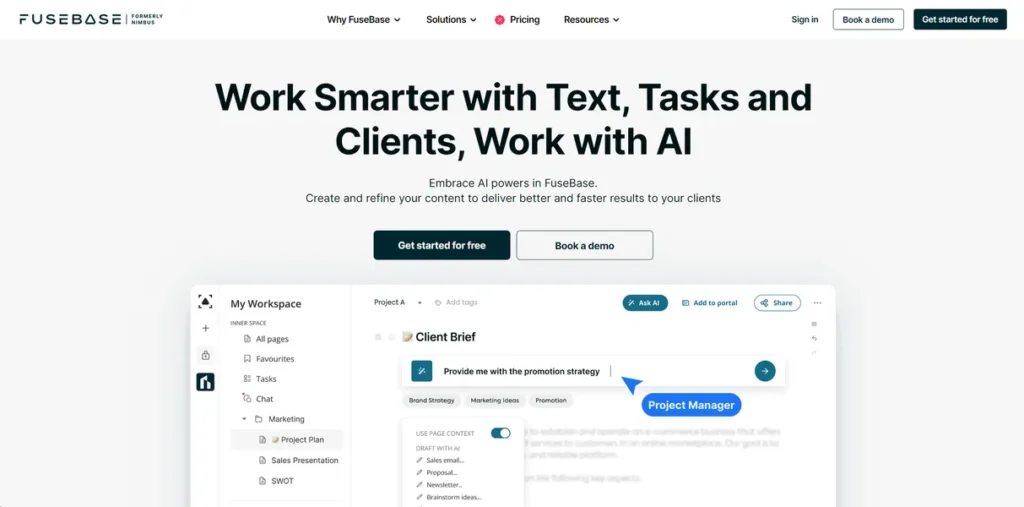
FuseBase AI, previously known as Nimbus, positions itself as a centralized workspace aimed at service-based businesses. At its core, it’s an AI-enhanced platform designed to consolidate client collaboration, project management, and internal knowledge management. For a small business owner, this means potentially reducing the number of subscribed tools by bringing disparate functions into one hub. It’s built for teams like digital agencies, consulting firms, and individual coaches who frequently manage complex client projects and need a single source of truth for communication, tasks, and documentation, all while leveraging AI to speed up common workflows.
Key Features and How It Works
FuseBase AI integrates its artificial intelligence directly into its project management and collaboration tools. Here’s a breakdown of its core functions from a practical standpoint:
- AI-Powered Assistance: The AI acts as an assistant that can read and understand the context of your projects. It can quickly summarize long client discussion threads or project documents to get team members up to speed, reducing the time spent on manual catch-up.
- Content Creation and Refinement: This feature directly addresses content bottlenecks. The AI can generate drafts for emails, proposals, blog posts, or social media updates from a simple prompt. It can also refine existing text for tone and clarity, which helps maintain professional communication standards without a significant time investment.
- Task Management: A key function is its ability to convert conversations into action. Within a client portal or meeting notes, you can highlight text and instantly turn it into a trackable task assigned to a team member. This direct link between discussion and action helps ensure that client requests and internal decisions don’t fall through the cracks.
- Personalized Recommendations: The system learns from your stored knowledge, such as past project documents and internal guides. When you ask the AI a question, it can leverage this internal data to provide tailored, context-aware answers, effectively turning your workspace into a smart, searchable knowledge base.
Pros and Cons
Every tool involves trade-offs. Here’s a straightforward look at FuseBase AI’s strengths and weaknesses for a business owner.
Pros
- Centralized Workflow: By combining a client portal, task manager, and knowledge base, it reduces the need to switch between multiple applications, saving time and preventing information silos.
- Significant Time Savings: The AI features for content generation and summarization directly cut down on hours spent on administrative and preparatory tasks, freeing up staff for billable work.
- High Data Security: Client work demands confidentiality. FuseBase AI emphasizes end-to-end encryption and data privacy, which is a critical selling point for businesses handling sensitive information.
- Adaptable to Service Businesses: Its flexible structure is not limited to one industry. It can be configured for marketing agencies, business consultants, event planners, and other service-oriented professionals.
Cons
- Upfront Time Investment: While the interface is clean, harnessing its full potential requires a learning period. Migrating workflows and training a team is not an overnight process.
- Cost Scales with Team Size: The paid plan is priced per user, which can become a significant monthly expense for larger teams compared to tools with flat-rate pricing.
- Limited Non-English Support: Businesses that operate heavily in languages other than English may find the AI’s performance and accuracy to be less reliable.
Who Should Consider FuseBase AI?
FuseBase AI is most valuable for businesses whose primary challenges are client communication and information management. If your team struggles with disorganized project files, missed client requests buried in emails, or spends too much time writing proposals and reports, this tool is worth investigating.
- Digital and Creative Agencies: For managing client campaigns, sharing deliverables for feedback, and documenting strategy.
- Consulting Firms: Ideal for organizing case files, collaborating on client solutions, and building a searchable knowledge base of past projects.
- Individual Consultants and Coaches: Helps solopreneurs manage a larger client load by streamlining communication and automating repetitive content tasks.
- Project Managers in Service Industries: Provides a unified view of client projects, team tasks, and relevant documentation, improving oversight and efficiency.
Pricing and Plans
FuseBase AI operates on a freemium model, allowing businesses to test its core functionality without financial commitment.
- Free Plan: This tier is available for an unlimited time and serves as a good entry point to explore the platform’s basic features and determine if it fits your team’s workflow.
- Pro Plan: Starting at $10 per user per month, this plan unlocks the platform’s full suite of advanced features, including expanded AI capabilities and greater storage.
Disclaimer: Pricing is subject to change. Please consult the official FuseBase AI website for the most current and detailed information on plan features and costs.
What makes FuseBase AI great?
Tired of switching between your project management tool, a separate AI writer, and your client portal just to get one task done? The primary advantage of FuseBase AI is its deeply integrated nature. The AI isn’t a separate feature you call upon; it’s embedded throughout the workspace. You can ask the AI questions about a specific project document and save its response directly into your notes without ever leaving the page. This elimination of ‘context switching’ is a real productivity booster. Rather than being just another AI writer, it’s an AI that understands the context of your work, making its assistance more relevant and immediately actionable. This turns your entire project history into a smart, interactive database.
Frequently Asked Questions
- How is FuseBase AI different from using ChatGPT with a tool like Asana?
- The main difference is integration and context. While you can copy-paste between ChatGPT and Asana, FuseBase AI’s intelligence has access to your project files and discussions within the platform. This allows it to provide summaries and answers based on your actual work, not just general knowledge.
- Is my client data safe with FuseBase AI?
- FuseBase AI emphasizes its security protocols, which include end-to-end encryption for all user data. This means your information is protected both in transit and at rest, a crucial feature for maintaining client confidentiality.
- What is the real learning curve like for a small team?
- Expect an initial adjustment period. The best approach is to start with the free plan and migrate a single, non-critical project first. This allows your team to learn the core features like task creation and client portals before a full-scale commitment. The platform’s value grows as more information is added, so the initial setup is key.
- Can FuseBase AI replace multiple subscriptions?
- Potentially, yes. For a small business, it can consolidate the functions of a dedicated internal wiki (like Notion), a simple client portal, and a task manager (like Trello or Asana), alongside AI writing assistance. The cost-effectiveness depends on what you’re currently paying for that software stack.