



What is Teal Resume Builder?
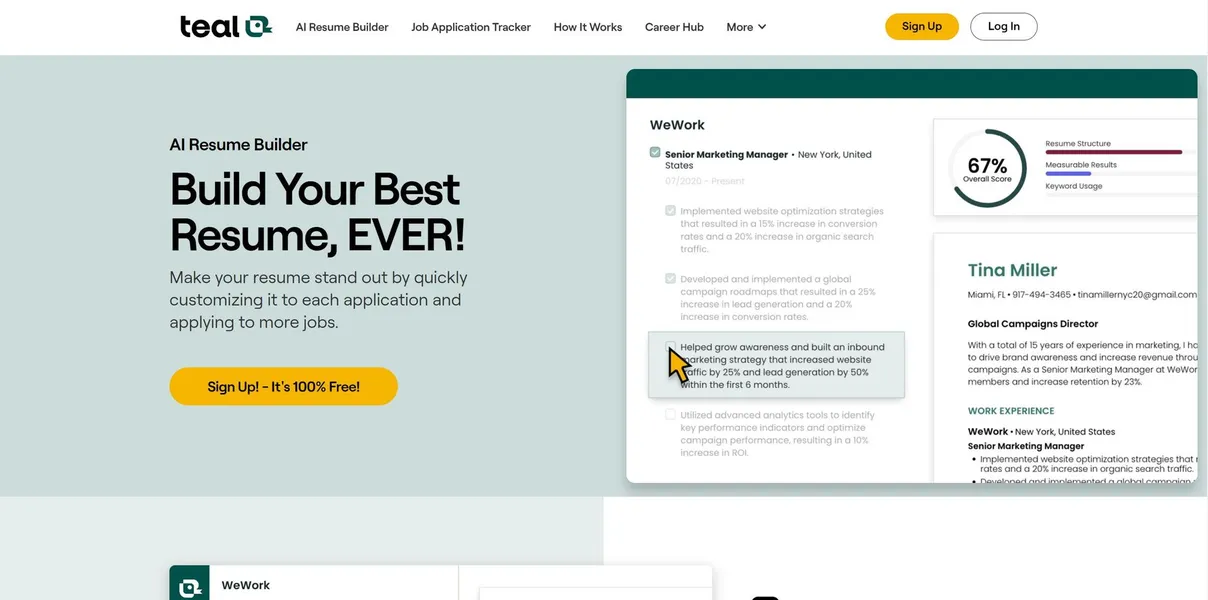
You find a perfect job posting on LinkedIn, but your current resume highlights the wrong skills. You need a tailored version immediately before the listing closes. Teal Resume Builder pulls your entire work history into a centralized database. You check boxes next to relevant achievements, and the software generates a targeted PDF in minutes.
Teal Labs, Inc. built this platform (originally launched as a career coaching service) for active job seekers managing multiple applications. The software combines an ATS-optimized document editor with a Chrome extension that tracks job postings. Users compare their resume text against specific job descriptions to identify missing keywords.
- Primary Use Case: Tailoring resumes to specific job descriptions and tracking applications.
- Ideal For: Active job seekers applying to multiple roles weekly.
- Pricing: Starts at $14.92/mo (annual). The free tier acts mostly as a trial for the resume builder.
Key Features and How Teal Resume Builder Works
Resume Generation and Formatting
- LinkedIn Import: Converts profile data into structured resume text. Limit: Requires a complete LinkedIn profile to work well.
- Resume Templates: Offers five ATS-friendly design layouts. Limit: Users cannot change specific fonts or margins beyond preset options.
- PDF Export: Downloads high-quality documents for application portals. Limit: No Microsoft Word (.docx) export available.
AI Content Creation
- AI Bullet Point Generator: Uses GPT-4 to write achievement-based work experience. Limit: Free users exhaust AI credits within one session.
- Keyword Matching: Scores your resume from 0 to 100 against a job description. Limit: High scores require exact phrasing matches.
Application Management
- Job Tracker: Chrome extension saves postings from 40 different job boards. Limit: Salary data extraction depends on the job board’s formatting.
- Work History Database: Stores all career achievements in one repository. Limit: Manual entry is tedious if you skip the LinkedIn import.
Teal Resume Builder Pros and Cons
Pros
- The Chrome extension saves job postings instantly, capturing salary data and descriptions before they disappear.
- The Career History database prevents data loss by storing all professional details in one place.
- Keyword analysis highlights specific missing terms to improve ATS ranking for targeted roles.
- The free version provides unlimited job tracking, a rare inclusion among career platforms.
Cons
- The free tier restricts users to a single resume, limiting those applying for diverse roles.
- The lack of Microsoft Word export options creates friction when recruiters request editable files.
- AI credits on the free plan run out quickly, forcing users to write bullets manually.
Who Should Use Teal Resume Builder?
- Tech-savvy job seekers: The Chrome extension and centralized database appeal to users who treat job hunting like a sales pipeline.
- Career pivoters: The keyword matching tool helps identify missing skills required for new industries.
- Design-focused candidates: Users who want highly visual, multi-column resumes should use Canva instead. The strict ATS templates offer little creative freedom.
Teal Resume Builder Pricing and Plans
- Free Forever: $0/mo. Includes 1 resume, limited AI credits, basic keyword analysis, and unlimited job tracking. This tier functions primarily as a trial for the resume builder.
- Teal+ Weekly: $9/week. Unlocks unlimited resumes, unlimited AI content generation, and advanced job description analysis.
- Teal+ Monthly: $29/mo. Provides the same unlimited features as the weekly plan at a lower daily cost.
- Teal+ Annual: $14.92/mo ($179/yr). Offers unlimited resumes, unlimited AI content, and priority customer support.
How Teal Resume Builder Compares to Alternatives
Similar to Jobscan, Teal focuses heavily on keyword optimization for Applicant Tracking Systems. Jobscan provides deeper technical ATS analysis based on specific software like Taleo or Workday. Teal offers a much better user interface for actually building the resume. Jobscan limits free users to five match scans per month, while Teal restricts the number of resumes you can build.
Unlike Rezi, Teal prioritizes application tracking alongside document creation. Rezi focuses entirely on AI resume generation, offering more advanced formatting options and a dedicated cover letter builder. Rezi allows users to export documents as Microsoft Word files. Teal forces users to download PDFs (which causes issues if a hiring manager requests an editable format).
The Best Resume Builder for High-Volume Applicants
Teal Resume Builder delivers massive value for candidates applying to dozens of jobs per week. The centralized work history database saves hours of copying and pasting. The Chrome extension keeps messy job hunts organized across multiple websites.
The single resume limit on the free tier is frustrating.
The lack of a Word export creates immediate friction.
Users who only need to update a resume once every few years should stick to Google Docs. Candidates who need precise formatting control or Word document exports should look at Rezi. Teal will likely integrate automated cover letter generation and direct application submission within the next 12 months.