



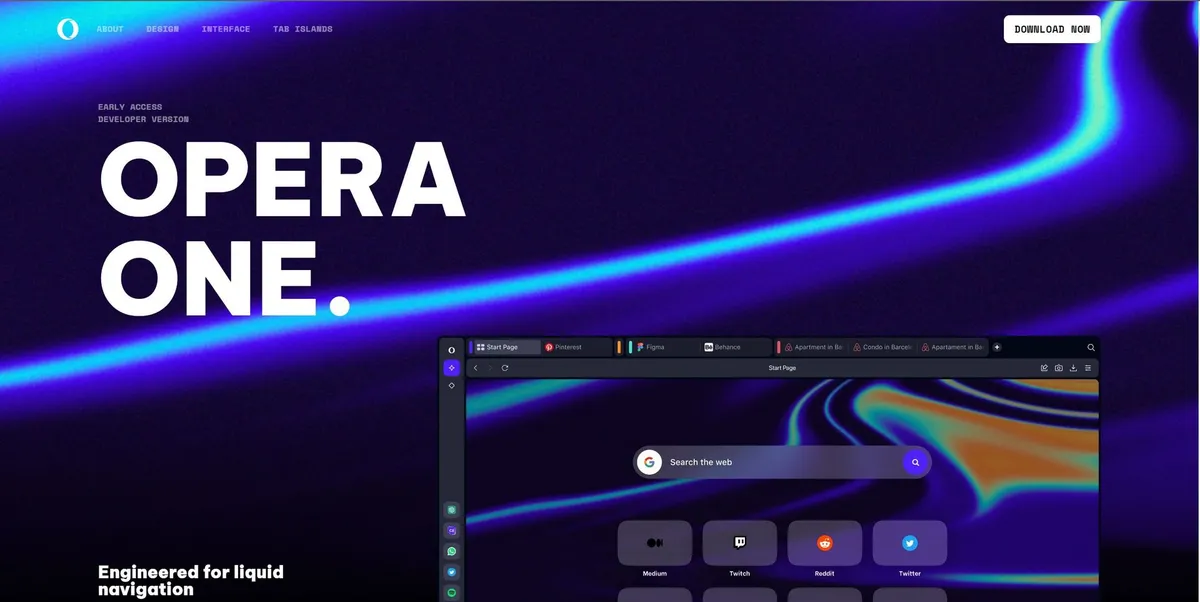
What is Opera One Browser?
Opera One Browser is a Chromium-based web browser that replaces static tab bars with dynamic groups. It forces users to rethink how they manage web pages. You do not just open tabs.
Developed by Opera Norway AS, this browser targets heavy multitaskers who struggle with tab overload. It organizes 50 or more open tabs into Tab Islands. The primary function focuses on reducing visual clutter while keeping essential tools accessible. But users must pay a premium for advanced AI access.
- Primary Use Case: Organizing 50 or more open tabs into context-aware Tab Islands.
- Ideal For: Researchers and professionals who manage dozens of concurrent web sessions.
- Pricing: Starts at $19.90 (Neon Subscription) : A steep price for browser-based AI access.
Key Features and How Opera One Browser Works
Automated Tab Management
- Tab Islands: Groups related tabs based on browsing context. Limit: High RAM consumption occurs when users keep more than five islands active.
- Pinboards: Collects and shares web content in a visual grid layout. Limit: Sharing requires the recipient to view the board through a web link.
Integrated AI Assistant
- Aria AI: Answers queries using GPT and Google Search data in the sidebar. Limit: Aria provides outdated information compared to standalone LLMs.
- Deep Research Agent: Scours the web for complex queries. Limit: Only available on the paid Neon Subscription tier.
Native Privacy Controls
- Built-in VPN: Routes traffic through three global regions with unlimited bandwidth. Limit: Speeds lag behind dedicated paid VPN services.
- Ad Blocker: Blocks pop-ups and video ads at the browser level. Limit: Some advanced YouTube ad scripts bypass the native filters.
Opera One Browser Pros and Cons
Pros
- Tab Islands reduce cognitive load for users managing 20 or more tabs.
- Native Aria AI provides real-time web results without requiring users to open separate tabs.
- Built-in VPN and Ad Blocker eliminate the security risks associated with third-party browser extensions.
- Sidebar apps allow instant communication via WhatsApp and Telegram without interrupting the primary workflow.
Cons
- Users report high RAM consumption when multiple Tab Islands remain active.
- Privacy concerns persist due to the parent company data policies and ownership structure.
- The $19.90 monthly price tag feels steep for features that competitors offer for free.
Who Should Use Opera One Browser?
- Heavy Multitaskers: Professionals who keep 50 tabs open will appreciate the automatic grouping features.
- AI Enthusiasts: Users who want quick access to GPT models in their browser sidebar.
- Budget-Conscious Privacy Seekers: This tool is NOT a good fit for users who need high-speed secure VPNs. They should buy a dedicated VPN instead.
Opera One Browser Pricing and Plans
Opera One requires a paid subscription for its advanced AI features. The company does not offer a free trial for the premium tier.
The Neon Subscription costs $19.90 per month. This plan grants access to Gemini 3 Pro, GPT-5.1, Veo 3.1, and Nano Banana Pro. It also includes a deep research agent and exclusive Discord community access. The free version of the browser only includes basic Aria AI access and standard Tab Islands.
This pricing model creates immediate friction.
How Opera One Browser Compares to Alternatives
Similar to Google Chrome, Opera One runs on the Chromium engine. This ensures compatibility with most web standards. But Chrome relies on third-party extensions for ad blocking and AI integration. Opera One builds these features into the browser shell. Chrome consumes massive amounts of RAM with individual tabs. Opera attempts to mitigate this through background tab limiting.
Unlike Brave Browser, Opera One focuses on AI integration rather than strict privacy. Brave blocks ads and trackers by default while offering a crypto-based rewards system. Opera provides a free VPN, but its speeds lag behind Brave Firewall. Users who prioritize absolute data privacy prefer Brave. Users who want built-in AI tools lean toward Opera.
The Final Verdict for Tab Hoarders
Opera One Browser delivers massive value to researchers who drown in open tabs. The Tab Islands feature reduces visual clutter. Sidebar integrations keep messaging apps accessible without breaking focus. (I found the WhatsApp sidebar integration useful during long research sessions).
Still, the $19.90 monthly fee for advanced AI models feels excessive. Users who just want basic tab management should stick to the free version. Privacy purists should look elsewhere. Brave Browser remains a better choice for strict data protection.
Opera will integrate local LLM processing within the next 12 months to justify its premium pricing.