



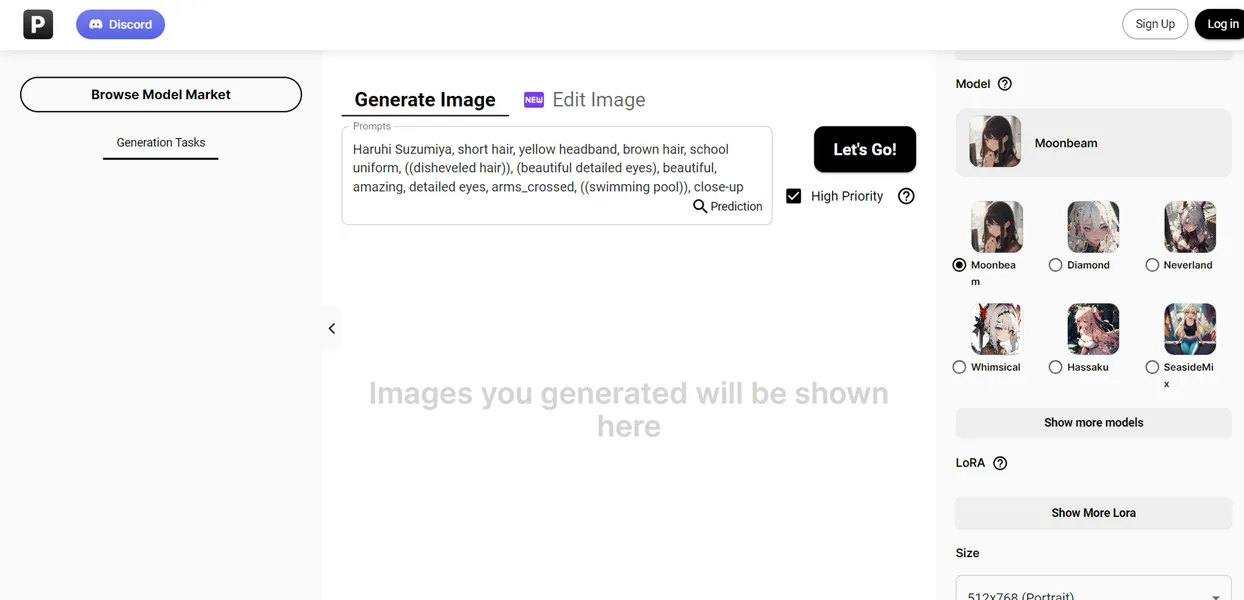
What is PixAI?
The most surprising part of testing PixAI is how fast a generous free tier vanishes when you activate high-resolution upscaling. You get 10,000 daily credits. But generating a single 4K image using the SDXL model consumes nearly a third of that allowance. This forces users to think hard before clicking the generate button.
PixAI Inc. built this AI-driven anime art platform to solve a specific hardware problem. It allows users to train custom LoRA models and generate character illustrations without owning expensive local GPUs. The tool targets anime hobbyists and digital artists who need precise control over character consistency. You can access thousands of community-shared styles from the main dashboard.
- Primary Use Case: Generating anime-style character illustrations and training custom LoRA models.
- Ideal For: Anime hobbyists and digital artists lacking local GPU hardware.
- Pricing: Starts at $7.99/month (freemium). The free tier offers 10,000 daily credits but restricts advanced video controls.
Key Features and How PixAI Works
Custom Model Training
- LoRA Training: You can upload 15 to 30 images to train custom character models. Training consumes credits and requires specific image cropping for good results.
- Model Library: Users access SDXL, Pony Diffusion, and thousands of community LoRA models. Finding specific niche styles requires exact keyword searches.
Generation and Control
- ControlNet Integration: Users apply Canny, Depth, or Lineart processors to dictate character poses. This feature struggles with complex overlapping limbs.
- Batch Generation: The system generates up to four images simultaneously. Batching SDXL models increases queue times during peak hours.
- Video Suite: You can generate short AI animations with motion strength sliders. Output is limited to 2 to 4 second clips.
Post-Processing Tools
- Image Upscaling: The tool offers 2x and 4x high-definition upscaling. This process costs much more than standard generation.
- Inpainting: A brush tool lets you edit specific image areas using text prompts. The brush lacks edge detection for precise masking.
- Image-to-Image: This transforms sketches into anime art with adjustable denoising. High denoising levels ignore the original sketch.
PixAI Pros and Cons
Pros
- The free tier provides 10,000 daily credits for basic generation tasks.
- The community library contains thousands of pre-trained LoRA models optimized for anime aesthetics.
- Cloud-based LoRA training removes the need for expensive local graphics cards.
- Cross-platform synchronization works well between the web browser and mobile applications.
Cons
- High-quality SDXL models and 4K upscaling deplete credit balances fast.
- Free users face generation queues exceeding five minutes during peak server traffic.
- Content filters often block benign prompts containing restricted keywords (like specific clothing items).
- The mobile app interface feels cluttered compared to the web version.
Who Should Use PixAI?
- Anime Hobbyists: Users wanting to create fan art can use the 10,000 daily credits to experiment with community styles.
- Digital Artists: Creators needing consistent character references can train custom LoRAs using their own sketches.
- Budget Creators: Solo users can generate dozens of standard images daily without spending money.
- Professional Studios: This tool is a poor fit for enterprise teams. It lacks collaborative workspaces and strict copyright protections.
PixAI Pricing and Plans
PixAI uses a freemium model based on a credit economy. Users buy subscriptions to increase their monthly credit limits and unlock faster generation speeds.
The free tier is real, not a disguised trial.
- Beginner: $0/month. Includes 10,000 daily credits, basic quality settings, and standard style model training.
- Starter: $7.99/month (billed annually). Provides 300,000 monthly credits, a video generation suite, turbo mode, and 15 private model uploads.
- Hobbyist: $22.99/month (billed annually). Offers 1,000,000 monthly credits, professional video controls, turbo mode, and 5 free style model trainings.
- Pro: $35.99/month (billed annually). Delivers 2,000,000 monthly credits, advanced video controls, turbo mode, and 10 free style model trainings.
How PixAI Compares to Alternatives
Similar to SeaArt.ai, PixAI focuses on anime aesthetics and community model sharing. But SeaArt.ai offers a wider variety of photorealistic base models. PixAI restricts its primary interface to anime-centric workflows. This makes PixAI better for manga creators but worse for generalist designers. Both platforms use a credit system, but PixAI offers better mobile app integration.
Unlike Leonardo.ai, PixAI includes native LoRA training directly in its mobile application. Leonardo.ai charges higher monthly fees ($12 minimum) but provides superior prompt adherence and a cleaner canvas interface. PixAI wins on budget accessibility. Leonardo.ai wins on professional asset generation. Leonardo.ai also provides better tools for game developers needing isometric assets.
The Best AI Art Generator for Anime Hobbyists
PixAI offers massive value for solo creators who want anime-style illustrations. The 10,000 daily credits give beginners enough room to learn prompt engineering. The built-in LoRA training makes character consistency achievable for amateur artists.
Professional teams should look elsewhere.
If you need enterprise collaboration, Leonardo.ai is a better alternative. PixAI remains a consumer-focused product designed for individual experimentation.
Over the next 12 months, expect PixAI to introduce stricter copyright filters as community model sharing faces increased legal scrutiny.