


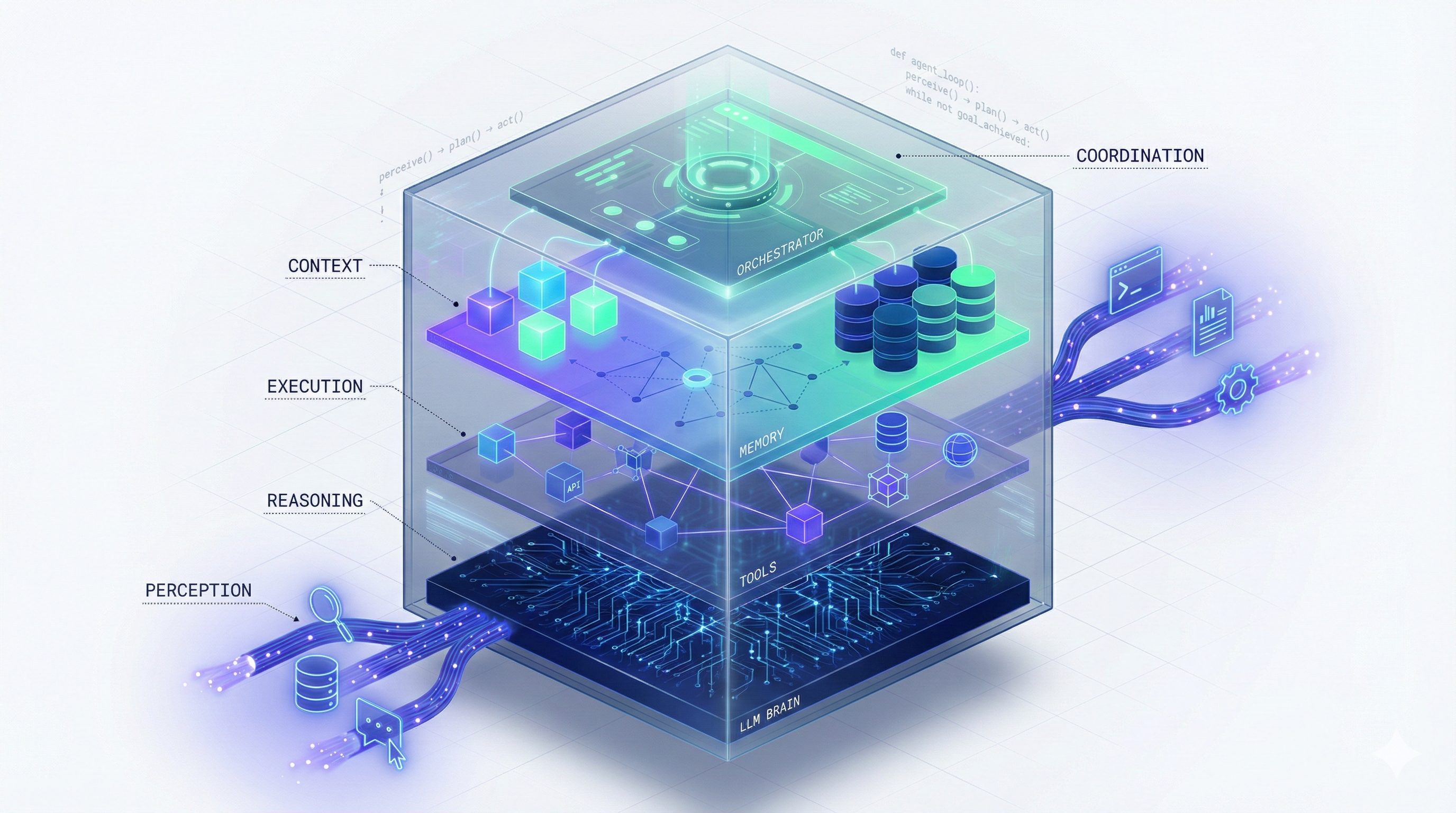
Introduction: Opening the Black Box
In our beginner’s guide, you learned what AI agents are and why they matter. Now it’s time to understand how they actually work.
This isn’t just academic curiosity. Understanding agent architecture helps you:
- Build better agents (or work more effectively with developers)
- Debug problems when agents don’t behave as expected
- Choose the right platform for your specific needs
- Optimize performance and reduce costs
- Make informed decisions about single vs. multi-agent systems
This guide goes under the hood. We’ll explore:
- The four-layer agent architecture
- How agents execute multi-step workflows
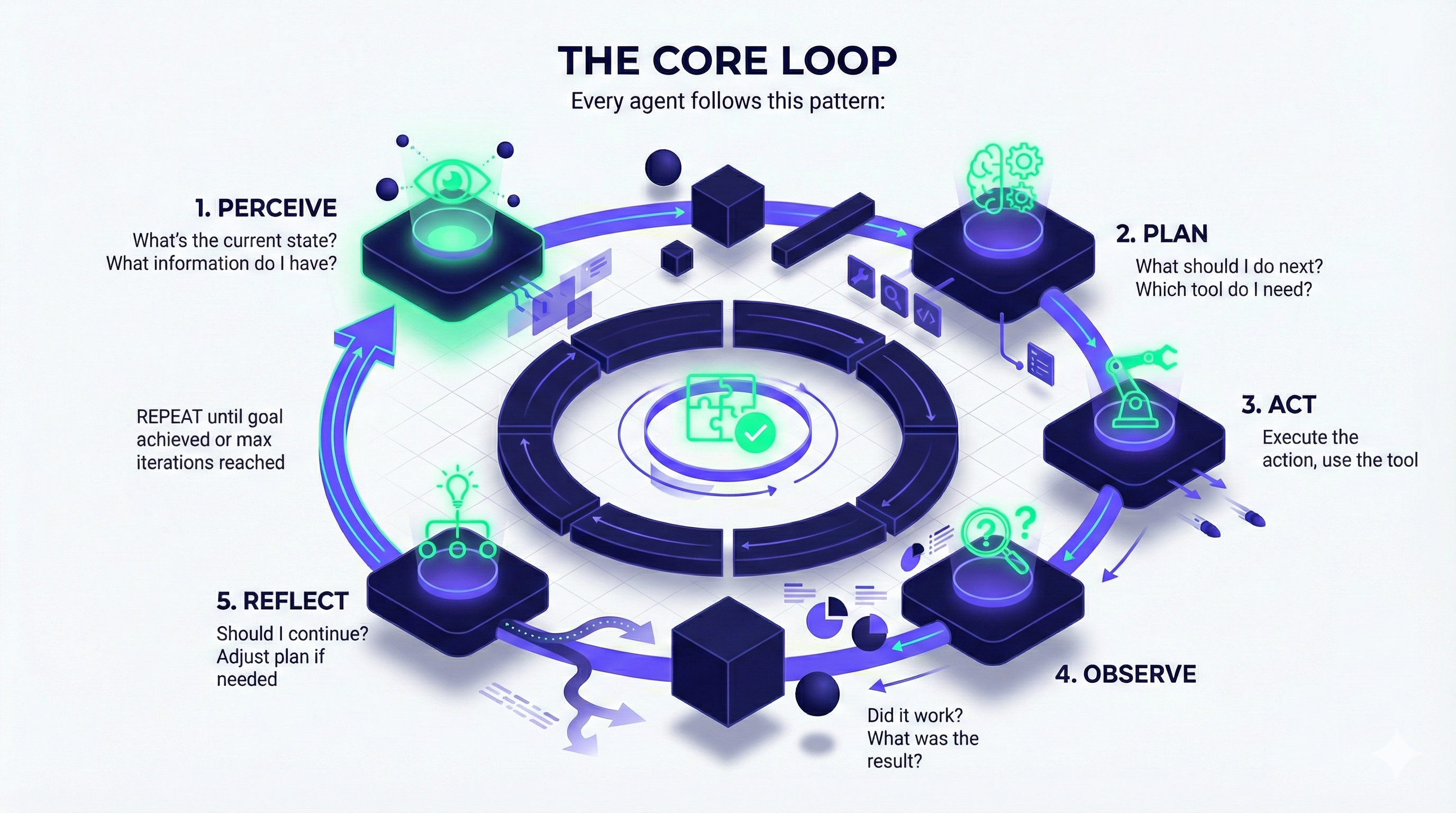
- The agent loop (perceive → plan → act → reflect)
- Single-agent vs. multi-agent systems
- Real implementation examples with pseudocode
Who is this for?
- Developers building agent applications
- Technical product managers designing agent features
- AI practitioners wanting deeper understanding
- Curious professionals who want to see how the magic happens
Ready to peek inside? Let’s go.
The Four-Layer Agent Architecture
Every AI agent, regardless of platform or complexity, is built on four foundational components working together. Think of it as the agent’s “anatomy.”
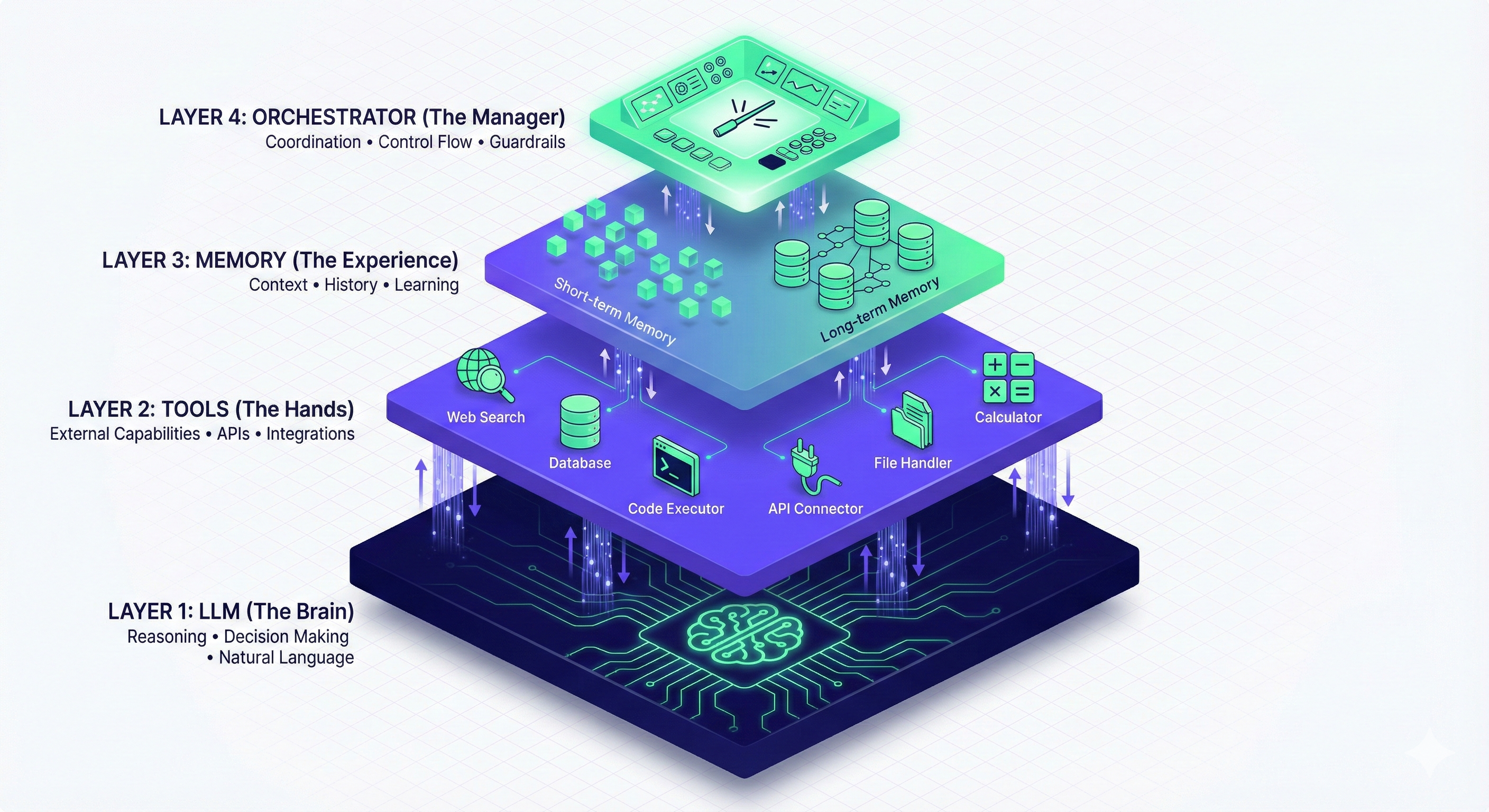
Layer 1: The LLM (Large Language Model) — The “Brain”
What it is: The reasoning engine. This is typically GPT-4, Claude, Gemini, or another foundation model.
What it does:
- Interprets the user’s goal
- Plans the sequence of actions
- Decides which tool to use at each step
- Generates natural language outputs
- Makes decisions when faced with multiple options
Think of it as: The agent’s consciousness—where thinking happens.
Technical details:
- Model options: GPT-4, Claude Sonnet 4.5, Gemini 2.5 Pro, Llama 3, Mistral
- API calls: Each decision typically requires 1-3 API calls
- Context window: Modern models handle 32K-200K tokens (roughly 25K-150K words)
- Latency: 0.5-3 seconds per generation, depending on model and complexity
Example prompt the LLM receives:
You are an autonomous research agent. Your goal is to analyze competitor pricing.

Available tools:
- web_search(query): Search the web
- web_scrape(url): Extract content from URL
- database_query(sql): Query internal database
- python_execute(code): Run Python code
- generate_report(data): Create formatted report

Context: User wants pricing analysis for Companies A, B, C

Current step: 1 of planned 6 steps
Previous action: None (starting)

What should you do next? Think step-by-step, then decide which tool to use.
The LLM’s response:
Thought: I need pricing information for three companies. The most efficient approach is to search for each company's pricing page first.

Action: web_search
Input: "Company A pricing 2025"

Reasoning: Starting with Company A. Once I get the URL, I'll scrape it to extract specific pricing data.
The LLM doesn’t execute the search—it decides to search and what to search for. The orchestrator (Layer 4) actually executes it.
Layer 2: Tools — The “Hands”
What it is: External capabilities the agent can invoke to interact with the world.
Common tool categories:
Information Retrieval:
- Web search (Google, Bing, DuckDuckGo)
- Database queries (SQL, MongoDB, etc.)
- File readers (PDF, Word, Excel)
- API calls (Salesforce, Stripe, Slack)
Data Processing:
- Code execution (Python, JavaScript)
- Calculators and math engines
- Data transformations
- Text analysis tools
Action/Output:
- Email senders
- File writers
- Calendar managers
- Notification systems
- Payment processors
Other AI Models:
- Image generation (DALL-E, Midjourney)
- Speech-to-text (Whisper)
- Text-to-speech (ElevenLabs)
- Video generation (Runway, Synthesia)
Technical implementation:
Tools are typically defined as functions with:
- Name: Identifier (e.g.,
web_search) - Description: What it does
- Parameters: Required inputs
- Return type: What it outputs
Example tool definition (OpenAI format):
json
{
  "name": "web_search",
  "description": "Search the web for current information. Returns top 10 results with titles, snippets, and URLs.",
  "parameters": {
    "type": "object",
    "properties": {
      "query": {
        "type": "string",
        "description": "The search query"
      },
      "num_results": {
        "type": "integer",
        "description": "Number of results to return (default 10)"
      }
    },
    "required": ["query"]
  }
}
How the LLM uses tools:
The LLM examines available tools and chooses based on:
- Goal requirements
- Current context
- Previous step outcomes
- Tool descriptions
It then generates a function call:
json
{
  "tool": "web_search",
  "arguments": {
    "query": "Company A pricing 2025",
    "num_results": 5
  }
}
The orchestrator executes this, and results flow back to the LLM for the next decision.
Layer 3: Memory — The “Experience”
What it is: Systems for storing and retrieving information across agent interactions.
Memory comes in two flavors:
Short-Term Memory (Working Memory)
Purpose: Maintains context within a single task or conversation.
What it stores:
- Current goal and plan
- Actions taken so far
- Results from each step
- Intermediate calculations
- Conversation history
Technical implementation:
- Usually stored in the LLM’s context window
- Or in short-lived session storage (Redis, in-memory cache)
- Duration: Current session only
Example structure:
json
{
  "goal": "Analyze competitor pricing",
  "plan": [
    "Search Company A pricing",
    "Extract pricing data",
    "Repeat for Company B and C",
    "Compare prices",
    "Generate report"
  ],
  "completed_steps": [
    {
      "step": 1,
      "action": "web_search",
      "query": "Company A pricing 2025",
      "result": "Found pricing page at companyA.com/pricing"
    },
    {
      "step": 2,
      "action": "web_scrape",
      "url": "companyA.com/pricing",
      "result": "Basic: $29/mo, Pro: $79/mo"
    }
  ],
  "current_step": 3
}
Long-Term Memory (Knowledge Base)
Purpose: Stores information persistently across sessions for learning and personalization.
What it stores:
- User preferences
- Past interactions and outcomes
- Domain-specific knowledge
- Successful strategies
- Failed approaches (to avoid repeating)
Technical implementation:
- Vector databases: Pinecone, Weaviate, Chroma, FAISS
- Traditional databases: PostgreSQL with pgvector extension
- Hybrid: Combination of both
How vector memory works:
- Embedding generation: Text is converted to high-dimensional vectors (arrays of numbers that capture meaning)
   Text: "Client X prefers email communication"
Vector: [0.23, -0.45, 0.78, ..., 0.12] (1536 dimensions)- Storage: Vectors stored with metadata (date, context, source)
- Retrieval: When agent needs information:
- Query is converted to vector
- Similarity search finds closest matches (cosine similarity)
- Top K most relevant memories returned
Example query:
Agent needs to contact Client X
↓
Query: "How does Client X like to communicate?"
↓
Vector search returns: "Client X prefers email communication" (95% similarity)
↓
Agent sends email instead of calling
Why vectors? They capture semantic meaning, not just keywords. “Client X likes email” and “Client X prefers electronic messages” will be similar in vector space, even though the words differ.
Layer 4: Orchestrator — The “Manager”
What it is: The control layer that coordinates between LLM, tools, and memory.
Responsibilities:
- Agent loop management: Runs the perceive → plan → act → observe → reflect cycle
- Tool execution: Takes LLM’s function calls and actually runs them
- Memory management: Stores and retrieves from short/long-term memory
- Error handling: Catches failures and decides how to recover
- Guardrails enforcement: Ensures agent stays within defined boundaries
- Logging/monitoring: Tracks performance and costs
Orchestrator pseudocode:
python
class AgentOrchestrator:
    def __init__(self, llm, tools, memory):
        self.llm = llm
        self.tools = tools
        self.memory = memory
        self.max_iterations = 10

    def run(self, goal):
        # Initialize
        context = self.memory.load_long_term(goal)
        state = {"goal": goal, "steps": [], "iteration": 0}

        while not self.is_goal_achieved(state) and state["iteration"] < self.max_iterations:
            # PERCEIVE: Gather current state
            current_context = self.build_context(state, context)

            # PLAN: LLM decides next action
            decision = self.llm.generate(
                prompt=current_context,
                available_tools=self.tools.list()
            )

            # ACT: Execute the tool
            if decision.tool_call:
                result = self.tools.execute(
                    tool=decision.tool_call.name,
                    args=decision.tool_call.arguments
                )
            else:
                result = decision.final_answer
                break

            # OBSERVE: Process results
            state["steps"].append({
                "action": decision.tool_call.name,
                "input": decision.tool_call.arguments,
                "output": result
            })

            # REFLECT: Should we continue?
            if self.should_stop(result, state):
                break

            state["iteration"] += 1

            # Store in short-term memory
            self.memory.save_short_term(state)

        # Save successful patterns to long-term memory
        self.memory.save_long_term(goal, state["steps"], result)

        return result
Popular orchestration frameworks:
- LangChain (Python/JavaScript): Most popular, extensive tool ecosystem
- AutoGPT: Autonomous agent with minimal human input
- Microsoft Semantic Kernel (.NET): Enterprise-focused
- LlamaIndex: Specialized for data-intensive applications
- CrewAI: Multi-agent orchestration
- Haystack: Production-ready pipelines
The Agent Loop: How Execution Actually Works
Now let’s watch these four layers work together in a real execution cycle.
The Core Loop
Every agent follows this pattern:
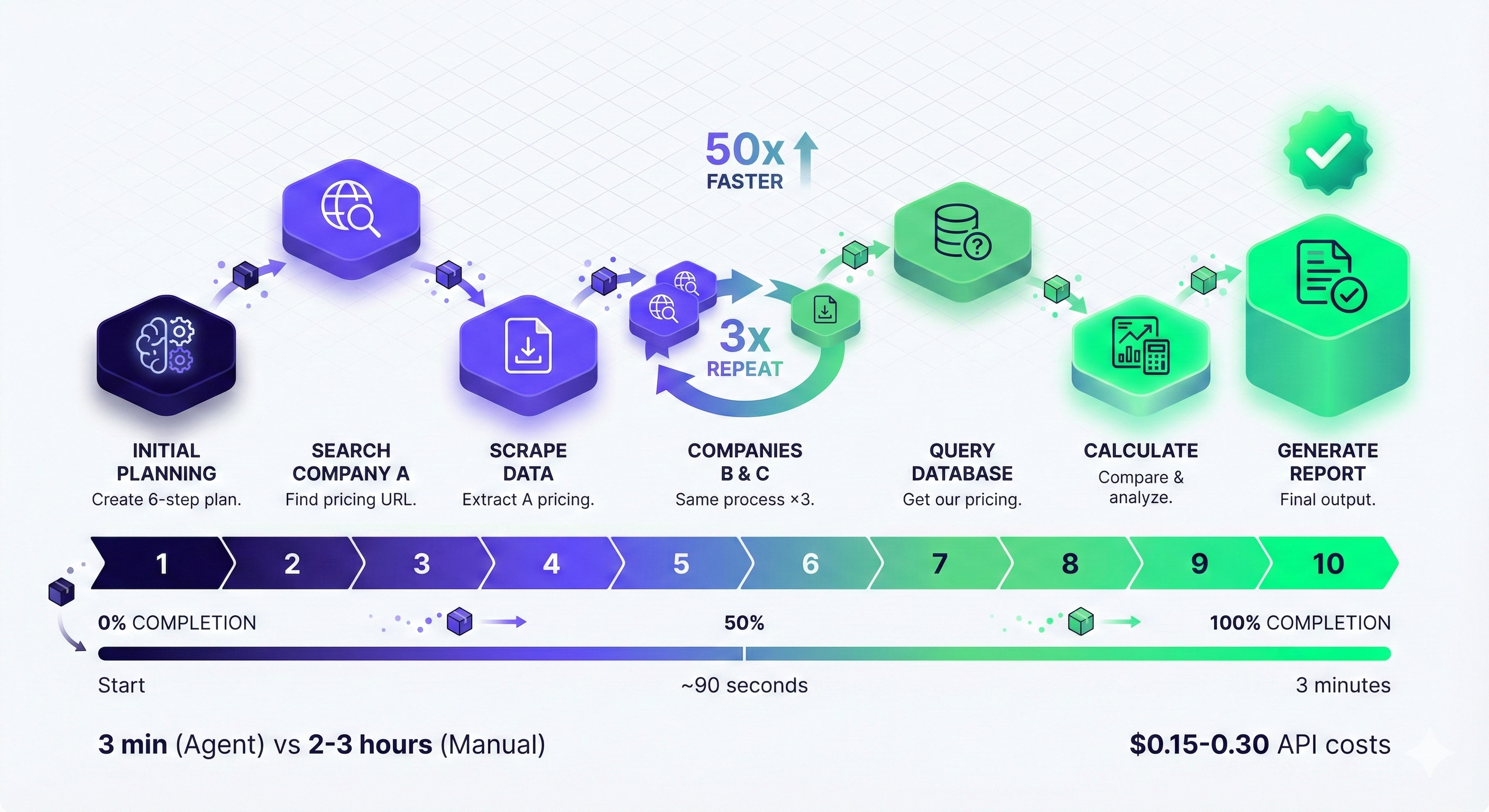
Detailed Walkthrough: Competitive Pricing Analysis
Let’s trace a complete agent execution with technical details.
User request: “Analyze our top 3 competitors’ pricing and recommend our strategy.”
Iteration 1: Initial Planning
PERCEIVE:
- Goal received: pricing analysis
- No context yet (first interaction)
- Available tools: web_search, web_scrape, database_query, python_execute, generate_report
PLAN (LLM reasoning):
Thought: I need to:
1. Identify competitors (assume user will provide or I search)
2. Find their pricing
3. Get our pricing
4. Compare
5. Make recommendations

First, I should ask user which competitors or search for top competitors in their industry.

Action: Ask for clarification
ACT: Agent: “Should I identify your top competitors, or do you want to specify which companies to analyze?”
OBSERVE: User responds: “Analyze Company A, Company B, and Company C.”
REFLECT: Good, I now have the competitors. Ready for next iteration.
Iteration 2: Search for Company A Pricing
PERCEIVE:
- Competitors identified: A, B, C
- Current task: Find Company A’s pricing
- Working memory: Goal, competitors list
PLAN:
Thought: I'll search for Company A's pricing page first.

Action: web_search
Query: "Company A pricing 2025"
ACT (Orchestrator executes):
python
result = tools.execute(
    tool="web_search",
    args={"query": "Company A pricing 2025", "num_results": 5}
)
OBSERVE (Results):
json
{
  "results": [
    {
      "title": "Pricing - Company A",
      "url": "https://companya.com/pricing",
      "snippet": "Our flexible pricing plans start at $29/month..."
    },
    {...}
  ]
}
REFLECT: Found the pricing page. Next step: scrape it for detailed info.
Iteration 3: Extract Company A Pricing
PERCEIVE:
- Have Company A’s pricing URL
- Need detailed pricing breakdown
PLAN:
Thought: Now I'll scrape the pricing page to extract specific plans and prices.

Action: web_scrape
URL: "https://companya.com/pricing"
ACT:
python
result = tools.execute(
    tool="web_scrape",
    args={"url": "https://companya.com/pricing"}
)
OBSERVE:
json
{
  "content": "...Basic Plan: $29/month...Professional Plan: $79/month...Enterprise: Custom pricing..."
}
REFLECT: Good data. Now repeat for Company B and C (iterations 4-7, similar process).
Iteration 8: Get Our Pricing
PERCEIVE:
- Have all competitor pricing
- Need our own pricing for comparison
PLAN:
Thought: Query internal database for our current pricing.

Action: database_query
SQL: "SELECT plan_name, monthly_price FROM pricing WHERE status='active'"
ACT:
python
result = tools.execute(
    tool="database_query",
    args={"query": "SELECT plan_name, monthly_price FROM pricing WHERE status='active'"}
)
OBSERVE:
json
{
  "results": [
    {"plan_name": "Basic", "monthly_price": 39},
    {"plan_name": "Professional", "monthly_price": 99}
  ]
}
REFLECT: Have all data. Ready for analysis.
Iteration 9: Analyze and Compare
PERCEIVE:
- All pricing data collected
- Ready for computational analysis
PLAN:
Thought: Calculate market averages, our position, and identify patterns.

Action: python_execute
Code: [price comparison calculations]
ACT:
python
result = tools.execute(
    tool="python_execute",
    args={"code": """
import pandas as pd

data = {
    'Company': ['Company A', 'Company B', 'Company C', 'Us'],
    'Basic': [29, 25, 35, 39],
    'Pro': [79, 69, 89, 99]
}

df = pd.DataFrame(data)
market_avg_basic = df[df['Company'] != 'Us']['Basic'].mean()
market_avg_pro = df[df['Company'] != 'Us']['Pro'].mean()

our_position_basic = ((39 - market_avg_basic) / market_avg_basic) * 100
our_position_pro = ((99 - market_avg_pro) / market_avg_pro) * 100

print(f"Market Avg Basic: ${market_avg_basic:.2f}")
print(f"Market Avg Pro: ${market_avg_pro:.2f}")
print(f"Our Basic is {our_position_basic:.1f}% above market")
print(f"Our Pro is {our_position_pro:.1f}% above market")
"""}
)
OBSERVE:
Market Avg Basic: $29.67
Market Avg Pro: $79.00
Our Basic is 31.5% above market
Our Pro is 25.3% above market
REFLECT: Analysis complete. Ready for final report.
Iteration 10: Generate Report
PERCEIVE:
- All analysis done
- Need to create user-friendly output
PLAN:
Thought: Synthesize findings into strategic recommendations.

Action: generate_report
Data: [all gathered information]
ACT: Creates formatted markdown report.
OBSERVE: Report generated successfully.
REFLECT: Goal achieved. End loop.
Final Output to User:
markdown
# Competitive Pricing Analysis

## Key Findings
- **Market Average:** $30/mo (Basic), $79/mo (Pro)
- **Our Position:** 31.5% above market (Basic), 25.3% above market (Pro)
- **Lowest Competitor:** Company B at $25/mo
- **Highest Competitor:** Company C at $35/mo

## Analysis
Your pricing positions you as premium but not luxury. You're competing on value, not cost.

## Recommendations
1. **No change to Pro plan** - within expected premium range
2. **Consider $35/mo for Basic** - reduces entry barrier while maintaining premium positioning
3. **Add feature comparison** - justify premium with clear differentiation
4. **Test annual discount** - 20% off to improve customer lifetime value

## Data Sources
[Competitor pricing tables with links]
[Analysis methodology]
Total iterations: 10
Total time: ~3 minutes
API calls: ~15-20 (varies by tool usage)
Cost: ~$0.15-0.30 in API fees
Single-Agent vs. Multi-Agent Systems
One of the most important architecture decisions: Should you use one agent or many?
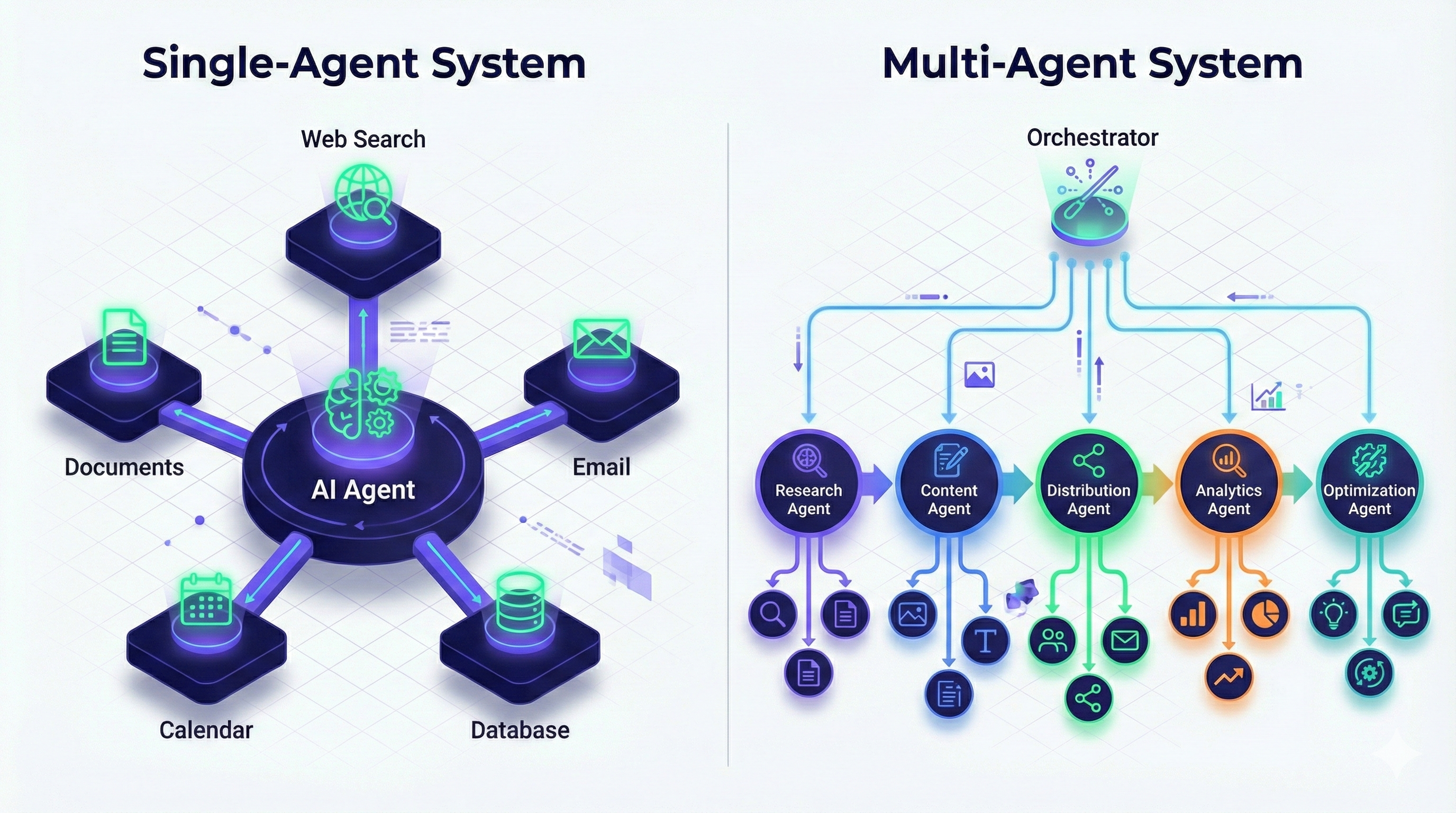
Single-Agent Architecture
What it is: One AI agent handles the entire workflow from start to finish.
Visual:
        USER
         ↓
    [AI AGENT]
     ↓  ↓  ↓  ↓  ↓
   [Tools/APIs]
Best for:
- Simpler, focused tasks
- Single domain of expertise
- When unified context is critical
- Lower complexity and cost
- Prototyping and MVPs
Pros:
- ✅ Simpler to build and maintain
- ✅ Lower operational costs (one set of API calls)
- ✅ Unified context (no information loss between agents)
- ✅ Easier to debug (single execution path)
- ✅ Faster iteration cycles
Cons:
- ❌ Limited by single model’s capabilities
- ❌ Can struggle with highly specialized tasks
- ❌ Cognitive “overload” on complex problems
- ❌ Single point of failure
Example use cases:
- Personal AI assistant
- Customer support chatbot
- Content writing assistant
- Research summarizer
Technical implementation:
python
class SingleAgent:
    def __init__(self, llm, tools):
        self.llm = llm
        self.tools = tools

    def execute(self, goal):
        context = f"Goal: {goal}\nAvailable tools: {self.tools.list()}"

        while not done:
            # Agent reasons about next step
            decision = self.llm.generate(context)

            # Execute tool
            result = self.tools.execute(decision.tool, decision.args)

            # Update context
            context += f"\nAction: {decision.tool}\nResult: {result}"

            # Check if complete
            done = self.check_completion(result)

        return final_output
Multi-Agent Architecture
What it is: Multiple specialized agents work together, each handling specific aspects of a complex workflow.
Visual:
              USER
               ↓
        [COORDINATOR AGENT]
               ↓
    ┌─────────┼─────────┐
    ↓         ↓         ↓
[AGENT A] [AGENT B] [AGENT C]
Research  Content  Distribution
  ↓         ↓         ↓
[Tools]   [Tools]   [Tools]
Best for:
- Complex, multi-domain problems
- When specialized expertise is needed
- Parallel task execution
- Scalable, enterprise systems
Pros:
- ✅ Specialized expertise per domain
- ✅ Parallel execution (faster for multi-step workflows)
- ✅ Failure isolation (one agent failing doesn’t break everything)
- ✅ Easier to scale specific capabilities
Cons:
- ❌ 3-10x more complex to build and maintain
- ❌ Higher operational costs (multiple API calls)
- ❌ Context transfer challenges (agents need to communicate)
- ❌ Coordination overhead
- ❌ Harder to debug (multiple execution paths)
Example: Software Development Team
[Product Manager Agent]
    ↓ defines requirements
[Architect Agent]
    ↓ designs system
[Backend Developer Agent] + [Frontend Developer Agent]
    ↓ write code in parallel
[QA Agent]
    ↓ tests code
[DevOps Agent]
    ↓ deploys to production
Technical implementation:
python
class MultiAgentSystem:
    def __init__(self):
        self.coordinator = CoordinatorAgent()
        self.agents = {
            "researcher": ResearchAgent(),
            "writer": ContentAgent(),
            "distributor": DistributionAgent()
        }
        self.shared_memory = VectorDatabase()

    def execute(self, goal):
        # Coordinator breaks down goal
        plan = self.coordinator.create_plan(goal)

        # Execute steps with appropriate agents
        for step in plan.steps:
            agent = self.agents[step.agent_type]

            # Get context from shared memory
            context = self.shared_memory.retrieve(step.context_query)

            # Agent executes
            result = agent.execute(step.task, context)

            # Store results for next agent
            self.shared_memory.store(result)

        # Coordinator synthesizes final output
        return self.coordinator.synthesize(plan, self.shared_memory)
Real-World Example: Marketing Campaign Agent System
Scenario: Launch a product announcement campaign
Single-Agent Approach:
One Marketing Agent:
- Researches target audience
- Analyzes competitors
- Creates content
- Optimizes for SEO
- Schedules across platforms
- Sets up tracking

Timeline: ~2 hours (sequential)
Cost: $5-10 in API calls
Complexity: Low
Multi-Agent Approach:
[Coordinator Agent] → Creates campaign strategy

↓ (parallel execution)

[Research Agent]          [Content Agent]           [SEO Agent]
- Audience analysis       - Blog post               - Keyword optimization
- Competitor intel        - Social posts            - Meta descriptions
- Trend analysis          - Email copy              - Link structure

↓ (results combine)


[Distribution Agent]
- Schedule posts
- Configure analytics
- Set up A/B tests


↓

[Monitor Agent]
- Track performance
- Adjust strategy
- Report results

Timeline: ~45 minutes (parallel)
Cost: $20-30 in API calls
Complexity: High
When the extra cost is worth it:
- Campaign is business-critical
- Need expert-level quality in each domain
- Time sensitivity (faster parallel execution)
- Ongoing optimization (monitor agent continuously improves)
Decision Framework: One or Many?
FactorSingle AgentMulti-AgentTask ComplexitySimple to moderateHighly complexDomains Involved1-23+Time SensitivityNot criticalNeed speed (parallel)BudgetLimitedFlexibleExpertise RequiredGeneralSpecializedMaintenance CapacitySmall teamDedicated teamFailure ToleranceHigh (can retry)Low (mission-critical)
Rule of thumb: Start with a single agent. Only add more agents when you hit clear limitations that specialization would solve. Don’t over-engineer.
Common Implementation Challenges & Solutions
Building agents is powerful but comes with pitfalls. Here’s what goes wrong and how to fix it:
Challenge 1: Agent Gets Stuck in Loops
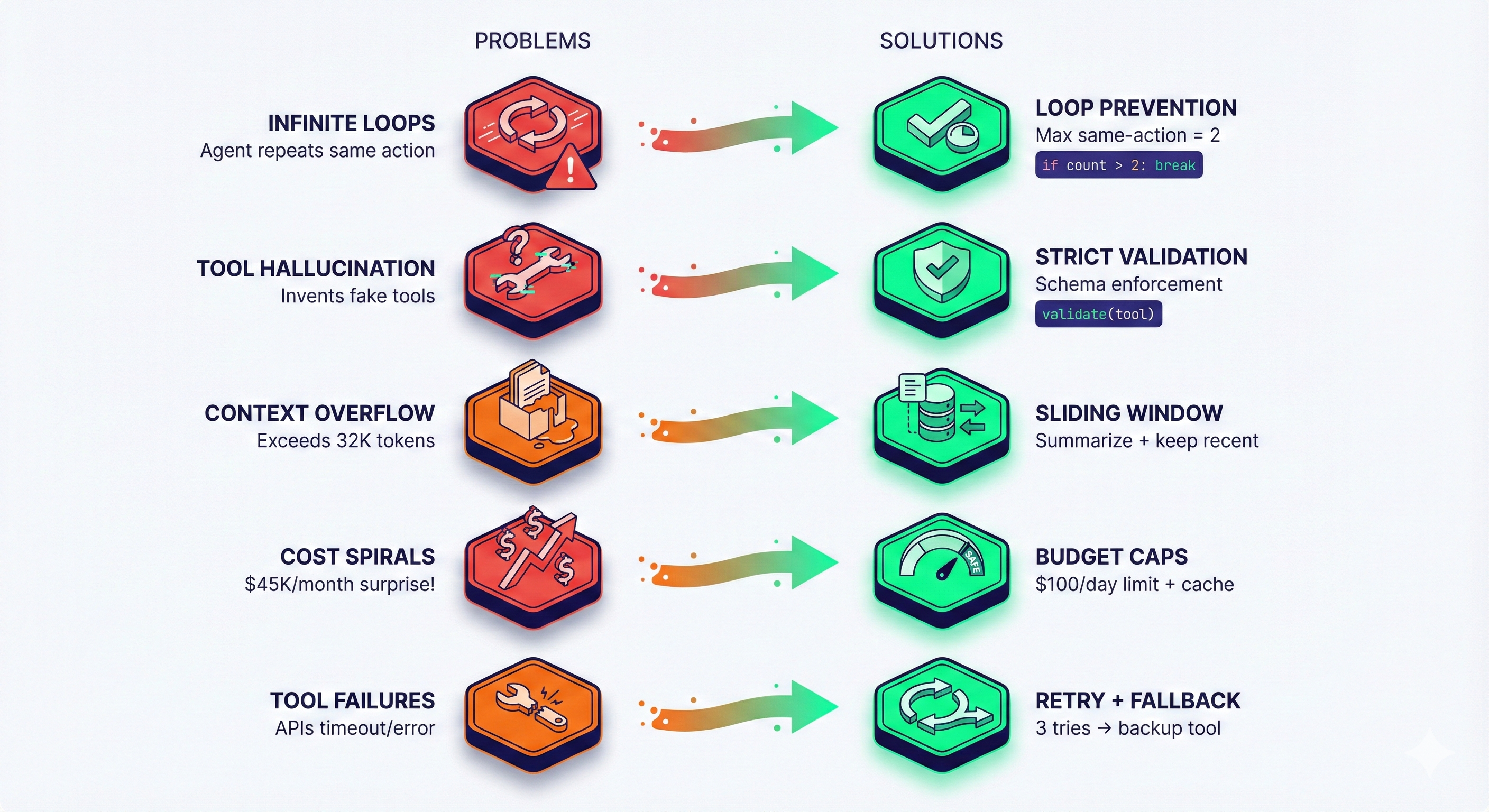
Problem: Agent repeats the same action over and over without progress.
Example:
Iteration 1: Search for "pricing"
Iteration 2: Search for "pricing" (again)
Iteration 3: Search for "pricing" (still)
...infinite loop
Why it happens:
- Agent doesn’t recognize it already tried this
- Short-term memory not working
- Poor reflection logic
Solution:
python
class LoopPrevention:
    def __init__(self, max_same_action=2):
        self.action_history = []
        self.max_same_action = max_same_action

    def check_loop(self, new_action):
        # Count recent occurrences
        recent = self.action_history[-5:]  # Last 5 actions
        count = sum(1 for a in recent if a == new_action)

        if count >= self.max_same_action:
            return True, "Loop detected: same action repeated"

        self.action_history.append(new_action)
        return False, None
Add to orchestrator:
python
is_loop, message = self.loop_prevention.check_loop(decision.action)
if is_loop:
    # Force different action or ask for help
    decision = self.llm.generate(context + f"\nWarning: {message}. Try a different approach.")
Challenge 2: Tool Hallucination
Problem: Agent “invents” tools that don’t exist or calls tools with wrong parameters.
Example:
Agent decides: Use tool "super_analyzer" with magic_mode=true
Reality: No such tool exists
Solution:
python
class StrictToolValidator:
    def __init__(self, available_tools):
        self.tools = {tool.name: tool for tool in available_tools}

    def validate(self, tool_call):
        # Check tool exists
        if tool_call.name not in self.tools:
            raise ToolNotFoundError(f"Tool '{tool_call.name}' doesn't exist. Available: {list(self.tools.keys())}")

        tool = self.tools[tool_call.name]

        # Validate parameters
        required = set(tool.required_params)
        provided = set(tool_call.arguments.keys())

        missing = required - provided
        if missing:
            raise InvalidParametersError(f"Missing required parameters: {missing}")

        return True
Better: Use structured output from LLM with schema validation (Pydantic, JSON Schema).
Challenge 3: Context Window Overflow
Problem: Agent’s conversation history grows too large, exceeding model’s context window.
Why it matters:
- GPT-4: 32K tokens (~25K words)
- Claude: 200K tokens (~150K words)
- Once exceeded, errors or truncation occur
Solution: Sliding Window + Summarization
python
class ContextManager:
    def __init__(self, max_tokens=28000):  # Leave buffer
        self.max_tokens = max_tokens
        self.messages = []

    def add_message(self, message):
        self.messages.append(message)

        # Check if over limit
        if self.count_tokens(self.messages) > self.max_tokens:
            self.compress()

    def compress(self):
        # Keep first message (system prompt) and last N messages
        system = self.messages[0]
        recent = self.messages[-10:]  # Last 10 interactions

        # Summarize middle section
        middle = self.messages[1:-10]
        summary = self.llm.summarize(middle)

        self.messages = [system, summary] + recent
Challenge 4: Cost Spirals
Problem: Agent makes excessive API calls, costs balloon unexpectedly.
Example:
- Single task: 50 LLM calls × $0.03 = $1.50
- 1,000 tasks/day = $1,500/day = $45K/month 😱
Solutions:
1. Caching:
python
@cache(ttl=3600)  # Cache for 1 hour
def web_search(query):
    # Expensive API call
    return results
2. Budget caps:
python
class BudgetEnforcer:
    def __init__(self, daily_limit_usd=100):
        self.daily_limit = daily_limit_usd
        self.today_spent = 0

    def check_budget(self, estimated_cost):
        if self.today_spent + estimated_cost > self.daily_limit:
            raise BudgetExceededError(f"Daily limit ${self.daily_limit} reached")

        self.today_spent += estimated_cost
3. Cheaper models for simple tasks:
python
def choose_model(task_complexity):
    if task_complexity == "simple":
        return "gpt-3.5-turbo"  # $0.002/1K tokens
    elif task_complexity == "medium":
        return "claude-sonnet-4"  # $0.015/1K tokens
    else:
        return "gpt-4"  # $0.03/1K tokens
Challenge 5: Unreliable Tool Outputs
Problem: External APIs fail, return unexpected formats, or have downtime.
Solution: Retry Logic + Fallbacks
python
class ResilientToolExecutor:
    def execute(self, tool, args, max_retries=3):
        for attempt in range(max_retries):
            try:
                result = tool.call(args)

                # Validate result format
                if self.validate_output(result, tool.expected_format):
                    return result
                else:
                    raise InvalidOutputError()

            except Exception as e:
                if attempt == max_retries - 1:
                    # Try fallback tool
                    if tool.has_fallback:
                        return self.execute(tool.fallback, args)
                    else:
                        # Escalate to human
                        return self.request_human_help(tool, args, e)

                # Exponential backoff
                time.sleep(2 ** attempt)
Key Takeaways for Builders
Remember these principles:
- Start Simple: Single-agent with 3-5 tools. Add complexity only when needed.
- Guardrails Are Essential: Loop prevention, budget caps, validation, human escalation.
- Memory Matters: Invest in good vector database setup for long-term memory.
- Monitor Everything: Log all actions, costs, errors. You can’t optimize what you don’t measure.
- Fail Gracefully: Agents will fail. Plan for retries, fallbacks, and human escalation.
- Test Extensively: Run agents in sandbox environments first. Test edge cases, failure modes, and cost scenarios.
- Optimize Iteratively: Don’t premature optimize. Get it working, then make it fast and cheap.
- Documentation: Document your agent’s capabilities, limitations, and decision logic. Future you will thank you.
Recommended Tools & Frameworks
Based on your technical level and needs:
For Beginners (No Code Required)
1. ChatGPT Custom GPTs
- Best for: Simple conversational agents
- Complexity: Lowest
- Cost: $20/month (ChatGPT Plus)
- Limitations: No complex multi-step workflows
2. Microsoft Copilot Studio
- Best for: Enterprise integration with Microsoft 365
- Complexity: Low
- Cost: Included with Microsoft 365 enterprise plans
- Limitations: Microsoft ecosystem only
For Developers (Low-Code)
3. LangChain
- Best for: Most flexible, extensive ecosystem
- Language: Python, JavaScript
- Complexity: Medium
- Pros: 300+ integrations, active community
- Cons: Can be overwhelming for beginners
Example:
python
from langchain.agents import create_openai_functions_agent
from langchain.tools import Tool

tools = [
    Tool(name="web_search", func=web_search_function),
    Tool(name="calculator", func=calculator_function)
]

agent = create_openai_functions_agent(
    llm=ChatOpenAI(model="gpt-4"),
    tools=tools,
    prompt=prompt_template
)

result = agent.invoke({"input": "Analyze competitor pricing"})
4. AutoGPT
- Best for: Maximum autonomy, research tasks
- Language: Python
- Complexity: Medium-High
- Pros: Minimal human intervention
- Cons: Can be unpredictable, high API costs
5. LlamaIndex
- Best for: Document-heavy applications (RAG)
- Language: Python
- Complexity: Medium
- Pros: Excellent for knowledge bases
- Cons: Specialized use case
For Production Systems (Full Code)
6. Microsoft Semantic Kernel
- Best for: Enterprise .NET applications
- Language: C#, Python
- Complexity: High
- Pros: Enterprise-grade, Azure integration
- Cons: Steeper learning curve
7. Haystack
- Best for: Production pipelines, NLP applications
- Language: Python
- Complexity: High
- Pros: Production-ready, scalable
- Cons: Opinionated architecture
8. CrewAI
- Best for: Multi-agent systems
- Language: Python
- Complexity: High
- Pros: Agent collaboration patterns built-in
- Cons: Newer, smaller community
Performance Optimization Tips
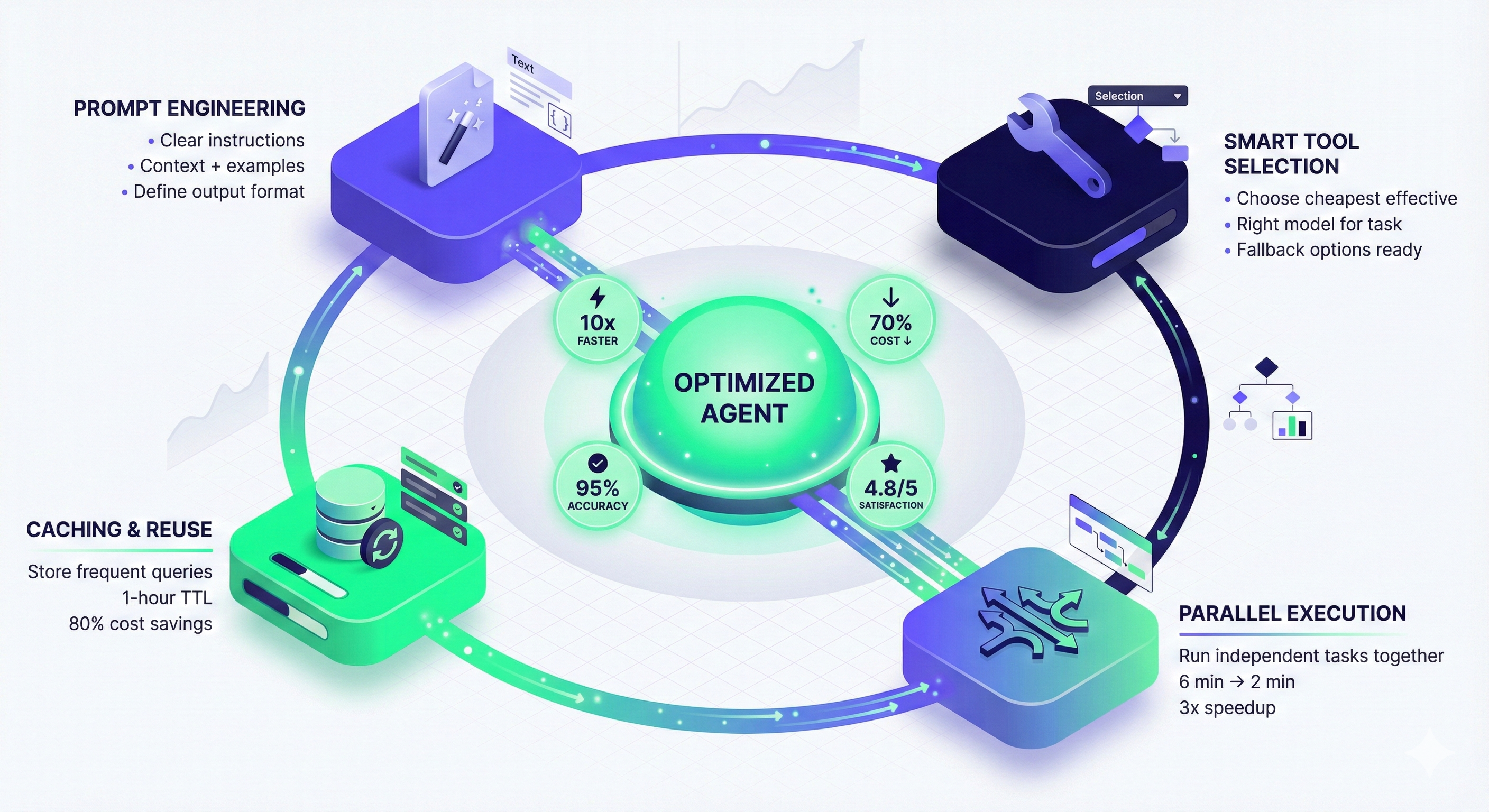
1. Prompt Engineering for Agents
Bad agent prompt:
You are a helpful assistant. Help the user with their task.Good agent prompt:
You are an autonomous research agent specializing in competitive analysis.

CAPABILITIES:
- Search the web for current information
- Extract data from websites
- Analyze patterns and trends
- Generate structured reports

WORKFLOW:
1. Always plan your approach before acting
2. Execute one step at a time
3. Verify results before proceeding
4. If stuck, try an alternative approach (max 2 attempts)
5. If still stuck, ask user for guidance

CONSTRAINTS:
- Do not make assumptions without data
- Always cite sources
- Flag uncertain conclusions
- Budget: Maximum 20 tool calls per task

OUTPUT FORMAT:
- Present findings in markdown
- Include data tables when relevant
- Provide actionable recommendations
- List all sources at the end
2. Tool Selection Strategy
Principle: Use the cheapest/fastest tool that gets the job done.
python
class SmartToolSelector:
    def select_search_tool(self, query, requirements):
        if requirements.need_real_time:
            return "google_search"  # More expensive, current
        elif requirements.need_academic:
            return "semantic_scholar"  # Specialized
        else:
            return "cached_search"  # Cheaper, slightly stale

    def select_llm(self, task_complexity):
        if task_complexity < 3:
            return "gpt-3.5-turbo"  # Fast, cheap
        elif task_complexity < 7:
            return "claude-sonnet"  # Balanced
        else:
            return "gpt-4"  # Most capable
3. Parallel Execution
When tasks are independent, run them in parallel:
python

import asyncio

async def parallel_research(competitors):
    tasks = [
        analyze_competitor(comp)
        for comp in competitors
    ]
    results = await asyncio.gather(*tasks)
    return results

# Sequential: 3 competitors × 2 min = 6 minutes
# Parallel: max(2 min) = 2 minutes
4. Streaming Responses
For better UX, stream results as they come:
python

def stream_agent_execution(goal):
    for step in agent.execute_streaming(goal):
        yield {
            "status": step.status,
            "action": step.action,
            "result": step.result
        }

# Frontend receives updates in real-time
# User sees progress instead of waiting
Debugging Agent Behavior
Essential Logging
python

import logging

class AgentLogger:
    def __init__(self, agent_id):
        self.logger = logging.getLogger(f"agent_{agent_id}")

    def log_iteration(self, iteration, state):
        self.logger.info(f"""
        Iteration: {iteration}
        Goal: {state.goal}
        Current Plan: {state.plan}
        Last Action: {state.last_action}
        Last Result: {state.last_result}
        Next Action: {state.next_action}
        Reasoning: {state.reasoning}
        Confidence: {state.confidence}
        Cost So Far: ${state.total_cost}
        """)
Visualization Tools
Use tools like LangSmith or Weights & Biases to visualize:
- Agent decision tree
- Tool usage patterns
- Cost breakdown
- Success/failure rates
- Bottlenecks in workflow
Common Debug Scenarios
Scenario 1: Agent produces wrong output
- Check prompt clarity
- Verify tool is returning expected format
- Review LLM reasoning (add “explain your thinking” to prompt)
- Test with simpler examples
Scenario 2: Agent is too slow
- Profile tool execution times
- Check for unnecessary API calls
- Implement caching
- Consider parallel execution
Scenario 3: Agent costs too much
- Count tool calls per task
- Switch to cheaper models where possible
- Implement result caching
- Add early stopping conditions
What’s Next: Advanced Topics
You now understand how AI agents work under the hood. To go further:
Continue your journey:
→ AI Agent Use Cases: 5 Industries Transformed in 2025(Article 1C)
- See detailed implementation examples
- Learn from real production systems
- Understand ROI calculations
- Explore 2025 trends (agentic RAG, multimodal, voice)
→ Explore Our AI Agent Tools Directory
- Compare frameworks and platforms
- Read detailed tool reviews
- Find the right stack for your project
Final Thoughts
Building AI agents is part engineering, part art. The architecture principles are consistent, but implementation varies wildly based on your specific needs.
The most important lesson: Start simple, iterate fast, measure everything.
Your first agent won’t be perfect. It will make mistakes, hit edge cases, and probably cost more than expected. That’s okay. Every production agent system started as a buggy prototype.
The opportunity is massive. According to Capgemini, 82% of organizations will deploy agents by 2026. The ones who start experimenting now will have a huge head start.
What separates successful agent builders from the rest:
- They test extensively before deploying
- They monitor performance obsessively
- They iterate based on real user feedback
- They balance autonomy with appropriate guardrails
- They don’t over-engineer (start simple!)
Now you have the knowledge. Time to build.
Found this helpful? Share with your engineering team. Subscribe to our newsletter for more deep-dives.
Questions or feedback? Join the discussion below or in our community.
Related Resources:
Citations:
- Microsoft Research on AI Agents 2024
- LangChain documentation and best practices
- OpenAI function calling patterns
- Capgemini AI Report 2024
- Production agent case studies from enterprise deployments
