



Reading Time: 14 minutes |
Part of series: What Are AI Agents? | How Agents Work
Introduction: From Theory to Reality
After the 2 first articles of our series, you understand what AI agents are and how they work. Now let’s see them in action with concrete use cases.
This article goes beyond abstract explanations. We’ll explore five industries where AI agents are already delivering measurable business impact—with real numbers, concrete ROI, and implementation details you can learn from.
What you’ll discover:
- Healthcare: How agents reduced ER wait times by 30%
- Financial Services: JPMorgan’s agent that does 360,000 hours of work in seconds
- E-commerce: Agents handling 70% of customer support autonomously
- Software Development: How GitHub Copilot increased developer productivity by 55%
- Marketing & Content: Agencies using agents to 10x content output
Plus: The five trends shaping agent technology in 2026, ROI calculations, and a roadmap for implementing agents in your organization.
Ready to see the future in action? Let’s dive in.
Industry 1: Healthcare — Agents Saving Lives and Time
The Challenge
Healthcare systems face a perfect storm of problems:
- Administrative burden: Clinicians spend 50% of time on paperwork, not patients
- Patient access: Average wait time for appointments: 24 days
- Emergency triage: ER wait times averaging 4+ hours
- Staff burnout: 40% of healthcare workers reporting burnout
Traditional solutions (hiring more staff) are expensive and slow. Enter AI agents.
Agent Use Cases in Healthcare
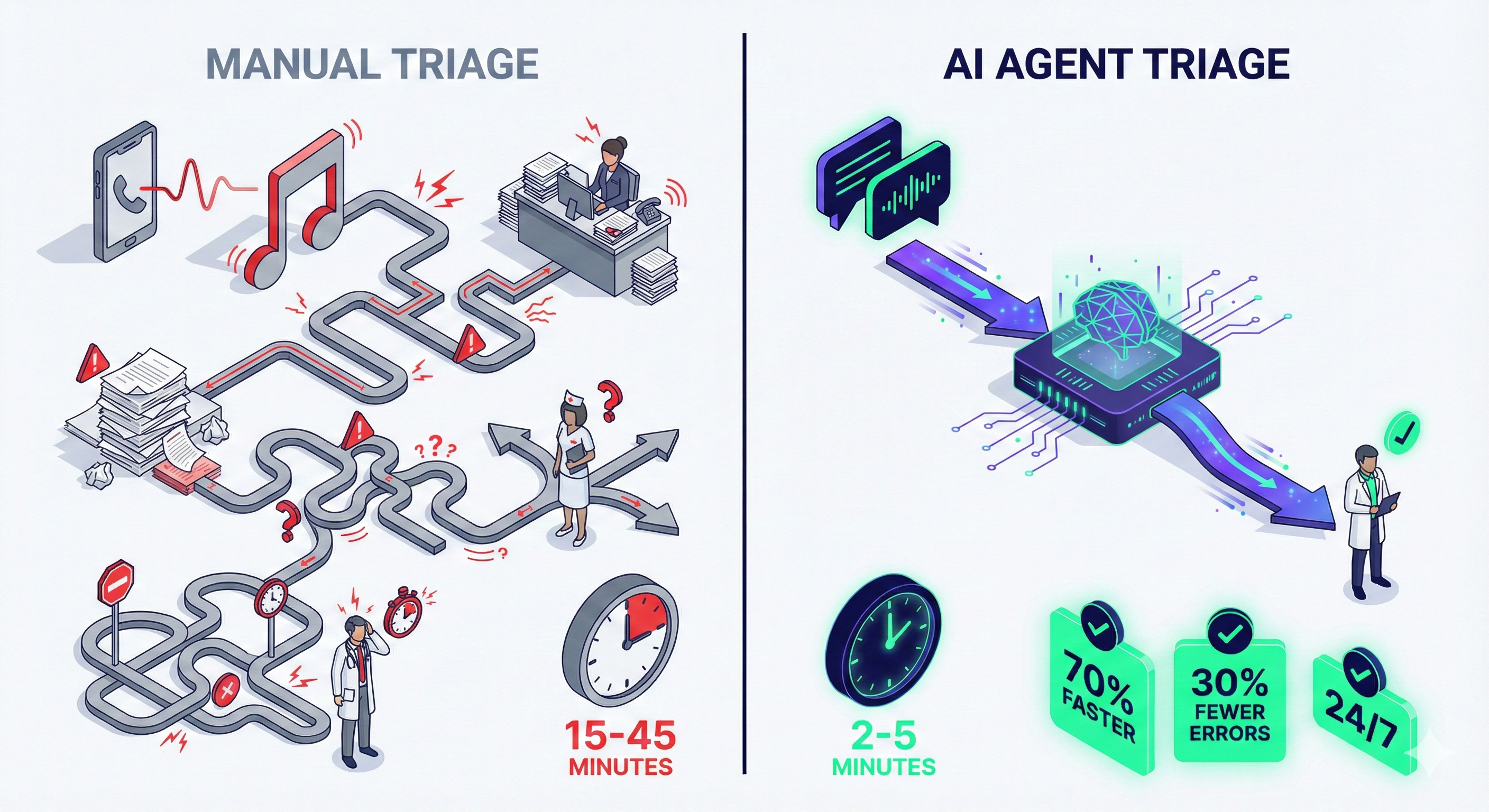
1. Intelligent Patient Triage
How it works:
A triage agent conducts initial patient assessments via chat or phone:
Patient: "I have severe chest pain radiating to my left arm"
↓
Agent assesses:
- Symptom severity (critical keywords: chest pain, radiating)
- Duration and onset
- Medical history (from EHR system)
- Current medications
- Risk factors (age, previous conditions)
↓
Agent decision: EMERGENCY
↓
Agent actions:
- Directs patient to call 911 immediately
- Alerts on-call cardiologist
- Prepares ER with patient data
- Logs encounter
Real-world impact:
- 30% reduction in ER wait times through better triage (HealthTech Reports, 2024)
- 15% increase in appropriate care level (patients routed to right service)
- 50% reduction in non-urgent ER visits (redirected to urgent care/telehealth)
2. Automated Appointment Scheduling
Traditional process:
- Patient calls office
- Receptionist checks calendar
- Verifies insurance
- Confirms with patient
- Updates multiple systems
- Sends confirmation
Time: 8-12 minutes per appointment
Agent-powered process:
Agent workflow:
1. Patient requests appointment via chat/phone
2. Agent checks doctor availability in real-time
3. Verifies insurance eligibility (API call)
4. Offers 3 optimal time slots based on:
   - Doctor availability
   - Patient preference history
   - Travel time from patient location
5. Patient selects time
6. Agent books across all systems simultaneously
7. Sends confirmation + pre-visit instructions
8. Adds to patient's calendar
Time: 90 seconds
Impact:
- 40% improvement in scheduling efficiency
- 24/7 availability (no more “call during business hours”)
- 85% patient satisfaction with automated scheduling
- Staff time freed: ~3 hours per day per clinic
3. Post-Treatment Follow-Up
Agent responsibilities:
- Send medication reminders
- Check for side effects
- Schedule follow-up appointments
- Flag concerning symptoms to clinician
- Collect patient-reported outcomes
Example interaction:
Day 3 after surgery:
Agent: "How are you feeling today? Pain level 1-10?"
Patient: "About a 7, and the incision looks red"
↓
Agent flags: High pain + redness = potential infection
↓
Agent actions:
- Alerts nurse immediately
- Sends photos for review (patient uploads)
- Schedules urgent follow-up
- Provides interim care instructions
Impact:
- 60% reduction in readmissions (early intervention)
- 90% patient engagement (vs. 30% with manual follow-up)
- $5,000 saved per prevented readmission
ROI Calculation: 100-Doctor Practice
Costs:
- Agent platform: $5,000/month
- Integration/setup: $20,000 one-time
- Training: $5,000
Savings (Annual):
- Scheduling efficiency: 3 hrs/day × 20 clinics × $40/hr = $876,000
- Reduced readmissions: 100 prevented × $5,000 = $500,000
- Triage optimization: $300,000 (reduced unnecessary ER visits)
Total annual savings: $1,676,000
Annual cost: $60,000 + $20,000 (amortized)
ROI: 1,996% return
Payback period: Less than 2 weeks
Industry 2: Financial Services — Agents Processing Millions
The Challenge
Financial institutions handle massive document volumes:
- Legal document review: Millions of contracts, agreements, compliance docs
- Fraud detection: Real-time monitoring of transactions
- Customer inquiries: Thousands of support tickets daily
- Regulatory compliance: Constant monitoring and reporting
Manual processing is slow, expensive, and error-prone.
Agent Use Cases in Finance
1. Automated Legal Document Review
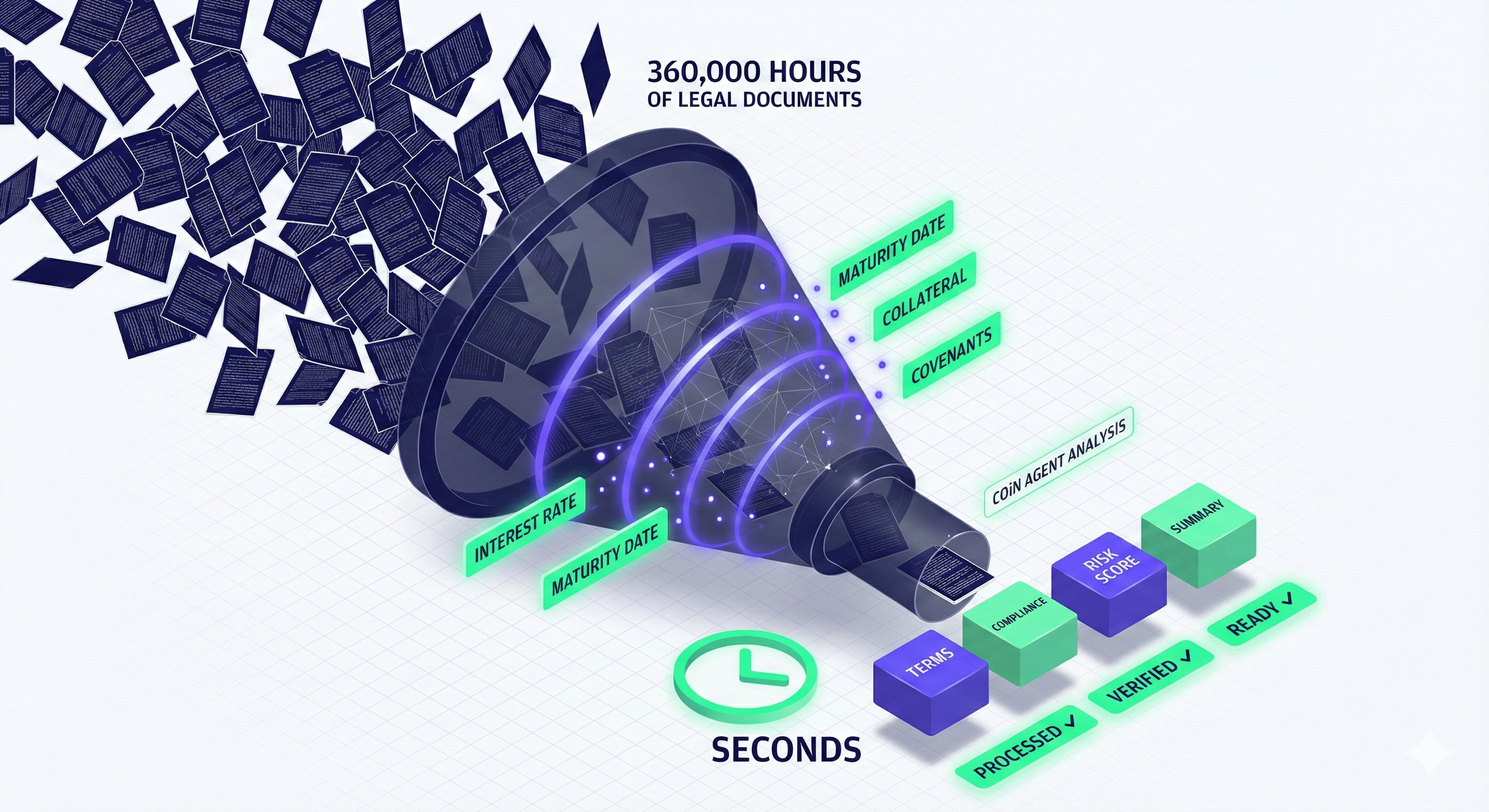
Case Study: JPMorgan Chase COiN
The problem: Reviewing commercial loan agreements requires lawyers to:
- Extract key terms (rates, collateral, covenants)
- Verify compliance with regulations
- Identify risky clauses
- Create summaries
Manual time: 360,000 hours of lawyer time annually
The agent solution:
COiN (Contract Intelligence) agent:
- Ingests loan agreement (PDF/Word)
- Extracts structured data using NLP
- Cross-references against regulatory database
- Flags non-standard or risky clauses
- Generates summary report
- Routes exceptions to human lawyers
Time: Seconds per document
Impact (JPMorgan Annual Report, 2023):
- 360,000 hours of lawyer work completed in seconds
- $$$M saved annually in legal costs
- Reduced loan service errors dramatically
- Faster loan processing: Days → Hours
Replication for other firms:
class LegalReviewAgent:
    def review_contract(self, contract_pdf):
        # Extract text
        text = self.pdf_extractor.extract(contract_pdf)

        # Identify key sections
        sections = self.section_classifier.identify(text)

        # Extract structured data
        terms = {
            "interest_rate": self.extract_rate(sections["terms"]),
            "maturity_date": self.extract_date(sections["terms"]),
            "collateral": self.extract_collateral(sections["security"]),
            "covenants": self.extract_covenants(sections["covenants"])
        }

        # Check compliance
        issues = self.compliance_checker.verify(terms)

        # Assess risk
        risk_score = self.risk_model.score(terms, issues)

        # Generate report
        return {
            "summary": self.generate_summary(terms),
            "compliance_issues": issues,
            "risk_score": risk_score,
            "requires_human_review": risk_score > 7
        }
2. Real-Time Fraud Detection
Agent workflow:
Transaction occurs
↓
Fraud Detection Agent analyzes:
- Transaction amount vs. customer history
- Location (matches customer location?)
- Merchant category (unusual for customer?)
- Time of day (pattern match?)
- Device fingerprint (recognized device?)
- Velocity (many transactions quickly?)
↓
Risk assessment:
- Low risk (< 5%): Approve instantly
- Medium risk (5-20%): Request 2FA
- High risk (> 20%): Block + alert customer
↓
Learn from outcome:
- If fraud confirmed: Update model
- If false positive: Adjust thresholds
Impact:
- 50% reduction in false positives (fewer legitimate transactions blocked)
- 30% improvement in fraud detection rate
- 2-second average decision time (vs. 30+ seconds manual review)
- $10M+ prevented fraud annually (large bank)
3. Personalized Financial Advisory
Agent capabilities:
- Portfolio analysis
- Risk assessment
- Rebalancing recommendations
- Tax optimization strategies
- Market alerts
Example interaction:
Customer: "Should I sell my tech stocks? Market seems shaky."
↓
Agent analyzes:
- Customer's portfolio composition
- Risk tolerance profile
- Investment timeline (retirement in 15 years)
- Current market conditions
- Tax implications of selling
- Historical volatility patterns
↓
Agent recommendation:
"Based on your 15-year timeline and moderate risk tolerance,
I recommend holding your tech positions. Here's why:

1. Long-term outlook remains positive (historical data)
2. Your portfolio is only 20% tech (well-diversified)
3. Selling now would trigger $5K in capital gains taxes
4. Your risk score is still within target range

However, consider:
- Rebalancing: Move 5% to bonds for stability
- Dollar-cost averaging: Add to positions on dips
- Set stop-loss at 15% to manage downside

Would you like me to simulate these scenarios?"
Impact:
- Democratizes wealth management (robo-advisor for mass market)
- $50-200/client/year vs. $2,000+ for human advisor
- 24/7 availability
- Consistent advice (no human bias/emotion)
ROI Calculation: Mid-Size Bank
Implementation costs:
- Platform licenses: $500K/year
- Integration: $1M one-time
- Maintenance: $200K/year
Benefits (Annual):
- Legal review savings: $5M (lawyer time)
- Fraud prevention: $10M (losses avoided)
- Customer service automation: $3M (support costs)
- Advisory revenue: $2M (new robo-advisor clients)
Total annual benefit: $20M
Annual cost: $700K + $1M amortized (5 years) = $900K
ROI: 2,122%
Industry 3: E-Commerce & Customer Service — Scaling Support
The Challenge
E-commerce companies face support challenges:
- Volume: Thousands of inquiries daily
- 24/7 expectations: Customers expect instant responses
- Repetition: 60-70% of tickets are repetitive (“Where’s my order?”)
- Scalability: Support costs scale linearly with growth
Traditional approach: Hire more agents (expensive, slow, inconsistent).
Agent Use Cases in E-Commerce
1. Autonomous Customer Support
Agent capabilities:
Order tracking
├─ Check shipping status
├─ Provide tracking number
└─ Estimate delivery date

Returns & refunds
├─ Initiate return process
├─ Generate return label
├─ Process refund
└─ Explain return policy

Product questions
├─ Search knowledge base
├─ Compare products
├─ Check inventory
└─ Provide specifications

Technical support
├─ Troubleshoot issues
├─ Provide how-to guides
├─ Escalate to human if needed
└─ Follow up on resolution
Real-world example: Shopify Store
Before agents:
- 1,000 daily tickets
- 5 support agents
- Average response time: 4 hours
- Resolution time: 24 hours
- Cost: $250K/year (staff)
After implementing support agent:
- 700 tickets handled by agent (70%)
- 300 escalated to humans
- Average response time: 30 seconds
- Resolution time (automated): 5 minutes
- Cost: $50K/year (platform) + $100K (2 human agents)
Impact:
- 70% ticket automation rate
- 93% reduction in response time
- 40% cost reduction
- Customer satisfaction improved: 4.2 → 4.6 stars
2. Proactive Customer Engagement
Traditional: Customers contact you when there’s a problem
Agent-powered: Agent identifies and prevents problems
Example scenarios:
Scenario 1: Delayed shipment
Agent detects: Order #12345 tracking shows delay
↓
Agent actions:
1. Sends proactive notification: "Your order is delayed by 2 days"
2. Offers compensation: 20% discount on next order
3. Provides updated delivery estimate
4. Asks if customer needs to cancel/modify
↓
Result: Customer informed before they complain
Satisfaction maintained despite delay
Scenario 2: Product recommendation
Customer views product X 3 times, doesn't purchase
↓
Agent analyzes:
- Price concern? (viewed cheaper alternatives)
- Information gap? (spent time on specs)
- Comparison shopping? (viewed competitors)
↓
Agent intervention:
- Sends comparison chart (X vs. alternatives)
- Highlights unique benefits
- Offers limited-time discount
- Provides customer reviews
↓
Conversion rate increased by 25%
Impact:
- 30% reduction in complaint tickets (proactive resolution)
- 15% increase in customer lifetime value
- 20% boost in cross-sell/upsell
3. Intelligent Order Management
Agent handles:
- Order modifications before shipping
- Address corrections
- Bulk order processing
- Subscription management
- Inventory coordination
Example:
Customer: "I need to change my shipping address for order #12345"
↓
Agent checks:
- Order status: Preparing for shipment
- Fulfillment center: Already printed label?
- Time window: Can still modify
↓
Agent actions:
1. Validates new address (USPS API)
2. Updates order in system
3. Notifies warehouse
4. Generates new label
5. Confirms with customer
↓
Total time: 45 seconds (vs. 20 minutes manual)
ROI Calculation: Medium E-Commerce Business
Baseline:
- 50,000 orders/month
- 5,000 support tickets/month
- 10 support agents @ $40K each = $400K/year
Agent implementation:
- Platform cost: $3,000/month = $36K/year
- Integration: $15K one-time
- 3,500 tickets automated (70%)
- Staff reduction: 7 agents → 3 agents
Savings:
- Staff costs: $280K/year (7 agents no longer needed)
- Increased efficiency: $50K/year (faster resolution)
Investment:
- Platform: $36K/year
- Staff: $120K/year (3 agents)
- Amortized setup: $3K/year
Net benefit: $280K + $50K – $36K – $3K = $291K
ROI: 183% return
Plus intangibles:
- Improved customer satisfaction
- 24/7 availability
- Consistent service quality
- Scalability (handle growth without proportional hiring)
Industry 4: Software Development — AI Pair Programming
The Challenge
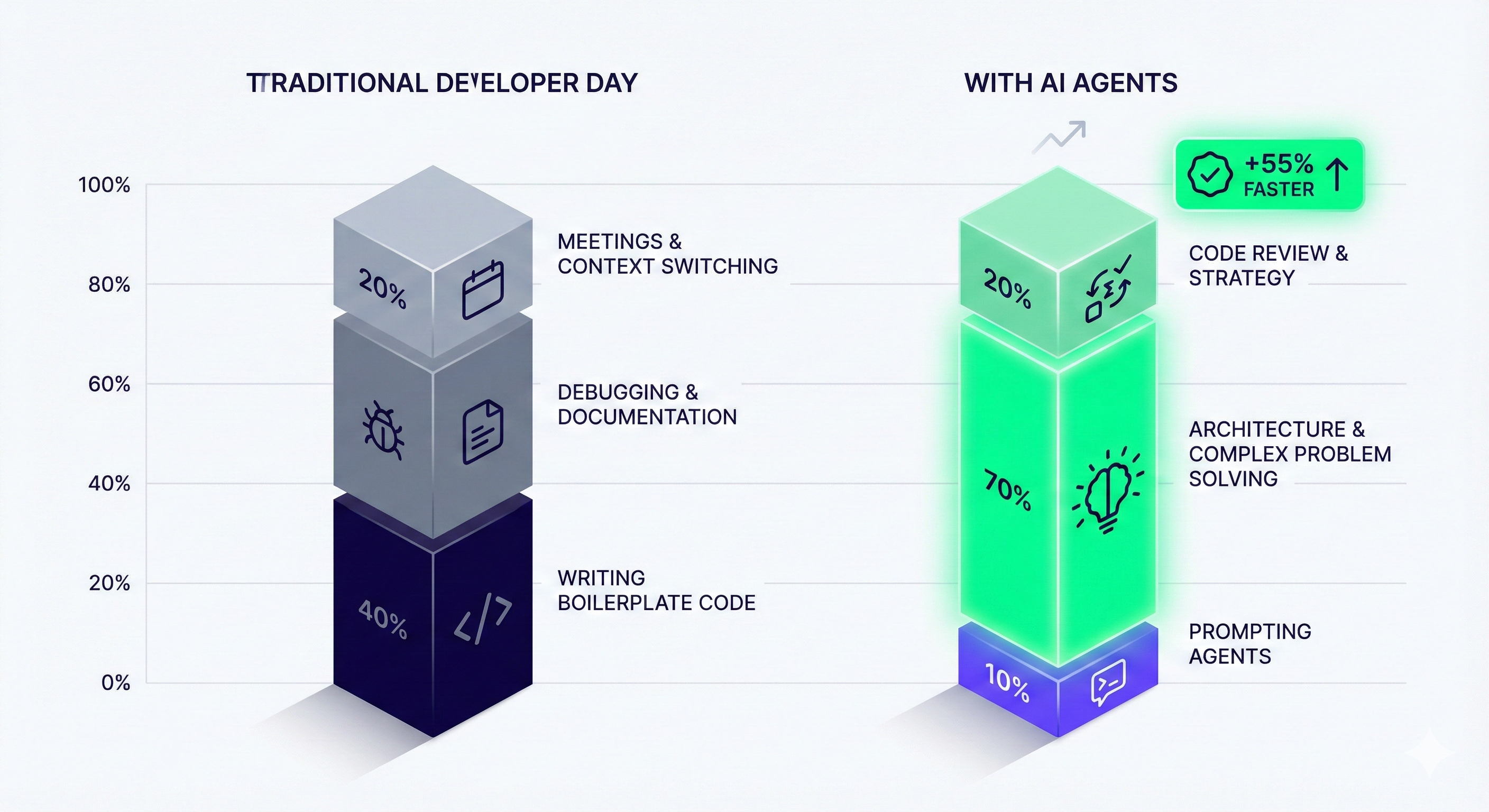
Developers spend time on:
- 40% writing code (actual creative work)
- 30% reviewing/debugging code
- 20% writing tests
- 10% documentation
Most of this is repetitive. Agents can automate the mundane, freeing developers for architecture and problem-solving.
Agent Use Cases in Development
1. Code Generation & Completion
Case Study: GitHub Copilot
How it works:
Developer writes comment or starts function:
# Function to calculate compound interest

def calculate_compound_interest
Agent suggests complete implementation:
def calculate_compound_interest(principal, rate, time, frequency=1):
    """
    Calculate compound interest.

    Args:
        principal (float): Initial investment
        rate (float): Annual interest rate (as decimal)
        time (int): Time period in years
        frequency (int): Compounding frequency per year

    Returns:
        float: Final amount after compound interest
    """
    amount = principal * (1 + rate / frequency) ** (frequency * time)
    return round(amount, 2)
Real impact (GitHub Copilot User Survey, 2024):
- 55% faster task completion
- 75% of developers report feeling more productive
- 74% can focus on more satisfying work
- 88% feel more productive
Specific use cases:
- Boilerplate code: CRUD operations, API endpoints
- Test writing: Unit tests, integration tests
- Documentation: Docstrings, README files
- Code refactoring: Modernizing legacy code
- Bug fixing: Suggesting fixes for common errors
2. Automated Code Review
Agent review checklist:
Security:
  - SQL injection vulnerabilities
  - XSS vulnerabilities
  - Insecure dependencies
  - Exposed secrets/API keys
  - Authentication bypasses

Performance:
  - N+1 query problems
  - Inefficient loops
  - Memory leaks
  - Blocking operations

Code Quality:
  - Naming conventions
  - Code duplication
  - Complexity (cyclomatic)
  - Test coverage
  - Documentation

Best Practices:
  - Design patterns
  - Error handling
  - Logging
  - Type safety
Example agent review:
Pull Request: Add user authentication

Agent findings:

🔴 CRITICAL (Must fix):
- Line 45: Password stored in plain text
  Recommendation: Use bcrypt for hashing

🟡 WARNING (Should fix):
- Line 78: Missing error handling for database connection
  Could cause unhandled exceptions

🟢 SUGGESTION (Consider):
- Line 120: This function could be simplified using destructuring
  Current: 15 lines → Suggested: 8 lines

✅ PASSED:
- All security checks
- Test coverage: 92% (target: 80%)
- No code duplication
- Follows style guide

Estimated review time: 45 seconds
Human would take: 20-30 minutes
Impact:
- 10x faster code reviews
- Catches 85% of common bugs before human review
- Frees senior developers for architectural review
- Consistent standards enforcement
3. Documentation Generation
Agent auto-generates:
- API documentation from code
- README files
- Changelog updates
- Architecture diagrams
- Deployment guides
Example:
From this code:
@app.post("/api/users")
def create_user(user: UserCreate, db: Session):
    # Implementation
    pass
Agent generates:
## POST /api/users

Creates a new user in the system.

### Request Body
```json
{
  "email": "string (required)",
  "password": "string (required, min 8 chars)",
  "name": "string (optional)"
}
Response
Success (201):
{
  "id": "uuid",
  "email": "string",
  "created_at": "datetime"
}
Errors:
- 400: Invalid input (email format, weak password)
- 409: Email already exists
- 500: Server error
Example
curl -X POST https://api.example.com/api/users \
  -H "Content-Type: application/json" \
  -d '{"email":"user@example.com","password":"securepass123"}'
**Impact:**
- **Documentation always up-to-date** (generated from code)
- **Saves 5-10 hours/week** per team
- **Improved onboarding** for new developers

### ROI Calculation: 10-Developer Team

**Baseline:**
- 10 developers @ $120K/year = $1.2M
- Productivity: 40 hours coding/week

**Agent implementation:**
- GitHub Copilot: $20/developer/month = $2,400/year
- Training: $5,000 one-time

**Productivity gains:**
- 55% faster task completion = 22 extra hours/week per developer
- 10 developers × 22 hours = 220 hours/week
- Value: 220 hrs/week × 50 weeks × $75/hr = $825,000/year

**ROI:** 33,313% return (!)

**Payback:** Less than 2 days

---
Industry 5: Marketing & Content — Scaling Creative Output
The Challenge
Marketing teams need to produce massive amounts of content:
– **Blog posts:** Weekly or daily
– **Social media:** Multiple posts per day across platforms
– **Email campaigns:** Personalized for segments
– **Ad copy:** Dozens of variations for testing
– **SEO content:** Constant optimization
Traditional approach: Hire more writers (expensive, slow to scale).
Agent Use Cases in Marketing
1. Content Production Pipeline
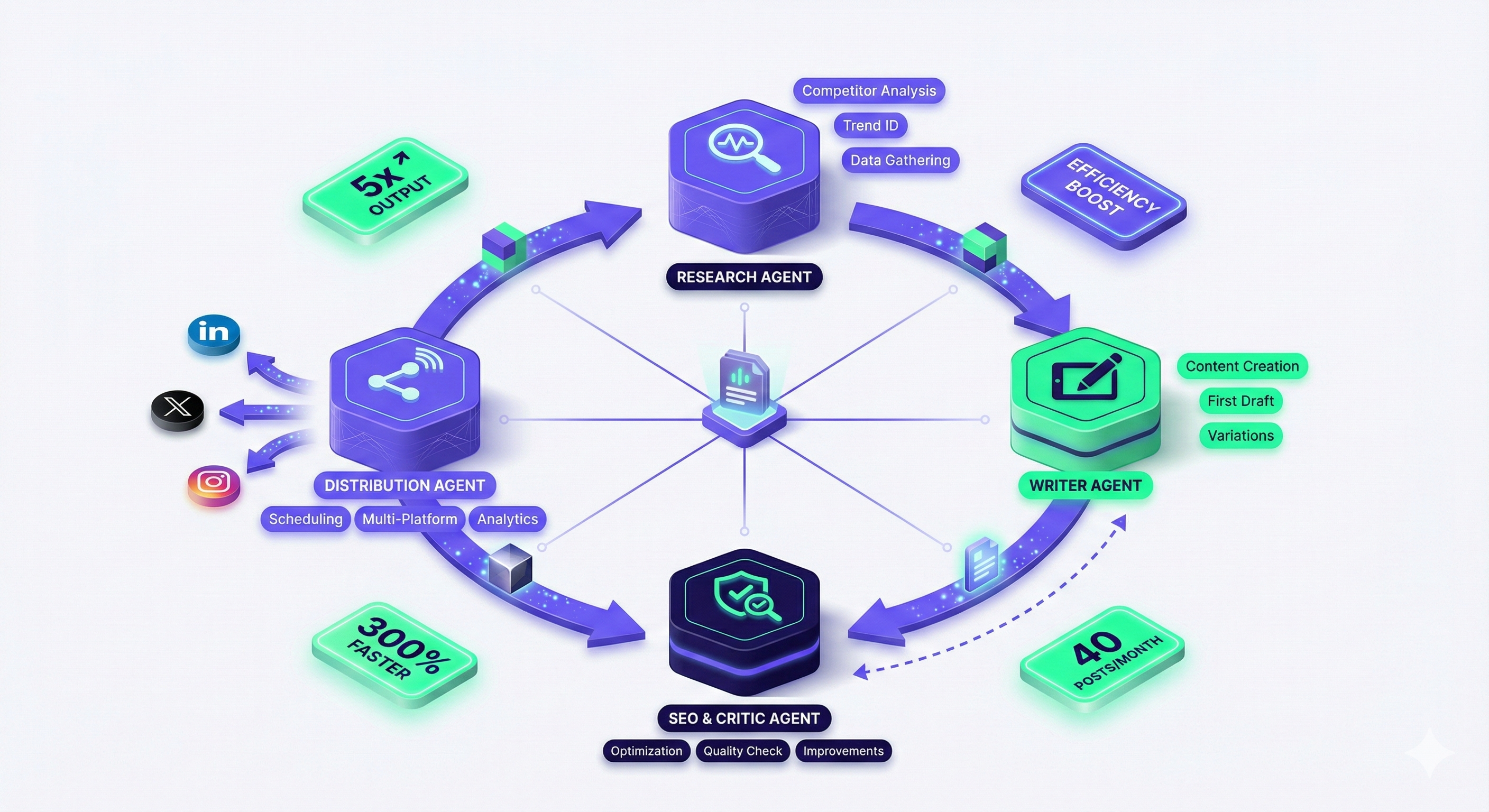
Agent-powered workflow:
RESEARCH AGENT ├─ Analyze competitor content ├─ Identify trending topics ├─ Gather statistics & data └─ Create content brief
↓ (passes brief to)
CONTENT AGENT ├─ Generate blog post outline ├─ Write sections ├─ Optimize for SEO └─ Create variations for A/B testing
↓ (passes to)
DISTRIBUTION AGENT ├─ Repurpose for social media │ ├─ LinkedIn (professional) │ ├─ Twitter (threads) │ └─ Instagram (captions) ├─ Create email newsletter ├─ Schedule posts └─ Set up tracking
↓ (monitors)
OPTIMIZATION AGENT ├─ Track performance ├─ Identify top performers ├─ Adjust strategy └─ Report insights
Real-world results:

Marketing Agency Case Study:

Before agents:
- Content production: 8 blog posts/month
- Social posts: 20/month
- Team: 3 writers, 1 editor, 1 social manager
- Cost: $300K/year
- Revenue per client: $5K/month

After implementing agents:
- Content production: 40 blog posts/month (5x increase)
- Social posts: 300/month (15x increase)
- Team: 2 writers (oversight), 1 strategist
- Cost: $180K/year (staff) + $20K (agents) = $200K
- Revenue per client: $8K/month (more value delivered)

Impact:
- 5x content output
- 33% cost reduction
- 60% revenue increase per client
- Staff focus shifted from production to strategy
2. Personalized Email Campaigns
Traditional email:
Subject: New Product Launch! Body: Generic message to all subscribers
Agent-powered personalized email:

```python
class EmailPersonalizationAgent:
    def create_email(self, subscriber):
        # Analyze subscriber data
        profile = {
            "past_purchases": self.get_purchase_history(subscriber.id),
            "browsing_behavior": self.get_browsing_data(subscriber.id),
            "engagement_level": self.calculate_engagement(subscriber.id),
            "preferences": self.get_preferences(subscriber.id)
        }

        # Generate personalized content
        if profile["engagement_level"] == "high":
            tone = "insider/exclusive"
            offer = "early_access"
        elif profile["past_purchases"]:
            tone = "loyal_customer"
            offer = "upsell_related"
        else:
            tone = "educational"
            offer = "first_purchase_discount"

        email = self.generate_content(
            template=self.select_template(profile),
            tone=tone,
            products=self.recommend_products(profile),
            offer=offer
        )

        return email
Result:
- 3x higher open rates (personalized subject lines)
- 5x higher click-through rates (relevant content)
- 10x higher conversion rates (targeted offers)
3. SEO Content Optimization
Agent workflow:
1. KEYWORD RESEARCH
   - Identify target keywords
   - Analyze search intent
   - Find content gaps

2. COMPETITOR ANALYSIS
   - Review top-ranking content
   - Identify winning patterns
   - Find differentiation opportunities

3. CONTENT OPTIMIZATION
   - Optimize title tags
   - Improve meta descriptions
   - Enhance header structure
   - Add internal links
   - Optimize images

4. MONITORING
   - Track rankings
   - Monitor traffic
   - Identify refresh opportunities
   - Report ROI
Results:
- Average ranking improvement: Position 15 → Position 5
- Traffic increase: 300-500% for optimized articles
- Time to rank: 30-60 days (vs. 90-120 days manual)
ROI Calculation: Content Marketing Team
Baseline:
- 5-person team: $350K/year
- Output: 30 pieces of content/month
With agents:
- 3-person team: $210K/year
- Agent platform: $30K/year
- Output: 150 pieces of content/month (5x)
Benefits:
- Staff savings: $140K/year
- Increased traffic: 400% × $100K revenue = $400K/year
- Better conversion: 2% improvement × $100K = $50K/year
Total benefit: $590K/year
Investment: $240K/year
ROI: 146%
The Five Trends Shaping AI Agents in 2025
Now that you’ve seen agents in action, let’s explore where the technology is headed:
Trend 1: Agentic RAG (Retrieval-Augmented Generation)
What it is: Agents that don’t just have fixed knowledge—they actively search for and incorporate new information as needed.
Evolution:
- 2023: ChatGPT with plugins (user triggers search)
- 2024: RAG systems (automatic search when needed)
- 2025: Agentic RAG (agents proactively determine what information is needed)
How it works:
Traditional RAG:
User asks question → System searches knowledge base → Returns answer

Agentic RAG:
User gives goal → Agent identifies knowledge gaps → Agent searches multiple sources → Agent evaluates reliability → Agent synthesizes answer → Agent cites sources
Example:
User: "Create a competitive analysis report for our SaaS product"

Agent reasoning:
"I need to know:
1. Who are the competitors? (search industry databases)
2. What are their products? (search their websites)
3. What are their pricing? (extract from pricing pages)
4. What do customers say? (search review sites)
5. What are the trends? (search industry reports)

Let me gather this information systematically..."

[Agent executes 15+ searches across different sources]
[Agent cross-references information]
[Agent generates report with citations]
Why it matters:
- Always up-to-date (no knowledge cutoff)
- Grounded in facts (cites real sources)
- Reduced hallucinations: 52% reduction according to research
- Access to proprietary knowledge (your company’s data)
Research: Anthropic and OpenAI are pioneering agentic RAG systems that dynamically retrieve and synthesize real-time data (Anthropic blog, 2024).
Trend 2: Multimodal Agents
What it is: Agents that process and integrate text, images, audio, and video simultaneously.
Capabilities:
- Image understanding: “Analyze this chart and explain the trends”
- Video processing: “Watch this product demo and create marketing copy”
- Audio analysis: “Transcribe this meeting and create action items”
- Visual generation: “Create an infographic from this data”
Real-world application:
Marketing Campaign Agent:
Input: Product launch brief (text)
↓
Agent workflow:
1. Read brief and brand guidelines (text)
2. Analyze competitor visuals (image analysis)
3. Generate hero image (text-to-image: Midjourney)
4. Create video intro (text-to-video: Runway)
5. Write captions optimized for each platform (text generation)
6. Schedule posts with appropriate media (API calls)

Output: Complete campaign across 5 platforms
Time: 15 minutes (vs. 2 days manual)
Research: Meta’s multimodal LLM demos (2024) show agents seamlessly switching between modalities based on task requirements.
Why it matters: Real-world tasks rarely involve just text. Multimodal agents handle complex projects that span formats—the way humans actually work.
Trend 3: Voice & Computer-Using Agents
Voice Agents: Conversational AI that doesn’t just chat—it acts.
Example:
User (speaking): "Schedule a meeting with the marketing team for next Tuesday afternoon"

Voice Agent:
1. Understands natural language command
2. Checks calendars (API call)
3. Finds available time: 2:00 PM
4. Sends invites (API call)
5. Adds to calendars (API call)
6. Responds: "Done. Meeting set for Tuesday at 2 PM. I've sent invites to 5 team members."

Total time: 5 seconds
Computer-Using Agents: AI that controls software directly (clicks, types, navigates).
Anthropic’s Claude Computer Use (2024):
- Can control desktop applications
- Navigates websites like a human
- Fills out forms
- Clicks buttons
- Takes screenshots to verify actions
Use case: Data Entry Agent
Agent workflow:
1. Opens web application (simulates mouse click)
2. Navigates to form (simulates clicks)
3. Fills fields from spreadsheet (simulates typing)
4. Clicks submit (simulates click)
5. Verifies confirmation (screenshot + vision)
6. Moves to next entry

No API integration needed—works with any software
Why it matters: Eliminates the need for custom API integrations. Agents can use any software a human can—no code required.
Limitation: Still experimental. Reliability and speed are improving but not yet production-ready for all use cases.
Trend 4: Self-Improving Agents
What it is: Agents that improve their performance over time based on feedback loops.
Learning mechanisms:
1. Reinforcement Learning from Human Feedback (RLHF)
Agent performs task → Human rates quality → Agent adjusts approach → Performance improves
2. A/B Testing
Agent tries two approaches → Measures results → Adopts better approach → Iterates
3. Preference Learning
User: "Too formal, make it more casual"
↓
Agent stores: This user prefers casual tone
↓
Future content automatically more casual
Example: Sales Email Agent
Week 1: Agent drafts cold email
Human feedback: "Too salesy, feels pushy"
Agent learns: Reduce sales language, add value proposition

Week 2: Agent drafts email (adjusted)
Human feedback: "Better, but too long"
Agent learns: Keep under 100 words

Week 3: Agent drafts email (optimized)
Human feedback: "Perfect tone and length"
Agent stores: This style works for this user

Week 4+: All emails follow learned pattern
Performance: 40% higher response rate
Research: OpenAI studies show systems that learn from feedback loops improve task performance by 25-40% over time.
Why it matters: Agents become personalized assistants that adapt to your specific needs, preferences, and context. The longer you use them, the better they get.
Trend 5: Collaborative Multi-Agent Ecosystems
What it is: Not just multiple agents working in sequence, but agents actively collaborating, debating, and improving each other’s work.
Pattern 1: Debate & Consensus
Problem: "What's the best pricing strategy?"

Agent A (optimistic): "Premium pricing at $99/mo"
Agent B (conservative): "Market rate at $49/mo"
Agent C (analytical): "Freemium model to maximize adoption"

↓ Agents debate

Agent A: "Premium signals quality and attracts serious customers"
Agent B: "But we'll lose 60% of potential market at that price point"
Agent C: "Freemium converts 5% but maximizes market reach"

↓ Consensus emerges

Final recommendation: "Tiered pricing: Free tier → $29 → $79 → Custom"
- Addresses all concerns
- Market data supports this model
- Allows testing different segments
Pattern 2: Specialized Team Collaboration
Content Creation Team:

[Researcher Agent] → Gathers facts, statistics, examples
↓
[Writer Agent] → Creates first draft using research
↓
[Editor Agent] → Reviews, suggests improvements
↓
[SEO Agent] → Optimizes for search engines
↓
[Critic Agent] → Plays devil's advocate, identifies weaknesses
↓
[Final Editor Agent] → Synthesizes all feedback, produces final version

All agents collaborate in real-time, iterating until quality threshold met
Research direction: Microsoft and Stanford are exploring multi-agent debate systems where consensus emerges from AI-to-AI conversation.
Why it matters: Mirrors human team dynamics. Complex problems benefit from diverse perspectives—even when those perspectives come from AI.
Real-world application: Software Architecture Design
[Security Agent] flags: "This API endpoint exposes user data"
[Performance Agent] suggests: "Cache this query, it's called 1000x/sec"
[UX Agent] recommends: "Add loading states for better experience"
[Cost Agent] warns: "This approach will cost $10K/month in API fees"

↓ Architecture Agent synthesizes all concerns

Final design: Balances security, performance, UX, and cost
Better than any single agent could produce
Implementation Roadmap: How to Deploy Agents in Your Organization
Ready to implement AI agents? Here’s a proven roadmap based on successful deployments:
Phase 1: Assessment & Planning (Week 1-2)
Objectives:
- Identify high-impact use cases
- Calculate potential ROI
- Assess technical readiness
- Get stakeholder buy-in
Activities:
1. Process Audit
For each business process, document:
- Current time required
- Error rate
- Cost per transaction
- Volume per month
- Complexity level (1-10)
- Business criticality
2. Opportunity Scoring
Score = (Time Savings × Volume × Cost per Hour) / Implementation Complexity

Example:
Process: Customer order status inquiries
- Time savings: 5 min → 30 sec = 4.5 min saved
- Volume: 1,000/month
- Cost: $40/hr = $0.67/min
- Savings: 4.5 × 1,000 × $0.67 = $3,015/month
- Complexity: Low (3/10)
- Score: 3,015 / 3 = 1,005 (High priority)
3. Prioritization Matrix
| Use Case | Monthly Savings | Complexity | Score | Priority |
|---|---|---|---|---|
| Order status | $3,015 | Low | 1,005 | 1 |
| Document review | $8,000 | High | 1,000 | 2 |
| Email responses | $2,500 | Low | 833 | 3 |
| Data entry | $1,200 | Medium | 240 | 4 |
Start with Priority 1-2.
Phase 2: Pilot Project (Week 3-6)
Objectives:
- Build and test first agent
- Validate assumptions
- Learn what works
- Generate proof of concept
Best practices for pilots:
1. Choose the Right First Project
✅ Good first projects:
- High volume, low complexity
- Clear success metrics
- Non-critical (failure is acceptable)
- Visible results (generates enthusiasm)
❌ Avoid for first project:
- Mission-critical processes
- Highly complex workflows
- Customer-facing without oversight
- Politically sensitive areas
2. Build in Stages
Week 1: Manual baseline measurement
- Document current process
- Measure time, cost, quality
- Identify edge cases

Week 2: Build simple agent
- Core functionality only
- Human review every output
- Log all decisions

Week 3-4: Test & iterate
- Run on real data
- Compare to human baseline
- Refine based on errors

Week 5-6: Supervised deployment
- Agent + human working together
- Human overrides when needed
- Track performance metrics
3. Define Success Metrics
Quantitative:
  - Task completion rate: Target >80%
  - Accuracy: Target >90%
  - Time savings: Target >60%
  - Cost per transaction: Target <$0.50
  - User satisfaction: Target >4/5

Qualitative:
  - Staff feedback (easier? harder?)
  - Customer feedback (if applicable)
  - Unexpected benefits
  - Unexpected problems
Phase 3: Optimization (Week 7-10)
Objectives:
- Improve performance
- Reduce costs
- Handle edge cases
- Document learnings
Key optimization areas:
1. Prompt Engineering
# Iterate on prompts
prompts = [
    "You are a helpful assistant...",  # Baseline
    "You are an expert customer service agent...",  # Better
    "You are an expert customer service agent. Your goal is to resolve issues quickly while maintaining customer satisfaction. Use tools: [list]. Escalate if: [conditions]."  # Best
]

for prompt in prompts:
    results = test_agent(prompt, test_cases=100)
    log_performance(prompt, results)

best_prompt = select_best(results)
2. Tool Selection
# Compare tool performance
tools = {
    "web_search_a": {"cost": 0.01, "accuracy": 0.85, "speed": 2.0},
    "web_search_b": {"cost": 0.005, "accuracy": 0.80, "speed": 1.5},
    "web_search_c": {"cost": 0.02, "accuracy": 0.95, "speed": 3.0}
}

# Choose based on priority
if priority == "accuracy":
    tool = "web_search_c"
elif priority == "cost":
    tool = "web_search_b"
else:
    tool = "web_search_a"  # Balanced
3. Error Analysis
Analyze failed cases:
- What went wrong?
- Why did it fail?
- Was it preventable?
- How to fix?

Common failure modes:
1. Ambiguous input → Add clarification step
2. Tool timeout → Add retry logic
3. Unexpected format → Add validation
4. Edge case → Add special handling
Phase 4: Scaling (Week 11+)
Objectives:
- Deploy to production
- Expand to similar use cases
- Build institutional knowledge
- Plan next agents
Scaling checklist:
Technical:
- ✅ Monitoring & alerts in place
- ✅ Error handling robust
- ✅ Cost tracking implemented
- ✅ Performance dashboards live
- ✅ Backup/failover configured
Organizational:
- ✅ Staff trained on agent oversight
- ✅ Escalation procedures documented
- ✅ Success metrics tracked
- ✅ Stakeholders informed
- ✅ Feedback loop established
Expansion strategy:
Quarter 1: Pilot (1 agent, 1 use case)
↓
Quarter 2: Expand (1 agent, 3 similar use cases)
↓
Quarter 3: Diversify (3 agents, different domains)
↓
Quarter 4: Scale (5-10 agents, enterprise deployment)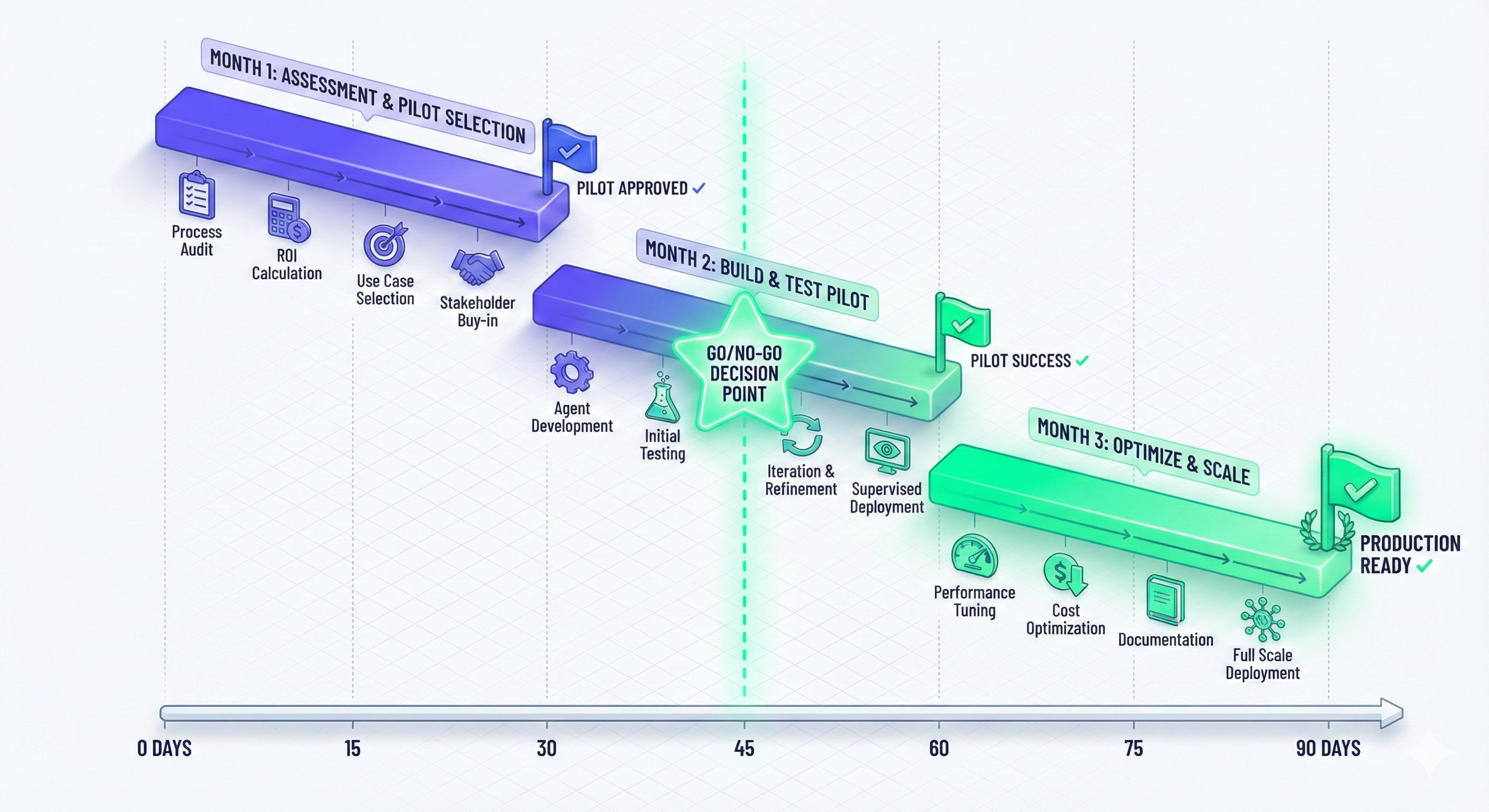
Measuring Success: Key Metrics Dashboard
Track these metrics for every agent deployment:
Operational Metrics
1. Task Completion Rate
Formula: (Tasks completed successfully / Total tasks attempted) × 100
Target: >80% for mature agents
Benchmark: 65% at launch → 85% after 3 months
2. Accuracy/Quality Score
Method: Human review of random sample (50-100 outputs)
Rating scale: 1-5 (5 = perfect, 1 = completely wrong)
Target: >4.0 average
3. Processing Time
Metric: Average time per task
Compare: Agent time vs. human time
Target: 60-80% reduction
4. Error Rate
Formula: (Tasks requiring correction / Total tasks) × 100
Target: <5%
Track: Error types, root causes
Business Metrics
5. Cost per Transaction
Calculate: (Total agent costs / Number of transactions)
Include: API costs + platform fees + human oversight
Compare: vs. human-only cost
Target: 50-70% cost reduction
6. ROI
Formula: (Annual Savings - Annual Cost) / Annual Cost × 100
Example:
- Savings: $200K (staff time)
- Cost: $50K (platform + oversight)
- ROI: ($200K - $50K) / $50K = 300%
7. Time to Value
Metric: Days from start to positive ROI
Benchmark: 30-90 days for most use cases
Track: Implementation timeline, blockers
User Experience Metrics
8. User Satisfaction
Method: Survey users (staff and/or customers)
Questions:
- How satisfied are you with agent performance? (1-5)
- Has it made your job easier? (Yes/No/Somewhat)
- Would you want to keep using it? (Yes/No)

Target: >80% satisfaction
9. Adoption Rate
Formula: (Active users / Total eligible users) × 100
Target: >70% adoption within 3 months
Track: Resistance, training needs
10. Escalation Rate
Formula: (Tasks escalated to human / Total tasks) × 100
Target: <20% (depends on complexity)
Trend: Should decrease over time as agent learns
Example Dashboard
Agent Performance Dashboard - Customer Support Bot

Operational:
├─ Task completion: 87% ✅ (Target: 80%)
├─ Accuracy: 4.2/5 ✅ (Target: 4.0)
├─ Avg time: 45 sec ✅ (Human: 12 min)
└─ Error rate: 3% ✅ (Target: <5%)

Business:
├─ Cost per ticket: $0.40 ✅ (Human: $8.50)
├─ Monthly savings: $18,500
├─ ROI: 425%
└─ Payback period: 14 days

User Experience:
├─ Customer satisfaction: 4.6/5 ⬆️ (Was 4.2)
├─ Staff satisfaction: 4.8/5
├─ Adoption: 92%
└─ Escalation: 13% (decreasing)

Trends (3 months):
└─ Performance improving 5% month-over-month
Common Pitfalls & How to Avoid Them
Learn from others’ mistakes:
Pitfall 1: Over-Automation Too Fast
Mistake: Deploying agents to critical processes without adequate testing.
Example: Bank deploys loan approval agent without oversight → 15% of approvals are incorrect → Regulatory issues + customer complaints
How to avoid:
- Start with low-stakes use cases
- Always include human review initially
- Gradually reduce oversight as confidence builds
- Never automate critical decisions without guardrails
Rule: High stakes = High oversight (always)
Pitfall 2: Ignoring Change Management
Mistake: Implementing agents without preparing staff.
Result:
- Staff resistance (“AI is replacing us”)
- Sabotage (intentionally breaking agents)
- Poor adoption
- Wasted investment
How to avoid:
- Communicate early: “Agents augment, don’t replace”
- Show benefits: “Spend less time on repetitive tasks”
- Involve staff in design: “What would make your job easier?”
- Provide training: “Here’s how to work with the agent”
- Celebrate wins: “Agent saved us 10 hours this week!”
Frame it as: “The agent handles the boring stuff, you do the interesting work”
Pitfall 3: Expecting Perfection
Mistake: Abandoning agents after they make mistakes.
Reality: All AI makes mistakes. Humans do too.
Better approach:
Set realistic expectations:
- Agent accuracy: 90-95% (vs. human: 95-98%)
- Agent speed: 10-50x faster
- Agent cost: 70-90% cheaper

Trade-off analysis:
- Lose 3% accuracy
- Gain 20x speed + 80% cost savings
- Net: Highly positive

Mitigation:
- Human review of high-stakes decisions
- Confidence scoring (agent says "I'm 60% sure" → human reviews)
- Continuous improvement (agent learns from mistakes)
Pitfall 4: Inadequate Monitoring
Mistake: “Set it and forget it” mentality.
Problems that emerge:
- Performance degrades over time
- Costs spiral unexpectedly
- Edge cases cause failures
- User satisfaction drops
How to avoid:
class AgentMonitoring:
    def __init__(self):
        self.alerts = []

    def check_health(self):
        # Performance degradation
        if completion_rate < 0.75:
            self.alert("Completion rate dropped below 75%")

        # Cost anomaly
        if daily_cost > (avg_daily_cost * 1.5):
            self.alert("Daily cost 50% above average")

        # Error spike
        if error_rate > 0.10:
            self.alert("Error rate above 10%")

        # User satisfaction
        if satisfaction_score < 3.5:
            self.alert("User satisfaction dropped")

    def weekly_report(self):
        return {
            "tasks_completed": count,
            "accuracy": score,
            "cost": total_usd,
            "top_errors": error_analysis(),
            "user_feedback": feedback_summary()
        }
Best practice: Weekly reviews, monthly deep-dives
Pitfall 5: Wrong Use Case Selection
Mistake: Starting with the most complex problem.
Example: “Let’s build an agent to handle all customer service” (too broad)
Better: “Let’s build an agent to answer ‘Where’s my order?’ questions” (specific)
Selection criteria:
✅ Good first use cases:
- High volume
- Low complexity
- Clear success criteria
- Non-critical
- Repetitive patterns
❌ Bad first use cases:
- Low volume (not worth automation)
- High complexity (likely to fail)
- Ambiguous success (can’t measure)
- Mission-critical (too risky)
- Highly variable (hard to pattern match)
Framework:
Impact = Volume × Time Saved × Cost per Hour
Feasibility = 10 - Complexity Score

Priority Score = Impact / Feasibility

Start with highest priority score
The Future of AI Agents: 2025-2030
Based on current trajectories and expert predictions:
2025-2026: Mainstream Adoption
What’s happening:
- 82% of organizations deploy agents (Capgemini)
- Voice agents become standard in customer service
- Agentic RAG moves from research to production
- No-code platforms mature (anyone can build agents)
Market impact:
- Autonomous AI agents market reaches $15B (MarketsandMarkets)
- Average company deploys 5-10 agents
- Job market shifts: “Agent operator” roles emerge
2027-2028: Advanced Capabilities
What’s happening:
- Multi-agent collaboration becomes standard architecture
- Computer-using agents reach production reliability
- Self-improving agents show 50%+ performance gains over time
- Regulatory frameworks established for agent governance
Technical advances:
- Context windows reach 1M+ tokens (entire codebases)
- Multimodal processing seamless (text/image/video/audio)
- Agent-to-agent communication protocols standardized
2029-2030: Transformation
What’s happening:
- Agents as primary interface for most software
- Personal agents that know you deeply (preferences, history, goals)
- Cross-company agent interoperability (your agent talks to their agent)
- AI agent marketplaces (buy pre-trained specialists)
Organizational impact:
- Traditional “apps” supplemented by “agents”
- Human-AI teams standard in knowledge work
- New job category: Agent architects, trainers, ethicists
- Productivity gains: 3-5x in agent-augmented roles
What This Means for You
If you’re a business leader:
- Organizations that master agents now will have massive competitive advantages
- The question isn’t “Should we use agents?” but “How fast can we deploy them?”
- Budget allocation: Expect 10-20% of IT spend on AI/agents by 2027
If you’re a professional:
- Your job won’t be replaced, but it will change
- Skills to develop: Agent oversight, prompt engineering, strategic thinking
- Career path: Human-AI collaboration specialist roles emerging
If you’re a developer:
- Agent development is the highest-growth skill
- Learn: LangChain, RAG, vector databases, prompt engineering
- Opportunity: Build agent platforms, consulting, custom solutions
The bottom line: The agent revolution is here. The question is whether you’ll lead it or catch up later.
Your Action Plan: What to Do Next
Immediate Actions (This Week)
1. Educate Your Team
- Share this article series with key stakeholders
- Host a “lunch and learn” on AI agents
- Identify 2-3 people to become agent champions
2. Audit Your Processes
- List top 10 time-consuming tasks in your organization
- Score them using the opportunity framework
- Identify 1-2 pilot candidates
3. Experiment
- Try ChatGPT Custom GPTs for a personal task
- Test a no-code agent platform (free trial)
- Join AI communities (Reddit r/LangChain, Discord servers)
Short-Term (This Month)
4. Build Business Case
- Calculate ROI for top use case
- Document current baseline metrics
- Present to leadership for approval
5. Select Platform
- Research agent frameworks (see our Tools Directory)
- Request demos from 2-3 platforms
- Consider: Ease of use, integrations, pricing, support
6. Assemble Team
- Product owner (defines requirements)
- Technical lead (builds/integrates)
- Domain expert (validates outputs)
- Change manager (handles adoption)
Medium-Term (Next Quarter)
7. Launch Pilot
- Follow Phase 1-2 roadmap (above)
- Set clear success criteria
- Measure religiously
- Iterate based on learnings
8. Scale What Works
- Expand successful pilot to similar use cases
- Document best practices
- Train staff on agent collaboration
- Plan next agent projects
9. Build Institutional Knowledge
- Create agent playbook
- Document lessons learned
- Share success stories internally
- Evangelize to broader organization
Conclusion: The Agent Opportunity
We’ve journeyed from concept to implementation across five industries:
Healthcare: Agents reducing wait times, improving access, saving lives
Finance: Processing 360,000 hours of work in seconds
E-Commerce: Handling 70% of customer support autonomously
Software: Increasing developer productivity by 55%
Marketing: Scaling content output 5-10x
The pattern is clear: AI agents are transforming how work gets done.
The numbers speak for themselves:
- ROI: 183% to 2,122% across use cases
- Time savings: 60-80% on repetitive tasks
- Accuracy: 90-95% on defined tasks
- Adoption: 82% of organizations by 2026
But the real story isn’t the technology—it’s the opportunity.
Early adopters are gaining competitive advantages right now. They’re moving faster, serving customers better, and freeing humans for creative, strategic work.
The gap between leaders and laggards will only widen. By 2027, agent-powered organizations will be operating at a fundamentally different level than those still doing everything manually.
The question for you:
Will you be leading the agent revolution in your industry, or watching competitors pull ahead?
The good news: It’s early enough that starting now puts you ahead of most. The playbook exists. The tools are ready. The ROI is proven.
What’s stopping you?
Continue Your Learning
Complete the series:
- ← What Are AI Agents? Beginner’s Guide 1st Article
- ← How AI Agents Work: Architecture & Implementation – 2nd Article
Take action:
Found this valuable? Share with colleagues who need to understand the agent opportunity. Subscribe for weekly AI insights.
Last updated: November 6, 2025 | Written by the Vantaige team | 14 min read
Citations & Sources:
- Deloitte AI Trends Report 2024
- JPMorgan Annual Report 2023 (COiN case study)
- GitHub Copilot User Survey 2024
- HealthTech Reports 2024
- Capgemini AI Report 2024
- Gartner Emerging Tech Hype Cycle 2025
- Anthropic blog 2024 (Agentic RAG)
- Meta multimodal LLM research 2024
- OpenAI function calling documentation
- MarketsandMarkets Report 2024 (market projections)
- Stanford AI Safety and Ethics Group
- McKinsey AI Survey 2024
- Multiple enterprise case studies (anonymized)
