

What is AI Perfect Assistant?
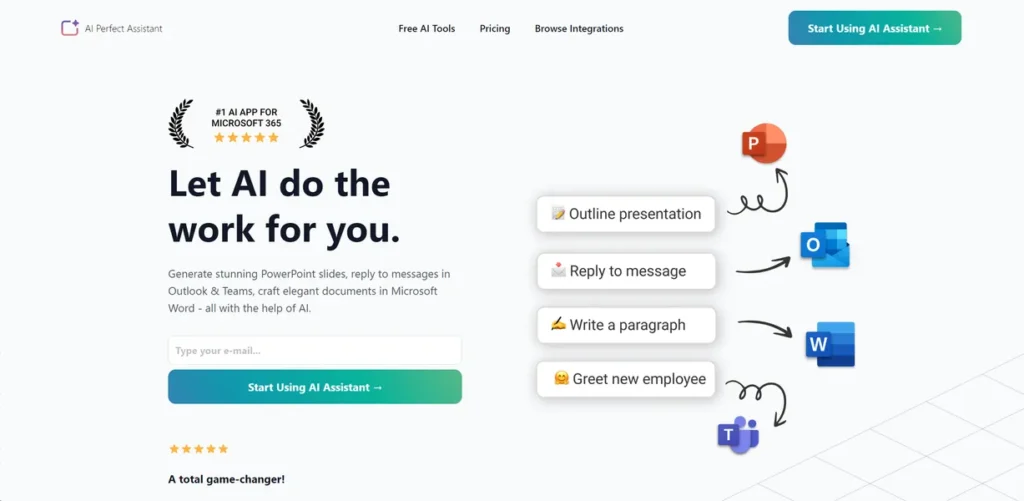
In the world of small business, time is money. Every hour spent on tedious, repetitive tasks is an hour not spent on strategy, sales, or client relationships. AI Perfect Assistant enters this landscape as a pragmatic tool, not just another piece of AI hype. It’s designed specifically to work within the software you already use daily: the Microsoft Office suite. Think of it as a digital apprentice that automates the creation of PowerPoint slides, drafts professional documents in Word, and even handles routine replies in Outlook and Teams. For a business owner focused on ROI, the proposition is simple: reduce administrative overhead and free up valuable time for revenue-generating activities. It aims to be a practical investment in efficiency, not a technological novelty.
Key Features and How It Works
AI Perfect Assistant embeds its capabilities directly into Microsoft applications, minimizing disruption to your existing workflow. It operates on a simple principle: provide a prompt, and the AI generates the content you need, where you need it. Here are its core functions translated into business value:
- Deep Microsoft Office Integration: The tool functions as an add-in for PowerPoint, Word, Outlook, and Teams. This means no more switching between a web browser and your document. You generate content, check grammar, or draft emails directly within the application, which is a significant time-saver.
- Broad Content Generation Suite: With over 40 distinct AI tools, it can act as an on-demand junior copywriter. It can generate first drafts for blog posts, product descriptions, social media updates, and marketing emails, giving your team a solid starting point to refine.
- Advanced Language Tools: Beyond simple grammar checks, the assistant can paraphrase complex sentences for clarity, translate text into different languages, or adjust the tone of a message, ensuring all communications are professional and on-brand.
- Customizable Templates: Think of its prompt templates like a master key for your company’s voice. You set the style and tone once—be it formal, friendly, or technical—and the AI uses that key to unlock consistent, on-brand content across every document or email, saving you the hassle of re-explaining your requirements every single time.
- Cross-Platform Accessibility: With a Chrome Extension and Telegram Web App, its functionality extends beyond the Office suite for quick tasks, making it accessible whether you’re at your desk or on the move.
Pros and Cons
From a business owner’s perspective, here’s a bottom-line look at the advantages and potential drawbacks:
Pros
- Tangible Time Savings: By automating routine document and email creation, the tool can save employees several hours per week, translating directly into increased productivity and a positive ROI.
- Minimal Training Required: Because it integrates into familiar Microsoft programs, the initial learning curve is low. Staff can start benefiting from its core features almost immediately with minimal training overhead.
- Consolidates Tooling: It combines the functions of a grammar checker, a writing assistant, and a content generator into one subscription, potentially reducing costs and simplifying your software stack.
- Consistent Quality: Customizable templates and style guides help ensure that all communications, from internal memos to client-facing presentations, maintain a consistent and professional tone.
Cons
- Initial Customization Effort: While easy to start, extracting maximum value requires an upfront time investment to learn advanced features and properly configure the custom templates to your brand voice.
- Usage-Based Limitations: Subscription plans come with token limits. Heavy usage by a team could necessitate upgrading to a more expensive tier, so it’s important to estimate your needs accurately.
- Requires Stable Internet: As a cloud-based service, its performance is entirely dependent on a reliable internet connection, which could be a factor for remote teams in areas with poor connectivity.
Who Should Consider AI Perfect Assistant?
This tool is most valuable for professionals and teams deeply embedded in the Microsoft ecosystem who are looking to optimize their workflows. Specific beneficiaries include:
- Consultants and Solopreneurs: Individuals who handle everything from proposals and presentations to client communication can use it to automate administrative work and maximize their billable hours.
- Small Marketing Teams: Teams can leverage the tool to accelerate the creation of first drafts for email campaigns, blog content, and social media posts, allowing them to focus on strategy and refinement.
- Corporate Professionals and Managers: For those who regularly create reports, presentations, and manage high volumes of email, this assistant can significantly cut down on preparation time.
- Administrative Staff: It can serve as a powerful force multiplier, automating the drafting of routine correspondence, meeting summaries, and internal announcements.
Pricing and Plans
AI Perfect Assistant operates on a paid subscription model, designed to provide predictable monthly costs for businesses. There is no permanent free tier; access to the tool’s full capabilities requires a paid plan. The pricing structure is straightforward, with subscriptions available on a monthly basis.
- Pricing Model: Paid Subscription
- Starting Price: $24 per month
- Available Plans: The service offers multiple tiers starting from $24/month. Higher-priced plans typically include more usage tokens, advanced features, and priority support.
For the most current and detailed breakdown of features included in each plan, it is best to consult the official AI Perfect Assistant website.
What makes AI Perfect Assistant great?
What sets AI Perfect Assistant apart is its deep, native integration directly within the Microsoft Office suite. While many AI tools require you to work in a separate browser tab and then copy-paste the results, this assistant lives inside the applications you already use. This contextual functionality is its killer feature. The ability to generate a PowerPoint slide, summarize a Word document, or draft an Outlook reply without ever leaving the program eliminates friction and saves a surprising amount of time throughout the day. It transforms AI from a destination you have to visit into a utility that’s always on, right where you do your work. This seamless workflow, combined with its versatile toolset, is what makes it a genuinely practical asset for business productivity.
Frequently Asked Questions
- Is my company’s data secure when using AI Perfect Assistant?
- Data security is a primary concern for any business tool. AI Perfect Assistant typically employs industry-standard encryption for data in transit and at rest. However, it’s crucial to review their specific privacy policy to understand how your data is processed and stored, especially when handling sensitive or confidential information within your documents and emails.
- How quickly can my team expect to see a return on investment?
- The ROI can be seen relatively quickly, often within the first month. The largest initial gains come from automating high-frequency tasks like email drafting and presentation creation. The ease of use, thanks to its integration with familiar software, means minimal downtime for training, allowing your team to boost productivity from day one.
- Does this tool replace the need for a human copywriter or assistant?
- No, it’s best viewed as a productivity multiplier, not a replacement. The AI is excellent at generating first drafts, summarizing information, and handling repetitive tasks. However, it still requires human oversight for critical thinking, strategic input, fact-checking, and refining the final output to perfectly match your brand’s unique voice and objectives.
- Can I customize the AI’s output to match my company’s specific tone and style?
- Yes. One of its key features is the ability to create and use customizable templates. You can define specific parameters for language, writing style, and tone, which guides the AI to produce content that is more consistent with your company’s brand identity, reducing the amount of manual editing required.