



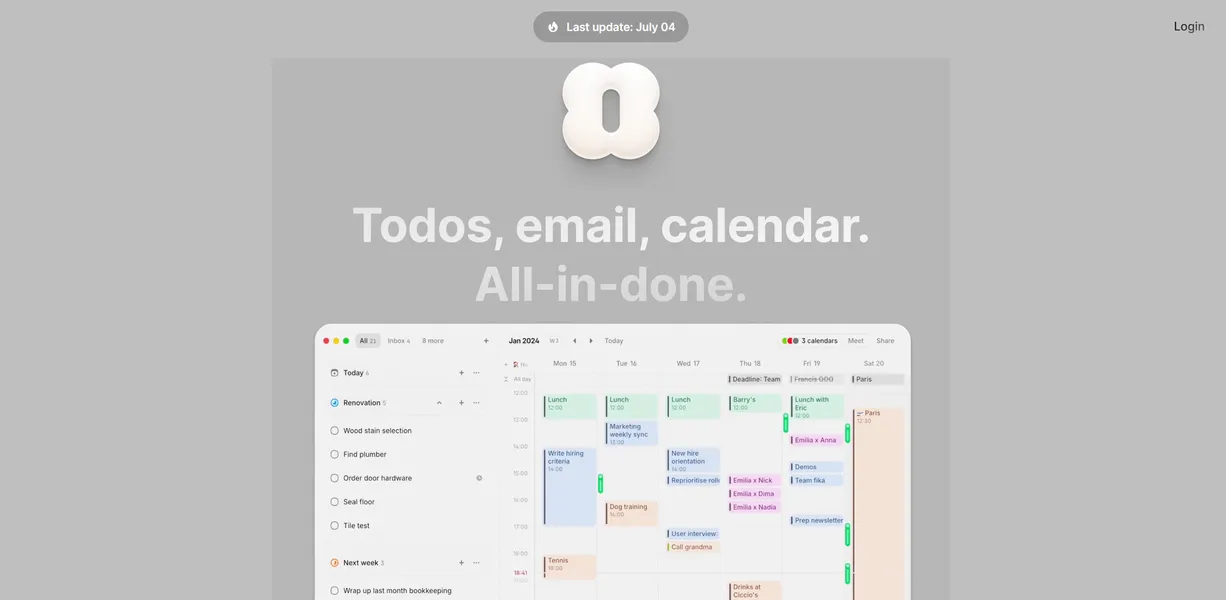
What is Amie?
Users looking for a simple calendar replacement expect a basic grid with a fresh coat of paint. Instead, they get a highly opinionated productivity environment that forces them to rethink how they schedule their days.
Developed by Amie GmbH, this productivity application merges calendar events, task lists, and email triage into one unified view. It targets founders, freelancers, and small teams who suffer from constant context switching. By allowing users to drag tasks directly onto specific time slots, Amie solves the disconnect between what you need to do and when you will actually do it.
- Primary Use Case: Dragging tasks and emails directly onto a calendar grid for strict time blocking.
- Ideal For: Founders and freelancers operating entirely within the Google ecosystem.
- Pricing: Starts at $6 per month (paid) for the Personal plan.
Key Features and How Amie Works
Unified Scheduling and Time Blocking
- Google Calendar Sync: Connects multiple Google accounts to view personal and work events together. It strictly limits users to Google, offering zero Outlook support.
- Drag-and-Drop Tasks: Pull items from a sidebar directly onto your calendar grid. Tasks uncompleted by midnight do not automatically roll over.
Communication and Booking
- Integrated Email Triage: Read and schedule Gmail messages as calendar events. This feature only works with Gmail and ignores other providers.
- Scheduling Links: Create custom booking pages for external guests. You cannot currently charge for meetings through these links.
Team and AI Tools
- AI Meeting Notes: Transcribes and summarizes video calls automatically. This requires the $20 per month Pro plan to function.
- Team Presence: Shows what music team members are playing via Spotify. It only supports Spotify and ignores Apple Music.
Amie Pros and Cons
Pros
- Reduced App Switching: Combining email, tasks, and calendar saves users from keeping three separate browser tabs open.
- Built-in Booking: Native scheduling links replace the need to pay $12 per month for Calendly.
- Keyboard Navigation: A global Cmd+K menu allows users to create events and tasks without touching a mouse.
- Premium Interface: The design is highly responsive and visually polished, matching the aesthetic of tools like Linear.
Cons
- No Outlook Support: The app completely excludes Microsoft users, making it useless for many corporate teams.
- No Free Tier: Amie removed its permanent free plan, forcing all users to pay at least $6 monthly.
- Mobile Clutter: The iOS app tries to pack too many desktop features into a small screen (a common trap for productivity tools), causing navigation friction.
Who Should Use Amie?
- Solo Founders: You get a single dashboard to manage client meetings, personal habits, and product development tasks.
- Remote Teams: The Spotify integration and team presence features make asynchronous work feel slightly more connected.
- Corporate Employees (Not Recommended): If your IT department mandates Microsoft Outlook or Exchange, Amie will not work for you at all.
Amie Pricing and Plans
Amie does not offer a permanent free tier.
Users must choose a paid subscription after their trial ends.
The Personal plan costs $10 per month, or $6 per month if billed annually. It includes calendar syncing, task management, and basic AI features.
The Pro plan costs $20 per month, or $15 per month annually. It adds unlimited meeting notes, bot-free recordings, and AI chat capabilities.
The Business plan costs $30 per month, or $21 per month annually. It provides advanced CRM integrations, custom branding, and enhanced security protocols.
How Amie Compares to Alternatives
Similar to Notion Calendar, Amie focuses heavily on design and keyboard shortcuts. Notion Calendar excels at pulling in database items from Notion workspaces. Amie ignores Notion entirely but adds native email triage and habit tracking. Notion Calendar remains free, while Amie forces users into a paid subscription.
Unlike Sunsama, which guides users through a daily planning ritual, Amie acts as a fast, unstructured canvas (assuming you enjoy building your own workflows). Sunsama costs $20 per month and integrates with Jira, Trello, and Asana. Amie costs less but requires you to build your tasks directly within its own ecosystem.
Final Verdict for Google Power Users
Amie justifies its price tag for design-conscious professionals who want their tasks and calendar in one window. Corporate workers tied to Microsoft Outlook should look elsewhere. If you need a free alternative with similar aesthetics, Notion Calendar is your best option.