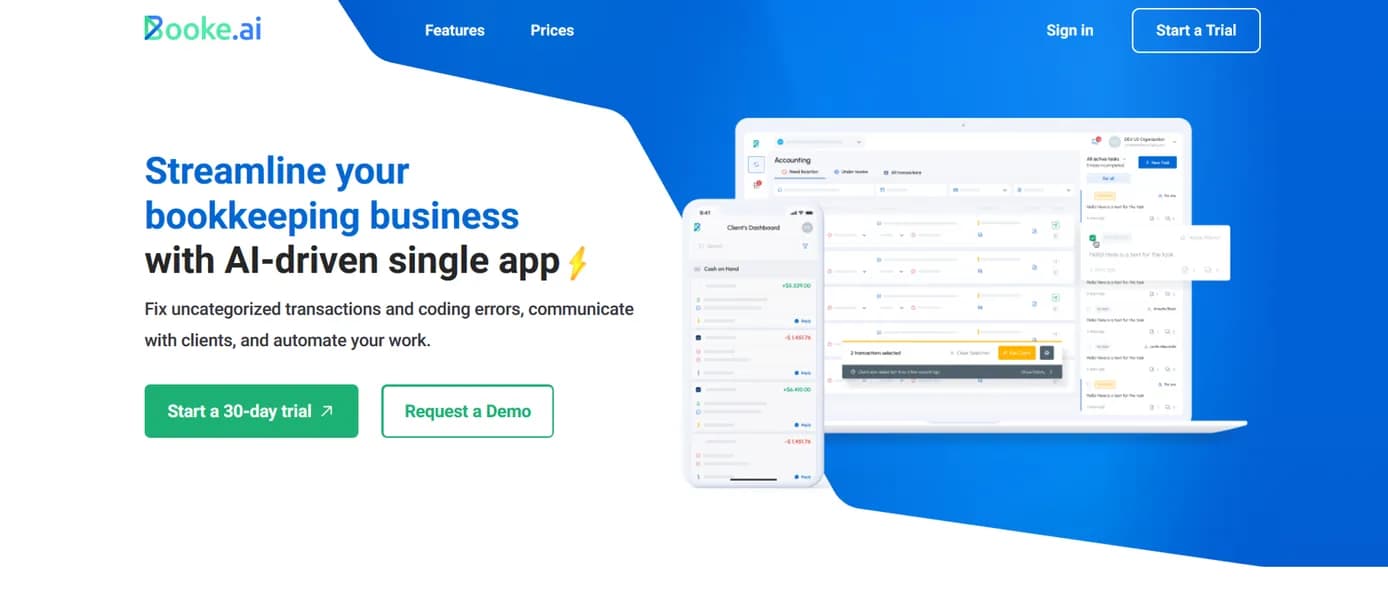

Booke AI automates transaction categorization and bank reconciliation for accounting firms using GPT-4. It extracts data from invoices with 95 percent accuracy and syncs directly with QuickBooks Online. But the $129 monthly starting price makes it an expensive choice for solo freelancers managing simple ledgers.
What is Booke AI?
Booke AI claims to reduce manual data entry by up to 80 percent for accounting professionals. The software uses GPT-4 to categorize bank feeds and extract invoice data.
Developed by Booke.ai Inc., this automation platform targets bookkeepers and accounting firms managing multiple client ledgers. It solves the persistent problem of uncategorized transactions. The tool identifies missing information and messages clients directly to resolve discrepancies.
- Primary Use Case: Automating transaction categorization and client query resolution for accounting firms.
- Ideal For: Mid-sized bookkeeping agencies managing 10 to 50 client files.
- Pricing: Starts at $129/mo (paid). A high entry cost that prices out solo freelancers.
Key Features and How Booke AI Works
AI Categorization and Reconciliation
Booke AI connects to over 10,000 banks globally using Plaid and Salt Edge. It pulls daily bank feeds and applies proprietary models to suggest categories.
- Bulk Processing: You can reconcile up to 500 transactions at once using the bulk categorization tool.
- Anomaly Detection: The system flags duplicate entries and inconsistent tax rates across historical data.
- Browser Extension: A Chrome extension allows categorization directly inside the Xero or QuickBooks dashboard.
Document Extraction and Syncing
The platform relies on optical character recognition to process receipts and bills. It achieves 95 percent accuracy for vendor and tax fields.
- OCR Data Extraction: Pulls data from PDF and JPEG invoices, though complex multi-page documents occasionally require manual review.
- Direct Integrations: Provides a two-way sync with QuickBooks Online, Xero, and Zoho Books.
Client Communication Portal
Accountants waste hours chasing clients for receipt details via email. Booke AI replaces this workflow with a dedicated messaging system.
- Client Portal: Offers a white-labeled portal for clients to answer transaction queries via a mobile app.
- Automated Reminders: You can schedule automated email and SMS reminders for clients with outstanding transaction queries.
- Multi-entity Support: Firm administrators can manage up to 50 different client files from a single login.
Booke AI Pros and Cons
Pros
- Reduces manual data entry time by up to 80 percent through automated bank feed categorization.
- Improves client response times by centralizing communication within the transaction record rather than email threads.
- Achieves 95 percent OCR accuracy, which reduces the need for manual corrections on complex multi-line invoices.
- Maintains a professional brand identity for accounting firms through the white-label client portal.
Cons
- The $129 monthly entry price is higher than competitors like Dext or Hubdoc for single users.
- AI suggestions hallucinate categories for new or rare vendors, requiring manual review.
- Setup for complex charts of accounts is tedious and requires significant initial mapping.
- Mobile app functionality is limited compared to the full web-based dashboard.
Who Should Use Booke AI?
- Mid-sized Accounting Firms: Teams managing 10 to 50 clients benefit from the bulk processing and white-labeled communication portal.
- Tech-Savvy Bookkeepers: Professionals comfortable mapping complex charts of accounts will save hours on monthly reconciliation.
- Solo Freelancers: Independent contractors managing a single simple ledger should avoid this tool. The high monthly cost outweighs the time saved on basic categorization.
Booke AI Pricing and Plans
Booke AI does not offer a free trial.
The pricing structure targets established businesses rather than individual users. The AI Bookkeeper Business plan costs $129 per month (a steep price for solo operators). This tier includes daily bank feed categorization, smart document matching, and OCR for bills. It also provides email and chat support.
The AI Bookkeeper Accounting Firms plan uses custom pricing. This tier unlocks multi-client management for up to 50 files. It adds the white-label experience and priority onboarding.
The lack of a free tier is a notable friction point. You must commit to the high monthly fee just to test the OCR accuracy on your specific invoice types.
How Booke AI Compares to Alternatives
Similar to Dext, Booke AI extracts data from receipts using OCR technology. But Dext focuses on high-volume receipt capture and costs less for single users. Booke AI differentiates itself by offering a dedicated client communication portal to resolve uncategorized transactions directly.
Unlike Hubdoc, this tool uses GPT-4 to suggest transaction categories based on historical data. Hubdoc fetches bank statements and extracts basic receipt data. Yet Hubdoc is included free with most Xero subscriptions. This makes Hubdoc a much better choice for budget-conscious users who do not need advanced AI categorization.
Verdict: The Ideal User for Booke AI
Booke AI delivers massive time savings for accounting firms managing dozens of clients. The automated client portal eliminates the endless email chains required to categorize mystery expenses.
But the high entry price makes it a poor choice for small businesses managing their own books.
If you run an accounting agency with multiple staff members, choose Booke AI. If you are a solo business owner looking to digitize receipts, look elsewhere. Dext provides better value for simple document extraction at a fraction of the cost.
User Reviews
No reviews yet. Be the first to share your experience!
Sign in to write a review.
Related articles
Guides and articles related to Booke AI.
How to Automate Invoice and Document Processing With AI (End-to-End Build)

The Boring B2B AI Agent Niches That Actually Pay (2026)

AI Agents for Business: What They Actually Are and 12 Things You Can Automate Today

Google Vision AI Explained (2026): Pricing Per 1,000 Units, Free Tier, and Alternatives

The Personal AI Productivity Stack (2026): One Tool Per Job, Nothing Extra