

What is ChartPixel?
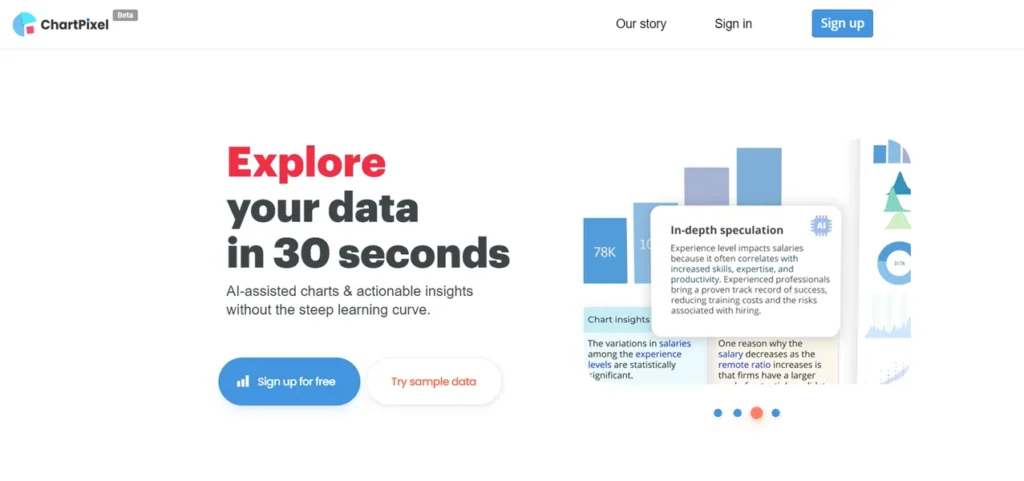
ChartPixel is an AI-powered data visualization engine designed to abstract the complexities of exploratory data analysis (EDA). From a development standpoint, it functions as a high-level service that ingests raw data from various sources—including structured files like Excel and CSV, or unstructured web content—and returns processed, visualized outputs. The core value proposition is speed: it promises to deliver charts and statistical insights in under 30 seconds. This positions ChartPixel as a rapid prototyping tool for data-driven applications and a productivity accelerator for teams that need to quickly iterate on business intelligence without dedicating significant engineering resources to building custom dashboards or data pipelines.
Key Features and How It Works
ChartPixel’s architecture is built around several key components that automate the typical data analysis workflow.
- AI-Assisted Chart Creation: The platform employs a recommendation engine that analyzes the input data’s structure, data types, and cardinality to select appropriate visualization formats. It automates the selection of columns and chart types, effectively bypassing the manual steps required in libraries like Matplotlib or D3.js for initial exploration.
- User-Friendly Interface: The front-end serves as an effective abstraction layer over its more complex back-end processes. This allows users without a background in data science or programming to execute data analysis tasks that would otherwise require specialized tooling and expertise.
- Smart Data Cleaning: A critical feature for any data-intensive application, ChartPixel includes a preprocessing module. This component handles tasks such as type inference, identifying and managing missing values, and potentially some feature engineering. This automated pipeline reduces the significant time typically spent on data sanitization.
- Insightful Annotations: Leveraging Natural Language Generation (NLG), the tool overlays charts with machine-generated annotations and statistical summaries. It interprets the visualized data to highlight trends, outliers, and correlations, adding a layer of analytical context to the raw output.
- Versatile Data Input Options: ChartPixel supports data ingestion from local files (Excel, CSV) and can also parse data directly from web pages via URL or keyword search. This web data extraction capability implies a robust scraping and parsing mechanism capable of handling varied HTML structures.
Pros and Cons
From a technical perspective, ChartPixel presents a compelling but nuanced offering.
Pros:
- Accelerated EDA: It significantly reduces the time and code required for initial data exploration, allowing developers and analysts to quickly validate hypotheses.
- Lowered Technical Barrier: Empowers non-technical team members (e.g., product managers, marketers) to perform self-service analytics, freeing up engineering resources.
- Streamlined Reporting: The ability to export directly to presentation-ready formats like PowerPoint creates an efficient workflow from data ingestion to stakeholder communication.
- Integrated Preprocessing: The automated data cleaning pipeline is a major benefit, handling a tedious but critical step in data analysis.
Cons:
- ‘Black Box’ Nature: The AI-driven process lacks transparency. Advanced users cannot inspect or override the data cleaning steps, statistical models, or chart selection logic, which can be a critical limitation for rigorous analysis.
- Scalability Questions: As a beta product running in a shared environment, its performance and reliability with very large or high-velocity datasets are not yet proven.
- Limited Customization: The platform prioritizes automation over granular control. Users who need to fine-tune visualizations or apply complex, domain-specific data transformations will find it restrictive.
- Dependency on AI Interpretation: While useful, the NLG insights might lack the specific context a domain expert would provide, and there’s a risk of the AI misinterpreting nuances in the data.
Who Should Consider ChartPixel?
ChartPixel is best suited for teams and individuals focused on speed and efficiency over deep, customized analysis.
- Business Analysts and Product Managers: Ideal for quickly analyzing business metrics, user behavior data, or market research without writing SQL queries or Python scripts.
- Software Developers: Useful for mocking up dashboards, validating data integrity in new features, or performing quick EDA during the initial phases of a project.
- Students and Educators: An excellent tool for teaching data literacy concepts without the steep learning curve of programming languages or complex BI software.
- Journalists and Content Creators: Enables the rapid generation of data-driven charts to support articles and reports, enhancing storytelling with quantitative evidence.
However, it is likely not the right tool for data scientists or ML engineers who require programmatic access, reproducible pipelines, and fine-grained control over statistical modeling and data transformation.
Pricing and Plans
ChartPixel operates on a freemium model, offering a free tier for basic use and a paid plan for more demanding requirements.
| Plan | Price | Key Features |
|---|---|---|
| Free | Free | Limited monthly uploads, basic chart types, standard data source connections. |
| Pro | $10/month | Increased upload limits, access to all chart types, advanced export options (e.g., high-resolution images, PowerPoint), priority processing. |
Disclaimer: Pricing is subject to change. Please consult the official ChartPixel website for the most current information.
What makes ChartPixel great?
How much engineering time is lost to cleaning messy datasets and generating initial exploratory visualizations? ChartPixel directly addresses this pain point by automating the most time-consuming, repetitive tasks in the data analysis workflow. Its primary strength lies in its ability to abstract away the underlying complexity of data preparation and visualization. For a technical team, this means developers can focus on building core application logic instead of writing boilerplate code for data parsing and charting. For the broader organization, it democratizes access to data insights, enabling a more agile, data-informed culture without requiring every user to become a data expert. It effectively lowers the activation energy required to get from raw data to a meaningful conclusion.
Frequently Asked Questions
- How does ChartPixel handle large datasets?
- As a cloud-based service, processing limits will depend on the user’s plan and the platform’s current architecture. While it handles typical business datasets (e.g., CSVs up to several hundred megabytes) efficiently, its performance on big data (gigabytes or terabytes) has not been specified and it may not be suitable for such use cases.
- What statistical methods does the AI use for generating insights?
- The platform likely uses a range of standard statistical tests for its annotations, such as correlation analysis (e.g., Pearson correlation), summary statistics (mean, median, mode), and potentially simple regression models to identify trends. The exact methodologies are proprietary.
- Can I integrate ChartPixel’s output via an API?
- Currently, ChartPixel appears to be a UI-driven tool focused on direct user interaction and manual exports. There is no publicly available information about a REST API for programmatic chart generation or data integration, which may limit its use in automated workflows.
- How does ChartPixel ensure data privacy and security?
- Users should review ChartPixel’s official privacy policy. Generally, cloud-based tools process data on their servers. It’s critical to understand their data retention policies, encryption standards (both in transit and at rest), and compliance with regulations like GDPR before uploading sensitive information.
- What are the limitations of the web data extraction feature?
- Web scrapers can be fragile. ChartPixel’s extractor will likely work best with simple, static HTML tables. It may struggle with data loaded dynamically via JavaScript, content behind logins, or complex, nested page structures.
- Can I customize the data cleaning process?
- No, the data cleaning process is automated and designed to be a ‘smart default’. Users who require custom scripts for imputation, normalization, or complex feature engineering will need to preprocess their data before uploading it to ChartPixel.