

What is ChatWithPDF?
In today’s business environment, information overload is a significant drain on resources. Teams spend countless hours sifting through dense contracts, lengthy market research papers, and technical reports. ChatWithPDF is an AI-powered tool designed to address this inefficiency head-on. It transforms static documents and video content into interactive, conversational assets. Instead of manually searching for information, professionals can simply ask questions and receive instant, context-aware answers. For a small business owner, this translates to tangible time savings, faster decision-making, and a more streamlined workflow for anyone who regularly interacts with complex information.
Key Features and How It Works
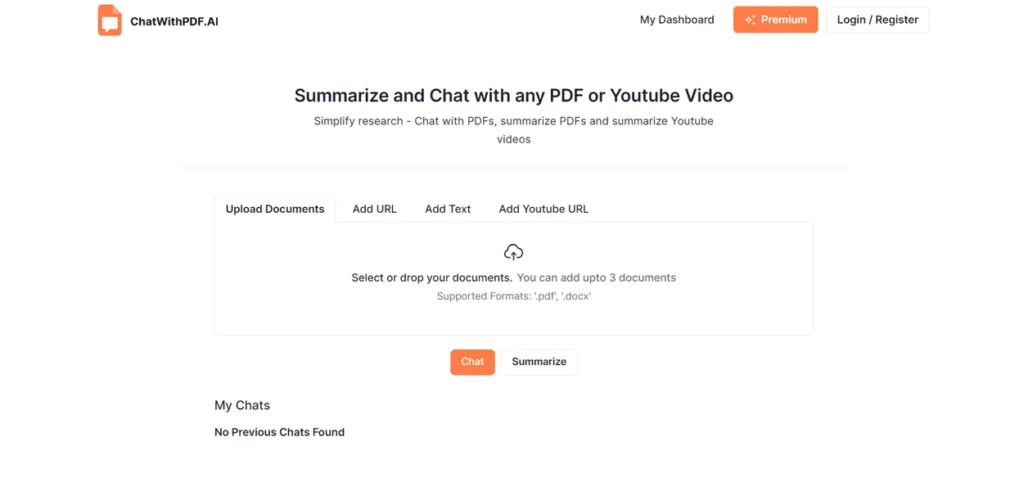
ChatWithPDF operates on a simple premise: upload a document or link a YouTube video, and the AI processes the content, making it ready for your inquiries. This functionality is delivered through a suite of practical features geared toward business productivity.
- Interactive Document Chat: Directly upload PDF or DOCX files and ask specific questions. For instance, instead of reading a 50-page vendor contract to find the termination clause, you can ask, “What are the conditions for contract termination?” and get an immediate, precise answer.
- PDF & YouTube Summarization: Generate concise summaries from lengthy materials. This is invaluable for quickly grasping the key takeaways from a competitor’s webinar, an industry report, or a project proposal without dedicating hours to consumption.
- Knowledge Base Interaction: This feature is a game-changer for internal data management. Think of it as a dedicated junior analyst who has memorized every report, contract, and proposal you’ve ever uploaded. Instead of tasking an employee to dig through a shared drive for hours to find a specific clause from a Q3 contract, you can simply ask the AI, and it pulls the answer from multiple sources at once. It’s an on-demand expert for your company’s internal library.
- Complex Concept Simplification: For businesses in technical fields, the tool can break down complex scientific or financial jargon into easy-to-understand explanations, bridging the gap between technical experts and other stakeholders.
Pros and Cons
From a business investment perspective, it’s crucial to weigh the operational advantages against the limitations.
Pros
- Significant Time Savings: The core benefit is converting hours of manual reading and searching into minutes of targeted questioning, delivering a clear return on investment through improved efficiency.
- Low Adoption Barrier: The interface is straightforward, minimizing the need for extensive team training. Most users can become proficient quickly.
- Enhanced Data Security: The platform emphasizes user privacy, with secure document handling and options to permanently delete your data—a critical feature for sensitive business information.
- Versatile Application: Its utility spans multiple departments, from legal teams reviewing contracts to marketing teams analyzing competitor content.
Cons
- Limited Free Tier: The free version’s cap of three documents or videos per day makes it more of a trial than a viable long-term solution for active business use.
- Features in Development: The promised Chrome Extension, which would further streamline workflows, is not yet available, making it a future benefit rather than a current one.
- Learning Curve for Advanced Use: While basic functions are simple, mastering advanced multi-document queries within the knowledge base may require some initial practice.
Who Should Consider ChatWithPDF?
ChatWithPDF is not just for students and researchers. Its practical applications make it a strong contender for various business professionals looking to optimize their information processing workflows.
- Small Business Owners & Solopreneurs: Ideal for individuals who wear multiple hats and need to quickly digest contracts, proposals, and market data without a large support team.
- Legal and Compliance Teams: Drastically reduces the time required to review dense legal documents, policies, and contracts to find specific clauses or information.
- Marketing and Sales Professionals: Useful for quickly analyzing competitor white papers, summarizing industry trend webinars, and extracting key insights from reports.
- Consultants and Analysts: Enhances research capabilities by allowing for rapid interrogation of multiple data sources to synthesize findings and deliver insights to clients faster.
Pricing and Plans
ChatWithPDF operates on a freemium model, allowing users to test its core functionality before committing to a paid plan. This is a practical approach for businesses wanting to validate a tool’s ROI.
- Free Plan: This entry-level tier is best suited for evaluation purposes. It allows users to interact with up to 3 documents or YouTube videos per day, providing a solid feel for the platform’s capabilities.
- Pro Plan: Priced at $10 per month, this plan is designed for professional use. It removes the daily limitations, offering unlimited document and video processing, which is essential for any consistent business application.
For the most current pricing information, visiting the official ChatWithPDF website is recommended.
What makes ChatWithPDF great?
How much time does your team waste hunting for specific information buried within lengthy reports, contracts, or research papers? What makes ChatWithPDF a standout tool is its ability to directly address this costly pain point. It fundamentally changes the user’s relationship with data. Instead of being a passive consumer of static information, the user becomes an active participant in a dialogue. This shift from one-way consumption to two-way interaction makes information retrieval exponentially more efficient. For a business, this isn’t just a convenience; it’s a competitive advantage that accelerates research, due diligence, and everyday decision-making.
Frequently Asked Questions
- Is my business data secure with ChatWithPDF?
- Yes, the platform prioritizes security. Documents are handled in a secure environment, and users have the option to permanently delete their data from the servers, ensuring control over sensitive information.
- Can I use it to query an entire project’s worth of documents at once?
- Yes, the Knowledge Base feature is designed for this purpose. You can upload multiple documents to create a centralized, queryable library, allowing you to ask questions and receive synthesized answers from various sources simultaneously.
- What is the realistic ROI for a small business?
- The primary ROI comes from time saved. If an employee saves even a few hours per month on research and document review, the $10/month Pro plan pays for itself. The value increases with the volume of information your team processes.
- How difficult is it for a non-technical team to adopt?
- ChatWithPDF is designed with a user-friendly, chat-based interface. Basic features like uploading a document and asking questions are intuitive and require minimal training, making it easy to integrate into existing workflows.