


What is DeepL Translator?
DeepL Translator processes over 500,000 characters per month for developers on its free API tier alone. This neural machine translation service consistently beats competitors in blind accuracy tests for European languages.
DeepL SE built this AI tool to solve the problem of robotic phrasing in automated translation. It targets professional translators, global enterprises, and individuals who need precise document localization. The platform handles 31 languages and preserves exact formatting in PDF or Word files.
- Primary Use Case: Translating entire PDF and Word documents while keeping the original layout intact.
- Ideal For: Professional translators and international business teams.
- Pricing: Starts at $8.74 (freemium). The paid tiers remove the restrictive 1,500-character free limit.
Key Features and How DeepL Translator Works
Document Translation and Formatting
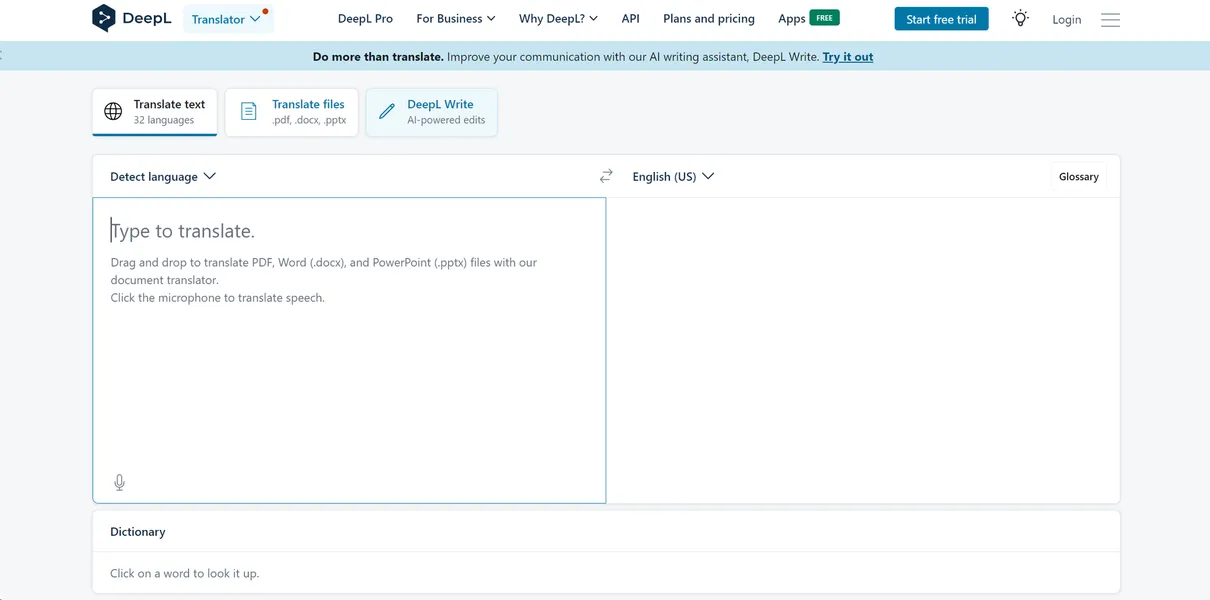
- Batch Processing: Translate PDF, DOCX, and PPTX files while maintaining original fonts and layouts. The free tier limits users to three non-editable files per month.
- Scanned Document Support: Read text from images using optical character recognition. The mobile app camera translation requires a clear image to work properly.
Custom Glossaries and Terminology
- Brand Consistency Rules: Create custom translation rules for specific industry terms. The Starter plan restricts users to one glossary with 5,000 entries.
- Formal Tone Toggle: Automatically adjust translations to formal or informal phrasing for languages like German. This feature requires a paid subscription.
Workflow Integrations
- Desktop Shortcuts: Translate text system-wide using a quick keyboard command. Windows users press Ctrl+C+C to trigger the app instantly.
- CAT Tool Support: Native plugins connect directly to software like SDL Trados Studio. This integration is only available on the Advanced plan or higher.
Grammar and Style Editing
- DeepL Write: Suggests grammar and style improvements in real time. It only supports English and German text inputs.
- Browser Extensions: Translate selected text on web pages with one click. It limits translations to the 1,500-character free tier cap unless logged into a Pro account.
DeepL Translator Pros and Cons
Pros
- Translation quality beats competitors in blind tests for nuanced European languages.
- Document formatting stays intact, saving hours of manual re-formatting in PowerPoint.
- Enterprise security ensures Pro user data never trains the AI models.
- Desktop shortcuts allow instant translation without opening a web browser.
Cons
- The 31 language options fall far behind Google Translate’s massive catalog.
- The free version restricts users to 1,500 characters per translation.
- Document translation credits expire monthly and do not carry over.
- Customer support responds slowly to non-enterprise users according to G2 reviews.
Who Should Use DeepL Translator?
- Professional Translators: Connect the API directly into MemoQ to speed up initial draft creation.
- International Sales Teams: Translate client emails and presentations without losing the original slide formatting.
- Casual Tourists: Do not use this tool. The limited language support makes Google Translate a better choice for global travel.
DeepL Translator Pricing and Plans
The free tier acts as a restrictive trial.
It caps text translations at 1,500 characters and allows only three non-editable document translations per month.
The Starter plan costs $8.74 per month billed annually. It provides unlimited text translation, five editable files per month, and one glossary. This tier works well for solo freelancers.
The Advanced plan jumps to $28.74 per month. It increases limits to 20 editable files, 2,000 glossaries, and adds CAT tool integration. Mid-sized agencies usually start here.
The Ultimate plan costs $57.49 per month. Users get 100 editable file translations per month and single sign-on security. Large corporations require this tier for compliance.
Developers can use the API Free plan for up to 500,000 characters monthly. The API Pro plan charges $5.49 per month plus $25 per one million characters. This usage-based model scales well for app localization.
How DeepL Translator Compares to Alternatives
Similar to Google Translate, DeepL offers instant web based text conversion. Unlike Google Translate, DeepL focuses heavily on contextual accuracy for a smaller set of 31 languages. Google supports over 130 languages and offers a much more generous free tier for casual users.
Microsoft Translator competes directly in the enterprise space.
Microsoft integrates natively into Office 365 products for large corporations. DeepL provides better standalone document formatting preservation (I tested a complex 20-page PDF and it kept every table intact).
The Best Translation Tool for European Business Teams
DeepL Translator delivers the highest accuracy for professional document translation. International business teams get the most value from the formatting preservation features.
Casual users needing quick translations for obscure languages should look elsewhere. Google Translate remains the better option for broad language coverage and free usage.
Expect DeepL to expand its language catalog significantly over the next 12 months to compete directly with Google in Asian markets.