
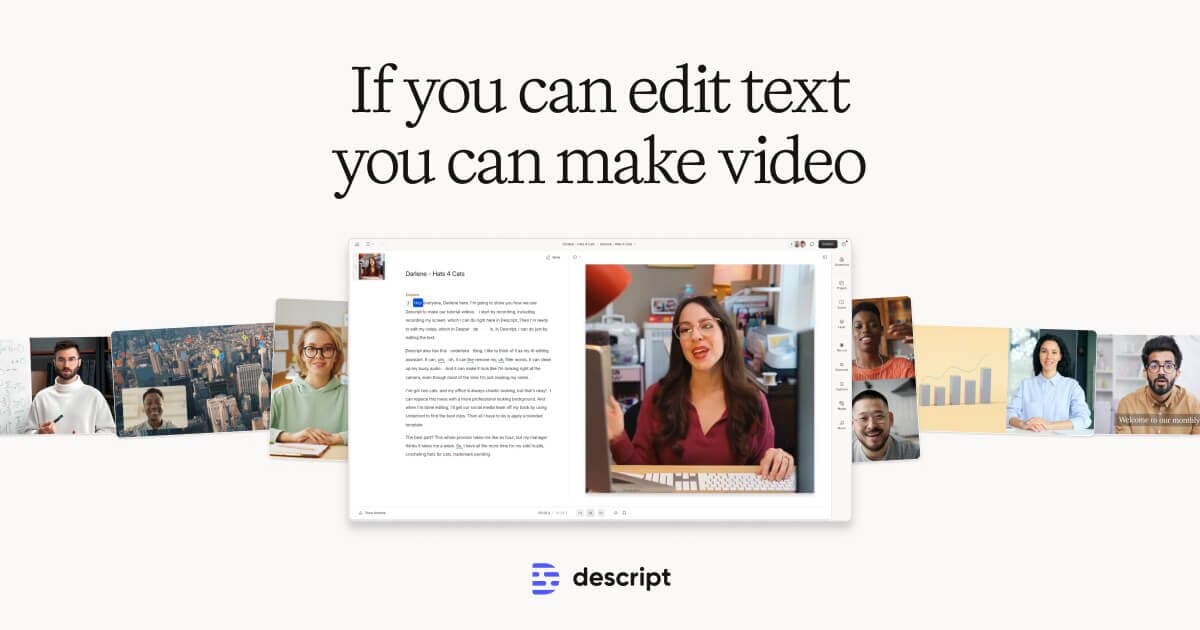

Descript turns video editing into transcript editing, delete a word and the media follows. Studio Sound, Underlord AI, and filler word removal make it the leading tool for podcasters and dialogue-heavy content. Stability bugs and a controversial 2025 pricing overhaul temper an otherwise distinctive product.
What Descript's editing experience and output actually look like in April 2026
We imported a raw 47-minute podcast recording: three speakers, two on clean local mics and one participant on a phone line. Total source: 1.1GB across three tracks. Descript transcribed all three speakers in approximately 90 seconds and assigned speaker labels automatically. Speaker diarization held accurately for the two clean-recording participants throughout; the phone-line speaker was misidentified as a fourth voice at six points where the call dropped and reconnected, a predictable failure mode with choppy audio sources.
We applied Studio Sound at 60% intensity to the phone-line track, following Descript's own guidance to start at a moderate setting. The result: the compressed, muddy phone audio tightened into something tolerable for a conversation-format release. Not studio-clean, but broadcast-acceptable. At 100% intensity, the voice crossed into slightly artificial territory, an overprocessing artifact other reviewers have documented. Filler word removal flagged 73 instances of "um," "uh," and "you know" across the three speakers. Reviewing and accepting took 4 minutes, with 6 preserved where natural speech rhythm called for them. Total edit from import to export-ready, a 47-minute interview trimmed to 38, took 26 minutes. A traditional timeline edit of the same session would have taken 75 to 90 minutes.
That time compression is the product. The paradigm is distinct from every other video editor: the transcript is the primary editing surface. Delete a word from the transcript and that segment vanishes from the video. Rearrange paragraphs and footage rearranges. Descript manages the silences deletions create. The more dialogue-heavy the content, the more dramatic the speed advantage.
Underlord, launched April 1, 2025 as part of Descript's Season 6 redesign, extends this into natural language instructions: "Polish this for YouTube, add captions, tighten pacing, create a 60-second social clip at the end." In documented testing, Underlord reduced a 28-minute interview edit from 31 minutes of manual work to 4 minutes. Multiple independent reviewers documented 40-78% post-production time reductions on dialogue-heavy workflows. Export caveat: our 38-minute 4K render took 34 minutes. For same-day social clips, plan accordingly.
Best use cases, and the disasters to avoid
Descript is built for content where the words are the edit. Podcasts, interview-format YouTube videos, talking-head content, recorded webinars, and corporate training videos all benefit disproportionately. The 72% time reduction documented across a 60-day podcasting workflow test reflects a specific structural advantage: every edit that requires scrubbing a timeline in traditional tools becomes a text search and delete in Descript. Find the rambling minute before the speaker gets to the point, select it in the transcript, delete. Done.
Filler word removal, flagging every "um," "uh," "like," and "you know" across a full recording and letting you accept or reject in bulk, is the feature that converts skeptics. One podcaster documented removing 89 instances of "um" in a single episode with one click. The time savings across a season of episodes compounds quickly.
The disaster zone is equally defined. Descript does not compete for music videos, motion graphics, color grading, or action-sequence editing. It has no equivalent to CapCut's template library, trending audio, or mobile-first TikTok pipeline. Its color tools are minimal; its timeline is functional but not professional-grade. A cinematographer or broadcast colorist has nothing to gain from it. The Automatic Multicam feature, which switches between speaker angles based on who is talking, is well-suited to panel discussions and remote interviews; it will not replace a multi-camera production editor on a narrative short. Bilingual creators should know that Overdub voice cloning is English-only. Trying to use Overdub for corrections in Spanish, Portuguese, or any other language will produce garbled output.
"Switching to Descript was the best decision I've ever made for productivity gains. I went from 3-4 hours per video to 45 minutes.". Sam Chlebowski, ProductHunt reviewer
Voice cloning and audio cleanup, how well it holds up
Studio Sound and Overdub operate in fundamentally different reliability bands. Studio Sound is the dependable one: frequency-specific modeling removes room tone, echo, HVAC hum, and background noise while preserving vocal character. Start at 60% intensity and raise incrementally, overprocessing at 100% produces an artifact signature that experienced listeners notice. On Creator and Business plans it is unlimited; on Hobbyist and Free it draws from the AI credit pool. Applied to a hotel room recording with echo and distant AC noise, one reviewer reported it "sounded like I was in a proper booth."
Overdub voice cloning occupies a narrower zone. Users record a 90-second training script; Descript builds a voice model in 24-48 hours, then lets users fix errors by typing replacement text. The sweet spot is the 2-to-10 word correction where the clone and the original are hard to distinguish. For longer regenerated passages, quality degrades , "unnatural intonation, missing emotional context, and pronunciation errors with names and technical terms," per an independent reviewer who rated it 6 out of 10. Training takes 24-48 hours versus 2-3 minutes at ElevenLabs. English only: multilingual creators cannot clone in any other language. Eye Contact, the gaze correction feature, works for single-person close-ups with good lighting; approximately 5% of frames produce an overcorrected look.
"The filler word removal is #1 for me. And Studio Sound blew my mind. I recorded from a hotel room with echo, distant AC noise, and paper-thin walls. It sounded like I was in a proper booth. It's not perfect, but damn it was close.", combined from ProductHunt and workfromyourlaptop.com reviewers, 2025
Export limits: resolution, length, watermarks
The free plan caps at 720p video with a Descript watermark on every export. The 60 minutes of media per month is a hard ceiling, not a suggestion, upload a one-hour interview and the month's quota is gone before editing begins. Free plan also includes 100 one-time AI credits total, not per month, making AI features nearly inaccessible in meaningful use.
Hobbyist at $16 per month (annual billing) raises the ceiling to 1080p watermark-free output with 10 media hours per month and 400 AI credits. Creator at $24 per month unlocks 4K export, full Underlord access, unlimited royalty-free stock from Storyblocks' 3-million-asset library, and 800 AI credits per month plus 500 bonus credits on signup. This is the plan where Descript's full capability set becomes accessible.
AI credit economics matter. Generating an AI video clip costs approximately 64 credits. The Creator plan's 800 monthly credits support roughly 12 AI clip generations before the pool is exhausted. Studio Sound, Eye Contact, filler word removal, and all Underlord tasks draw from the same pool. Power users will hit the ceiling before month-end and face top-up costs of $35-$200. Descript's troubleshooting documentation recommends breaking projects over 60 minutes into smaller compositions to avoid export timeouts, a workaround, not a fix.
A real workflow: podcast post-production with Descript
The complete pipeline: record in Squadcast (Descript's acquired remote recording tool), which captures each participant's audio and video locally on their device rather than through the internet stream. The session uploads to Descript automatically and appears ready to edit immediately after recording ends.
In the editor: assign speaker labels during the diarization pass, correct misidentifications. Apply Studio Sound to tracks with audio quality issues, hotel rooms, laptop mics, phone lines. Run filler word removal, accept in bulk with selective overrides. Use Underlord to generate show notes, identify the best 90-second social clip, and tighten pacing. Export via Castos to hosting or download MP4 and MP3.
One protection step is non-optional: do not keep all edits in a single long project. Data integrity is Descript's most serious documented failure mode. Multiple reviewers described edited projects reverting to raw recordings with no recovery path. One documented case: "We lost many hours of work. Projects edited months earlier appeared as raw recordings later." Descript's support response was to attribute it to user error. Breaking sessions into 20-to-30-minute compositions substantially reduces the risk.
The true cost per finished video
On September 23, 2025, Descript replaced its transcription-minute billing model with a media-minute model. Under the old system, one hour of content counted as one hour toward your quota regardless of how many source files you uploaded. Under the new system, every file counts. A one-hour interview uploaded as four files, mixed recording, two separate camera angles, and a cleaned audio backup, now consumes 240 media minutes instead of 60. Simultaneously, AI features previously described as "unlimited". Studio Sound, filler word removal, Eye Contact, silence removal, moved into metered AI credit pools.
One long-standing customer, Ariel Gatoga, stated publicly: "Since the new pricing structure was introduced, my monthly bill has soared from $30 to $195. I haven't changed my workflow at all." Descript published a FAQ claiming users were "broadly happy with the changes", independent observers noted this was inconsistent with actual community sentiment.
The realistic monthly cost for a Creator plan user running a weekly podcast: $24/month plus the likelihood of one or two $35 AI credit top-ups, effective costs closer to $55-$94 during heavy production weeks. Before committing to any plan, calculate your actual media minutes including all file variants, not just final output duration.
Descript vs. Adobe Podcast vs. Riverside.fm
Adobe Podcast (Enhanced Speech) is free and browser-based, upload an audio file, receive studio-quality cleanup in minutes, no subscription required. For the single need of audio enhancement, it beats Descript on accessibility and cost. It has no text-based editing, no multi-track management, no Underlord equivalent, and no post-production workflow. Premiere Pro adds professional video tools but requires a separate Creative Cloud subscription (~$23/month) and no native transcript-based editing. The combined Adobe Podcast plus Premiere Pro workflow costs more and requires switching between tools for every step Descript handles in one place. Choose Adobe Podcast if audio cleanup is the only task and budget is the constraint.
Riverside.fm is Descript's most direct competitor for the podcast-to-publish pipeline. Riverside's practical edge: browser-based for guests, up to 4K local recording per participant, and a transcript-based editor added in 2024-2025. Critically, Riverside's free tier includes 2 hours of separate-track recordings with genuine access to the text editor. Descript's free tier is a 60-minute watermarked demo. For creators whose bottleneck is guest recording reliability and who want a real free-tier evaluation, Riverside is the better starting point. For those who need Underlord's workflow depth, Storyblocks stock integration, or multi-language translation and dubbing, Descript's Creator and Business plans go further.
CapCut is worth naming for a different reason: it is not an alternative for the same workflow. CapCut dominates social-format short video. TikTok, Reels, YouTube Shorts, with trending templates and a capable mobile app. Descript has no template library and no mobile editing. CapCut has no transcript-based audio management and no voice cloning. The choice between them is a workflow question, not a quality question: social-first visual editing versus dialogue-heavy long-form post-production.
User Reviews
No reviews yet. Be the first to share your experience!
Sign in to write a review.
Featured in collections
Curated lists that include Descript.
Related articles
Guides and articles related to Descript.

Undetectable AI Review (2026): What It Does, What It Costs, and 7 Alternatives

Replit Pricing Explained (2026): Core vs Pro and Effort-Based Agent Billing
AI Video Generator Prompting: The Filmmaker's Real Workflow

Wix Logo Maker Review (2026): Real Costs, the Edit Catch, and AI Alternatives

The Personal AI Productivity Stack (2026): One Tool Per Job, Nothing Extra
