



What is Dezgo?
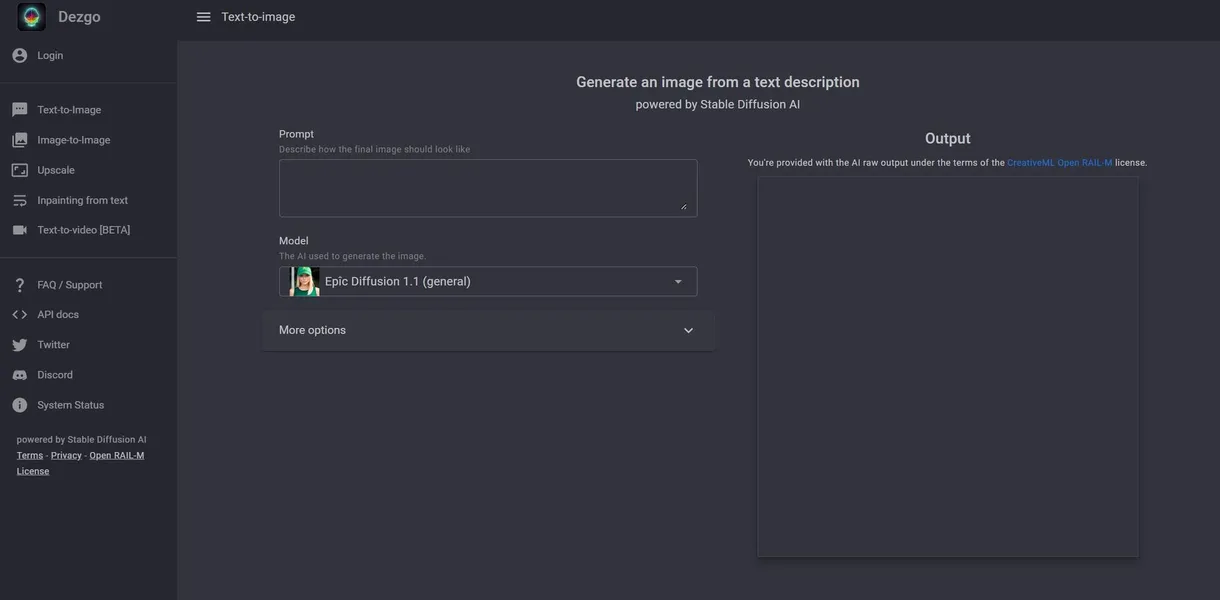
Dezgo operates as a bare-bones web interface for Stable Diffusion image generation. It strips away complex dashboard menus to offer immediate text-to-image rendering. You type a prompt, select a model, and receive an image.
Developed by Dezgo, this platform targets developers and casual creators who want fast access to open-source AI models. It solves the hardware problem of running Stable Diffusion locally. Users generate high-resolution marketing assets or character designs without buying expensive GPUs.
- Primary Use Case: Generating and upscaling images via Stable Diffusion models and REST API.
- Ideal For: Developers needing API access and casual users wanting quick generations.
- Pricing: Starts at $3.49 (prepaid credits). Pay-as-you-go pricing keeps costs low for occasional users.
Key Features and How Dezgo Works
Image Generation and Editing
- Text-to-Image: Supports Stable Diffusion XL and 1.5 models. Users must write precise prompts to get good results.
- Inpainting: Masks specific image parts for modification. The brush tool lacks edge detection for precise selections.
- Image-to-Image: Alters existing images based on an Image Strength slider. High strength values distort the original subject.
Advanced Structural Control
- ControlNet: Uses Canny, Depth, HED, and Scribble processors to guide image structure. Non-technical users face a steep learning curve here.
- Negative Prompts: Excludes unwanted elements like blurry shapes or extra fingers. The model sometimes ignores these commands on complex prompts.
- Sampling Methods: Offers over 10 schedulers including Euler a and DPM++ 2M. Changing schedulers alters generation times.
Upscaling and Automation
- AI Upscaling: Increases image dimensions by 2x or 4x using Real-ESRGAN. Upscaling compressed JPEGs introduces visible artifacts.
- REST API: Allows developers to integrate generation into third-party apps. API calls cost $0.0019 per image.
Dezgo Pros and Cons
Pros
- Users access basic generation tools without creating an account.
- Power Mode delivers images in under 5 seconds per request.
- Pay-as-you-go pricing avoids recurring monthly subscription fees.
- The platform hosts over 50 community-tuned models for diverse artistic styles.
Cons
- Free tier users wait in long queues during peak traffic hours (we tested this during evening hours).
- The web interface lacks mobile optimization (buttons overlap on small smartphone screens).
- Users cannot save generation history due to missing cloud storage.
Who Should Use Dezgo?
- Budget-conscious creators: The $3.49 prepaid package offers 50 credits for casual users who only need occasional images.
- Independent developers: The REST API provides cheap access to Stable Diffusion models for app integration.
- Non-technical beginners: Users expecting a guided experience will struggle with ControlNet settings and manual prompt engineering. This tool is not a good fit for them.
Dezgo Pricing and Plans
Dezgo uses a freemium model with prepaid credit packages. The Free Tier costs $0 per month. It allows browser-based generation but enforces strict rate limits and queue times.
The Small Package costs $3.49 as a one-time payment, providing 50 credits for casual use.
The Medium Package costs $9.49 for 200 credits.
The Large Package costs $19.99 for 500 credits.
Power Mode and API access use pay-as-you-go pricing. Generation costs start at $0.0019 per image.
How Dezgo Compares to Alternatives
Similar to Leonardo.ai, Dezgo offers access to multiple Stable Diffusion models. Leonardo.ai provides a visual dashboard with built-in asset management and prompt generation tools. Dezgo strips these features away to focus on speed and low-cost API access.
Unlike Getimg.ai, Dezgo does not offer a real-time canvas for outpainting. Getimg.ai targets professional designers who need complex editing workspaces. Dezgo remains a better choice for developers who just want a reliable REST API endpoint for their own applications.
The Verdict for Developers and Casual Creators
Dezgo delivers fast access to open-source image models. Independent developers get the most value from the usage-based API pricing. Casual users benefit from the account-free basic generator.
Professional designers should look elsewhere, as the platform lacks PSD export options.
The lack of cloud storage and complex editing canvases makes professional workflows difficult.
We still do not know if Dezgo plans to add dedicated mobile support or user galleries. Until then, Getimg.ai serves as a better alternative for users needing visual asset management.