

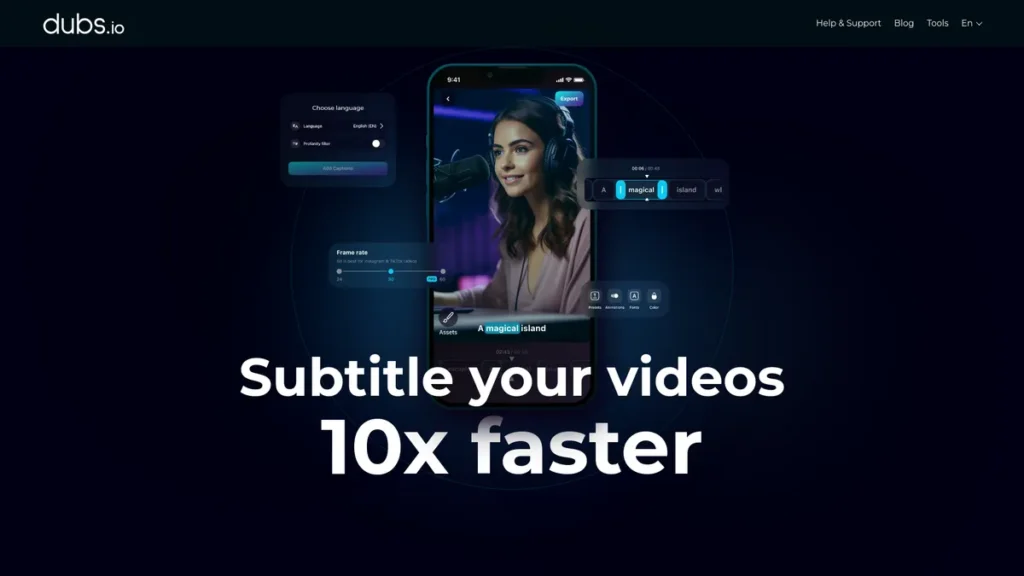
What is Dubs?
In a competitive digital landscape, capturing audience attention is only half the battle; ensuring your message is understood globally is the other. Dubs enters the market as an AI-powered tool designed to address this challenge head-on. It’s a mobile-centric application that automates the often tedious and expensive processes of video subtitling, translation, and dubbing. For a small business owner, this technology promises a streamlined path to international markets by making video content accessible and engaging for non-native speakers. It aims to replace manual transcription services and expensive voice-over artists with a single, integrated solution, but does it deliver on its promise of efficiency and reach without a hefty price tag?
Key Features and How It Works
Dubs is built around a core set of AI-driven features designed to minimize manual effort and maximize output. Let’s examine the tools a business would actually use:
- AI Video Dubbing: This is the platform’s headline feature. It allows you to translate your video’s audio into over 100 languages using synthetic voices. Think of it as a universal translator for your brand’s voice. Instead of hiring a team of interpreters for an international conference, you have one device that instantly translates your speech for every delegate. Dubs applies this concept to your video marketing, converting your original audio into numerous languages to speak directly to new customer bases.
- Auto-Subtitle Generator: The tool leverages AI speech recognition to generate subtitles with a claimed accuracy of over 96%. For businesses creating instructional videos, product demos, or social media content, this significantly cuts down on the time and cost associated with manual transcription. The generated text can then be reviewed and edited for perfect accuracy.
- Customizable Subtitles: To maintain brand consistency, you can adjust the appearance of your subtitles. Dubs allows for customization of fonts, sizes, colors, and on-screen positioning. This ensures that accessibility doesn’t come at the expense of your established visual identity.
- Dynamic Animations: In the fast-scrolling world of social media, static text can be easily ignored. Dubs includes options to add dynamic animations to captions, such as word-by-word highlights or pop-up effects. This feature is designed to increase viewer engagement and ensure key messages are not missed.
Pros and Cons
Every business tool involves a trade-off between features, cost, and usability. Here’s a balanced look at Dubs:
Pros
- Cost and Time Efficiency: The primary ROI comes from reducing labor hours spent on transcription and eliminating the high cost of hiring voice-over artists for multiple languages.
- Accelerated Global Reach: For a small business, testing a new international market is a significant investment. Dubs provides a low-cost way to adapt marketing content for different regions and gauge interest.
- Ease of Use: The interface is designed to be intuitive, which means less time spent on training and more time spent on creating and distributing content.
Cons
- Mobile-First Platform: Being primarily a mobile app is a significant limitation for businesses that manage marketing workflows on desktops. A lack of robust desktop functionality can disrupt an established process.
- Potential Learning Curve: While the basic features are straightforward, mastering the advanced customization and dubbing options to achieve a professional finish may require an initial time investment.
- Synthetic Voice Quality: While functional, AI-generated voices may not be suitable for all brand aesthetics. High-end, emotionally-driven campaigns may still require the nuance of a human voice actor.
Who Should Consider Dubs?
Dubs is not a one-size-fits-all solution. It’s most valuable for specific types of businesses and creators:
- Small E-commerce Brands: Companies looking to market products in non-English speaking countries can use Dubs to create localized ad campaigns and product videos without a large budget.
- Educators and Course Creators: Professionals developing online courses can leverage the tool to subtitle and dub their instructional content, making it accessible to a global student base.
- Digital Marketers and Agencies: Marketers managing social media for multiple clients can use Dubs to quickly add engaging, multilingual captions to video content, boosting performance metrics.
- Content Creators: YouTubers and influencers can expand their audience by offering videos in multiple languages, a strategy that was previously only accessible to large production studios.
However, enterprises requiring enterprise-grade security, complex team collaboration features, or broadcast-quality dubbing might find the current mobile-centric offering insufficient.
Pricing and Plans
Dubs operates on a freemium model, allowing you to test its core functionality before committing financially.
- Free Plan: This tier offers basic features, likely including subtitle generation with watermarks and limited export options. It’s suitable for testing the tool’s accuracy and interface.
- Pro Plan: Starting at approximately $15/month, the Pro plan unlocks the platform’s full potential. This typically includes unlimited exports, no watermarks, access to the full suite of languages for AI dubbing, and advanced customization features.
Disclaimer: Pricing is subject to change. Please consult the official Dubs website for the most current information.
What makes Dubs great?
What makes Dubs genuinely compelling for a small business is its AI-driven video dubbing. This single feature democratizes global video marketing. Traditionally, dubbing a short promotional video into even one new language could cost hundreds or thousands of dollars and involve a complex process of hiring translators and voice talent. Dubs collapses that entire workflow into an affordable, accessible mobile application. It transforms the prospect of creating a multilingual content strategy from a high-cost, high-risk project into a manageable and scalable marketing tactic. This ability to instantly localize content is its key differentiator in a crowded market of video tools.
Frequently Asked Questions
- How natural does the AI-dubbed voice sound?
- The quality of AI voices has improved dramatically but still varies. They are generally clear and intelligible, making them excellent for instructional or direct-response marketing content. However, they may lack the emotional nuance required for highly cinematic or narrative-driven videos. It’s best to use the free tier to test a voice in your target language.
- Can I use Dubs on my desktop computer?
- Dubs is primarily designed as a mobile application for iOS and Android. While some features might be accessible via a web interface or emulator, its core workflow is optimized for mobile devices. This is a critical consideration for businesses with desktop-based video editing processes.
- Is the 96% subtitle accuracy reliable enough for technical content?
- An accuracy rate of 96% is very high for AI transcription, but it isn’t perfect. For general marketing content, it requires minimal editing. For highly technical or medical content with specific jargon, you should plan to have a subject matter expert review and correct the generated subtitles to ensure 100% accuracy.
- What kind of ROI can a business expect from using Dubs?
- The return on investment can be measured in two ways. First, in direct cost savings by comparing the Pro subscription fee against the cost of manual transcription services and voice actors. Second, in potential revenue growth from entering new markets. By tracking engagement metrics and sales from regions where you’ve deployed dubbed or subtitled content, you can measure the uplift in reach and conversion.