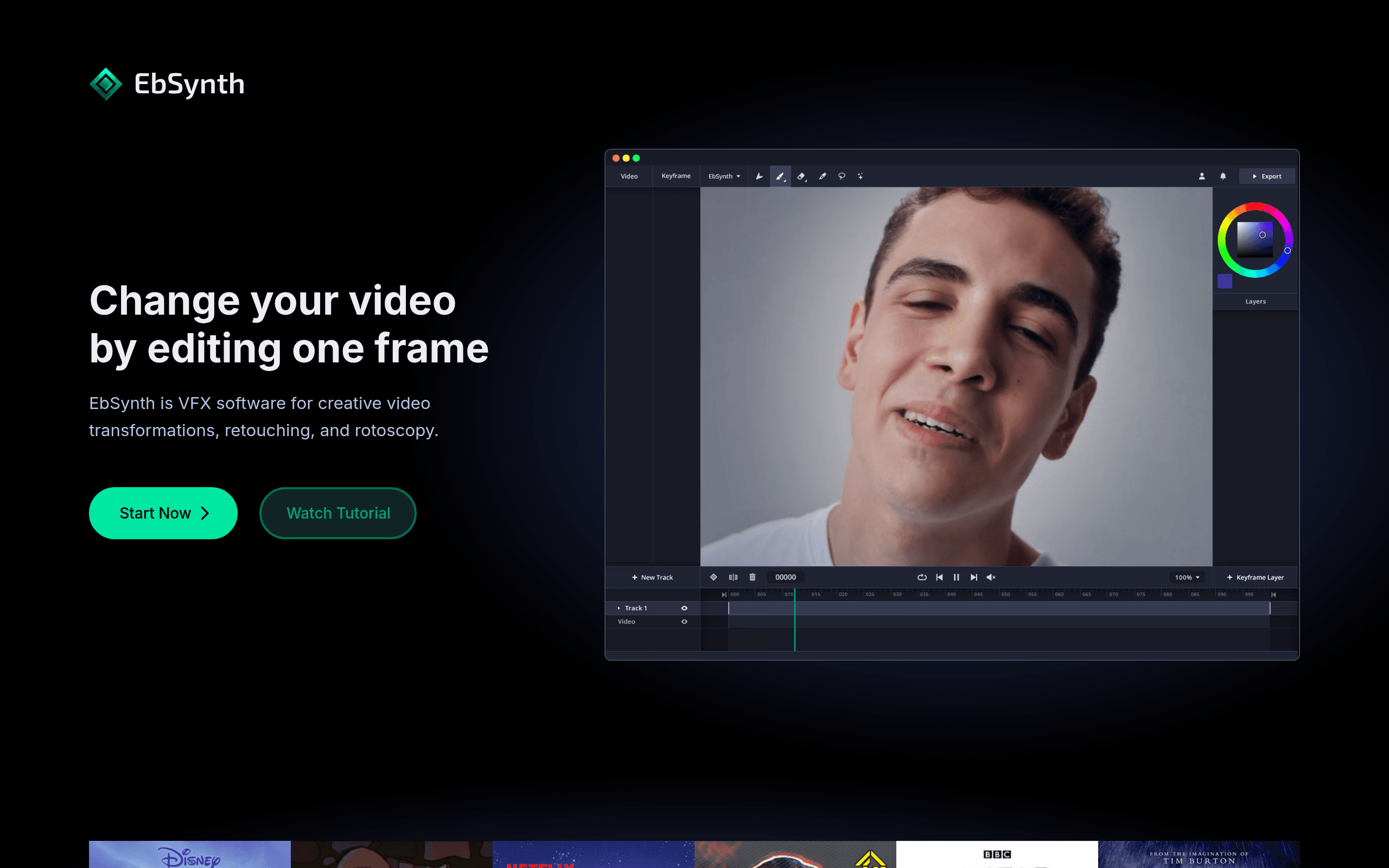

EbSynth transforms live-action video into hand-painted animation by propagating a single stylized keyframe across entire sequences. Built for animators and VFX artists, it preserves original brushstrokes with high fidelity. However, videos with rapid perspective changes require extensive manual keyframe preparation to avoid visual artifacts.
What is EbSynth?
You can animate a full video sequence by painting just one frame. EbSynth takes a single piece of artwork and maps it onto moving video footage.
Secret Weapons s.r.o. built this tool to eliminate tedious frame-by-frame rotoscoping. Animators and VFX artists use it to apply digital makeup or hand-painted styles to actors in motion.
- Primary Use Case: Transforming live-action video into hand-painted animation styles.
- Ideal For: Solo animators and indie VFX artists.
- Pricing: Starts at $10 (freemium). The free tier allows basic local processing while paid plans add cloud rollout credits.
Key Features and How EbSynth Works
Example-Based Synthesis and Keyframes
- Style propagation: Maps a painted keyframe to adjacent frames automatically. Limited by the complexity of scene motion.
- Keyframe management: Supports multiple reference frames for complex occlusions. Limited by the manual effort required to paint each frame (I found managing dozens of frames tedious on a two-minute clip).
Masking and Visual Control
- Alpha channel masking: Defines specific areas for style application. Limited by the need for accurate manual mask creation beforehand.
- Weighting maps: Guides the synthesis process using custom grayscale maps. Limited to users who understand advanced compositing workflows.
Processing and Export Options
- GPU Acceleration: Uses CUDA for faster processing. Limited to compatible NVIDIA graphics cards.
- High-resolution export: Outputs PNG or JPG sequences up to 4K. Limited by your local hardware capabilities.
- De-flickering algorithms: Reduces visual noise between frames. Limited effectiveness on clips with extreme perspective shifts.
- Batch processing: Queues multiple stylization tasks for automated rendering. Limited by available system memory during long queues.
EbSynth Pros and Cons
Pros
- Maintains high temporal consistency compared to frame-by-frame AI filters, reducing visual jitter.
- Preserves the exact brushstrokes and texture details of the original artist.
- Reduces manual labor for rotoscoping and paint-over tasks in post-production.
- Processes files locally to ensure data privacy and zero cloud latency.
Cons
- Requires heavy manual preparation of keyframes for videos with complex perspective changes.
- Struggles with rapid occlusions without frequent manual keyframe updates.
- Demands a powerful dedicated GPU for reasonable processing times on long clips.
- Features a steep learning curve for achieving professional results without visual artifacts.
Who Should Use EbSynth?
- Solo Animators: You can create stylized short films without drawing every frame by hand.
- VFX Artists: You can apply digital makeup or texture changes to moving actors quickly.
- Casual Creators: This is not a good fit. If you want a one-click filter for social media, the manual keyframe preparation will frustrate you.
EbSynth Pricing and Plans
The pricing model uses a freemium structure with cloud rollout credits.
Free: $0 per month. Includes zero rollout credits and no team features. It supports Bring Your Own Key (BYOK) for local use (the free tier is fully functional for local processing).
Pro: $10 per month. Provides $10 in rollout credits and a $200 overdraft limit. You get unlimited non-rollout usage.
Team: $100 per month. Includes $100 in rollout credits, a $200 overdraft limit, and team collaboration features.
Studio: Custom pricing. Offers an offline pipeline and command line access. You must contact sales for exact costs.
How EbSynth Compares to Alternatives
Similar to Runway, EbSynth alters video aesthetics based on reference images. Runway operates in the cloud and uses generative AI to create new pixels. EbSynth runs locally and warps your exact painted pixels across the video. Runway handles complex motion better, but EbSynth retains specific artistic textures.
Unlike Kaiber, this tool does not generate audio-reactive animations or hallucinate new scenes. Kaiber targets musicians and casual creators looking for evolving visuals. EbSynth targets traditional artists who want strict control over the final output. You must provide the exact artwork for EbSynth, whereas Kaiber generates the art for you.
The Verdict for Traditional Animators
EbSynth bridges the gap between traditional painting and automated video stylization. It serves patient artists who want exact control over their visual output. Casual users seeking instant AI video filters should look at Runway instead.
User Reviews
No reviews yet. Be the first to share your experience!
Sign in to write a review.
Related articles
Guides and articles related to EbSynth.
AI Video Generator Prompting: The Filmmaker's Real Workflow
One Product Photo, Full Fashion Campaign: AI Images and Video That Sell (2026)

The Personal AI Productivity Stack (2026): One Tool Per Job, Nothing Extra

How to Get an AI Model Wearing Your Clothes (Step by Step)

The AI Content Automation Stack: 7 Tools That Run a Full Blog Without a Team