

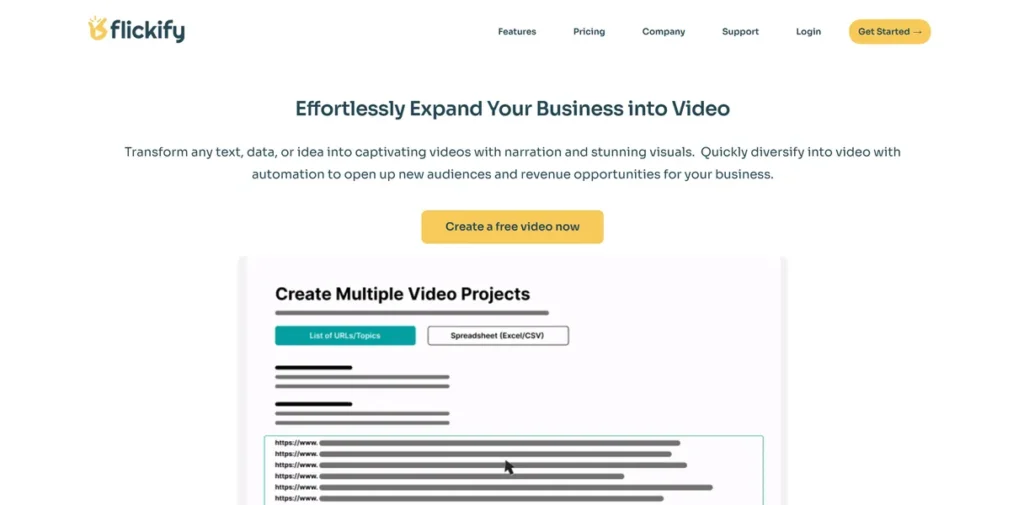
What is Flickify?
Flickify is an AI-powered video generation platform engineered to transpile text-based content into dynamic video formats. From a technical standpoint, it serves as a rendering engine that automates the traditionally resource-intensive pipeline of video production. For businesses, developers, and marketers sitting on extensive libraries of articles, blog posts, or product descriptions, Flickify provides a scalable solution to repurpose these text assets into a more engaging medium. It effectively bridges the gap between static content and video, programmatically handling tasks like media selection, voiceover synthesis, and timeline assembly, thereby maximizing content ROI with minimal manual input.
Key Features and How It Works
Flickify operates on a set of core functionalities designed to abstract away the complexities of video creation. Here’s a breakdown of its primary components from a developer’s perspective.
Text to Video Conversion
This is the tool’s most direct function. Users provide a block of text, which the system parses and segments into logical scenes. The AI then queries integrated stock media libraries for relevant visuals and overlays synthesized narration, compiling the assets into a cohesive video. The process is a classic input-output model, optimized for speed and efficiency.
URL to Video Transformation
Think of the URL to Video feature as a sophisticated web scraper married to a video rendering pipeline. You provide an endpoint (the URL), and Flickify dispatches a service to parse the DOM, extract key text and image assets, and then systematically populates a video template with this content. It’s a powerful abstraction that converts unstructured web data into a structured video narrative with a single command, making it incredibly efficient for revitalizing entire archives of web content.
Diverse Narrators and Voice Cloning
Under the hood, this feature leverages advanced Text-to-Speech (TTS) APIs. Flickify offers a selection of pre-built voice models for narration. The voice cloning capability is a more sophisticated implementation, likely utilizing a neural network trained on a user-provided voice sample. This allows for the creation of a unique, proprietary TTS model that can be used to maintain brand consistency across all video assets.
Video Avatars and Customization
Flickify incorporates AI-generated human-like avatars, adding a layer of personalization. The drag-and-drop editor provides a user-friendly interface for manipulating the video timeline, assets, and text overlays. While it simplifies customization, it operates within the constraints of the platform’s pre-defined components, offering controlled flexibility rather than open-ended, code-level access to the rendering engine.
Pros and Cons
Pros
- High Scalability: The architecture is clearly designed for batch processing, allowing organizations to convert vast content libraries into video format programmatically.
- Rapid Prototyping: For marketing and development teams, Flickify serves as an excellent tool for rapidly generating video concepts and A/B testing different messaging without engaging a full production team.
- API-like Simplicity: The URL-to-video function in particular behaves like a high-level API call, abstracting immense back-end complexity into a simple user action.
- Reduced Technical Overhead: It eliminates the dependency on complex video editing software and specialized hardware, lowering the barrier to entry for professional-grade video production.
Cons
- Limited Integration and API Access: The most significant drawback for technical users is the current lack of a robust, public API. This limits the potential for deep integration into automated CI/CD pipelines or custom content management systems.
- Potential for Templated Output: Without careful manual customization, the reliance on automation and stock assets can result in videos that feel generic and lack unique brand identity.
- ‘Black Box’ Customization: The user-friendly editor, while efficient, prevents granular, code-level control over animations, transitions, and rendering parameters that a dedicated video library or API would offer.
Who Should Consider Flickify?
Flickify is best suited for professionals and organizations focused on content velocity and scalability. Its ideal user base includes:
- Digital Marketing Agencies: Teams that need to produce video content at scale for multiple clients can leverage Flickify to streamline workflows and reduce production costs.
- SEO Specialists: Professionals looking to enhance on-page engagement metrics and SERP visibility by embedding video can generate relevant assets quickly.
- Content-Heavy Businesses: Companies with extensive blogs, knowledge bases, or e-commerce product catalogs can systematically convert these assets into a new channel.
- Startups and Developers: Teams building an MVP or launching a new product can use Flickify to create marketing and instructional videos with minimal resource allocation.
Pricing and Plans
Flickify operates on a freemium model, providing an accessible entry point for testing its core capabilities before committing to a paid subscription.
Plan Breakdown
- Free Plan: Allows users to generate up to three videos, offering a hands-on evaluation of the platform’s features and output quality.
- Pro Plan: Starting at $15 per month, this plan unlocks more advanced features, higher usage limits, and greater customization options suitable for professional and commercial use.
Disclaimer: Pricing information is subject to change. For the most current and detailed plan information, please consult the official Flickify website.
What makes Flickify great?
Flickify’s standout feature is its API-like efficiency in converting unstructured web content from a simple URL into a structured video narrative. The platform’s true power lies in its abstraction of a deeply complex process—content parsing, semantic analysis, media sourcing, voice synthesis, and video rendering—into a single, user-initiated command. This level of automation and scalability is what elevates it from a simple video editor to a powerful content transformation engine. For any organization looking to leverage its existing text-based assets, Flickify offers an engineered solution to multiply content output with minimal friction.
Frequently Asked Questions
- Does Flickify offer a public API for developers?
- Currently, Flickify’s integration capabilities are limited, and it does not appear to offer a public, developer-facing API for programmatic video generation. This is a key consideration for teams requiring deep integration into custom workflows.
- How does the voice cloning technology function?
- The voice cloning feature likely employs a machine learning model (a neural network) that analyzes the acoustic properties of a user’s voice sample. It then generates a unique Text-to-Speech profile that can synthesize new speech in that specific voice, ensuring brand consistency.
- How much control is available for video customization?
- Customization is managed through an intuitive drag-and-drop editor. Users can control asset placement, text overlays, and avatar selection within the provided templates. However, it does not offer code-level access for creating custom animations or modifying the core rendering logic.
- What is the source of the visual media used in the videos?
- Flickify almost certainly integrates with one or more large, royalty-free stock media libraries. This ensures that the images and video clips used in the final output are properly licensed for commercial use without copyright infringement concerns.