

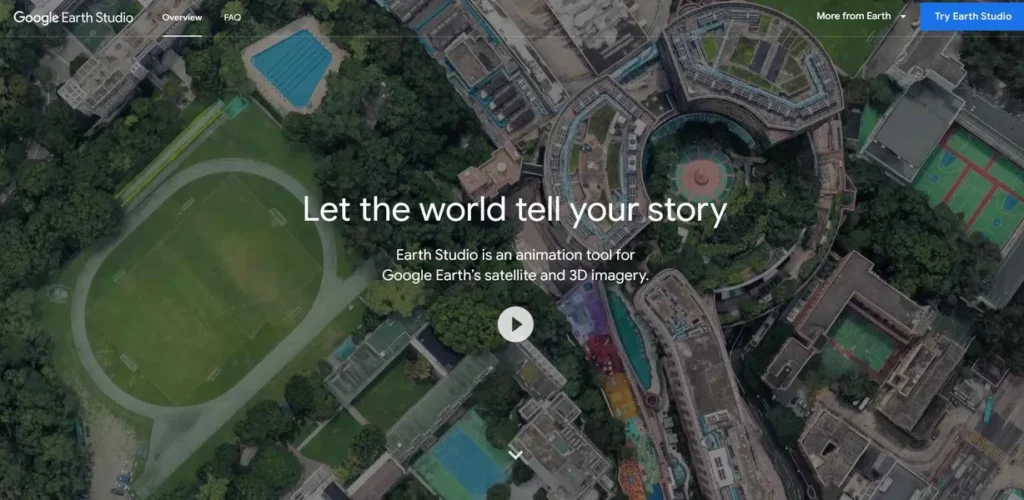
What is Google Earth Studio?
Google Earth Studio is a powerful, browser-based animation tool that transforms Google Earth’s vast repository of satellite and 3D imagery into cinematic video assets. For marketing managers, it’s a game-changing resource for crafting visually stunning, location-based narratives without the need for expensive drone footage or complex CGI. Whether you’re launching a product with a global footprint, promoting a destination, or creating a compelling corporate overview, Earth Studio provides the tools to build professional-grade animations that can stop a user’s scroll and drive engagement. It effectively democratizes high-end geographic visualization, putting the power of our planet’s imagery directly into your campaign workflow.
Key Features and How It Works
Google Earth Studio operates on a foundation familiar to video professionals while remaining accessible to newcomers. It allows you to manipulate a virtual camera over photorealistic 3D models of the Earth’s surface. This functionality is delivered through a suite of focused features designed for speed and creative control.
- Keyframe Animation: At its core, the platform uses a standard keyframing system. You can set specific camera positions, rotations, and altitudes at different points in a timeline. The software then smoothly interpolates the motion between these points, creating fluid, dynamic camera movements. This is perfect for crafting a precise fly-through of a new retail location or a dramatic reveal of an event venue.
- Quick-Start Templates: For marketers on a tight deadline, the five pre-built templates are invaluable. These allow you to create common animations—like orbiting a point of interest or flying from one city to another—with just a few clicks. This feature drastically cuts down production time, enabling rapid creation of social media content or B-roll for larger video projects.
- Animatable Effects: Add a layer of polish and realism by animating environmental effects. You can change the time of day to create a dramatic sunrise over a landscape or adjust the camera’s field of view to produce a sweeping, wide-angle shot. These subtle adjustments can significantly elevate the production value of your marketing materials.
- 3D Camera Export: Think of the 3D Camera Export feature as a blueprint for a professional decorator. Google Earth Studio builds the stunning, geographically accurate location, and then hands your video team the precise architectural plans. They can import these plans directly into Adobe After Effects to add custom ‘furniture’—like branded graphics, kinetic typography, and data visualizations—perfectly tracked to the 3D space.
Pros and Cons
While a formidable tool, it’s important to understand its strengths and limitations within a fast-paced marketing environment.
Pros:
- Unmatched Visual Impact: The ability to leverage Google’s high-resolution 3D cityscapes and satellite imagery provides a level of visual fidelity that can make any campaign feel premium and authoritative.
- Zero Budget Impact: As a free-to-use tool, it allows for the creation of high-value video assets without impacting your campaign budget, freeing up funds for ad spend and distribution.
- Rapid Content Creation: The intuitive interface and Quick-Start templates empower teams to generate compelling video content in minutes, not days, which is ideal for agile marketing strategies.
- Seamless Workflow Integration: For teams using Adobe After Effects, the native camera export feature creates a highly efficient workflow from visualization to final compositing.
Cons:
- Browser Dependency: The platform is exclusively available on the desktop version of Google Chrome, which could be a minor inconvenience for teams standardized on other browsers.
- Mastery Requires Practice: While getting started is simple, achieving highly complex and nuanced animations requires a solid understanding of keyframing principles and camera mechanics.
- Limited Post-Production Path: The direct 3D camera export is limited to Adobe After Effects, potentially requiring extra steps for teams primarily using other video editing suites like DaVinci Resolve or Final Cut Pro.
Who Should Consider Google Earth Studio?
Google Earth Studio is a versatile tool, but it delivers exceptional value for specific professional roles focused on visual communication and lead generation.
- Marketing Managers: Ideal for creating geo-targeted ad campaigns, visualizing global supply chains, or producing dynamic establishing shots for corporate videos and event promotions.
- Real Estate Marketers: Essential for developing breathtaking virtual tours of properties, showcasing their surrounding neighborhoods, and highlighting proximity to key landmarks.
- Travel and Hospitality Brands: A perfect tool for crafting immersive promotional videos that transport potential customers to destinations, resorts, and attractions.
- Content Creators & Social Media Managers: Offers a unique way to generate thumb-stopping visual content that explains complex topics, tells geographic stories, and stands out in crowded social feeds.
- Broadcast Journalists & Educators: Provides a powerful visual aid for adding context to news stories and creating engaging, interactive lessons on geography, history, and environmental science.
Pricing and Plans
During our review, Google Earth Studio was available for free for non-commercial and commercial use, though access must be requested and approved through a Google account. Users must also adhere to specific attribution guidelines when publishing content created with the tool. For the most accurate and up-to-date pricing, please visit the official Google Earth Studio website.
What makes Google Earth Studio great?
Need to showcase your brand’s global reach without commissioning expensive drone shoots across multiple continents? This is the core challenge Google Earth Studio masterfully solves. Its greatest strength is its ability to provide unparalleled production value and geographic authenticity at zero cost. It eliminates the logistical and financial barriers to creating cinematic, world-scale animations. This allows a marketing team of any size to produce content with the visual impact of a major studio, leveling the playing field and enabling more compelling, data-rich storytelling. The use of real-world imagery builds instant credibility and context that purely graphical maps cannot match.
Frequently Asked Questions
- Do I need animation experience to use Google Earth Studio?
- No, not necessarily. The Quick-Start templates are designed for beginners and allow you to create professional-looking animations with minimal input. However, to unlock the tool’s full potential, a basic understanding of keyframe animation is beneficial.
- Can I use videos created with Google Earth Studio in commercial ad campaigns?
- Yes, Google permits the use of content for commercial purposes, including advertising. However, you are required to follow their attribution guidelines, which typically involves displaying the Google Earth logo and data sources on-screen. Always consult the official terms of service for the latest requirements.
- How does this integrate into my existing video production workflow?
- It serves as a powerful asset generator. You create the foundational geographic animation in Earth Studio. From there, you can either render the video clip directly or, for more advanced workflows, export the 3D camera data to Adobe After Effects to composite additional graphics, text, and effects.
- Is the imagery in Google Earth Studio updated in real-time?
- No, the imagery is sourced from Google Earth’s vast, high-resolution database, which is updated periodically. It is not a live feed, but the data is comprehensive and current enough for the vast majority of marketing and storytelling applications.