



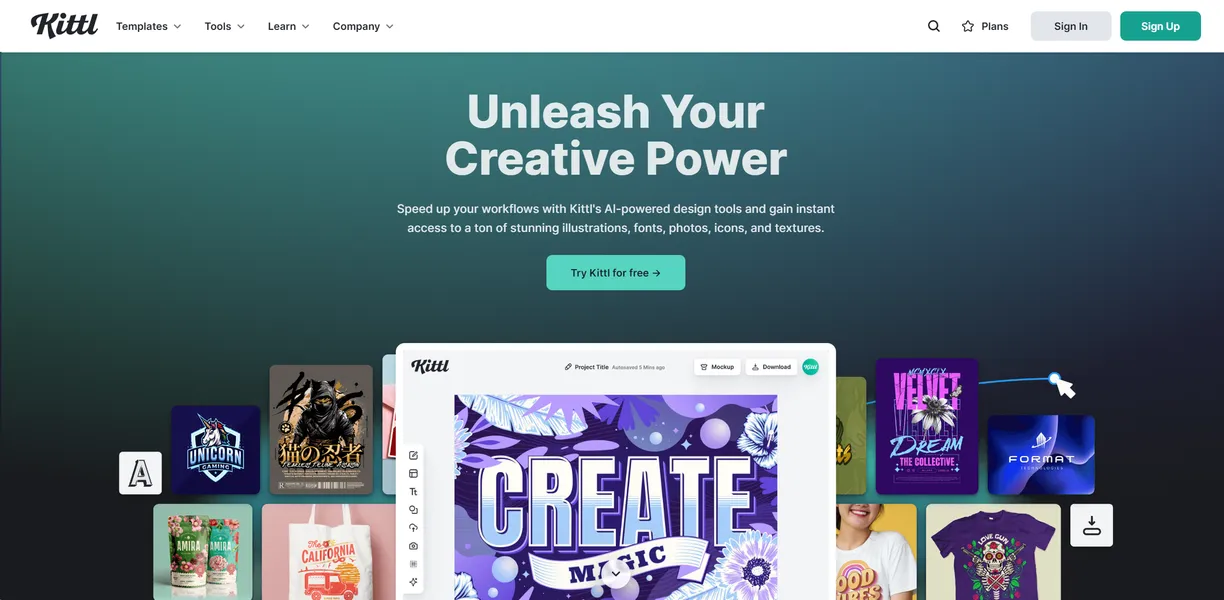
What is Kittl?
Over 1 million premium illustrations, fonts, and textures sit inside Kittl, a browser-based design tool built for speed. Users generate vector-based logos from text prompts and apply complex text effects like warp or arch in seconds. The platform combines artificial intelligence with traditional layout tools to speed up production.
Kittl Technologies GmbH developed this platform to solve a specific problem. Traditional vector software requires years of training. Kittl gives print-on-demand creators, marketers, and small business owners a faster way to build commercial graphics.
You do not need a design degree to produce high-quality merchandise.
- Primary Use Case: Creating custom t-shirt designs with curved text and vintage textures for print-on-demand.
- Ideal For: Merchandise creators and solo entrepreneurs.
- Pricing: Starts at $15 ($12/mo billed annually) – The Pro plan provides unlimited projects and vector exports.
Key Features and How Kittl Works
AI Generation Tools
- AI Vector Engine: Converts text prompts into scalable SVG vector graphics. You spend AI tokens for each generation.
- AI Image Generator: Creates high-resolution images in vintage or 3D styles. Image generation consumes more tokens than text tasks.
- AI Logo Generator: Builds brand identities from text descriptions. Output quality depends heavily on prompt specificity.
Typography and Layout
- Text Effects: Applies warp, arch, and shadow controls to typography. Complex distortions can slow down browser performance.
- Asset Library: Provides access to over 1 million premium illustrations and fonts. Free users cannot access premium assets.
- Background Remover: Isolates subjects from backgrounds with one click. This feature struggles with complex edges like hair.
Export and Branding
- Export Options: Downloads files in PNG, JPG, SVG, and PDF formats. Vector exports require a paid subscription.
- Brand Kits: Stores custom logos, colors, and fonts. This feature is locked behind the $35 per month Expert plan.
- Mockup Generator: Previews designs on apparel and packaging. Mockup resolution is limited on lower tiers.
Kittl Pros and Cons
Pros
- Intuitive interface allows non-designers to create professional layouts in under 10 minutes.
- Superior typography controls compared to competitors include advanced warping and pathing.
- Built-in print-on-demand templates are specifically optimized for high-quality t-shirt and poster printing.
- High-quality vector output ensures designs remain crisp and scalable for any physical medium.
- Extensive library of unique vintage and retro assets is unavailable in standard design tools.
Cons
- The free tier is highly restrictive, limiting users to only 5 projects and 200 tokens.
- Browser performance can significantly lag when working on complex designs with many layers.
- Mobile application functionality is currently limited compared to the full desktop web experience.
- AI credit system is opaque, with different generation tasks consuming varying amounts of tokens.
Who Should Use Kittl?
- Print-on-demand sellers: You need fast, high-quality vector designs for merchandise. Kittl provides the exact templates and typography tools required for apparel.
- Social media marketers: You want to build engaging posts quickly. The AI image generator and premium assets speed up daily content creation.
- Solo entrepreneurs: You lack the budget for a dedicated designer. The AI logo generator helps you build a brand identity in minutes.
- Professional UI/UX designers (Not Recommended): You need precise pixel control and advanced prototyping. Kittl lacks the interface design tools found in dedicated software.
Kittl Pricing and Plans
Kittl uses a freemium model, but the free tier acts more like a trial (you will hit the 5-project limit quickly).
- Free: $0 per month. You get 5 projects, 200 one-time AI tokens, and access to the asset library. You cannot export vectors.
- Pro: $15 per month (or $12 per month billed annually). This tier includes unlimited projects, 2,000 AI tokens per month, 10GB of storage, and vector exports.
- Expert: $35 per month (or $26 per month billed annually). You receive 6,000 AI tokens per month, 100GB of storage, and custom brand kits.
The token system causes friction.
Different tasks consume different token amounts, making it hard to predict your monthly usage. You spend AI tokens for each generation (usually 10 to 15 tokens per image).
How Kittl Compares to Alternatives
Similar to Canva, Kittl offers a browser-based drag-and-drop interface for quick design work. Canva targets a broader audience with presentation and video tools. Kittl focuses heavily on typography, vector generation, and print-on-demand assets. Canva provides a much more generous free tier.
Unlike Adobe Express, Kittl includes advanced text warping and pathing tools directly in the browser. Adobe Express integrates better with professional tools like Photoshop and Illustrator. Kittl wins on vintage asset variety and AI vector generation. Adobe Express offers superior mobile app functionality.
Verdict: The Best Tool for Merchandise Creators
If you design t-shirts, posters, or physical merchandise, choose Kittl. The typography controls and vector exports justify the Pro subscription. The vintage asset library saves hours of manual drawing.
If you need to build slide decks or edit social media videos, look elsewhere. Kittl lacks timeline editing and presentation features. Choose Canva if you need a general-purpose design tool for a marketing team.