
What is Midjourney Prompt Helper?
Midjourney Prompt Helper is a strategic tool designed to accelerate the visual content pipeline for marketing professionals using the Midjourney AI image generator. In a landscape where speed and visual distinction are paramount, this utility removes the technical friction of prompt engineering. It provides a structured, intuitive interface where marketers and designers can rapidly assemble complex prompts, select style parameters, and manage variable weightings without needing to memorize Midjourney’s specific syntax. For teams focused on generating high-volume, on-brand visuals for campaigns, social media, and advertising, the Helper acts as an essential workflow accelerator, translating creative vision into tangible digital assets efficiently.
Key Features and How It Works
Midjourney Prompt Helper is engineered to optimize the creative process, allowing teams to focus on strategy rather than syntax. Its functionality is geared towards rapid iteration and asset management, which are critical in a marketing environment.
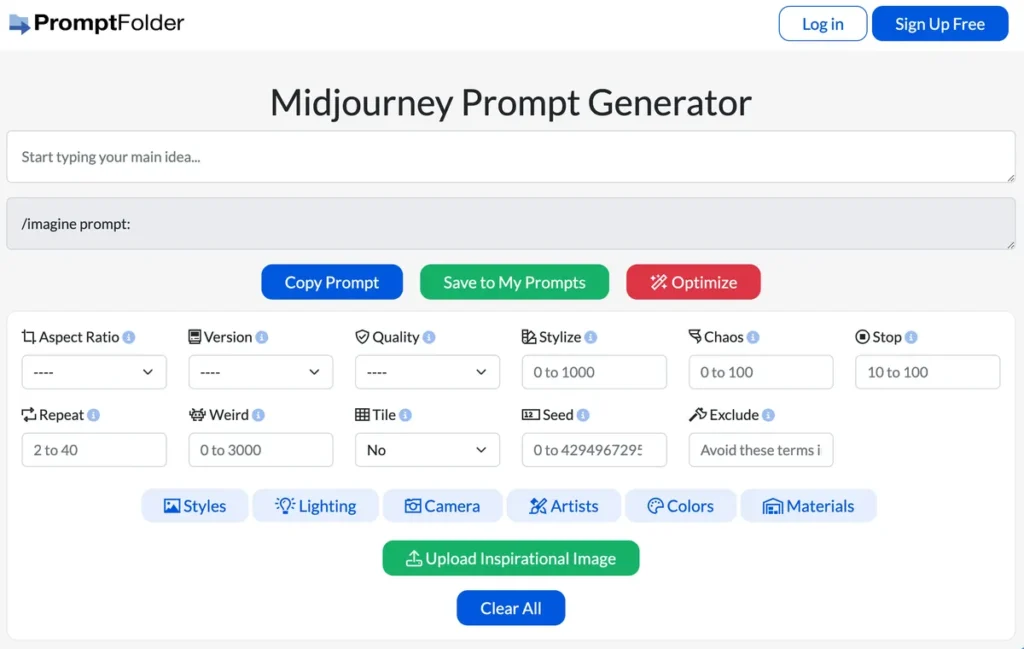
- Prompt Customization: The tool offers a comprehensive dashboard of parameters and styling options. This allows marketing teams to fine-tune outputs to match precise brand guidelines, campaign aesthetics, or A/B testing variables, ensuring visual consistency and relevance.
- User-Friendly Interface: Its intuitive design significantly lowers the barrier to entry for team members who aren’t prompt engineering experts. This democratizes AI image generation within an organization, reducing dependencies on specialized roles and speeding up content creation.
- Save and Organize Prompts: A key feature for campaign management, this allows users to build, save, and categorize a library of successful prompts. Teams can create templates for different channels—like social media posts, blog headers, or ad creatives—ensuring consistency and enabling rapid deployment of new visual assets.
- AI Optimization: The platform includes an AI-powered enhancement feature that analyzes and refines user prompts. This mechanism improves the likelihood of generating high-quality, relevant images on the first try, minimizing the trial-and-error process and saving valuable time.
Pros and Cons
Evaluating Midjourney Prompt Helper requires a practical look at its benefits and limitations within a professional workflow.
Pros
- Accelerated Content Production: Drastically reduces the time required to craft and test complex prompts, enabling faster creation of visual assets for time-sensitive campaigns.
- Enhanced Creative Control: Empowers marketers to experiment with a wide array of visual styles and parameters without a deep technical understanding of Midjourney, leading to more innovative campaign visuals.
- Improved Workflow Efficiency: The ability to save and organize prompts creates a scalable system for managing visual assets, making it easier to maintain brand consistency and reuse effective creative formulas.
- Greater Accessibility: Simplifies the Midjourney experience, allowing more team members to contribute to visual content generation, regardless of their technical skill level.
Cons
- Initial Learning Curve: While user-friendly, mastering the full suite of advanced features and parameters may require a brief adjustment period for new users.
- Platform Dependency: The tool’s value is entirely contingent on the Midjourney ecosystem. Any changes or disruptions to the Midjourney service will directly impact its utility.
- Requires Connectivity: As a web-based tool, it requires a stable internet connection, which can be a limitation for remote team members in low-connectivity areas.
Who Should Consider Midjourney Prompt Helper?
Midjourney Prompt Helper is an ideal solution for marketing and creative professionals operating in fast-paced environments. Its value is most pronounced for:
- Marketing Managers: Those responsible for overseeing content strategy and campaign execution will find it invaluable for accelerating visual asset production and enabling rapid A/B testing of ad creatives.
- Social Media Content Creators: Professionals who need a constant stream of unique, eye-catching visuals to drive engagement across platforms can use the tool to quickly generate diverse content.
- Graphic Designers & Creative Teams: Designers can integrate the Helper into their workflow to quickly generate concept art, mood boards, or initial drafts, freeing up time for more complex design tasks.
- Digital Agencies: Agencies managing multiple clients can use the prompt organization features to maintain separate visual styles and asset libraries for each brand, ensuring consistency and efficiency.
Pricing and Plans
At the time of this review, specific pricing and subscription details for Midjourney Prompt Helper were not publicly available. The tool appears to offer free access to its core features, with potential premium tiers for advanced functionality. For the most accurate and up-to-date pricing, please visit the official Midjourney Prompt Helper website.
What makes Midjourney Prompt Helper great?
The single most powerful feature of Midjourney Prompt Helper is its AI-driven optimization, which translates simple creative inputs into complex, effective prompts for superior image generation. This capability fundamentally changes the dynamic of working with Midjourney, removing the steep learning curve associated with manual prompt engineering. For a marketing manager, this means less time spent on technical refinement and more time focused on the creative direction of a campaign. It ensures that the team’s vision is translated more accurately and reliably into a final visual, streamlining the entire content creation lifecycle from concept to delivery and directly impacting campaign velocity.
Frequently Asked Questions
- How does Midjourney Prompt Helper integrate into an existing marketing content workflow?
- It acts as a front-end tool for the image generation phase. Your team can ideate a campaign visual, use the Helper to rapidly create and refine the prompt, generate the image in Midjourney, and then pass the asset to designers for final edits or directly to the social media team for deployment. Its prompt-saving feature allows you to build a library that aligns with your content calendar.
- Can I use this tool to maintain a consistent brand style across generated images?
- Yes. By saving and organizing prompts that successfully produce images aligned with your brand’s aesthetic—including specific styles, color palettes, and compositions—you can create a set of templates. This ensures that any team member can generate on-brand visuals consistently.
- Is this tool suitable for beginners on my team who have never used Midjourney?
- Absolutely. It is designed to abstract away the complexity of Midjourney’s syntax. The user-friendly interface guides users through selecting options rather than writing code-like commands, making it an excellent entry point for beginners.
- Does the tool provide access to the Midjourney bot itself?
- No, Midjourney Prompt Helper is a complementary tool for building prompts. You still need a separate, active subscription and access to the Midjourney bot (typically via Discord) to actually generate the images using the prompts you create.