{
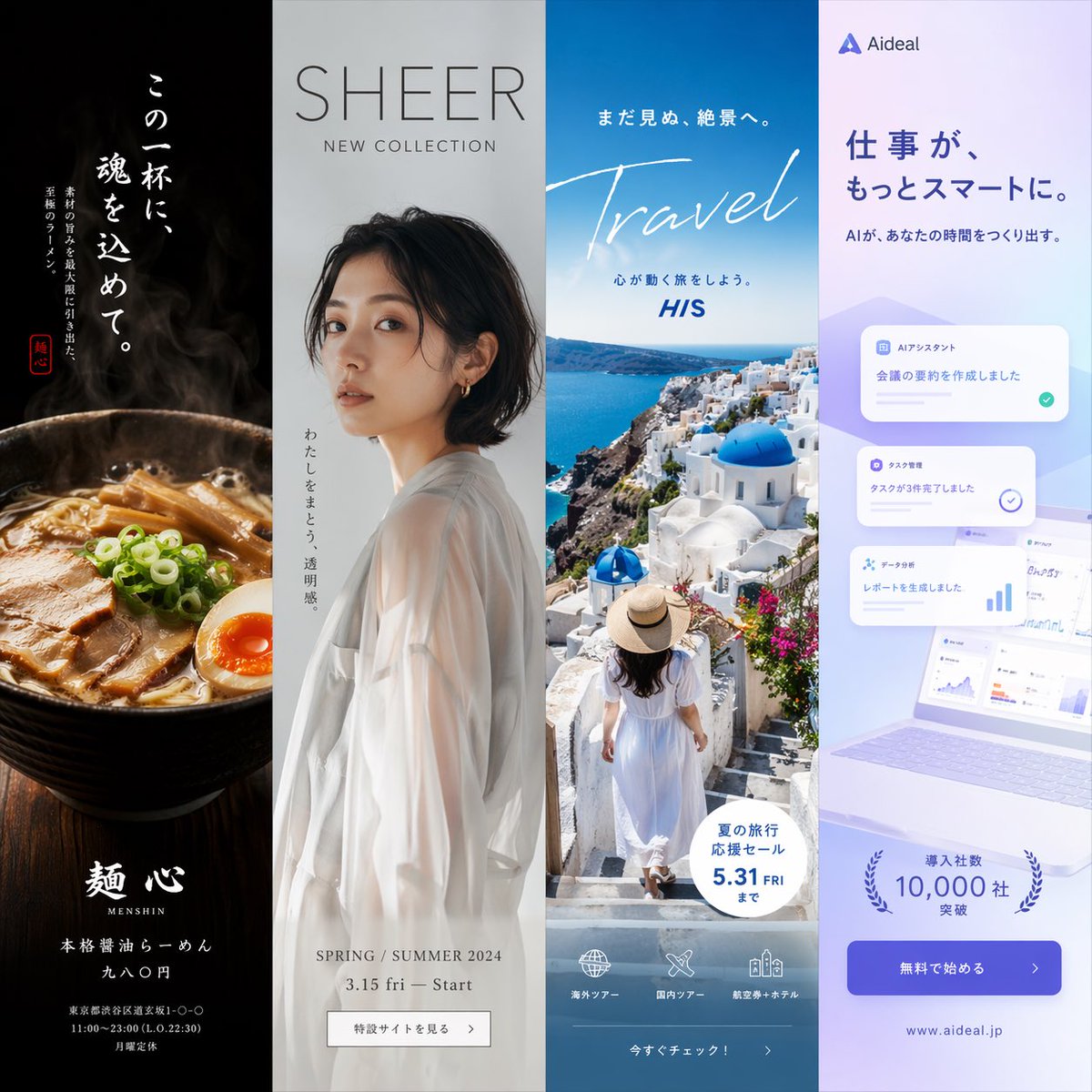
"type": "four-panel advertisement mockup",
"layout": "vertical split into four equal columns",
"panels": [
{
"position": "far left",
"theme": "food advertisement",
"subject": "steaming bowl of authentic soy sauce ramen with sliced pork, half a soft-boiled egg, bamboo shoots, and green onions",
"background": "dark, moody lighting",
"typography": {
"catchphrase": "{argument name=\"ramen catchphrase\" default=\"この一杯に、魂を込めて。\"}",
"subtext": "ultimate ramen maximizing ingredient umami",
"brand_name": "麺心",
"details": "authentic soy sauce ramen 980 yen",
"footer": "Tokyo Shibuya address and business hours"
}
},
{
"position": "mid-left",
"theme": "fashion lookbook",
"subject": "young Japanese woman looking back over her shoulder, wearing a sheer white long-sleeve top",
"background": "light grey studio backdrop",
"typography": {
"headline": "{argument name=\"fashion brand\" default=\"SHEER\"}",
"subheadline": "NEW COLLECTION",
"vertical_text": "wearing transparency",
"details": "SPRING / SUMMER 2024 3.15 fri - Start",
"button": "特設サイトを見る >"
}
},
{
"position": "mid-right",
"theme": "travel agency promotion",
"subject": "woman in a white summer dress and straw hat walking down white stairs",
"background": "{argument name=\"travel destination\" default=\"Santorini, Greece\"} with iconic blue dome churches, white buildings, and deep blue Aegean sea",
"typography": {
"top_text": "to an unseen spectacular view",
"main_title": "Travel",
"subtitle": "let's take a journey that moves your heart",
"badge": "summer travel sale until 5.31 FRI",
"bottom_nav": {
"count": 3,
"labels": ["海外ツアー", "国内ツアー", "航空券+ホテル"]
},
"button": "今すぐチェック! >"
}
},
{
"position": "far right",
"theme": "B2B SaaS software",
"subject": "open laptop displaying a data dashboard, surrounded by floating UI elements",
"background": "light purple and white gradient",
"ui_elements": {
"count": 3,
"labels": ["AIアシスタント", "タスク管理", "データ分析"]
},
"typography": {
"logo": "{argument name=\"tech product name\" default=\"Aideal\"}",
"headline": "{argument name=\"tech headline\" default=\"仕事が、もっとスマートに。\"}",
"subheadline": "AI creates time for you",
"badge": "over 10,000 companies",
"button": "無料で始める >",
"url": "www.aideal.jp"
}
}
]
}
Fill in the variables
0 of 1 filled
Type your own values below and we'll drop them straight into the prompt. Leave any blank to keep the placeholder.
{
"type": "four-panel advertisement mockup",
"layout": "vertical split into four equal columns",
"panels": [
{
"position": "far left",
"theme": "food advertisement",
"subject": "steaming bowl of authentic soy sauce ramen with sliced pork, half a soft-boiled egg, bamboo shoots, and green onions",
"background": "dark, moody lighting",
"typography": {
"catchphrase": "{argument name=\"ramen catchphrase\" default=\"この一杯に、魂を込めて。\"}",
"subtext": "ultimate ramen maximizing ingredient umami",
"brand_name": "麺心",
"details": "authentic soy sauce ramen 980 yen",
"footer": "Tokyo Shibuya address and business hours"
}
},
{
"position": "mid-left",
"theme": "fashion lookbook",
"subject": "young Japanese woman looking back over her shoulder, wearing a sheer white long-sleeve top",
"background": "light grey studio backdrop",
"typography": {
"headline": "{argument name=\"fashion brand\" default=\"SHEER\"}",
"subheadline": "NEW COLLECTION",
"vertical_text": "wearing transparency",
"details": "SPRING / SUMMER 2024 3.15 fri - Start",
"button": "特設サイトを見る >"
}
},
{
"position": "mid-right",
"theme": "travel agency promotion",
"subject": "woman in a white summer dress and straw hat walking down white stairs",
"background": "{argument name=\"travel destination\" default=\"Santorini, Greece\"} with iconic blue dome churches, white buildings, and deep blue Aegean sea",
"typography": {
"top_text": "to an unseen spectacular view",
"main_title": "Travel",
"subtitle": "let's take a journey that moves your heart",
"badge": "summer travel sale until 5.31 FRI",
"bottom_nav": {
"count": 3,
"labels": ["海外ツアー", "国内ツアー", "航空券+ホテル"]
},
"button": "今すぐチェック! >"
}
},
{
"position": "far right",
"theme": "B2B SaaS software",
"subject": "open laptop displaying a data dashboard, surrounded by floating UI elements",
"background": "light purple and white gradient",
"ui_elements": {
"count": 3,
"labels": ["AIアシスタント", "タスク管理", "データ分析"]
},
"typography": {
"logo": "{argument name=\"tech product name\" default=\"Aideal\"}",
"headline": "{argument name=\"tech headline\" default=\"仕事が、もっとスマートに。\"}",
"subheadline": "AI creates time for you",
"badge": "over 10,000 companies",
"button": "無料で始める >",
"url": "www.aideal.jp"
}
}
]
}
Tested and verified with GPT Image and other compatible tools.
How to use this prompt
1
Copy the prompt
Hit copy above - the full, exact wording lands on your clipboard.
2
Paste into your AI tool
Drop it into GPT Image (or any compatible tool) exactly as written. Add a reference image and tell it to keep your model or product consistent across the generation.
3
Tweak the variables
Swap the bracketed variables below to make the result your own.
Paste into GPT Image 2 to recreate this image style with your own subject.