Connect a Local Model to Your App Without Exposing It Accidentally
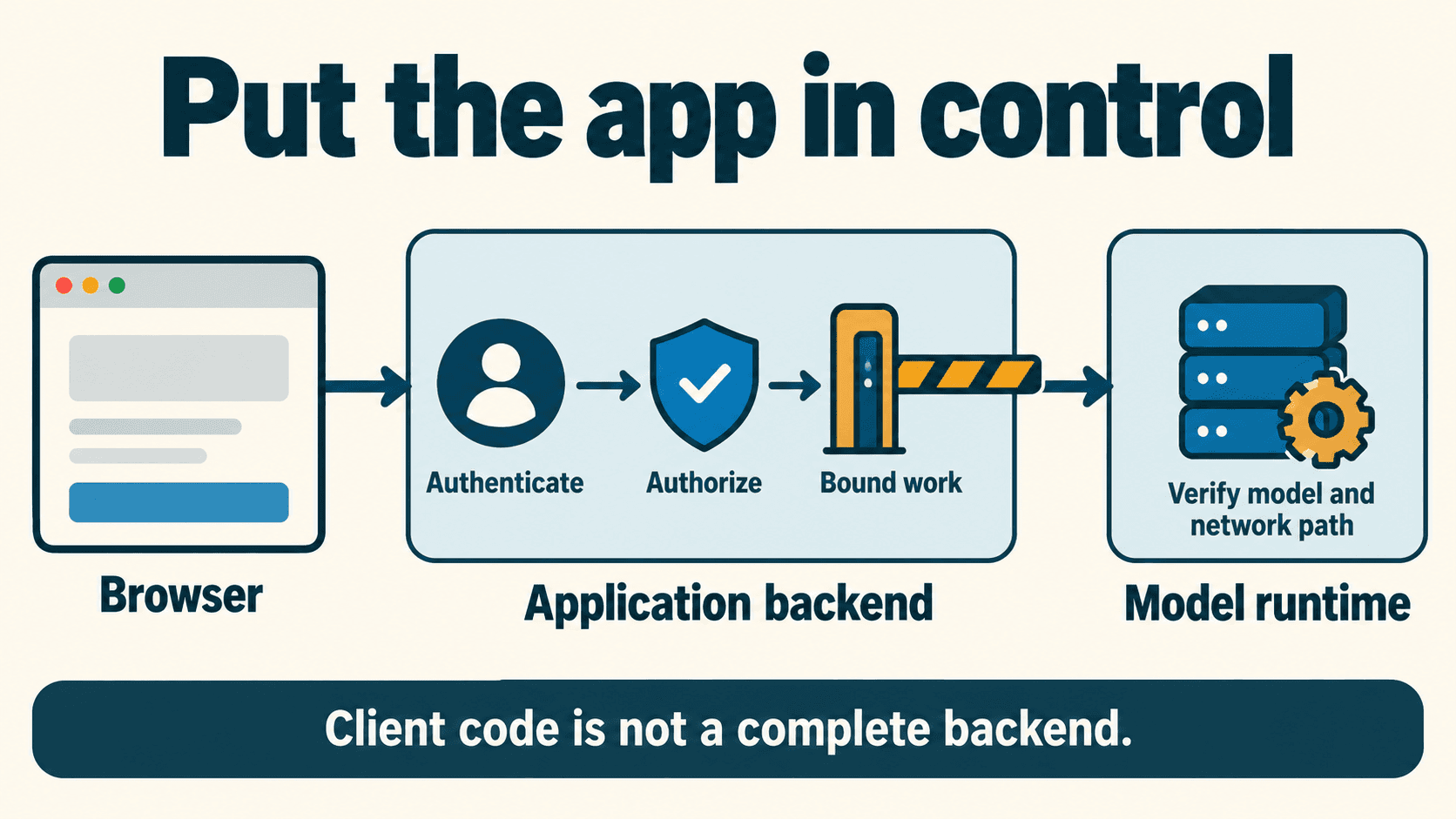
For a hosted or shared application, put the local model runtime behind your application backend. Let the backend authenticate users, authorize their work, validate requests, and control admission to inference. Keep the runtime on the intended private network path and check which model actually handles each request.
Start with one text request that completes correctly. Then add streaming, failure handling, and network checks. A local URL, a successful HTTP response, or a working demo does not by itself establish a private, reliable integration.
This guide uses Ollama's native API for the small code example and LM Studio's documentation as a second implementation pattern. The downloadable client is a teaching example to adapt and validate against your own running server.
Map the browser, backend, and runtime
For this example, the application backend and Ollama runtime run on the same host:
| Component | Responsibility | Boundary to check |
|---|---|---|
| Browser | Send the user's task to your application | It receives no backend runtime credential |
| Application backend | Validate the user, allowed task, input size, and admission policy | Tenant/resource authorization is enforced here |
| Local runtime | Execute the selected model request | Its listener is reachable only where intended |
| Response handler | Parse output, detect failure, and report completion | Partial text is not recorded as a completed task |
The backend needs real access controls; adding a system prompt or an input “sanitizer” does not create them. A runtime token also does not automatically implement your application's per-user permissions or spending policy.
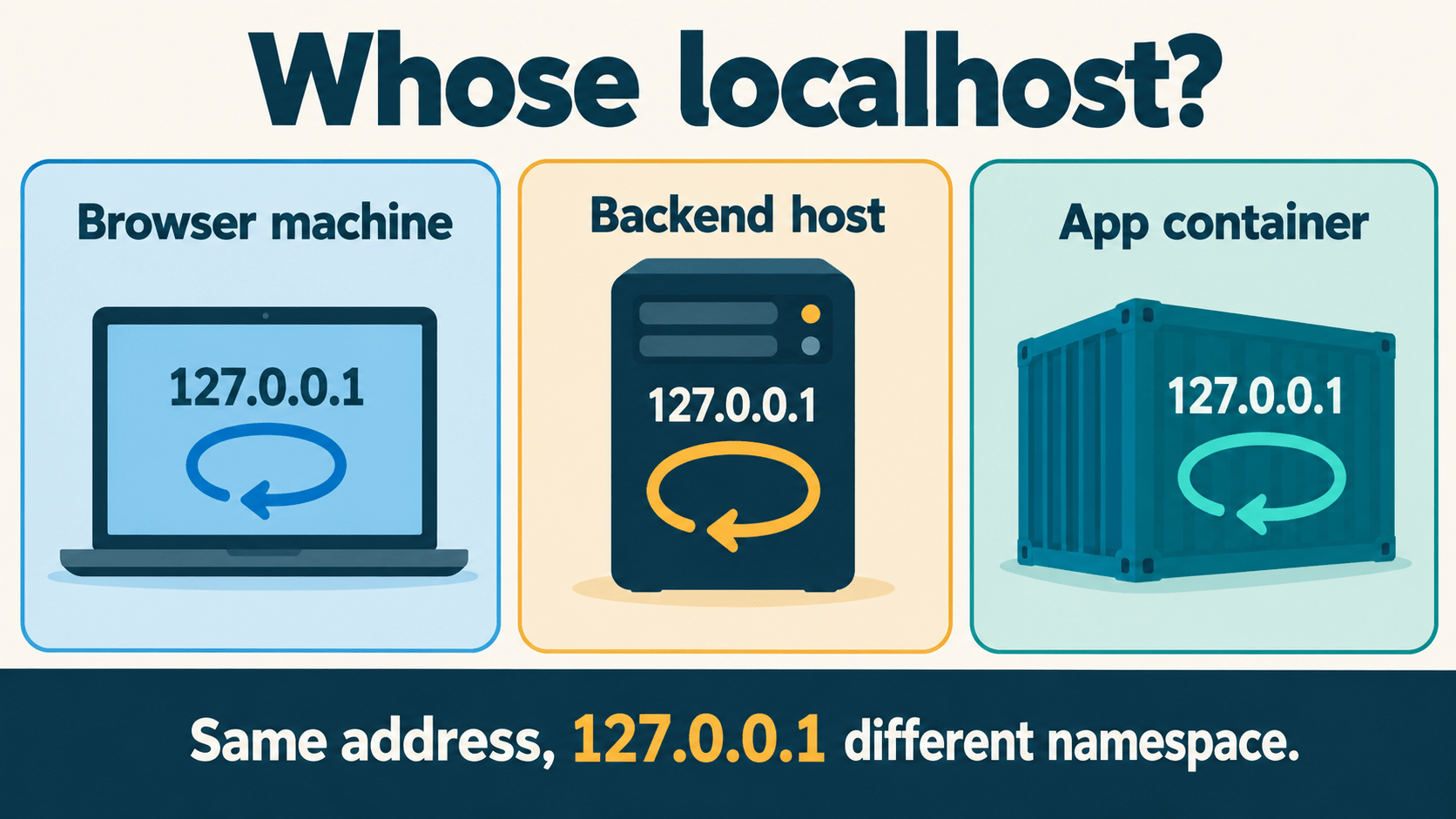
Be precise about whose localhost you mean. A browser request to 127.0.0.1 targets the browser user's computer. A request from a hosted backend targets the backend's own network namespace. A backend in the cloud does not reach a user's laptop model just because both use the same localhost URL.
Some desktop and bring-your-own-model applications intentionally connect a local browser to a local runtime. That is a different architecture and needs its own origin, local-access, and authorization design. For the shared-service example here, keep the application backend responsible for user access and resource admission.
Choose one documented API contract
Ollama's native chat endpoint accepts a model and a messages array at POST /api/chat. Streaming defaults to true. With stream:false, a successful response is a single JSON object whose text answer is in message.content.
The Ollama streaming guide documents newline-delimited JSON, or NDJSON. Do not pass that stream to a parser expecting Server-Sent Events merely because another provider uses SSE.
LM Studio's server documentation describes starting its local server from the Developer tab or with:
lms server start
LM Studio offers its own API and compatibility endpoints. Choose a documented endpoint, request shape, response shape, and authentication configuration together. Do not assume a native Ollama request works unchanged at an LM Studio endpoint, or that “compatible” means every feature of another API is supported.
For a first integration, record:
- Runtime version and API endpoint.
- Actual model identifier and whether inference is local or cloud-routed.
- Streaming mode, output field, and completion/error signals.
- Authentication and the network path from the backend.
These documented patterns reflect official specifications; verify endpoints against your active server version.
Select an available local model explicitly
Use Ollama's documented model inventory endpoint:
curl --noproxy '*' --max-time 10 \
  http://127.0.0.1:11434/api/tags
Read the actual models entries and copy the exact intended name. An inventory check can catch a missing or misspelled name; it does not reserve memory, prove the model can load, or establish that it performs local inference.
The Ollama authentication documentation shows that a cloud model can also be invoked through a local API after sign-in. Loopback transport and local inference are separate facts. Verify the chosen model and cloud configuration rather than relying on the hostname or a naming convention alone.
If you already downloaded and verified the local qwen3:0.6b example from the Ollama library, this is a small non-streaming request:
curl --noproxy '*' --max-time 30 \
  http://127.0.0.1:11434/api/chat \
  -H 'Content-Type: application/json' \
  -d '{
    "model": "qwen3:0.6b",
    "messages": [
      {"role": "user", "content": "Say hello in one sentence."}
    ],
    "stream": false
  }'
This is a documented-protocol example. Substitute a model you have verified locally if using another one. The client deadline is a chosen demonstration setting; a client timeout does not prove upstream generation stopped.
Inspect message.content, the completion fields, and whether the answer satisfies the task. done:true describes protocol completion, not factual accuracy. A length-limited, empty, or irrelevant answer can still fail your application's acceptance criteria.
Use the bounded Python example
The downloadable native API client uses Python's standard library. It has a fixed 127.0.0.1 endpoint, checks the model name against the inventory, disables environment proxies, refuses automatic HTTP redirects, and bounds JSON/NDJSON reads. It sends no model download request and performs no automatic retry.
To use it, run it on the same host as the already-running runtime. Replace YOUR_INSTALLED_LOCAL_MODEL with the actual name you independently verified as local:
python3 native-api-example.py --model 'YOUR_INSTALLED_LOCAL_MODEL'
For streaming:
python3 native-api-example.py \
  --model 'YOUR_INSTALLED_LOCAL_MODEL' --stream
Running that file makes a real inference request on your machine. Its header states the preconditions. Verify the script against your local environment, driver, and network policy before deploying to a shared service.
The example's 30-second socket timeout applies to blocking operations; it is not a whole-request wall-clock deadline. Its 1 MiB total response limit, 64 KiB line limit, and 256-token output setting are selected example limits, not vendor defaults or recommended production budgets. The Modelfile parameter reference documents num_predict; the chosen setting is not a quality guarantee. Choose limits for your workload and model.
Handle streams as incomplete until they finish
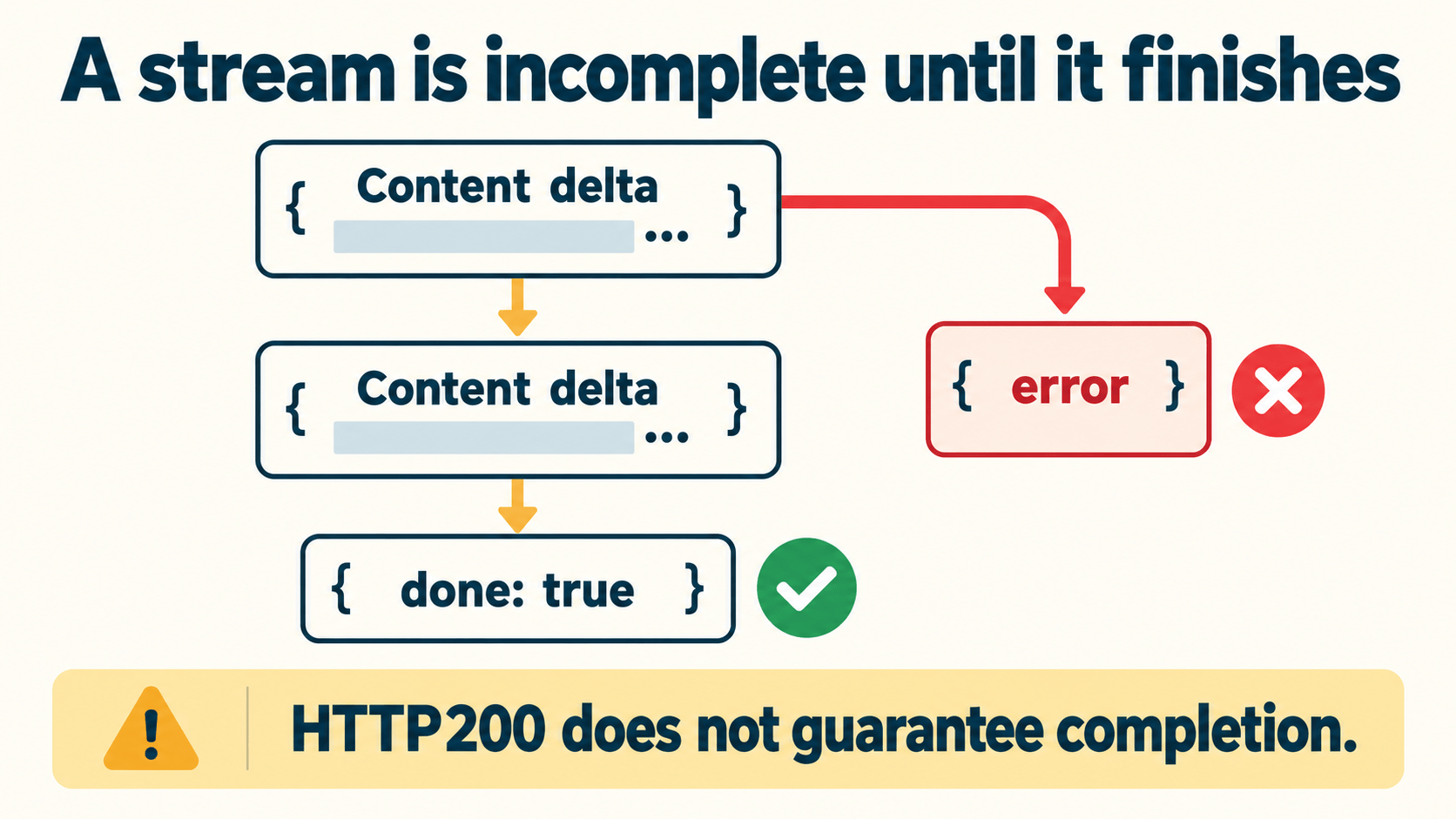
For native Ollama streaming, parse complete NDJSON lines. Network chunks do not necessarily align with JSON objects. Inspect every decoded object for an error and require the documented terminal completion signal.
The Ollama error guide explains an important case: a failure during streaming can arrive as an error object after the HTTP response has started. The status code cannot retroactively change.
| Response condition | What your handler should do |
|---|---|
| Complete valid text stream with terminal completion | Apply the application's result acceptance checks |
| Error object after partial text | Mark the task failed; preserve partial text only as visibly incomplete |
| End of connection before completion | Mark incomplete, not successful |
| Invalid UTF-8/JSON or unexpected structure | Stop parsing and report a protocol failure |
| Response exceeds your selected limits | Stop consuming; record a bounded failure |
The sample does not forward arbitrary runtime error bodies to the user or logs. Keep diagnostics useful without collecting prompts, credentials, or retrieved documents by default.
Streaming can let a user see partial content earlier. It does not guarantee faster inference or a fixed first-token latency. For models with thinking or tool fields, verify the actual response contract; this example displays text content only and does not execute tools.
Plan timeouts, cancellation, and admission together
An HTTP timeout and runtime cancellation are different events. If the client stops waiting, treat the upstream outcome as unknown until the runtime's actual behavior or other evidence establishes what happened. Do not automatically retry an expensive generation and assume the previous one stopped.
Separate these controls in your application design:
| Control | Question it answers |
|---|---|
| Admission limit | May this user start another request now? |
| Queue bound | How many requests may wait, and for how long? |
| Input/context/output policy | What work can a single admitted request request? |
| Client deadline | How long will this caller wait? |
| Runtime cancellation | Can active compute be stopped, and how is that confirmed? |
| Reconciliation | What happened to a task whose caller disconnected? |
The code download implements none of the server-side admission, identity, queue, or accounting layers. Begin with a small workload, measure it on your actual hardware, and choose concurrency based on the observed memory and latency behavior. Avoid increasing context and parallelism together while diagnosing a failure.
Check model availability at startup, but also handle load failures and runtime changes at request time. A model listed in the inventory can still fail to load or become unavailable.
Check localhost, containers, and remote paths separately
The Ollama FAQ documents a default listener at 127.0.0.1:11434. Loopback reduces direct exposure through other interfaces; it is not a per-user authentication boundary. Other processes able to reach that namespace may still connect.
For containers, distinguish the host from each container:
- A backend container's 127.0.0.1 normally targets that container, not the host runtime.
- Containers on a shared private network may use a service name and internal port instead of host loopback.
- Publishing a container port is a separate exposure decision. Inspect the actual publish address and reachability; do not infer it from the application's internal bind alone.
This guide does not provide a copy-and-run Docker or reverse-proxy deployment. Select a topology, then verify the listener, published ports, forwarding rules, authentication, and routes from each relevant location.
If the runtime moves to a remote host, DigitalOcean and Hostinger both offer small VPS plans. Their Vantaige listings (DigitalOcean, Hostinger) show current entry pricing. Keep the model endpoint private either way.
A failed curl request from one location is not proof that a port is safely blocked everywhere. It could reflect a stopped service, DNS failure, wrong address, or timeout. Record what was tested, from where, and the actual failure.
Configure authentication deliberately
Ollama's authentication guide says its local API does not require authentication. Do not expose that raw service as a public multi-user application. If another host needs access, design an authenticated private path with appropriate transport protection and network controls.
LM Studio supports API tokens in 0.4.0 or newer. Its docs state that API authentication is disabled by default. Enable the requirement in Server Settings, create an appropriately scoped token, and supply it from the backend. A dummy string used to satisfy an SDK parameter is not a substitute for real server-enforced authentication.
Keep actual tokens outside browser code and source control. Test both authorized and unauthorized requests against the configured endpoint. Review token permissions separately from your application's tenant authorization. CORS policy controls browser cross-origin behavior; it does not authenticate non-browser callers or replace resource authorization.
Complete the integration test matrix
The integration test matrix is a proposed live-test worksheet. Its observations remain not_run. The separate parser-validation record concerns only in-memory byte fixtures.
| Proposed scenario | Acceptance to verify |
|---|---|
| Intended model selected | Exact identity and local-routing evidence recorded |
| Single JSON answer | Valid structure, completion, and useful output |
| NDJSON answer | Correct deltas and terminal completion |
| Runtime error or truncated stream | No false success or silent retry |
| Timeout or size limit | Bounded client failure; upstream status not assumed |
| Unauthenticated caller | Rejected at the configured access boundary |
| Each intended and unintended network path | Reachability and authorization match the chosen topology |
| Concurrent work | Admission/queue policy holds without exceeding chosen capacity |
Use synthetic prompts and a controlled environment for these checks. Do not fault-inject on a shared production runtime merely to complete a checklist.
Before connecting real user data, download the network-boundary checklist, fill in the actual topology and controls, and complete the relevant matrix rows. A successful first request is the start of that review, not its conclusion.
Get the best new AI tools and guides, weekly
One short email a week. The tools worth trying, the guides worth reading, nothing else.
No spam. Unsubscribe anytime.
Aymen B
Contributing writer at Vantaige, covering the AI tools ecosystem.