Cold Email Deliverability in 2026: The Technical Guide That Actually Explains It
Cold Email Deliverability in 2026: The Technical Guide That Actually Explains It
Cold email deliverability is the gap between what you send and what actually lands in front of a prospect. Every tool listicle mentions it. Almost none explains why emails miss the inbox in the first place, or what the infrastructure underneath actually does. This guide covers authentication records, domain strategy, warmup ramps, sending velocity, list hygiene, content signals, and placement monitoring in plain language a non-engineer can act on. Following the checklist below, well-configured outbound systems consistently reach 85 to 95 percent inbox placement. If your sequences are running but replies are flat, the root cause is almost always one of the seven layers this guide addresses.
TL;DR: Authentication (SPF + DKIM + DMARC) is now mandatory for Gmail and Yahoo senders as of 2024.
Never send cold email from your primary business domain. Use a dedicated sending domain or subdomain.
Warmup every new inbox for a minimum of 30 days before cold sends begin.
Cap cold sends at 30 to 50 per inbox per day and rotate across multiple inboxes.
Verify every list before sending. A bounce rate above 2% damages sender reputation fast.
What Does "Cold Email Deliverability" Actually Mean?
Cold email deliverability means the percentage of your sent messages that reach the recipient's primary inbox, not the spam folder, promotions tab, or a bounce report. Globally, the average inbox placement rate sits at 83.5% across all senders in 2025 per Validity's benchmark, but that average includes newsletters and transactional mail. Cold outbound, when run without proper infrastructure, lands far lower. The good news: senders who fully configure authentication and warm their domains consistently hit 90 percent or better.
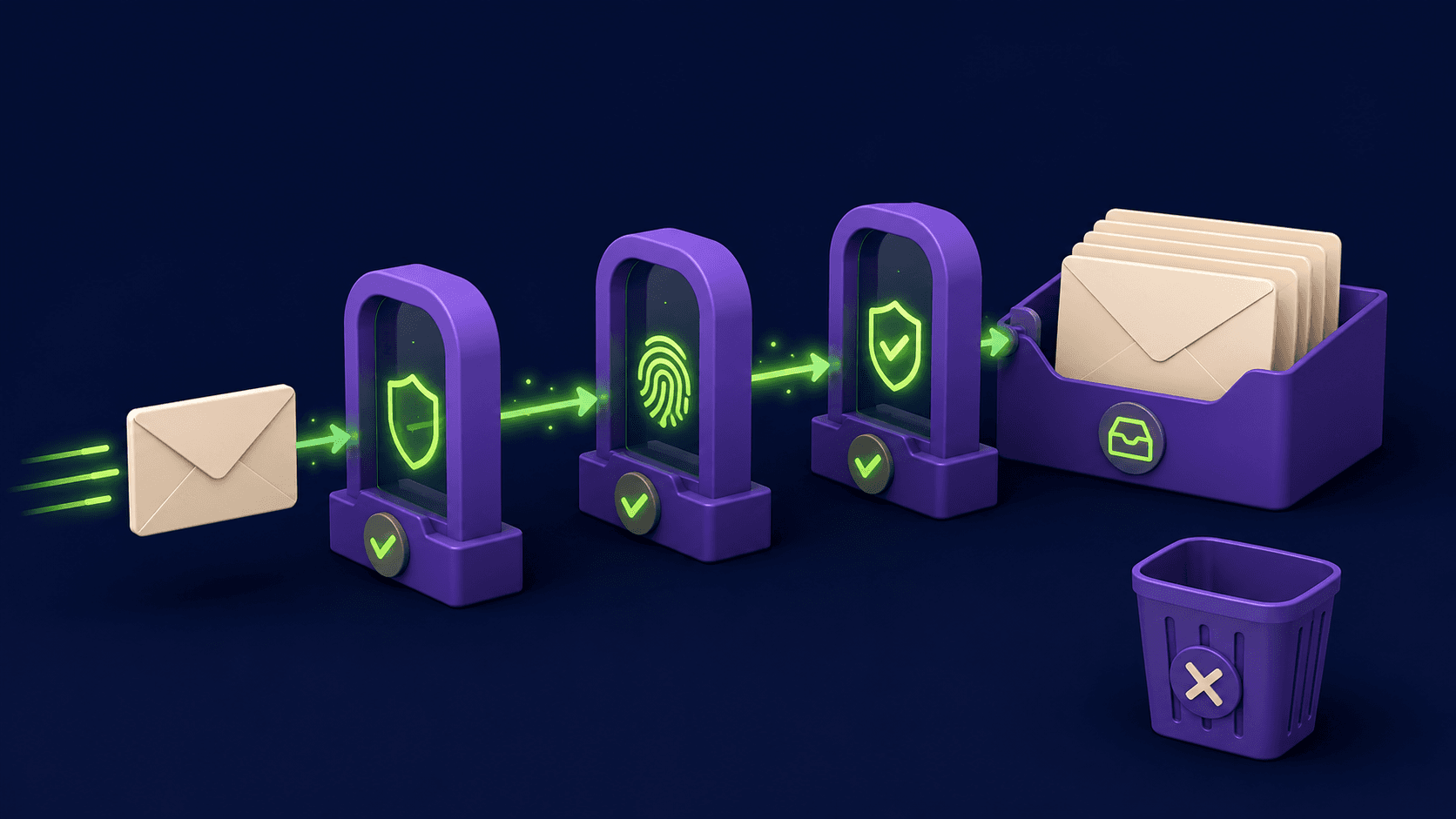
Placement is determined by a scoring process that happens in milliseconds at the receiving mail server. That server checks your authentication records, evaluates your sending domain's reputation, scans the message content, and compares your behavior against historical patterns. Getting the infrastructure right before you send a single cold email is the only reliable way to influence that score.
How Does SPF Work, and What Does It Actually Do?
SPF (Sender Policy Framework) is a DNS record that tells receiving mail servers which IP addresses are allowed to send email for your domain. If a message arrives claiming to be from your domain but originates from an IP not listed in your SPF record, the receiving server can reject it or mark it as suspicious.
To set one up: go to your domain registrar's DNS settings and add a TXT record on the root domain (or sending subdomain). A basic SPF record looks like this:
v=spf1 include:_spf.google.com ~allThe ~all at the end means "soft fail" everything not listed. For cold email, you usually want -all (hard fail) once you are confident all your sending sources are listed. Common mistakes: listing too many include statements (the limit is 10 DNS lookups per SPF evaluation), and forgetting to add the IP or domain of your cold email platform (Smartlead, Instantly, Lemlist, etc.) to the record.
How Does DKIM Work, and Why Do You Need It?
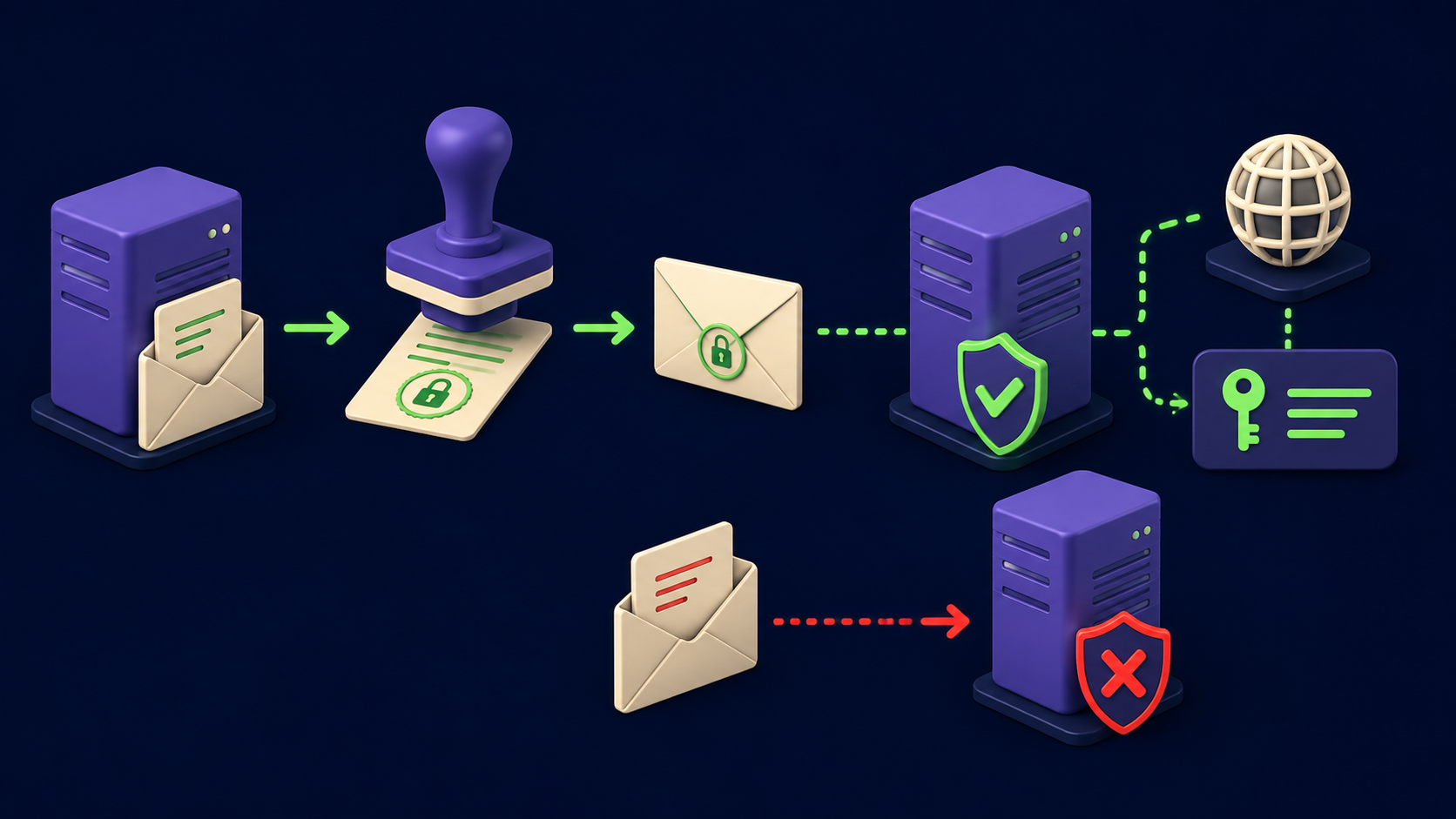
DKIM (DomainKeys Identified Mail) uses a cryptographic signature to prove that a message was sent by someone who controls the signing domain and that the message content was not altered in transit. The sending server signs outgoing mail with a private key. The receiving server fetches the corresponding public key from your DNS and verifies the signature.
Your cold email platform (for example, Smartlead or Instantly) will generate the DKIM keys for you and show you the DNS record to add. It looks like a long TXT record on a subdomain such as mail._domainkey.yourdomain.com. Add it, wait up to 24 hours for propagation, then verify it using a tool like MXToolbox. The most common mistake is letting the platform auto-generate a DKIM key but never actually adding the DNS record, which means messages go out unsigned.
How Does DMARC Work, and Is It Now Required?
DMARC (Domain-based Message Authentication, Reporting, and Conformance) ties SPF and DKIM together and tells receiving servers what to do when a message fails both checks. It is configured as a DNS TXT record on _dmarc.yourdomain.com.
A minimal DMARC record looks like this:
v=DMARC1; p=none; rua=mailto:[email protected]Yes, it is required. Google and Yahoo announced in October 2023 that all bulk senders (defined as anyone sending more than 5,000 messages per day to Gmail or Yahoo users) must have a DMARC record with at least p=none. That enforcement went live in February 2024 and tightened further in November 2025, with non-compliant emails now subject to temporary or permanent rejections. Microsoft followed with similar requirements in early 2025.
The three DMARC policy levels are: p=none (monitor only, no action taken), p=quarantine (failing mail goes to spam), and p=reject (failing mail is blocked). Start at p=none with aggregate reporting enabled so you can see what is signing correctly before tightening the policy. Aim for p=quarantine on sending domains within 30 days of setup. Also note: Google's spam complaint rate threshold is 0.1% as a safe ceiling and 0.3% as the hard cap where deliverability penalties begin.
Why Should You Never Send Cold Email from Your Primary Domain?
Your primary business domain (the one on your website, your support email, your invoices) carries years of hard-earned sender reputation. Cold outreach generates bounce rates and spam complaints at volumes that marketing or transactional mail does not. A single burned primary domain can disable your entire company's email credibility: sales, support, receipts, and onboarding flows all share that reputation pool.
The standard approach is to register one or more dedicated sending domains and point them back to your primary brand visually without sharing DNS reputation. For example, if your company is acme.com, you might register getacme.com, tryacme.com, or acme-hq.com. These domains are separate MX environments with their own SPF, DKIM, and DMARC records.
Subdomains of your primary domain (like outreach.acme.com) offer some isolation but not complete separation. If the subdomain gets flagged, the damage can propagate to the root domain's reputation in Google's eyes. For serious cold email volume, separate registrations are safer. You can run multiple sending domains simultaneously and rotate across them, which also limits the blast radius if one domain takes a reputation hit. Tools like Lemlist support multi-domain rotation natively.
What Is Inbox Warmup, and How Long Does It Actually Take?

Inbox warmup is the process of building a sending history on a new domain or mailbox before you use it for cold outreach. Mail servers assign reputation scores based on behavioral signals: how often recipients open your mail, whether they reply, whether they move it from spam to inbox. A brand-new domain has zero history, so servers default to treating it cautiously.
A realistic warmup plan looks like this, per mailbox:
Days 1 to 7: 5 to 10 sends per day. These should be real or simulated peer-to-peer emails, not cold pitches. Warmup platforms (built into Smartlead and Instantly, or standalone tools) automate this by sending your inbox messages to a pool of real addresses that open, reply, and mark as "not spam."
Days 8 to 14: Increase by 20 percent per day, reaching 25 to 30 sends.
Days 15 to 30: Maintain 30 to 50 sends per day while starting to mix in first cold sends at low volume (10 to 20 per day).
Day 30 onward: Full cold send capacity, 30 to 50 per inbox per day. Warmup traffic continues in the background at 30 to 40 percent of daily volume.
Warmup is not a one-time graduation. Thirty days of inactivity resets a domain to cold status, so warmup interactions should run continuously even during active campaigns. The minimum timeline from domain registration to campaign-ready is 30 days. Skipping this step and blasting from a fresh domain is the single most common reason cold email operations fail in the first week.
How Many Emails Per Day Per Inbox Is Safe?
The ceiling for cold outreach from a single mailbox is 30 to 50 emails per day. Sending above that threshold on a relatively new domain is a fast path to spam filter triggers. The practical implication: volume requires infrastructure, not just a bigger send button.
If you need 500 cold sends per day, you need 10 to 17 warmed mailboxes rotating across one or more sending domains. Platforms like Smartlead and Instantly handle this rotation automatically, spreading sends across your inbox pool throughout the day and varying send times to mimic human behavior. Sending 500 emails in a two-hour burst from one inbox looks like a machine (because it is), and modern spam filters know what that pattern looks like.
Inbox rotation also distributes risk. If one inbox accumulates complaints, the others remain clean. Aim for no more than 3 to 5 mailboxes per sending domain to keep domain-level volume in a safe range. For agencies managing multiple clients, see how this multi-inbox structure fits into the full AI outbound stack and how it compares between the two leading platforms in Smartlead vs Instantly.
How Should You Verify and Clean Your List Before Sending?
List hygiene is the practice of removing invalid, risky, or dead email addresses before they reach your sending queue. A bounce rate above 2 percent signals to receiving servers that you are not maintaining your list, and that signal lowers inbox placement for every future send from that domain. Senders who maintain bounce rates under 1.5% see 10 to 12 percent higher inbox placement than those who do not.
The verification process involves running your list through a tool before you ever send. NeverBounce and ZeroBounce both check whether an email address actually exists, whether the mailbox is accepting messages, and whether the address appears on known spam trap lists. Hunter includes a verification layer inside its prospecting workflow. Run verification on every list, even scraped data from tools you trust, because B2B data degrades at roughly 20 to 30 percent per year as people change jobs and domains expire.
Specific things to remove before sending:
Hard bounces from any prior send (remove immediately, never retry)
Role addresses (info@, support@, admin@): low reply rates, high complaint rates
Catch-all domains where verification returns "accept-all": these are risky, send to them in small batches only
Anyone who previously unsubscribed or marked prior outreach as spam
What Content and Copy Signals Trigger Spam Filters?
Spam filters analyze message content alongside authentication and reputation signals. A perfectly authenticated email can still land in spam if the copy looks like a mass marketing message. The core principle: write emails that look like they came from a human who spent 10 minutes on them, not a template run through mail merge.
Signals that increase spam scoring:
Excessive links in the body (more than 1 to 2 in a cold first-touch email)
Image-heavy emails or emails that are mostly images with minimal text
Tracked links using redirect domains with bad reputation
Subject lines using all-caps words or excessive punctuation
HTML-heavy templates with tables, divs, and inline CSS (plain text or minimal HTML performs better for cold)
High use of spam-trigger vocabulary: "free," "guaranteed," "no risk," "act now"
Mismatched display name and From address
For cold outreach specifically, the best-performing format in 2026 is short plain-text emails under 150 words with one clear ask. Keep tracked links out of the first email in a sequence. Track opens minimally and be aware that Apple Mail Privacy Protection inflates open rates, making open-rate-based triggers unreliable for iOS recipients.
How Do You Monitor Whether Your Emails Are Actually Hitting the Inbox?
Sending without monitoring is guessing. Three categories of tools give you visibility into actual placement:
Seed-based inbox testing sends a copy of your email to a set of test addresses across major providers (Gmail, Outlook, Yahoo) and reports where it landed. Tools like GlockApps and Mail-Tester do this. Run a seed test before every new sequence goes live.
Platform-native health scores inside Smartlead and Instantly surface domain health, bounce trends, and spam complaint rates per mailbox. Check these dashboards daily during active campaigns. A sudden rise in bounce rate or a drop in reply rate on a specific inbox is an early warning sign.
Google Postmaster Tools is a free dashboard from Google that shows your domain reputation, spam rate as measured by Gmail, and IP reputation over time. If you are sending any volume to Gmail addresses, set this up on every sending domain. It is free and takes 15 minutes to configure. The spam rate signal is the closest thing to ground truth you can get from Google itself.
For a broader look at the tools that make this whole system work, the cold email tools category covers the full stack from sequencing to enrichment.
Pre-Send Infrastructure Checklist
Before any cold sequence goes live, every item in this checklist should be confirmed:
Area | Check | How to Verify | Status |
|---|---|---|---|
Authentication | SPF record published and valid (under 10 DNS lookups) | MXToolbox SPF checker | |
Authentication | DKIM key published and signing verified | MXToolbox DKIM checker | |
Authentication | DMARC record live with | MXToolbox DMARC checker | |
Domain | Sending domain is separate from primary business domain | Confirm DNS records are on a non-primary domain | |
Domain | Sending domain is at least 30 days old before campaign start | Check registration date in registrar | |
Domain | MX record exists on sending domain (for reply routing) | MXToolbox MX lookup | |
Warmup | Each mailbox warmed for 30+ days before cold sends | Check warmup platform send history | |
Warmup | Warmup traffic still running during campaign (not stopped) | Confirm warmup is enabled in platform | |
Volume | Cold sends capped at 30 to 50 per inbox per day | Check platform sending limits per mailbox | |
Volume | Send times distributed across business hours, not burst-sent | Check platform time-delay settings | |
List | List verified with NeverBounce, ZeroBounce, or Hunter | Verification report showing under 2% invalid | |
List | Role addresses (info@, support@) removed | Filter list by address pattern | |
List | Previous hard bounces and unsubscribes suppressed | Suppression list imported to platform | |
Content | No more than 1 to 2 links in first-touch email | Review email body | |
Content | From name matches domain (no spoofed display names) | Send test to personal Gmail and inspect headers | |
Monitoring | Google Postmaster Tools configured for each sending domain | Log into postmaster.google.com | |
Monitoring | Seed test run on campaign email template (GlockApps or Mail-Tester) | Seed test report showing inbox placement |
Building and running this infrastructure is what Vantaige does before any client campaign goes live. If you want to see what a properly configured outbound system looks like in practice, including how it fits with enrichment, personalization, and CRM sync, the AI automation service operator playbook walks through the full architecture.
Want your outbound system built for you?
Vantaige designs and builds done-for-you AI outbound: data, enrichment, personalization, sequencing, and CRM sync, wired into one system your reps actually use. Book a free outbound audit and we will find the revenue leaking from your pipeline.
Common Cold Email Deliverability Mistakes (and the Fix for Each)
1. Using the primary business domain for outreach. Fix: register a dedicated sending domain and move all cold sends there immediately.
2. Publishing SPF but exceeding the 10 DNS lookup limit. Fix: consolidate your include statements or use an SPF flattening service. SPF records that exceed 10 lookups silently fail, causing DMARC to fail alongside them.
3. Setting up DKIM in the platform but never adding the DNS record. Fix: after generating keys in your platform, verify publication with MXToolbox before sending anything.
4. Setting DMARC to p=none and never reviewing the aggregate reports. Fix: configure the rua reporting address and check reports weekly. The reports show you which sending sources are passing and which are failing alignment. Free tools like dmarcian parse them into readable dashboards.
5. Warming up for 14 days and calling it done. Fix: commit to 30 days minimum, keep warmup traffic running during campaigns, and re-warm any inbox that goes dark for a month.
6. Skipping list verification on "fresh" scraped data. Fix: verify every list, regardless of source. B2B databases, even paid ones, carry 15 to 30 percent stale records. One campaign to a dirty list can take weeks to recover from.
7. Measuring success only by open rate. Fix: track reply rate and bounce rate as primary indicators. Open rates are distorted by Apple Mail Privacy Protection. Reply rate and placement (from seed tests and Postmaster Tools) are the reliable signals.
These same infrastructure principles apply whether you are using a standalone cold email tool or building an integrated outbound system. The B2B niches where AI outbound pays best and the rate card for AI automation operators both assume this infrastructure is already in place. Without it, the most sophisticated personalization in the world lands in spam.
Frequently Asked Questions
Do I need DMARC if I am sending fewer than 5,000 emails per day?
You technically fall below Google's and Yahoo's "bulk sender" threshold at under 5,000 per day, but DMARC is still strongly recommended. First, you may cross that threshold faster than you expect as you scale. Second, having DMARC in place improves deliverability even below the threshold, because receiving servers use its presence as a trust signal. A p=none record with reporting takes about 20 minutes to configure and has no downside. Do it on every domain you own that sends email.
How many sending domains and inboxes do I need for 200 cold emails per day?
At 30 to 50 cold sends per inbox per day, 200 sends per day requires 4 to 7 warmed inboxes. A safe configuration is two sending domains with 3 mailboxes each (6 total). This keeps volume per domain low, limits your blast radius if one domain takes a hit, and gives you room to scale by adding inboxes without touching new domains. Budget roughly 45 days from domain registration to campaign-ready to account for warmup time plus DNS propagation.
What is the difference between a hard bounce and a soft bounce?
A hard bounce means the email address does not exist or the domain is invalid. The message cannot be delivered under any circumstances. Remove hard bounces from your list immediately and never retry them. A soft bounce is a temporary delivery failure: the mailbox is full, the server was temporarily down, or the message was too large. Most platforms retry soft bounces automatically. If an address soft-bounces three or more times, treat it as a hard bounce and remove it. Hard bounces above 2% of sends trigger serious reputation damage at the domain level.
Should I use subdomains or separate registered domains for cold email?
Separate registered domains offer better isolation. A subdomain like outreach.yourcompany.com still shares some reputation signals with the root domain in Google's infrastructure. If the subdomain accumulates spam complaints, there is documented risk of bleed to the root. Separate registrations (like getyourcompany.com) give you a completely independent reputation environment. The tradeoff is cost and management overhead. For low-volume individual senders, subdomains are acceptable. For agencies or anyone running multi-client outbound, separate domains per client are the correct choice.
How does inbox rotation actually work in tools like Smartlead or Instantly?
When you add multiple mailboxes to a campaign in Smartlead or Instantly, the platform distributes outgoing sends across those inboxes automatically. Rather than sending all 300 daily emails from one account, it might send 50 from each of 6 accounts, staggered throughout the day. Each inbox maintains its own sender reputation independently. Some platforms also support "mailbox pools" where a contact is consistently associated with one specific inbox throughout a sequence, so follow-up emails come from the same address as the initial contact, which improves conversational coherence and deliverability signals.
What does Google Postmaster Tools actually show, and how often should I check it?
Google Postmaster Tools shows your domain reputation (ranging from bad to high), your IP reputation, spam rate as measured by Gmail's own systems, delivery errors, and encryption compliance. The spam rate dashboard is the most important: it shows the percentage of Gmail recipients who marked your mail as spam, sampled from Gmail's actual spam button clicks. Check it at least weekly during active campaigns. If your spam rate approaches 0.1 percent, pause sends and diagnose the cause (list quality, content, or a specific sequence step) before continuing. Postmaster data typically has a 24 to 48 hour lag.
References
Related from Vantaige
Get the best new AI tools and guides, weekly
One short email a week. The tools worth trying, the guides worth reading, nothing else.
No spam. Unsubscribe anytime.
Aymen B
Contributing writer at Vantaige, covering the AI tools ecosystem.
Similar articles

How to Build an AI Outbound Stack From Scratch: The Complete 2026 Playbook

The Complete AI SDR Setup Guide: Deploy an Autonomous Outreach Agent in 30 Days