Claude in Slack (2026): App vs Connector Setup, Permissions, and Fixes When It Breaks
# Claude in Slack (2026): App vs Connector Setup, Permissions, and Fixes When It Breaks
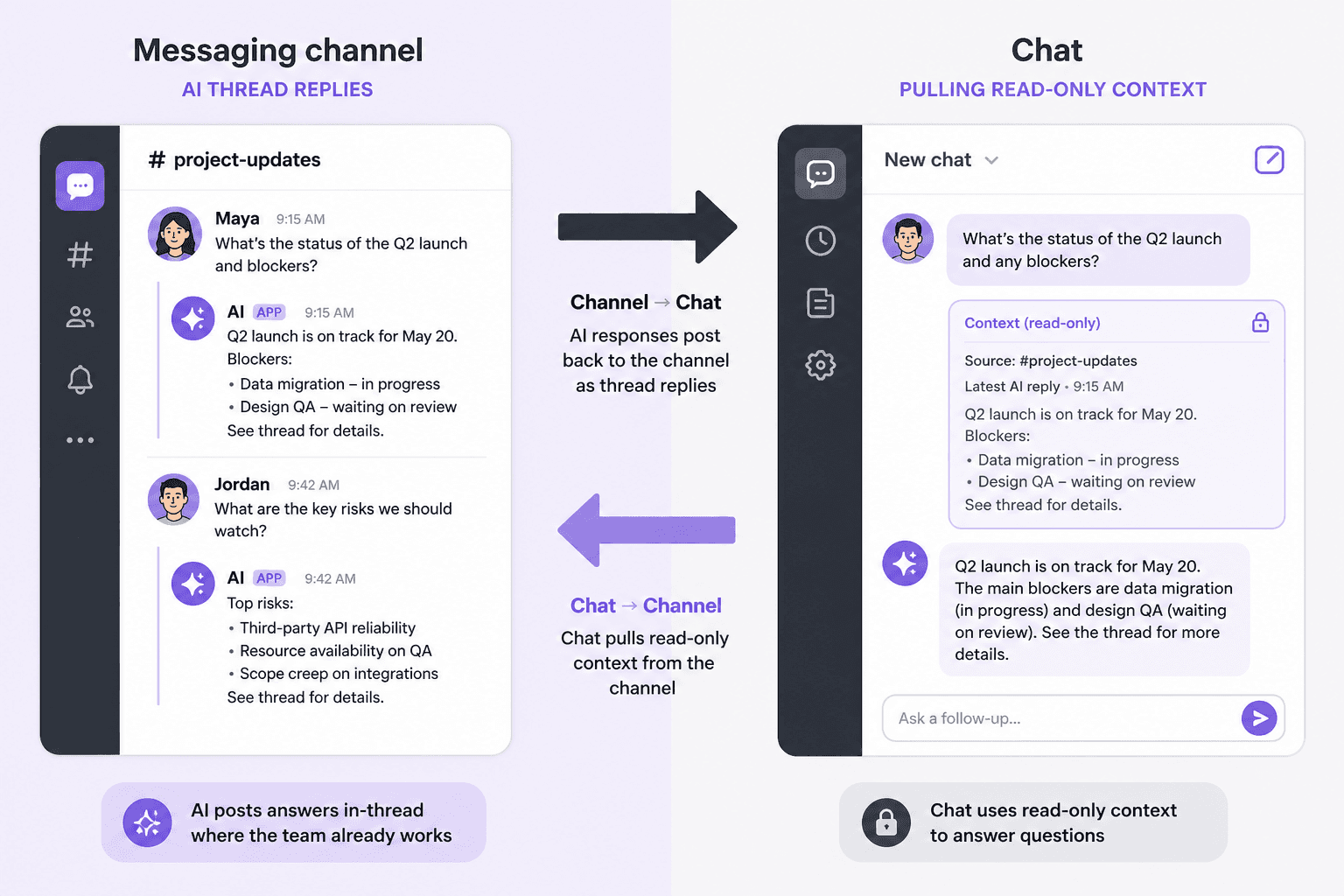
You are probably mixing up two products that share a brand and a Slack OAuth screen. One puts Claude inside Slack (Claude Tag / the Claude Slack app). The other puts Slack inside Claude (the Slack connector on claude.ai). They point opposite directions, bill differently, and fail differently. As of 2 September 2026 - after the 3 August 2026 Claude Tag cutover - getting the path wrong wastes an Owner’s afternoon and an Admin’s patience.
This is a dual-path setup + ordered fix list. Same voice as our Outlook “not working” guide: symptoms first, then the permission that actually blocks you.
Concrete requirements come from Anthropic and Slack docs. Third-party summaries are labeled when used.
Some product links may earn a commission. That does not change the setup order.
Table of contents
1. TL;DR
9. FAQ
10. References
TL;DR {#tldr}
Two directions. Claude Tag (Slack app):
@Claudelives in channels, can act with org tools, shared identity, consumption billing to the organization for channel work. Slack connector: claude.ai can search Slack as a data source; it is not a teammate that posts back as your channel bot.Cutover: Anthropic switched Claude in Slack over to the Claude Tag experience on 3 August 2026. Use Tag setup docs for Team/Enterprise. Legacy Claude Code-in-Slack remains the documented path on Pro/Max (Tag is Team/Enterprise only).
Who can set Tag up: Claude Primary Owner or Owner only - Anthropic is explicit that the Admin role cannot run Tag access/channel setup. Slack side usually needs a workspace admin for install +
@Claude connect.Pairing:
/invite @Claude→@Claude connect→ paste the code atclaude.ai/admin-settings/claude-tagwithin 15 minutes.Billing split: Channel
@Claude→ org usage / Tag spend limits. DMs with Claude → the user’s own Claude account.When NOT: Free/Pro/Max orgs expecting Tag; ZDR organizations (Tag stores memory - unavailable); “we only needed search in claude.ai” (use the connector); regulated channels without guest / memory policy.
The dual-path map (read this before installing) {#dual-path}
| Question | Claude Tag / Slack app | Slack connector |
|---|---|---|
| Where do you work? | Inside Slack | Inside claude.ai (web/desktop) |
| Can Claude reply in a channel? | Yes (when Tag is launched and channel allowed) | No - read/search oriented from Claude’s side |
| Identity | Org agent identity for channel work; user account for DMs | Your Claude user + Slack OAuth scopes |
| Plan gate | Team or Enterprise (Tag beta); not Free/Pro/Max | Team/Enterprise org enablement for managed connectors; see connector docs for your plan |
| Admin shape | Claude Owner/Primary Owner + Slack admin | Claude Owner enables connector; users auth (unless Enterprise-managed auth) |
| Typical job | “@Claude summarize this thread / open the PR / follow up tomorrow” | “Using Slack, find what we decided about X last week” while chatting in Claude |
If your CEO said “put Claude in Slack,” they mean Path A. If your analyst said “let Claude see Slack,” they often mean Path B - and will be confused when @Claude never appears.
You can run both. They do not replace each other.
Path A - Claude Tag / Claude in Slack (setup) {#path-a}
Primary walkthrough: Set up Claude Tag and What is Claude Tag?. Slack’s help article Use Claude in Slack still covers Marketplace install + account connect; note the Tag replacement banner for Aug 2026.
Prerequisites (fail these and nothing else matters)
| Prerequisite | Why |
|---|---|
| Claude Team or Enterprise | Tag is not on Free / Pro / Max |
| Not on Zero Data Retention (ZDR) | Tag stores channel memory / transcripts; ZDR orgs cannot use it |
| Routines enabled for the org | Until enabled, mentions reply that Claude is unavailable |
| Signed-in user is Claude Owner / Primary Owner | Admin role cannot complete Tag setup writes |
| Slack workspace admin available | Install + @Claude connect |
| Team plan usage credits loaded | Channel work draws org usage; nothing runs without balance |
| Optional: Claude GitHub App already linked | Turns the GitHub step into repo selection |
Ordered setup (Owner + Slack admin)
1. Open
claude.ai/admin-settings/claude-tag→ Start setup (or Resume).2. Install the Claude app from the Slack Marketplace (
claude.com/claude-for-slack/ Marketplace listing). Approve scopes. Reinstall over an existing app if prompted - settings keep.3. In Slack:
/invite @Claudein a channel, then send@Claude connectalone. Claude returns a one-time pairing code (expires in 15 minutes). Only a Slack workspace (or Grid) admin can run this.4. Paste the code on the Claude Tag setup page. Confirm the workspace name appears.
5. Choose reply scope: Entire workspace (recommended) or Specific channel IDs.
6. Select at least two tools your team uses (selection ≠ connection yet).
7. Connect GitHub via the Claude GitHub App (org install, not a personal account) - or skip if Claude will not touch code.
8. For each other tool: create a Claude service identity (email like a new hire), invite it, create that account’s API key, paste into setup. Treat least privilege as the default.
9. Launch Claude Tag: set a monthly spend limit (presets include $500 / $1,000 / $2,500 / $5,000 / Unlimited / Custom up to $1,000,000 per setup docs), optionally notify members, click Launch.
10. Verify: invite Claude →
@Claude summarize what this channel decided this week→ expect a threaded reply with model footer. Then@Claude what can you access from this channel?for connected tools.
Until Launch completes, mentions get “Claude is disabled in this channel.” That is expected, not a broken install.
Surfaces after launch
Channel tagging: shared Claude, org-billed, org tools/memory for that scope.
DMs: user’s own Claude capabilities; billed to the user.
AI assistant panel: Claude icon in Slack’s AI assistant header (Slack/Anthropic surfaces).
Migration note (if you had the earlier app)
Migrate from the earlier Claude in Slack: same Slack app and @Claude handle; no automatic data migration of the old experience’s memory into Tag. Channel work shifts to org identity. You can phase Legacy vs New per scope with the version setting during cutover. Re-configure tools/access rather than assuming the old personal links carry over.
Path B - Slack connector into Claude (setup) {#path-b}
Primary: Use connectors to extend Claude’s capabilities and Anthropic’s Claude ↔ Slack product notes.
What you get
Claude on claude.ai / Desktop / mobile can use Slack as a connected app - search / retrieve context your Slack user can already see. Connectors inherit source permissions. This path does not turn Claude into a channel coworker. If you need replies in #eng, you are back on Path A.
Team / Enterprise enablement
1. Owner / Primary Owner: Organization settings → Connectors → Browse → add Slack for the team.
2. Enabling makes it available; it does not auto-auth every member (unless you use Enterprise-managed auth, beta, which can inherit on login).
3. Each user: Customize → Connectors → connect Slack → complete OAuth.
4. Owners can set org-wide tool policies: Always allow / Needs approval / Blocked for read vs write style actions. Users cannot widen past the org ceiling.
5. In a chat:
+→ Connectors → toggle Slack on for that conversation (or rely on Auto suggestion).
Connector vs Tag - do not conflate OAuth
Installing the Slack app for Tag and connecting the Slack connector are separate consent moments. Success on one does not imply the other works. Troubleshooting the wrong console wastes hours.
Permissions cheat sheet {#permissions}
| Control | Where it lives | Who sets it |
|---|---|---|
| Install Claude Slack app | Slack Marketplace / org app approval | Slack workspace / org admin |
Pair workspace (@Claude connect) | Slack channel | Slack workspace admin |
| Launch Tag, spend limits, channel access, guest policy | claude.ai/admin-settings/claude-tag | Claude Owner / Primary Owner |
| Member Access (anyone in Slack / Claude org / role-gated) | Organization settings → Claude Tag | Owner; role-gated mode is Enterprise |
| Guest channels (Restrict / Channel only / Allow) | Tag guest settings | Owner |
| Memory / audit of Tag activity | Tag admin Audit | Owner |
| Enable Slack connector for org | Organization settings → Connectors | Owner |
| Per-user Slack connector OAuth | Customize → Connectors | Each user (or managed auth) |
| Connector action allow/block | Connector tool permissions | Owner |
| Enterprise custom roles for connectors / “Claude Tag in Slack” capability | Role editor | Enterprise Owners |
Most common human error: assigning the project to a Claude Admin and wondering why Tag setup shows “View setup guide” instead of Start setup. Promote an Owner or have an Owner run it.
Common failures, in order {#fixes}
Work top-down. Do not reinstall five times before checking plan and role.
Fix 1 - “Claude is disabled in this channel”
Cause: Tag not launched, or channel outside the allowed scope.
Do: Finish Launch on the setup page. Confirm workspace under Where Claude Tag works. If you chose Specific channel, invite Claude and add that channel ID.
Not: Reinstalling the Marketplace app alone.
Fix 2 - Setup shows View guide / Go to chat, not Start setup
Cause: Signed-in Claude user is not Owner/Primary Owner (or wrong org).
Do: Switch org; ask an Owner to run setup or promote you at claude.ai/admin-settings/members.
Fix 3 - @Claude connect refused / names another admin
Cause: You are not a Slack workspace (or Grid) admin.
Do: Send Anthropic’s suggested admin message from the setup docs; redeem the code within 15 minutes while both of you are online.
Fix 4 - Pairing code expired or already used
Cause: 15-minute TTL or single use.
Do: Run @Claude connect again; paste immediately.
Fix 5 - Mentions say Claude is unavailable / does no work
Cause: Routines disabled for the Claude org (Tag prerequisite).
Do: Admin enables Routines at claude.ai/admin-settings/claude-code (per Tag setup docs), then retry.
Fix 6 - Works in DM, dead in channels (or opposite billing surprise)
Cause: Different identity and billing paths. DMs = user account; channels = org Tag.
Do: For channel silence, check Launch + channel allowlist + Member Access. For surprise bills, check whether spend was channel (org) or DM (user).
Fix 7 - “I can’t reach …” a tool that you just connected
Cause: Connection saved after the thread started, or Access bundle incomplete.
Do: Start a fresh thread; open Access bundle / Connectors on the workspace entry; confirm the tool’s API key under Claude’s service account; check the tool’s own audit log for Claude’s identity.
Fix 8 - GitHub step stuck on a personal install
Cause: Claude GitHub App installed on a user account; Tag needs a GitHub organization.
Do: Org owner installs on the org; grant repos from Tag admin afterward.
Fix 9 - Connector connects but Claude “can’t see Slack”
Cause: Org connector not enabled; user never OAuth’d; connector toggled off in the chat; verified-domain Enterprise restriction forcing the company Claude account.
Do: Owner adds Slack under Organization Connectors; user reconnects under the org Claude login; enable Slack for the conversation; if you see the “corporate identity belongs to an Enterprise…” message, stop using a personal Claude account for that domain.
Fix 10 - Spend blocks mid-task
Cause: Org-wide or per-channel Tag limit (alerts at 75% / 95%). Work that would exceed the limit is declined, not silently truncated.
Do: Owner raises limit at usage/Claude Tag settings; user can request more from Slack when blocked.
Fix 11 - Guests in the channel, Claude goes quiet
Cause: Default Restrict on guest channels.
Do: Owner sets guest policy intentionally (Restrict / Channel only / Allow) after a security review - do not “Allow” casually on customer-shared channels.
Fix 12 - Still on Legacy expectations after 3 Aug 2026
Cause: Cutover to Tag; old personal workflows / docs.
Do: Read the migrate guide; set version per scope if you need a phased Legacy→New move; re-teach the team that channel Claude is an org teammate, not “my Pro sidebar.”
Pro / Max vs Team / Enterprise {#plans}
| Plan | Claude Tag (shared org agent in Slack) | Claude Code in Slack (earlier / Pro-Max path) | Slack connector |
|---|---|---|---|
| Free | No | No (see current Claude Code access rules) | Limited / check connector directory for your tier |
| Pro / Max | No Tag | Documented as remaining setup path for individuals (Claude Code in Slack) | Per connector availability |
| Team / Enterprise | Yes (Tag beta) | Retiring in favor of Tag for those workspaces | Owner-enabled connectors + optional managed auth |
If you are on Pro/Max and Googling Tag setup, stop. Either upgrade to Team for Tag, use the Pro/Max Claude Code-in-Slack path for coding handoffs, or use the connector for read-side context in claude.ai.
Watch out / when NOT to put Claude in Slack {#when-not}
Watch out
1. Admin ≠ Owner on Claude - Tag setup will not start.
2. Opposite-direction install - connector when you needed Tag (or vice versa).
3. 15-minute pairing codes - schedule Owner + Slack admin overlap.
4. Channel vs DM billing - org vs user meters.
5. Memory - Tag retains channel/workspace memory; review Audit; delete when projects end.
6. Guest channels - default deny is a feature; overriding it is a security decision.
7. ZDR - Tag unavailable; do not promise leadership a Slack agent on a ZDR tenant.
8. Tool keys on a shared human login - use Claude’s own service accounts so revoke is clean.
When NOT to put Claude in Slack
You only needed search-from-Claude → Path B connector, not a channel agent.
The workspace is mostly external guests / customers and you are not ready to set guest policy.
Leadership wants “AI in Slack” but refuses Team/Enterprise spend or Owner time - Path A will not happen on Pro seats.
Your compliance model forbids long-lived channel memory or third-party posting bots in #general.
The real pain is Office mail/docs - fix Claude Office add-ins first; Slack Tag will not triage Outlook for you.
You expected Claude to silently read private channels the inviting user cannot see - connectors and Slack perms still mirror human access.
FAQ {#faq}
Is Claude Tag the same as the Slack connector?
No. Tag = Claude acting in Slack. Connector = Slack as a source inside Claude. Opposite directions.
When did the old Claude in Slack app go away?
Anthropic’s help center: Claude in Slack switched to the Claude Tag experience on 3 August 2026. Use Tag docs for Team/Enterprise going forward.
Can a Claude Admin set up Claude Tag?
No. Primary Owner or Owner only. Admins cannot perform those setup writes.
Who pays when I @Claude in a channel?
The organization (Tag consumption / spend limits). DMs bill to the individual’s Claude account.
Why does Claude Tag need Routines enabled?
Anthropic’s setup guide lists Routines as a prerequisite; without them, Claude replies that it is unavailable and does no work.
Does Claude Tag work on Pro or Max?
No. Tag is Team and Enterprise. Pro/Max users follow the separate Claude Code in Slack documentation path for coding delegation, not Tag.
Can Claude in Slack send messages to channels I am not in?
Channel Claude only operates where it is invited / allowed by admin scope. The connector only sees what your Slack permissions allow. Neither is a backdoor past Slack ACLs.
We connected Slack in Claude settings but @Claude does nothing in Slack - why?
You likely finished Path B only. Install/launch Claude Tag (Path A) for in-Slack replies.
Is conversation history shared between Slack and claude.ai?
Anthropic’s Tag FAQ: Slack conversations stay separate from Claude chat history and vice versa. Disconnect/uninstall retention follows Anthropic’s stated deletion windows plus your Slack retention policies.
What’s the fastest pilot that won’t blow the budget?
Private pilot channel → Specific channel scope → Low spend cap (e.g. $500 preset) → one read-only tool + optional GitHub → Autofix-style write tools later. Measure accepted useful threads for two weeks before org-wide Entire workspace.
References {#references}
All accessed September 2026:
1. Anthropic Help - What is Claude Tag?
2. Anthropic Docs - Set up Claude Tag
3. Anthropic Docs - Migrate from the earlier Claude in Slack
4. Slack Help - Use Claude in Slack
5. Anthropic Help - Use connectors to extend Claude’s capabilities
6. Anthropic Help - Authorize MCP connectors for your entire organization
7. Anthropic Docs - Claude Code in Slack (Pro/Max path; Team/Enterprise → Tag)
8. Anthropic - Claude and Slack (product context; verify dates against Help Center)
Related from Vantaige {#related}
Claude Add-In for Outlook, Excel & Word: Setup Guide (2026) - the other surface teams confuse with “Claude at work”
Claude for Outlook Not Working? Every Fix in Order (2026) - same ordered-fix voice for Office
Claude vs Microsoft Copilot in Word, Excel and Outlook (2026) - when Slack Tag is still the wrong place for document work
Fix MCP Server Not Working: Stdout Bug & 1-Line Fix - if you extend Tag/connectors with custom MCP
---
One short email a week: the dual-path installs teams get backwards, the Owner-only gates that block Fridays, and the “when NOT” notes before you @Claude in #general. Subscribe at vantaige.io.
Get the best new AI tools and guides, weekly
One short email a week. The tools worth trying, the guides worth reading, nothing else.
No spam. Unsubscribe anytime.
Aymen B
Contributing writer at Vantaige, covering the AI tools ecosystem.