Ship Your First MCP Server in 20 Minutes (2026)
Ship Your First MCP Server in 20 Minutes (2026): A Complete Beginner Guide
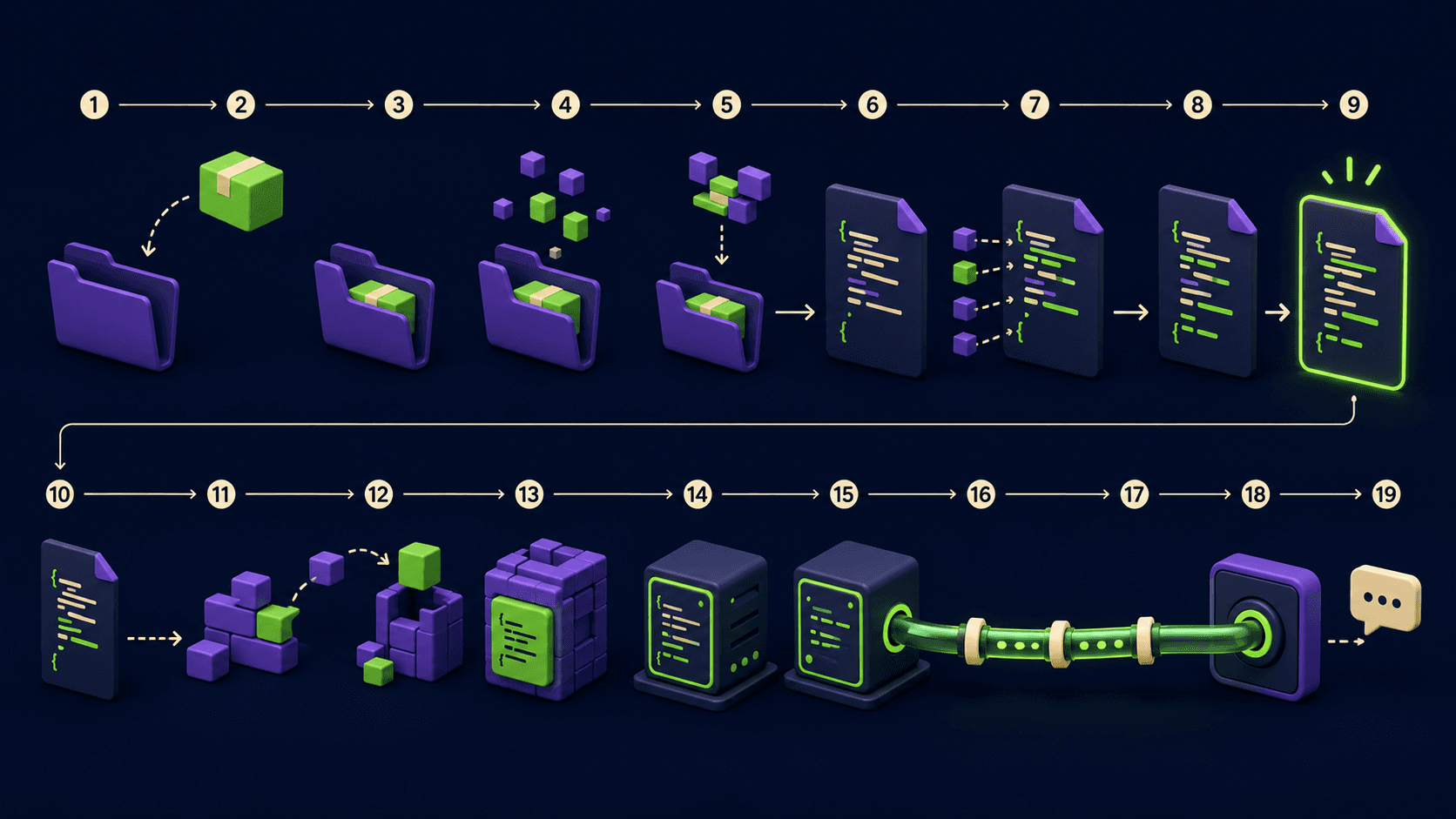
An MCP server is a small program that exposes tools, data, and prompt templates to an AI agent over a standard protocol, so Claude Code, Cursor, or Codex can call your code instead of guessing. This guide walks you from an empty folder to a working server that an agent calls live, in about 20 minutes, using only the official SDK and stdio transport. By the end you will have a real scaffold, a working config entry, and a verified tool call.
The Model Context Protocol matters now because it stopped being a niche idea. By Q1 2026 the ecosystem crossed roughly 97M monthly SDK installs and 10,000+ public servers, and the Linux Foundation took the spec under open governance. If you build for AI agents, MCP is the wire format you target.
An MCP server exposes tools, resources, and prompts over JSON-RPC.
Local servers use stdio transport: stdin in, stdout out.
Claude Code is MCP-native; Cursor and Codex add servers via config.
A minimal working server is one file and one config block.
Never print logs to stdout. It corrupts the JSON-RPC stream.
Written by the Vantaige engineering team. Published 2026-05-19. Last reviewed 2026-05-19. About 12 min read.
What is an MCP server and why build one?
An MCP server is a process that speaks the Model Context Protocol so an AI client can discover and invoke capabilities you define. It is the standard way to give an agent real abilities: query your database, hit an internal API, read a file format, or run a deterministic function instead of hallucinating the answer.
The protocol defines three capability types. Tools are functions the model can call, with user approval, like get_invoice(id). Resources are file-like data the client can read, like an API response or a config file. Prompts are reusable templates that help a user start a task. Most first servers ship one or two tools and nothing else, which is the right scope.
Communication is JSON-RPC 2.0 messages. The client sends a request, your server returns a result or an error. For local servers the messages travel over stdio transport: the client launches your process, writes requests to its stdin, and reads responses from its stdout. That single detail explains the most common beginner failure, covered below.
You build one when an agent keeps getting something wrong that your code already does right. Instead of pasting data into a chat, you expose a tool, and the agent calls it on demand with structured arguments and a structured response.
What do you need before you start?
You need one runtime, one package, one client, and about 20 minutes. Pick Node.js 18+ for the TypeScript SDK or Python 3.10+ for the Python SDK. Both are official and maintained by the protocol authors at modelcontextprotocol.io. You do not need a server host, a domain, or a paid API to run a local stdio server.
Here is the full checklist before you write code:
A runtime: Node.js 18 or newer, or Python 3.10 or newer.
A package manager:
npmfor TypeScript, oruv/pipfor Python.An MCP client: Claude Code, Cursor, or Codex installed and working.
A terminal you can run commands in, and a text editor.
One idea for a single tool. Start with something trivial like a string transformer or a fixed lookup.
Do not start with authentication, remote hosting, or OAuth. The local stdio path has the fewest moving parts, and every concept transfers to remote transports later.
How do you scaffold an MCP server in TypeScript?

Create a project, install the official SDK, register one tool, and connect a stdio transport. The whole server is one file. The TypeScript SDK uses a high-level McpServer class that handles the JSON-RPC protocol details for you, so you write a tool handler and a transport line, nothing more.
Step 1. Create the project and install the SDK. The package name has been moving as the SDK approaches its v2 release, so confirm the exact name in the current MCP SDK docs. The v1.x line widely uses @modelcontextprotocol/sdk; newer docs reference @modelcontextprotocol/server. Use whichever the official quickstart shows today.
mkdir hello-mcp && cd hello-mcp
npm init -y
npm pkg set type="module"
npm install @modelcontextprotocol/sdk zod
npm install -D typescript @types/node
npx tsc --init
Step 2. Write the server. Create server.ts. This registers one tool named greet that takes a name and returns a greeting, then starts the stdio transport. The import paths differ slightly between SDK majors, so match them to the version you installed.
import { McpServer } from "@modelcontextprotocol/sdk/server/mcp.js";
import { StdioServerTransport } from "@modelcontextprotocol/sdk/server/stdio.js";
import { z } from "zod";

const server = new McpServer({
  name: "hello-mcp",
  version: "1.0.0",
});

server.registerTool(
  "greet",
  {
    description: "Return a friendly greeting for a given name.",
    inputSchema: { name: z.string().describe("Person to greet") },
  },
  async ({ name }) => {
    return {
      content: [{ type: "text", text: `Hello, ${name}. Your MCP server works.` }],
    };
  }
);

const transport = new StdioServerTransport();
await server.connect(transport);

// IMPORTANT: log to stderr, never stdout.
console.error("hello-mcp server running on stdio");
Step 3. Build and confirm it starts. Compile, then run it. Success looks like the process staying open with the stderr line printed and nothing on stdout. If it prints JSON or exits immediately, recheck your import paths against the installed SDK version.
npx tsc
node build/server.js
# expected on stderr: hello-mcp server running on stdio
# stdout stays silent until a client connects
How do you scaffold an MCP server in Python?
Install the mcp package, create a FastMCP instance, decorate one function with @mcp.tool(), and run it on stdio. Python is the shortest path: the official FastMCP helper infers the tool schema from your type hints, so a working server is under 10 lines.
Step 1. Set up the project and install the SDK.
mkdir hello-mcp-py && cd hello-mcp-py
python -m venv .venv
source .venv/bin/activate   # Windows: .venv\Scripts\activate
pip install "mcp[cli]"
Step 2. Write the server. Create server.py. The type hints become the tool's input schema automatically, and the docstring becomes the tool description the model reads.
from mcp.server.fastmcp import FastMCP

mcp = FastMCP("hello-mcp")

@mcp.tool()
def greet(name: str) -> str:
    """Return a friendly greeting for a given name."""
    return f"Hello, {name}. Your MCP server works."

if __name__ == "__main__":
    mcp.run(transport="stdio")
Step 3. Confirm it runs without crashing.
python server.py
# the process should stay open and produce no stdout
# stop it with Ctrl+C, then wire it into a client below
If the exact transport= value or import path differs in your installed version, check the current MCP SDK docs. The protocol authors version the Python and TypeScript SDKs independently, and the FastMCP API has changed across releases.
How do you connect the server to Claude Code, Cursor, or Codex?
Each client reads a small JSON config that tells it the command to launch your server over stdio. Claude Code is fully MCP-native and adds servers with a single CLI command or an .mcp.json file. Cursor and Codex use a similar JSON config block. The shape is the same everywhere: a server name, a command, and its arguments.
For Claude Code, the fastest path is the CLI. Run this from any directory, pointing at your built file:
claude mcp add hello-mcp -- node /absolute/path/to/hello-mcp/build/server.jsOr commit a project-scoped .mcp.json at your repo root so the whole team gets it:
{
  "mcpServers": {
    "hello-mcp": {
      "command": "node",
      "args": ["/absolute/path/to/hello-mcp/build/server.js"]
    }
  }
}
For Cursor, add the same block to ~/.cursor/mcp.json (global) or .cursor/mcp.json in the project. For Codex, the MCP server config lives in its TOML config file. The keys map one to one: command plus args, or for Python, command: "python" and args: ["/absolute/path/to/server.py"]. Use absolute paths. Relative paths are the second most common reason a server silently fails to load.
Restart the client after editing the config. In Claude Code, run /mcp to see connected servers and their tools. Ask the agent to call your greet tool with your name. A correct response that includes "Your MCP server works" confirms the full loop: client launched the process, sent a JSON-RPC request over stdin, and read the result from stdout.
What are the most common MCP server mistakes?

The top failures are stdout pollution, relative paths, missing input schemas, and version drift. None are hard to fix once you know the symptom. Here are the seven that cost beginners the most time, each with the fix.
Logging to stdout. Any
print()orconsole.log()writes into the JSON-RPC stream and the client reports zero tools. Fix: log to stderr only. We document this exact failure in our fix for an MCP server returning no tools in Claude.Relative paths in config. The client launches from its own working directory, not yours. Fix: always use an absolute path in
args.No input schema. Without a typed schema the model cannot form valid arguments. Fix: define a Zod schema (TypeScript) or type hints (Python) for every tool.
Forgetting to rebuild. Editing
server.tsbut running a stalebuild/server.js. Fix: re-runnpx tscbefore testing, or use a watch task.SDK version drift. Copying an import path from an old tutorial that no longer exists in your installed version. Fix: read the quickstart at modelcontextprotocol.io for the version you actually installed.
Not restarting the client. Config changes are read at launch. Fix: fully restart Claude Code, Cursor, or Codex, then check
/mcp.Crashing on bad input. An unhandled exception kills the process and the client drops every tool. Fix: validate inputs and return a structured error instead of throwing.
How do you go from one tool to a useful MCP server?
Add tools one at a time, keep each one deterministic, and return structured content the model can reason over. A useful server is usually three to eight focused tools, not one tool that does everything. The agent picks the right tool from your descriptions, so write tool descriptions like API docs, not marketing copy.
Practical progression after the hello server works:
Add a second tool that hits a real data source you control: a database read, an internal REST endpoint, or a file parser.
Add a resource if the agent needs to read a document or config rather than call a function.
Tighten schemas. Use enums and ranges so the model cannot send invalid arguments.
Return typed results. Structured JSON content beats a wall of text for downstream reasoning.
Keep tools side-effect aware. Mark anything that writes or deletes so a human approves it.
If you are wiring MCP into a larger automation, the same protocol plugs into workflow tools. We walk through that in the n8n MCP and Claude Code setup guide. And when an agent project grows past a few tools, splitting work across Claude Code subagents to save context keeps each agent focused on its own server surface.
Should you use stdio or a remote transport?
Use stdio for local, single-user servers and personal tooling. Use a remote transport when the server must run as a shared service, scale independently, or be reached over a network. For a first server, and for almost all developer-machine tooling, stdio is correct: zero networking, zero auth, the client owns the process lifecycle.
Factor | stdio transport | Remote transport |
|---|---|---|
Setup effort | Lowest. One config line. | Higher. Hosting, URL, auth. |
Who runs it | The client launches the process | You host it as a service |
Best for | Local dev tools, personal agents | Shared team or org services |
Auth needed | No | Usually yes |
Network | None. Pipes only. | HTTP over a network |
Start on stdio. The tool handlers you write do not change when you later move to a remote transport. Only the transport line and the deployment change, so nothing in this guide is throwaway work.
Frequently asked questions
What language should I use for my first MCP server?
Use Python with FastMCP for the shortest path, or TypeScript if your stack is JavaScript. Both are official SDKs maintained by the protocol authors and both support stdio. Python infers tool schemas from type hints, which means fewer lines for a first server. TypeScript gives you Zod schemas and tighter typing if you are already in a Node project.
Do I need to host an MCP server anywhere?
No, not for a local stdio server. The client launches your process directly and talks to it over stdin and stdout, so there is no port, no URL, and no hosting bill. Hosting only enters the picture when you choose a remote transport to share one server across a team or expose it over a network.
Why does my server show zero tools in the client?
The most common cause is writing logs to stdout, which corrupts the JSON-RPC stream the client parses. Move every log statement to stderr. The next most common causes are a relative path in the config, a stale build, or forgetting to restart the client. Check each in that order.
Is MCP only for Claude Code?
No. Claude Code is MCP-native, but Cursor and Codex both support MCP servers through a JSON or TOML config block, and the public ecosystem passed 10,000+ servers by Q1 2026. The same server you build here works across every compliant client without code changes, because the protocol, not the client, defines the contract.
How long does a first MCP server really take?
About 20 minutes for a working hello server: a few minutes to install the SDK, a few to write one tool, a few to wire the client config, and a few to verify the call. Most of the time goes into the first debug loop, usually the stdout-logging mistake, which is why this guide flags it up front.
Where is the authoritative MCP specification?
The official spec, quickstarts, and SDK references live at modelcontextprotocol.io, maintained by the protocol authors. Since the spec moved under Linux Foundation open governance and the SDKs version independently, treat that site as the source of truth for exact package names and import paths rather than any third-party tutorial, including this one.
Can one MCP server expose many tools?
Yes, and useful servers usually do, typically three to eight related tools. Register each with its own name, description, and input schema. The agent reads those descriptions to choose which tool to call, so keep each tool single-purpose and describe it like API documentation rather than bundling unrelated actions into one tool.
What is the difference between a tool, a resource, and a prompt?
A tool is a function the model calls with arguments and gets a result. A resource is read-only data the client can pull in, like a file or an API response. A prompt is a reusable template that helps a user start a task. Most first servers only need tools; add resources and prompts when a concrete need appears.
Related from Vantaige
References
Model Context Protocol, Build an MCP server quickstart, modelcontextprotocol.io
Model Context Protocol, Server concepts: tools, resources, prompts
Model Context Protocol, Specification, modelcontextprotocol.io
Official TypeScript SDK, github.com/modelcontextprotocol/typescript-sdk
Official Python SDK, github.com/modelcontextprotocol/python-sdk
Get the best new AI tools and guides, weekly
One short email a week. The tools worth trying, the guides worth reading, nothing else.
No spam. Unsubscribe anytime.
Aymen B
Contributing writer at Vantaige, covering the AI tools ecosystem.