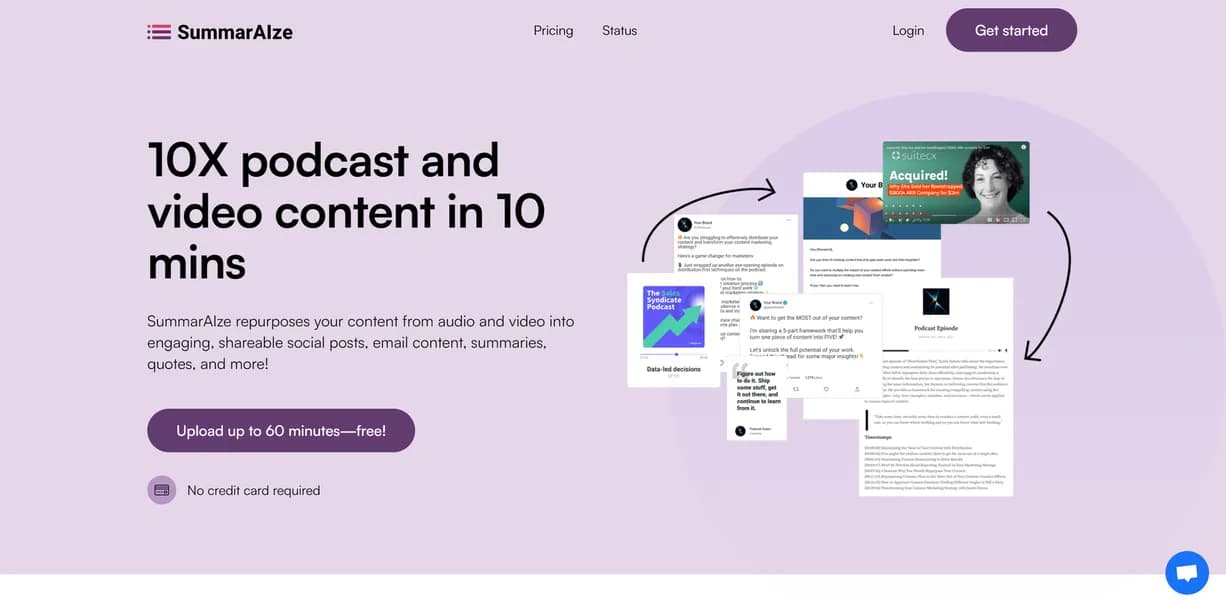

SummarAIze converts audio and video files into ready-to-publish social media posts and newsletters. It helps creators and marketing teams extract up to ten quotes from a single podcast episode. The tool lacks a mobile application, restricting users to desktop environments for all processing tasks.
What is SummarAIze?
Creators often expect AI repurposing tools to generate a month of content from one video automatically. SummarAIze requires more manual oversight than promised, but it reliably turns a one-hour podcast into a Substack newsletter and five LinkedIn posts in under ten minutes.
Developed by SummarAIze, this content repurposing platform targets solo creators and marketing teams. It solves the blank-page problem by processing MP3 or MP4 files and outputting formatted text.
- Primary Use Case: Converting long-form podcasts into formatted social media threads.
- Ideal For: Solo podcasters and small marketing teams on a budget.
- Pricing: Starts at $5.58 per month. This entry-level pricing beats most competitors by at least ten dollars.
Key Features and How SummarAIze Works
Media Import and Processing
- YouTube Integration: Paste a URL to process videos without downloading them first. (This only works for public videos).
- Multi-format Support: Upload MP3, MP4, WAV, and AAC files directly. (File size limits apply based on your subscription tier).
- Language Support: Transcribe and summarize content in over 50 languages. (Accuracy drops slightly for non-English dialects).
Content Generation and Formatting
- Social Media Templates: Apply 20 pre-formatted templates for LinkedIn and Twitter. (Custom template creation requires higher tiers).
- Newsletter Module: Generate structured email summaries for platforms like Substack. (Output often requires manual editing for brand voice).
- Custom Tone: Choose from five presets including Professional and Witty. (The Witty setting occasionally produces unnatural phrasing).
Extraction and Export
- Quote Extraction: Pull up to ten key quotes from a single recording. (You cannot request more than ten quotes per run).
- Timestamp Generation: Create clickable YouTube timestamps automatically. (Timestamps sometimes miss the exact topic transition by a few seconds).
- Export Options: Download generated text in PDF, Word, or Markdown formats. (Direct API export to CMS platforms is missing).
SummarAIze Pros and Cons
Pros
- Reduces manual drafting time from several hours to under five minutes per episode.
- Handles technical terminology well during multi-speaker recording transcriptions.
- Direct YouTube URL import saves local hard drive space and upload time.
- The $5.58 monthly GO plan costs significantly less than similar audio tools.
Cons
- The free tier provides too few minutes to process a standard 45-minute podcast episode.
- Speaker attribution fails frequently when recordings contain heavy background noise.
- Users cannot process files on the go due to the lack of iOS or Android apps.
Who Should Use SummarAIze?
- Budget-conscious podcasters: The $5.58 monthly plan offers enough features to handle a weekly show without breaking the bank.
- B2B marketing teams: The LinkedIn templates and newsletter module help teams extract more value from monthly webinars.
- Not for mobile-first creators: Vloggers who edit and publish entirely from their smartphones will find the desktop-only interface frustrating.
How does the pricing stack up?
SummarAIze Pricing and Plans
The Free Tier costs $0 per month but acts strictly as a limited trial. You cannot process a full-length podcast episode with the included minutes.
The GO Plan costs $5.58 per month ($67 billed yearly). It unlocks entry-level premium features and basic templates.
The PLUS Plan costs $6.67 per month ($80 billed yearly). This tier increases processing limits for regular weekly uploaders.
The PRO Plan costs $16.67 per month ($200 billed yearly). It adds bulk upload capabilities for processing multiple files simultaneously.
Enterprise pricing requires a custom quote. It provides tailored solutions and dedicated support for large organizations.
How SummarAIze Compares to Alternatives
Similar to Castmagic, SummarAIze turns audio into text assets. Castmagic offers more complex custom prompts and a slicker interface. SummarAIze wins on price, as Castmagic starts at $39 per month compared to SummarAIze at $5.58.
Unlike Podcastle, which includes a full audio recording and editing suite, SummarAIze focuses entirely on post-production text generation. Podcastle suits users who need to record remote interviews. SummarAIze works better for users who already have finished media files.
The Verdict for Solo Creators on a Budget
SummarAIze delivers massive value for independent podcasters who hate writing show notes.
The low entry price makes it an easy choice for beginners.
Large marketing agencies should look elsewhere. The lack of direct CMS integrations and mobile apps creates workflow friction for fast-paced teams. If you need advanced audio editing alongside text generation, try Podcastle instead.
The true test remains how well the AI adapts to highly technical niche topics over time.
User Reviews
No reviews yet. Be the first to share your experience!
Sign in to write a review.
Related articles
Guides and articles related to SummarAIze.

How to Repurpose One Blog Post Into 30 Pieces With AI (The Step-by-Step System)

The AI Content Automation Stack: 7 Tools That Run a Full Blog Without a Team

The Personal AI Productivity Stack (2026): One Tool Per Job, Nothing Extra

Undetectable AI Review (2026): What It Does, What It Costs, and 7 Alternatives

AI SOP Generator: Document Every Process in Your Business in a Weekend