How to Repurpose One Blog Post Into 30 Pieces With AI (The Step-by-Step System)

How to Repurpose One Blog Post Into 30 Pieces With AI (The Step-by-Step System)
Most content teams produce one asset, publish it once, then start the whole research-and-write cycle again. The result: a content calendar that is expensive to fill and slow to compound. A structured AI content repurposing system solves this by treating one well-researched blog post as a source document rather than a finished product. According to a 2026 survey of digital marketers compiled by SHNO, teams running active repurposing programs report 32% higher content ROI compared to teams that publish originals only, yet only 35% of marketers have a documented repurposing workflow in place. This guide gives you the exact 8-step SOP, tool by tool, with realistic time estimates and a concrete output table showing how 30 pieces come from one source post.
One 2,000-word blog post reliably yields 30 distribution-ready assets across six channels.
AI handles drafting; a human editor handles platform voice and brand fit in each step.
Total operator time per repurposing run: roughly 4.5 to 6 hours spread over two sessions.
The bottleneck is format-specific editing, not content creation. AI speeds up the first draft.
Every channel gets its own voice pass; copy-paste repurposing is the failure mode to avoid.
What Does a Full 1-to-30 Output Actually Look Like?
The table below shows the exact breakdown used in client content operations built by Vantaige. Counts are conservative; a longer post with more data points can yield more.
Format | Count | Platform | Primary tool |
|---|---|---|---|
LinkedIn posts (text-only, single insight) | 7 | ||
X (Twitter) threads | 4 | X / Twitter | |
Short-form video scripts (60-90 sec) | 5 | TikTok / Reels / Shorts | |
Carousel slides (multi-image posts) | 4 | LinkedIn / Instagram | |
Quote graphics (single stat or pull-quote) | 6 | LinkedIn / X / Instagram | |
Email newsletter edition | 1 | ||
Scheduled social queue (Buffer-distributed) | 3 | Multi-channel | |
Total | 30 |
Each format gets a distinct voice pass in Step 5 below. Skipping that step is the most common reason repurposed content underperforms.
Why Does Content Repurposing Work Better With AI Than Without It?
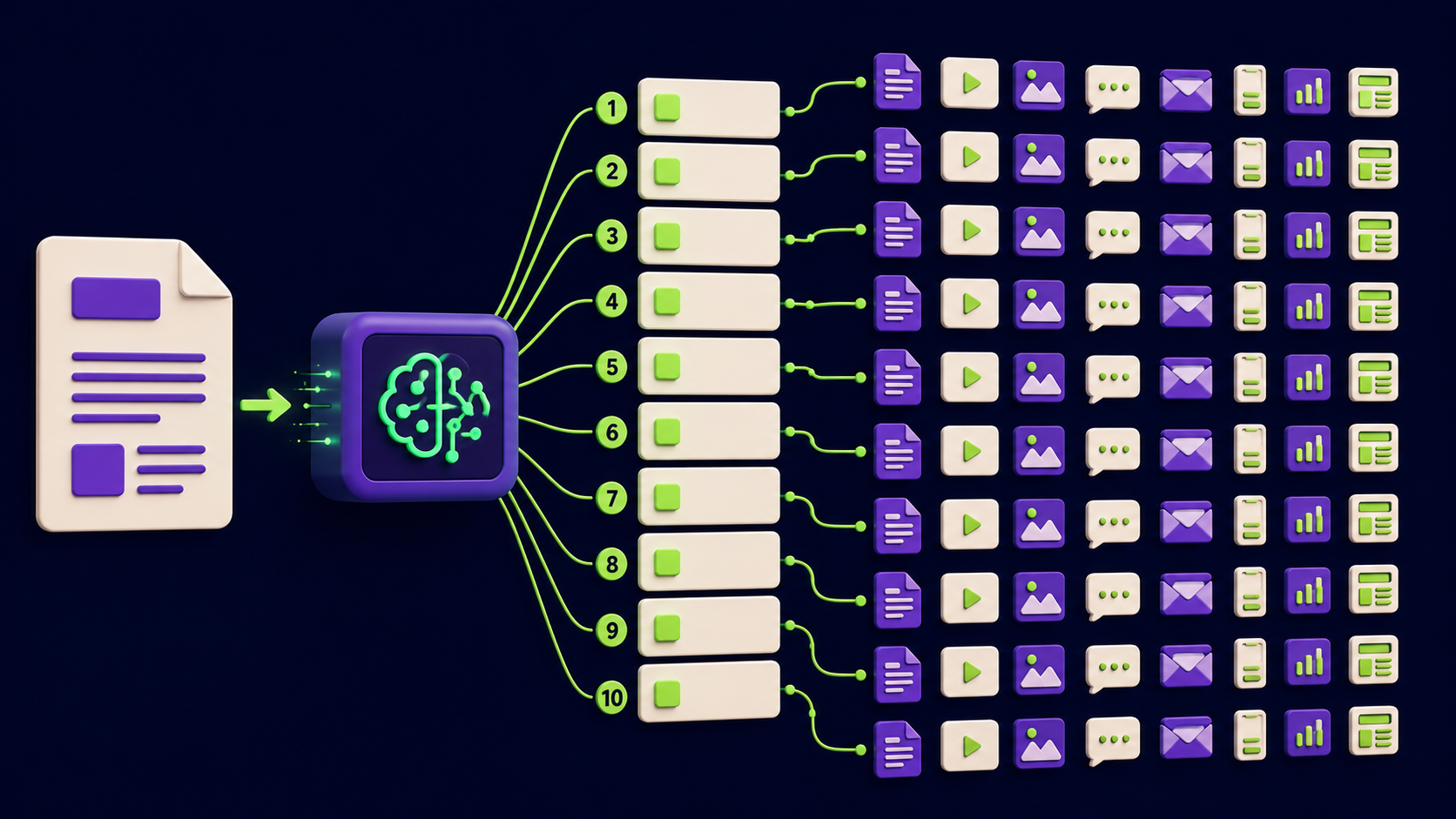
AI accelerates the extraction and first-draft phases so that human editors spend their time on judgment calls rather than typing. HubSpot's 2025 State of Marketing data found that marketers using AI tools save roughly 3 hours per piece of content produced. Applied to 30 pieces, that is a potential 90 hours recovered per repurposing cycle. The same survey noted that the top use of generative AI among marketers is repurposing existing content, ahead of writing copy from scratch.
The practical reason repurposing outperforms repeated original content creation: the research is already done. The source post contains the claims, the structure, and the insights. AI extracts atomic ideas, reframes them per platform, and outputs a first draft in seconds. What remains is editing for tone, which is faster than ideating from zero.
See also the AI content automation stack for a complementary look at which tools handle which parts of the publishing pipeline end-to-end.
Step 1: Choose a Source Post Worth Repurposing
Not every post deserves a 30-piece run. Choose posts that are already earning traffic, answer a question with a clear claim, or contain original data. Posts that performed in search or email are the safest bets because they have already been validated by an audience.
Criteria for a good source post:
500+ organic sessions in the past 90 days, OR a newsletter open rate above your list average when it first shipped.
Contains at least 5 discrete, standalone ideas (not one long argument).
Uses your real POV, not a generic overview. Generic overviews produce generic repurposed content.
Was published or last updated within 18 months. Outdated posts require a fact-check pass before repurposing.
Tool: Google Search Console (filter by page, check clicks + impressions). No additional AI tool required at this stage.
Time estimate: 15 minutes.
Step 2: Extract Atomic Ideas From the Post
An atomic idea is a single claim, insight, or data point that stands on its own without the surrounding context of the blog post. This step is where AI earns its role. Paste the full post into your AI tool of choice and prompt it to return a numbered list of standalone assertions, each under 30 words.
A 2,000-word blog post reliably contains 10 to 15 atomic ideas. For a post this length, aim to extract exactly 10, then rank them by specificity. Vague assertions ("AI helps with content") get cut. Specific claims ("Teams using AI drafts cut per-piece time from 4 hours to 45 minutes per operator survey data") make it to the list. Those 10 atomic ideas become the raw material for the 30 pieces.
Tool: Claude or ChatGPT (paste full post, prompt: "Extract 10 standalone, specific, citable insights from this article. Each must be one sentence under 30 words and require no context from the article to understand.").
Time estimate: 20 minutes, including review and trimming.
Step 3: Map Each Atomic Idea to a Format
Format mapping is a mechanical step that prevents bottlenecks later. Each atomic idea gets assigned to one or more output formats before any drafting begins. This produces a manifest: a simple spreadsheet where each row is an idea and each column is a format that idea will feed.
The mapping logic:
Stat or benchmark: quote graphic, X thread opener, LinkedIn post.
Process or step list: carousel, short-form video script, newsletter section.
Opinion or hot take: LinkedIn post, X thread, quote graphic.
How-to with before/after: short-form video script, carousel.
Definition or explainer: X thread, newsletter intro, LinkedIn post.
One atomic idea can appear in multiple formats. A strong stat might become a quote graphic, one slide of a carousel, AND the first line of a LinkedIn post. That overlap is intentional. Each output is different enough in structure that the same audience encounters it differently on each platform.
Tool: Any spreadsheet (Airtable or Google Sheets). Fill manually or ask AI to populate the format-mapping table from your extracted idea list.
Time estimate: 25 minutes.
Step 4: Draft Each Format With AI
With the manifest in place, drafting is systematic rather than open-ended. For each cell in the manifest, pass the relevant atomic idea plus a format-specific prompt to your AI tool. Use separate prompts per format type; a LinkedIn post prompt and a video script prompt need different instructions.
Sample prompt for a LinkedIn post: "Write a 150-200 word LinkedIn post based on this insight: [atomic idea]. Hook in the first line. No hashtags in the body. End with a question. Tone: direct, practical."
Sample prompt for a video script: "Write a 75-second spoken script based on this insight: [atomic idea]. Open with a problem. Give 2-3 actions. Close with a single takeaway. Reading speed: 140 words per minute."
For content sourced from a recorded interview, Castmagic surfaces timestamped pull-quotes automatically. For converting a written script into a video, Pictory handles B-roll matching.
Tool: Claude, ChatGPT, or Castmagic for audio sources. Pictory for video-first outputs.
Time estimate: 60 to 90 minutes for all 30 first drafts across formats. Budget more time for video scripts, which need more precision than social posts.
Step 5: Edit Each Draft for Platform Voice
This step is where most repurposing systems fail. Copy-paste from AI output to scheduler, without a human voice pass, produces content that reads like it came from a template. Platform audiences notice immediately, and engagement rates reflect it.
Each platform has a distinct register:
LinkedIn: Conversational but professional. Personal observation framing works. Long paragraphs kill reach. Three-line max per paragraph.
X (Twitter): Punchy, faster cadence. Threads work when each tweet stands alone. Avoid filler connectors ("next up," "in summary").
Short-form video: Spoken rhythm matters more than written polish. Read the script aloud and cut anything that sounds unnatural when said.
Email newsletter: More editorial latitude. You can open with a story, build context, and link back to the full post at the bottom.
Carousels: Each slide must work as a standalone image. The headline on slide 1 is the entire hook. Slide 2 onward is payoff.
Budget 5 to 8 minutes per piece for the voice pass. This is not rewriting; it is adjusting sentence rhythm, removing anything that reads like a template, and adding one phrase or observation that is specific to your brand or recent experience.
Tool: Human editor (no AI shortcut here). Optional: use Repurpose.io to handle cross-platform format conversion after the voice pass is done.
Time estimate: 2.5 to 3 hours for 30 pieces at 5 to 6 minutes each.
Step 6: Produce Visuals for Static Formats
Quote graphics and carousels need designed outputs. Canva is the standard tool here, and its AI-assisted background generation and bulk-create feature reduce design time significantly compared to building each asset from scratch. The goal is not variety in design; it is consistency. Use one template set per format type so that your carousels and quote graphics are recognizable as a brand family.
Carousel setup: one master template per slide count (6-slide and 9-slide cover most use cases). Swap the text per atomic idea. Export as PDF for LinkedIn and individual PNGs for Instagram. Quote graphics follow the same pattern: one brand template, text as the only variable per asset.
For teams building this at scale, see how n8n AI agents can replace several SaaS subscriptions in the visual production layer by automating Canva API calls through a workflow. The n8n approach is also detailed in our 15 AI agent workflows you can build in a weekend guide.
Tool: Canva (bulk-create feature for quote graphics; template system for carousels).
Time estimate: 45 to 60 minutes for all visual assets, assuming templates already exist. First-time template setup adds 90 minutes.
Step 7: Schedule and Distribute

Distribution is not the final step in a repurposing system; it is the most mechanical one. With 30 pieces ready, the goal is to spread them across a 3 to 6 week window so that the audience sees the topic from multiple angles over time rather than all at once.
Suggested cadence for a 4-week window: 2 LinkedIn posts per week, 1 X thread per week, 1 short-form video per week rotated across TikTok/Reels/Shorts, 1 carousel per week, 3 quote graphics per week, and the newsletter in week 1 to drive initial traffic to the source post.
Use Buffer for LinkedIn and X scheduling. For email, Beehiiv handles newsletter delivery and provides open-rate and click data at the per-link level, which feeds into Step 8.
Tool: Buffer (social), Beehiiv (email).
Time estimate: 30 to 45 minutes to schedule all 30 pieces across platforms.
Step 8: Measure and Feed Results Back Into the Source Selection
Repurposing compounds when results inform the next source post selection. After the 4 to 6 week distribution window closes, pull three numbers for each format: reach, engagement rate, and any conversion action (link clicks, replies, DM inquiries).
The question is not "which post did best" but "which atomic idea resonated across formats." If one idea generated strong engagement as a LinkedIn post AND as a carousel, that idea is signaling a topic worth expanding into a new, dedicated long-form piece. That new piece then feeds the next repurposing run, creating a compounding loop rather than a one-time lift.
Track it in a simple spreadsheet: one row per atomic idea, columns for each format's metric. After three or four cycles, patterns emerge. Some ideas consistently perform in video and poorly in text, or the reverse. Those patterns feed directly into the format assignments in Step 3 of the next run.
For teams running this at a consulting-client scale, pricing context for this kind of AI-assisted content operation is documented in our 2026 AI automation rate card. See the full content creation tools directory for additional tools that slot into each step above.
Tool: LinkedIn Analytics, X Analytics, Buffer Insights, Beehiiv Analytics, Google Sheets.
Time estimate: 30 minutes per cycle to pull and log metrics.
What Are the Most Common Repurposing Mistakes and How Do You Fix Them?
Five failure modes account for most of the repurposing results that underperform.
Repurposing weak source posts. If the blog post had no original research, no clear POV, and low readership, repurposing amplifies the weakness. Fix: apply the Step 1 criteria strictly before committing to a 30-piece run.
Skipping the voice pass. AI draft output for LinkedIn looks different from real LinkedIn content. Audiences can tell. Fix: treat the voice pass in Step 5 as non-optional. Budget 5 minutes per piece.
Publishing all 30 pieces in one week. Flooding one channel with repurposed variants triggers fatigue and can reduce algorithmic reach. Fix: the 4-week cadence in Step 7 is the minimum spread.
Identical openings across formats. If your LinkedIn post, your X thread, and your quote graphic all start with the same sentence, the audience who sees all three loses interest. Fix: vary the entry point per format using different atomic ideas as the opener.
No measurement loop. Repurposing without Step 8 is a one-time tactic rather than a compounding system. Fix: block 30 minutes at the end of each distribution window to log the data. The system compounds only when feedback enters the selection step.
What Does This System Cost to Run?
Approximate tool cost for one repurposing cycle per month, solo operator or small team:
Tool | Purpose in SOP | Approx. monthly cost |
|---|---|---|
Claude Pro or ChatGPT Plus | Extraction, drafting (Steps 2, 3, 4) | $20 |
Castmagic | Audio/video transcription and pull-quotes | $29 |
Pictory | Video script to video conversion | $19 |
Canva Pro | Quote graphics, carousels | $15 |
Buffer Essentials | Social scheduling | $15 |
Beehiiv (Launch tier) | Email newsletter | $0 up to 2,500 subscribers |
Total | ~$98/month |
Operator time is the larger variable. Content teams running this system in-house report 4.5 to 6 hours per cycle. Agencies billing at a productized rate typically charge $800 to $1,500 per cycle, per operator-reported pricing in the Vantaige 2026 rate card survey.
FAQ: AI Content Repurposing
How many pieces of content can you realistically get from one blog post?
A 2,000-word post with 10 atomic ideas reliably yields 25 to 35 distribution-ready assets. The count depends on format mix, not post length. Short-form video scripts and carousels increase the count faster than adding more social text posts. The 30-piece system here is a conservative baseline for a solo content operator.
Does repurposed content hurt SEO?
Not when done correctly. Each repurposed piece lives on a different platform with a different URL, or in a different format entirely. Google's duplicate content guidelines apply to the same text appearing at multiple indexed URLs on your own site. Social posts, newsletters, and video scripts are not indexed alongside your blog post and do not trigger duplication penalties. The source blog post remains the canonical indexed version.
How long does one full repurposing cycle take with AI?
Content teams using this SOP report 4.5 to 6 hours total per cycle across two sessions. The voice editing pass in Step 5 accounts for roughly half that time. Without AI, the same output volume takes 12 to 18 hours by operator-reported estimates. AI shifts time from drafting to editing, not eliminates it.
Which step in this SOP should you automate first?
Step 4 (drafting) is the safest first automation target because the output is a first draft that still requires human review. Step 2 (atomic idea extraction) is the second highest-impact automation: a well-designed prompt reliably extracts the same quality of ideas as a human spending 30 minutes on the task. Avoid automating Step 5 (voice editing) until you have built a large library of approved brand voice examples the AI can pattern-match against.
Can agencies run this system for multiple clients simultaneously?
Yes, but each client needs a separate voice and format library. The SOP steps are identical; only the prompts and templates differ per brand. Agencies typically package this as a productized monthly deliverable (30 pieces per source post, one or two cycles per client). For pricing context, see the 2026 AI automation rate card.
What if you do not have a blog post to start from?
The same SOP applies to any long-form source: a webinar transcript, a podcast episode, a recorded sales call, or a detailed LinkedIn post. For audio or video material, run it through Castmagic first to produce a clean transcript, then proceed from Step 2. The blog post is the most common starting format because it is search-indexed and usually the best-documented asset a team already has.
Want this content system built for you?
Vantaige designs and deploys done-for-you AI content operations: the stack, the prompts, and the publishing pipeline, configured to your brand in weeks. Book a free content automation audit and we will map what to automate first.
Related from Vantaige
References
SHNO, "Content Repurposing Statistics for 2026: ROI Uplift, Marketer Adoption Rates," shno.co/marketing-statistics/content-repurposing-statistics (accessed June 2026).
HubSpot, "The Top Marketing Trends of 2025 (Data from 1,500+ Global Marketers)," blog.hubspot.com/marketing/marketing-trends (accessed June 2026).
AutoFaceless, "Content Repurposing Statistics 2026: ROI Impact, Time Savings and Multi-Platform Distribution Data," autofaceless.ai/blog/content-repurposing-statistics-2026 (accessed June 2026).
Open Forem / Synergist Digital Media, "One Blog Post, 15 Assets, Under 2 Hours: A Content Repurposing System That Actually Works," open.forem.com (accessed June 2026).
Get the best new AI tools and guides, weekly
One short email a week. The tools worth trying, the guides worth reading, nothing else.
No spam. Unsubscribe anytime.
Aymen B
Contributing writer at Vantaige, covering the AI tools ecosystem.
Similar articles

The AI Content Automation Stack: 7 Tools That Run a Full Blog Without a Team

AI SEO Content at Scale: Publish 20 Posts a Month Without Hiring Writers