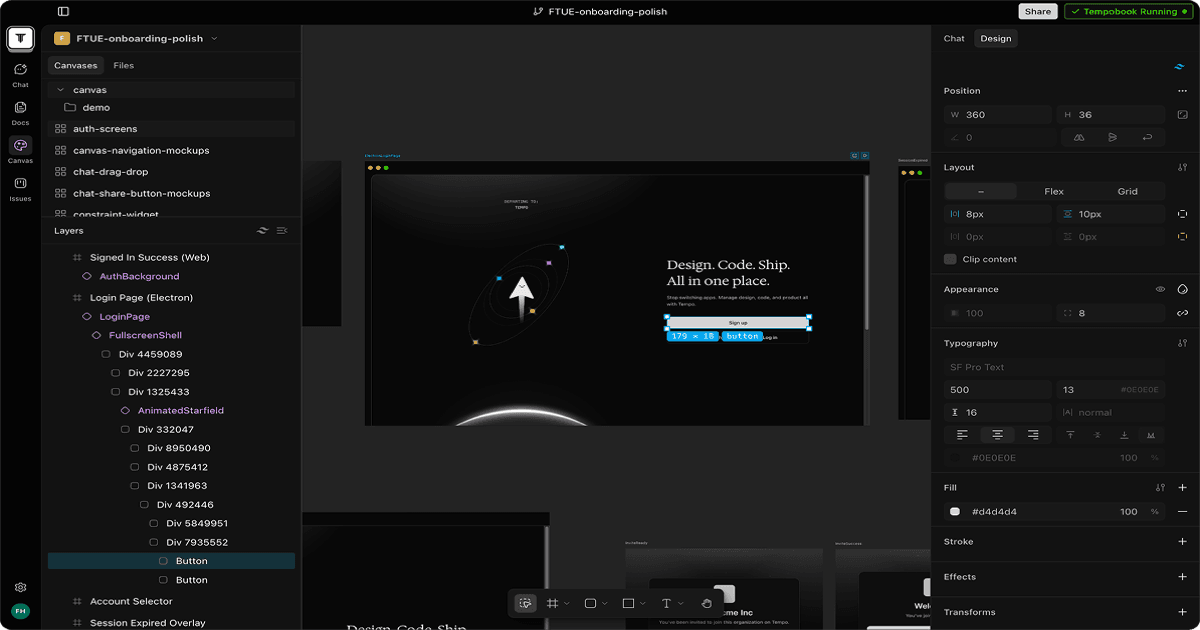
Tempo is a web-based AI development environment that builds React apps from prompts or specs using a multi-agent planning system, then lets you edit the UI visually with drag-and-drop, no CSS knowledge required.
Tempo is an AI-powered React development environment built by Tempo Labs, a Y Combinator S23 company founded in Toronto by Kevin Michael and Peter Gokhshteyn. Where most AI builders hand you generated code and step back, Tempo layers in a structured planning phase: paste an idea, and the tool generates a Product Requirements Document and user flow diagrams before writing a single line of code. The result is a React app you can tweak visually without digging through CSS, making it accessible to designers and PMs who want to ship product without being React experts.
The core feature set covers a PRD-first multi-agent loop, a Figma plugin that converts designs directly to production React code, a drag-and-drop visual editor wired to live React (not a screenshot preview), a flat-rate credit billing model, and a growing MCP App Store with one-click integrations for Stripe, Supabase, Convex, Clerk, and Resend. The platform launched V2 with Expo support for React Native mobile apps, pre-built SaaS templates, and enhanced AI reasoning via Gemini Search. In October 2025, the company raised a $5 million seed round backed by Y Combinator, General Catalyst, iNovia, Golden Ventures, Box Group, and Webflow Ventures, with angel participation from Lenny Rachitsky and Varun Anand.
What Tempo actually does in June 2026
Tempo operates as a browser-based IDE oriented entirely around React. The entry point is a natural language prompt, or a pasted spec from a product brief. From that, Tempo's multi-agent system generates a PRD with feature definitions and a visual user flow diagram before any code generation begins. This planning step is the tool's main differentiator: users get a moment to validate what they are building before committing credits to code.
Once the planning phase completes, Tempo generates the React frontend and opens a visual editor alongside the live preview. The editor behaves like a stripped-down Figma: users can drag components, resize elements, and adjust layout properties via a Tailwind CSS panel without touching source code. AI remains available throughout the build for iterative prompting, adding features, or debugging individual components. Code export to standard React or Next.js is available on all paid plans, and one-click deployment is built in.
The Figma plugin (published to Figma Community as "Tempo: AI-Powered Figma to Code React") converts design files into editable React code in Tempo's environment. This creates a direct pipeline from design to production code, removing the manual translation step that typically sits between a Figma handoff and a developer's first commit.
The MCP App Store provides pre-wired integrations. Stripe, Resend, Supabase, Convex, and Clerk can be added to a project with a single click; Tempo handles the configuration boilerplate. V2 added Expo support, meaning React Native mobile targets are in scope alongside web apps. The billing model uses flat-rate message credits rather than token counting: each AI interaction costs one credit, making cost predictable across the session.
"It's the design and prototyping tool we always wished existed, one that brings the entire product team into the build process." - Kevin Michael, CEO of Tempo Labs, seed funding announcement, October 2025
Where Tempo sits versus Bolt.new and Lovable
The AI React builder market has three meaningfully different tools right now. Tempo, Bolt.new, and Lovable all generate React apps from prompts, but their underlying architectures and default workflows produce different tradeoffs.
Bolt.new runs on WebContainers, a StackBlitz technology that executes Node.js directly in the browser without a remote server. The result is near-instant app generation with zero planning phase. You type a prompt and get a running prototype in seconds. Bolt.new supports React, Vue, Svelte, Angular, Next.js, and Remix, a broader framework menu than Tempo's React-only scope. Bolt V2 added Bolt Cloud, which packages databases, authentication, file storage, edge functions, and hosting into the same environment. The Pro plan runs $20/month versus Tempo's $30/month. The core trade: Bolt prioritizes speed and framework flexibility; Tempo trades that speed for structural planning and a visual editor you can actually manipulate.
Lovable (formerly GPT Engineer) focuses on full-stack output. Every Lovable workspace automatically provisions a Supabase backend, including database schema generation and migrations, without requiring the user to configure anything separately. The design output from Lovable is widely noted as cleaner and more polished aesthetically than Tempo's defaults. Lovable also offers two-way GitHub sync and multiplayer prototype editing, which makes it stronger for team collaboration on early-stage products. The pricing is $20/month, $10 less than Tempo. The gap: Lovable has no visual drag-and-drop editor and no Figma plugin; everything happens through prompt iteration. Users who want to fine-tune UI layout without rewriting prompt instructions will find Tempo's visual editor more efficient.
For completeness: v0 by Vercel is the strongest tool for frontend component generation within the Vercel ecosystem, while Cursor is the choice when you need a full-featured IDE with AI assistance across an existing large codebase rather than greenfield app generation.
Tempo's positioning is the space between Bolt's prompt-speed and Lovable's full-stack output: React-specific, visually editable, and planning-first. That combination is real and useful, but the constraint is hard. If your stack is not React, Tempo is not your tool.
What the PRD-first agent loop actually looks like
The experience starts cleanly. A user describes a product idea in a few sentences, say, an AI headshot generator with Stripe payments and Supabase auth. Tempo's agents return a structured PRD with a feature list, scope definitions, and a user flow diagram. This forces a planning moment: you can read the PRD and correct misunderstandings before spending credits on code generation. Users who have tried building complex apps with Bolt.new or similar tools often cite scope drift as a problem; Tempo's planning layer addresses that directly.
Once the PRD is approved, Tempo generates the React frontend and presents the visual editor. Tailwind properties update in real time as you drag components. Adding a Stripe payment integration is a single click from the MCP App Store; Tempo writes the configuration code and connects the environment variables automatically.
The friction shows up at complexity. Several users on Product Hunt reported the agent loop breaking during authentication setup. The tool claims to implement Auth0 or Supabase auth, reports completion, but the code is not actually updated. Credits are consumed. The app sometimes freezes. This pattern of "hallucinating completion" is the most consistent negative across reviews, and it is specific to backend integration tasks rather than frontend UI work, where Tempo performs more reliably.
"Sometimes it feels like giving your requirements to a goldfish. Endless frustration with repeated corrections needed." - Warren Cowan, Product Hunt review, 2024
For frontend-heavy work, the experience is substantially different. Users building dashboards, landing pages, or component libraries from Figma designs report the visual editor working as advertised. The planning step reduces the back-and-forth that comes from underspecified prompts. The credit system is predictable: a multi-page SaaS dashboard uses 50 to 80 credits, costing $10 to $16 on the Pro plan's credit allocation. That is a reasonable cost for what can be a multi-day frontend project compressed into a few hours.
The Figma plugin path has attracted positive attention specifically from designers. Importing a Figma file and receiving editable React code, not a screenshot approximation but actual component code with Tailwind classes, closes the handoff gap that has frustrated design-engineering teams for years. This use case has fewer of the backend reliability complaints.
Who Tempo is built for
Tempo's strongest fit is the cross-functional product team trying to move faster on React frontends. The combination of a visual editor with a planning layer and a Figma import path makes it genuinely useful for at least three personas simultaneously: the PM who wants to validate flows before engineering resources are committed, the designer who wants to move from Figma to live React without a handoff delay, and the developer who wants to iterate visually on UI without writing CSS by hand.
Solo founders building React MVPs who want more structural guidance than Bolt.new provides but don't need Lovable's auto-provisioned backend will find Tempo's $30/month Pro plan worth the premium. The flat-rate credit model makes budgeting predictable, and code export means you're never locked into the Tempo environment.
Chorus AI, an early partner on the Agent+ plan, reported cutting frontend development costs in half with a 3x velocity increase. That result will not generalize to every team, but it points to the use case where Tempo performs best: product teams with enough React work to benefit from systematic AI acceleration on the frontend, where the structured planning reduces wasted cycles.
What Tempo is not
Tempo is not a multi-framework tool. Vue, Svelte, Angular, and other frontend frameworks are out of scope. If your team's stack is not React, this tool does not help you.
It is not a backend-first platform. Supabase integration exists via the MCP App Store, but Tempo does not auto-provision or manage your database the way Lovable does. Complex backend logic, custom API routes, and database schema generation require substantial manual follow-up. Users who hit authentication setup walls report the agent loop consuming credits without resolving the actual problem. This is a real and documented failure mode, not an edge case.
It is not the right tool for throwaway prototypes where time is the only metric. Bolt.new generates a working app in seconds. Tempo's planning phase takes longer by design. If you need to demo something in 20 minutes, Bolt.new is faster.
The Agent+ tier at $4,500/month targets funded startups with a dedicated engineering budget. There is nothing between $30/month and $4,500/month. Growing teams that have outgrown the Pro plan's 150 credits but cannot justify enterprise pricing have limited options within the Tempo ecosystem.
Enterprise buyers looking for SSO support, SOC2 documentation, or audit logging will not find public information on these features. Security-conscious procurement teams will need to engage Tempo directly before signing any contract.
User Reviews
No reviews yet. Be the first to share your experience!
Sign in to write a review.
Related articles
Guides and articles related to Tempo.

Replit Pricing Explained (2026): Core vs Pro and Effort-Based Agent Billing

AI User Testing in 2026: The Tools That Test Your Product While You Sleep

OpenAI GPT-Realtime-2 (May 2026): Pricing, Latency & 30-Min Voice Agent

Run a Company With AI Agents: The Open-Source Orchestration Setup (2026)

Auto-Build Weekly Client Status Reports From Slack, Asana, GitHub & Stripe (2026)