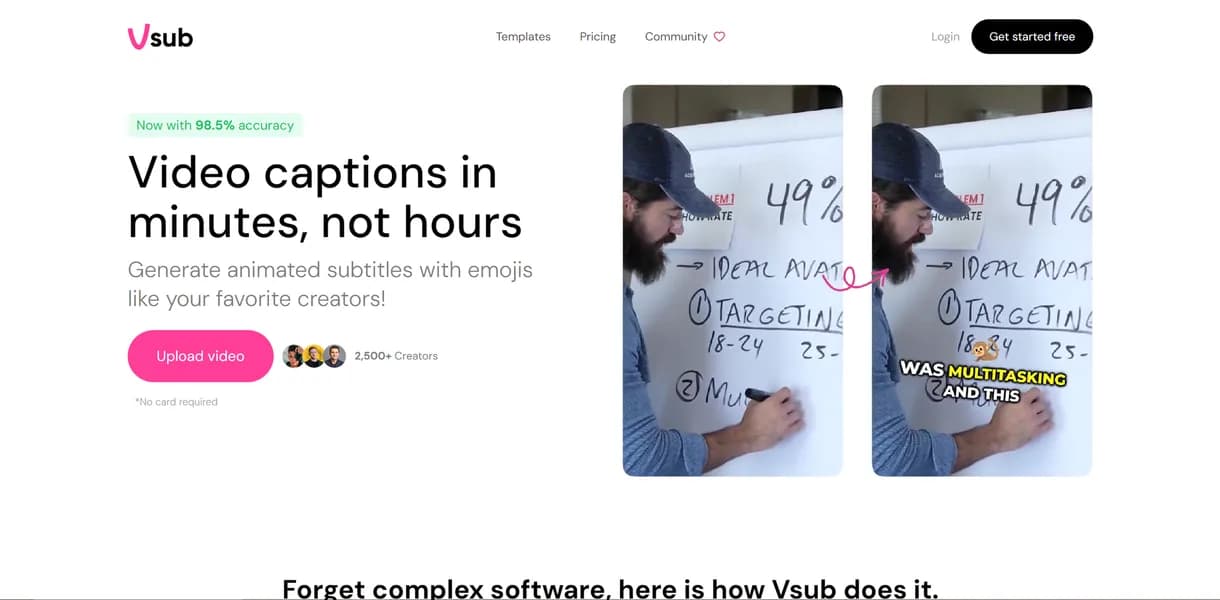

Vsub is an AI subtitle generator built for short-form video creators on TikTok and YouTube Shorts. It applies viral caption styles and auto-generates emojis with 98 percent transcription accuracy. The tool lacks a free trial, forcing users to pay upfront before testing its workflow.
What is Vsub?
Creators expect AI captioning tools to handle full video editing workflows. Vsub does exactly one thing: it generates animated text overlays for short-form video.
Developed by Vsub.io, this AI subtitle generator targets TikTok and YouTube Shorts creators. It solves the manual labor of timing text to speech. The tool claims a 98 percent transcription accuracy rate.
- Primary Use Case: Generating animated caption overlays for short-form social media videos.
- Ideal For: Solo content creators producing high-volume vertical video.
- Pricing: Starts at $29/mo (Subscription). Users pay $20.30 per month on the annual plan.
Key Features and How Vsub Works
Automated Transcription and Translation
- Speech-to-Text: Converts spoken audio to text with 98 percent accuracy. It struggles with heavy background noise.
- Multi-language Support: Translates subtitles into over 30 languages. Dialect recognition varies by region.
Visual Styling and Animation
- Viral Templates: Offers 20 pre-set styles including Hormozi and Beast formats. Users cannot build custom animation paths.
- Emoji Integration: Places emojis automatically based on spoken context (our testing showed it sometimes misinterprets slang).
Export and Formatting Controls
- Aspect Ratio Adjustment: Resizes video for 9:16, 1:1, and 16:9 formats. It crops the video rather than extending the background.
- Export Limits: Caps video exports at 2 minutes on the Starter plan.
Vsub Pros and Cons
Pros
- Achieves 98 percent transcription accuracy to reduce manual text editing time.
- Includes 20 viral templates that mimic high-performing social media styles.
- Detects context to add emojis automatically without manual searching.
- Renders video quickly to allow fast turnaround for daily uploads.
Cons
- Lacks a free tier or trial to test accuracy before paying.
- Restricts high-volume creators with a 5,000 credit limit on the Starter plan.
- Places emojis incorrectly during fast speech, forcing manual corrections.
Who Should Use Vsub?
- Solo TikTok Creators: You need fast captions without learning complex editing software.
- Social Media Managers: You repurpose long-form YouTube videos into Shorts and need quick formatting.
- Budget-Conscious Beginners (Not a fit): You should look elsewhere. The $29 monthly starting price makes this a risky choice for new creators.
Vsub Pricing and Plans
Vsub offers three paid tiers and refuses to offer a free trial.
The Starter plan costs $29 per month. It provides 5,000 credits and limits exports to two minutes per video.
The Pro plan costs $49 per month. Users get 10,000 credits and can export videos up to 10 minutes long.
The Premium plan costs $99 per month. It includes 25,000 credits, 20-minute export limits, and team collaboration features.
How Vsub Compares to Alternatives
Similar to Submagic, Vsub focuses on viral caption templates. Submagic offers a more intuitive interface for manual text adjustments. Vsub competes on price, but Submagic provides a limited free trial for testing.
Unlike Captions.ai, Vsub operates in the browser rather than requiring an iOS app. Captions.ai includes advanced features like AI eye contact correction. Vsub sticks to text and emoji generation for its core workflow.
Verdict for High-Volume Vertical Video Creators
Vsub delivers fast captions for creators who prioritize speed over granular control. Social media managers handling daily uploads will benefit from the automated emoji placement.
The lack of a free trial remains a significant barrier.
Users who need full video editing capabilities should avoid this tool. CapCut offers a better environment for those users. If you only need captions but want to test the software first, Submagic is a safer alternative.
User Reviews
No reviews yet. Be the first to share your experience!
Sign in to write a review.
Related articles
Guides and articles related to Vsub.

How to Make Money Selling AI UGC Content for Brands (2026)

Sell AI-Generated Short Films on TikTok Shop, Instagram & YouTube (2026)

AI Instagram Reels Factory: 30 Reels/Day on Autopilot (2026)

AI Video Generator Prompting: The Filmmaker's Real Workflow

Faceless YouTube AI Channel: $5,000+/Month Tutorial (2026)