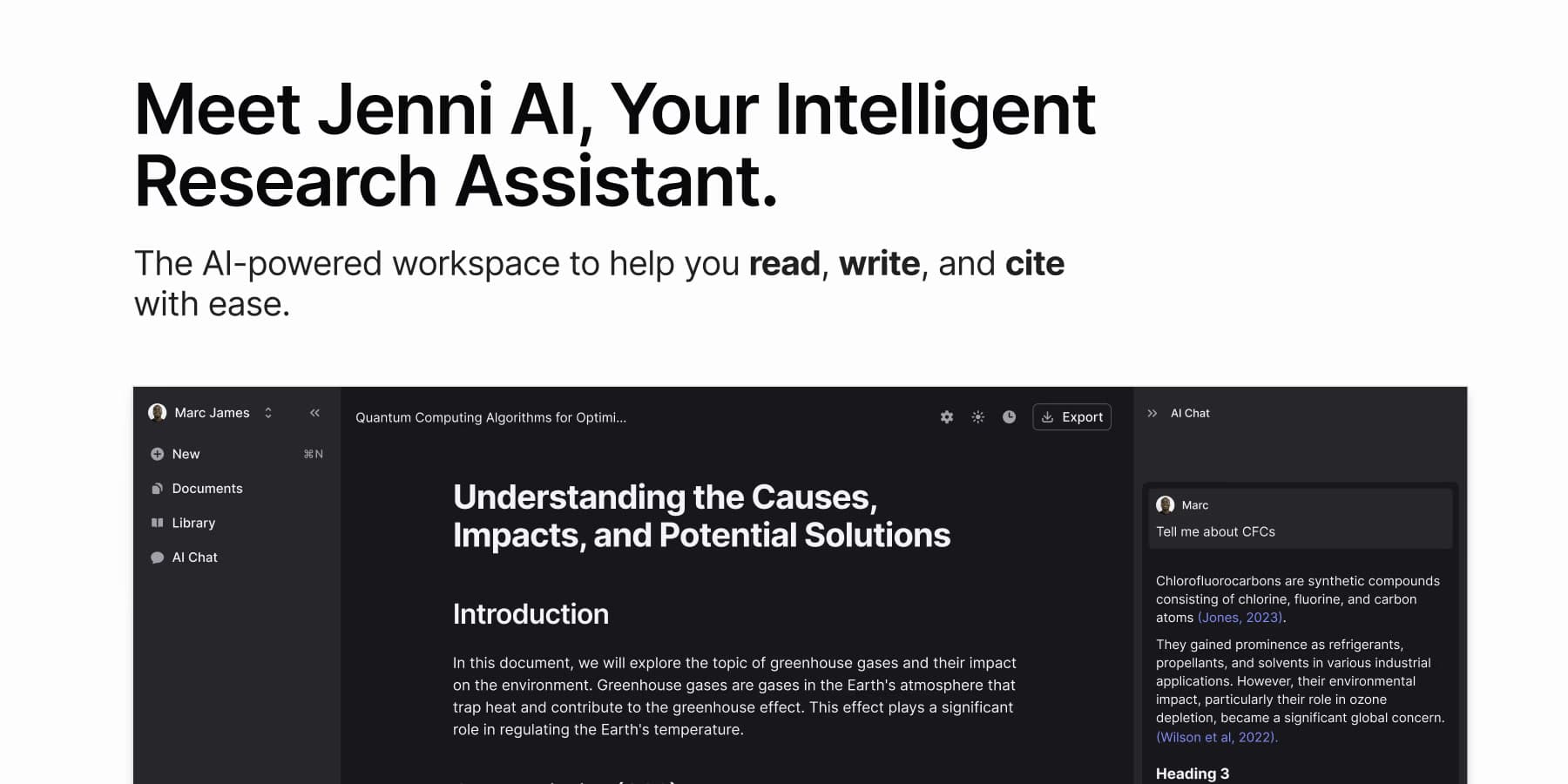

Jenni AI is an academic writing assistant built for students and researchers. It combines AI autocomplete, source-grounded citations in over 2,600 styles, PDF chat, and a literature search across 250 million papers, all inside a single browser-based editor.
Jenni AI is an academic and research writing assistant developed by founders David Park and Henry Mao, who met at UC San Diego. The product targets students, graduate researchers, and academics who spend significant time wrestling with citations, source management, and the blank-page problem. Unlike general-purpose AI chat tools, Jenni works inside a dedicated web editor where every autocomplete suggestion can be traced back to a specific passage in a source you uploaded or found through its paper database. The company is bootstrapped, reached $10 million in annual recurring revenue in early 2025 with a team of 23 people, and serves more than 5 million registered users globally.
The core features are AI autocomplete tuned to academic tone, a citation manager supporting over 2,600 referencing styles (APA, MLA, Chicago, Vancouver, and hundreds of discipline-specific formats), chat with uploaded PDFs, a literature search across 250 million academic works via the OpenAlex database, a paraphrase tool, and a "Reviews" feature that scans your draft and flags claims that lack source support. Documents can be exported to Word, LaTeX, or HTML. A browser extension extends the editor to other tabs. Jenni sits at a different position than general-purpose AI writers like Jasper or Grammarly: it is narrowly focused on research-driven academic writing rather than marketing copy or grammar polish.
What Jenni AI writes in June 2026
Jenni's editor functions as a word processor with an AI layer woven into the drafting experience rather than bolted on top. As you type, the autocomplete engine offers sentence continuations calibrated to academic register. You can accept a suggestion with the Tab key, reject it, or adjust how aggressively it intervenes. The system reads the documents you have uploaded and, when it completes a sentence that draws on those sources, it can insert an in-text citation automatically in whichever style you have selected for the project.
The PDF chat feature lets you open one or more uploaded papers and ask questions in plain language: "What methodology did this study use?" or "Find me a quote that supports my argument about X." Answers come with page-level citations so you can verify them against the original. The literature search, powered by OpenAlex, surfaces related papers from a corpus of 250 million works. You can pull a result directly into your project library and start chatting with it immediately.
The Reviews feature, added in late 2024, reads through a completed draft and marks each substantive claim as supported, weakly supported, or unsupported, then recommends citations. This is the closest Jenni gets to an integrity check built into the product itself. However, Reviews operates on your own draft text, not against your institution's plagiarism database, so it is not a substitute for Turnitin or iThenticate.
Export options include Word (.docx), HTML, and LaTeX. LaTeX export is relevant for STEM researchers submitting to journals that require it, and it is a meaningful differentiator over tools aimed at undergraduate essay writers. The browser extension is lightweight and primarily lets you access your Jenni documents from other tabs.
"Jenni takes context into account really well. I was testing it on a paper about cognitive load theory and it offered a completion that even included an in-text citation of a relevant study I hadn't mentioned yet. ChatGPT can't do that." - Justin Gluska, Gold Penguin review, 2024
Where Jenni AI sits versus QuillBot and SciSpace
The three tools represent three different entry points into academic writing, and the mechanical differences matter.
QuillBot is paraphrase-first. Its core product is a paste-and-rewrite interface with seven paraphrasing modes (Standard, Fluency, Formal, Academic, Simple, Creative, Expand/Shorten). It does not maintain a writing project, does not connect to a paper database, and does not generate in-text citations from sources you are reading. QuillBot does include a standalone citation generator, a grammar checker, and a plagiarism detector, but these are separate modules you switch between. The workflow is: write elsewhere, bring text into QuillBot to polish. Jenni's workflow is the opposite: draft inside the tool while it surfaces sources. QuillBot is also notably cheaper, with a free tier and paid plans starting around $4.17/month on annual billing, making it popular for students who primarily need paraphrase and grammar support. Jenni is the better fit when citation management and source-grounded drafting are the bottleneck. For students who just need to rephrase existing text, QuillBot wins on price. You can learn more about QuillBot on its Vantaige listing.
SciSpace (formerly Typeset) approaches the problem from the reading side rather than the writing side. Its core strength is parsing and interrogating uploaded PDFs at scale: you upload a batch of papers and use its Copilot feature to ask cross-paper questions, extract key findings, or generate a literature summary. SciSpace also offers a writing assistant and a citation tool, but bulk paper comprehension is what its users consistently cite as the reason to pay. Its paid plans start significantly higher than Jenni's (around $70/month for advanced tiers), which positions it toward research professionals and institutions rather than individual students. Jenni is more accessible and more tightly focused on the act of writing a single document. SciSpace is the better choice when you are ingesting dozens of papers to synthesize a literature review from scratch. See the SciSpace listing for a full breakdown.
Jenni's position: it combines a real writing editor, inline autocomplete, source-cited completions, and PDF chat under one subscription at a student-accessible price. It does not match SciSpace for bulk paper analysis or QuillBot for dedicated paraphrasing modes, but it covers more of the research writing workflow end-to-end than either competitor alone. Users who pair Jenni with Grammarly for final proofing and ChatPDF for supplementary PDF interrogation get a reasonably complete stack.
What real users keep hitting
The recurring complaints across Trustpilot (4.1/5 from 142 reviews), third-party review aggregators, and academic writing forums fall into four categories.
Citation hallucination. Multiple independent reviewers who tested Jenni against verifiable sources found that a meaningful share of automatically generated citations either contained errors (wrong volume, page number, or author order) or referenced papers that do not exist. The Reviews feature partially addresses this by prompting you to add citations, but it does not verify that the citations Jenni inserts are accurate. Researchers who used Jenni without manually checking every reference reported discovering fabricated sources during proofreading. This is the most serious recurring issue for academic use.
Free tier friction. The free plan allows 10 AI autocompletes per day and 5 chat messages. For anyone trying to evaluate whether Jenni fits their workflow before paying, 10 completions is an extremely small window. Several reviewers noted that the limit resets at midnight UTC, which can mean mid-session cutoffs during active writing in other time zones.
Silent document edits. A notable cluster of Trustpilot reviews describes an issue where Jenni's autocomplete or editing features altered paragraphs the user considered final, sometimes deleting content, without a clear undo path. Whether this reflects a UX misunderstanding (autocomplete accepted accidentally) or a genuine bug is unclear from the reviews, but the pattern appears frequently enough to warrant caution: always work on documents that exist in a separate backup.
AI detection exposure. Testing by multiple reviewers found that Jenni-generated text scores at or above 85% AI likelihood on common detection tools (GPTZero, Copyleaks, Turnitin's AI writing indicator). Students who use Jenni's autocomplete extensively without editing the output are at real risk of triggering AI-writing flags under policies that have proliferated at universities since 2023. Jenni does not market itself as a tool for submitting AI-generated work unedited, but the marketing emphasis on "write faster" has led some users to underestimate this risk.
"I loved Jenni until I ran my submitted paper through my university's AI detector after the fact. It flagged 78% of the content. I had used the autocomplete heavily and barely edited the suggestions. My professor gave me an academic integrity warning. I can't blame the tool entirely, but the way it's marketed makes you feel like the output is your own work." - anonymous PhD student, r/GradSchool thread cited in academic integrity discussion, 2024
Where Jenni earns its place
For a specific type of user in a specific workflow, Jenni is genuinely useful and hard to replicate with free alternatives.
Graduate students conducting original research who upload their own source materials, write with autocomplete at low aggressiveness (using it for structure rather than full sentences), and manually verify every citation get real value from the integrated experience. The alternative is managing citations in Zotero, writing in Word, and using a separate AI tool for ideation, then manually linking everything together. Jenni compresses that stack into one interface.
The paraphrase tool is less powerful than QuillBot's dedicated modes, but it works without context-switching: highlight a sentence, choose "paraphrase," and the suggestion appears in the same document. For academic writers who paraphrase frequently during drafting rather than in a separate cleanup pass, this embedded approach is faster. The literature search via OpenAlex, accessible directly from the editor, means you can find a relevant paper and immediately chat with its PDF without switching tabs. The "Claim Confidence" review is useful for identifying citation gaps before submission rather than during peer review.
Who should and shouldn't use Jenni AI
Best fit: Graduate students and academics writing research papers who need integrated citation management, who will verify every autocompleted citation manually, and who treat Jenni's suggestions as a starting point rather than final text. Also useful for undergraduate students working on long-form research essays who need help organizing sources and generating structured outlines. Researchers who export to LaTeX will find the export quality adequate for initial journal submission drafts.
Skip Jenni when: You need a plagiarism checker or AI detection report as part of your writing workflow (Jenni does not offer these). You are writing marketing copy, blog posts, or social content (tools like Jasper are purpose-built for those formats). You need to analyze dozens of papers at once to synthesize a literature review (SciSpace handles bulk ingestion much better). You are on a very tight budget and only need paraphrasing and grammar polish (QuillBot's free tier covers a large portion of those needs). And critically: if your institution has a blanket prohibition on AI writing assistance or if you are planning to submit Jenni-generated text without substantial revision, the AI detection exposure documented by multiple reviewers means the risk of an academic integrity flag is real.
The academic-integrity question deserves plain language. Jenni is a legitimate writing tool when used as a scaffold, and a liability when used as a ghostwriter. The distinction is between using autocomplete to suggest phrasing for ideas you already have versus accepting completions to fill in ideas you don't. The tool does not enforce that distinction. The writer does.
User Reviews
No reviews yet. Be the first to share your experience!
Sign in to write a review.
Related articles
Guides and articles related to Jenni AI.

Gemini Deep Research for a Thesis Literature Review in One Day (2026)

Perplexity AI Tutorial: Maximize Your Research Workflows

Undetectable AI Review (2026): What It Does, What It Costs, and 7 Alternatives

The Personal AI Productivity Stack (2026): One Tool Per Job, Nothing Extra

Google Vision AI Explained (2026): Pricing Per 1,000 Units, Free Tier, and Alternatives