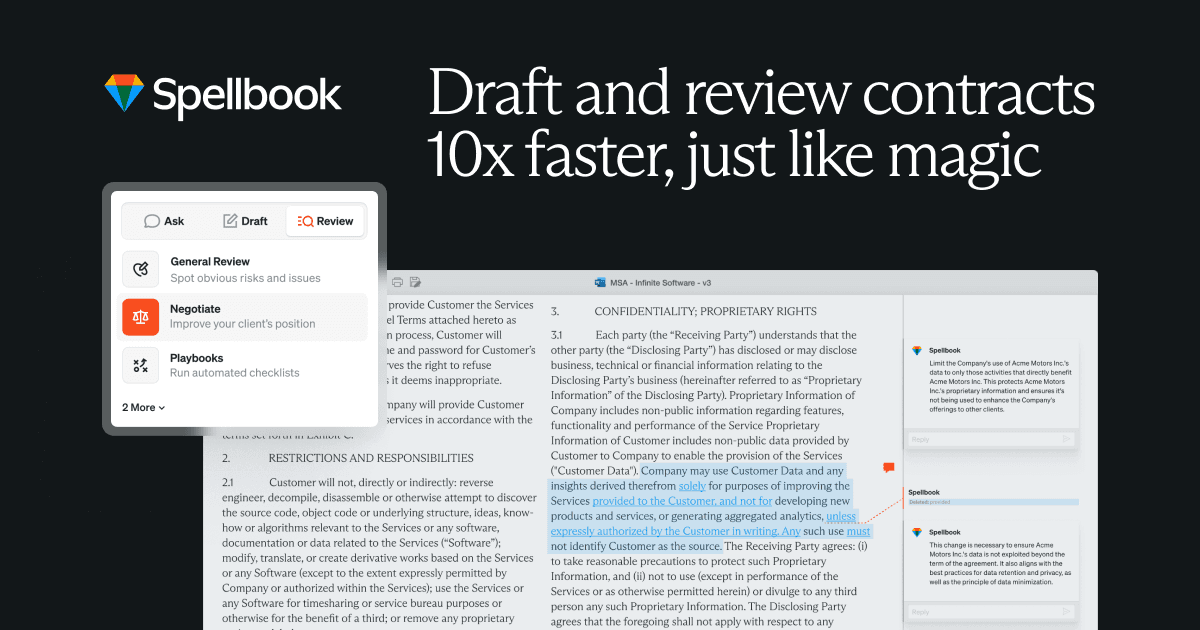

Spellbook is a Microsoft Word add-in that uses AI to review, redline, and draft contracts for lawyers. Built for transactional legal work, it suggests clause-level edits in real time and runs on a mix of GPT-4o, Claude, and Gemini models.
Spellbook is an AI contract drafting and review tool that runs as a native Microsoft Word add-in. It was founded in 2018 as Rally in St. John's, Canada, rebranded to Spellbook in May 2023 after a $10.9M seed round, and has since raised a $20M Series A in January 2024 and a $50M Series B in October 2025 led by Khosla Ventures, valuing the company at $350M. The product launched as the first generative AI contract drafting tool specifically built for lawyers, and as of mid-2026 serves more than 4,400 legal teams across 80 countries, including eBay, Nestle, Dropbox, and Franklin Templeton. The core idea is simple: contract lawyers spend their days in Microsoft Word, so the AI should live there too.
The platform breaks into five modules: Review (flags risky clauses and generates redlines using Word's track changes feature), Draft (creates clauses or full documents from scratch or saved templates), Ask (answers contract-specific legal questions with clause-level citations), Benchmarks (compares your terms against 2,300+ contract types by industry and deal size), and Associate (an AI agent launched in August 2024 that handles multi-document workflows including disclosure schedules and deal package drafting). The Playbooks feature, launched January 2025, lets in-house teams codify their standard negotiation positions so future AI reviews apply firm-specific rules automatically. Spellbook runs on a mix of GPT-4o, Claude, Gemini, and o1, choosing the best model for each task rather than committing to a single provider.
What Spellbook actually does in May 2026
Spellbook installs as a sidebar inside Microsoft Word on Windows, Mac, and the web version. When you open a contract, the Review panel scans the document and surfaces flagged clauses within seconds. Each flag comes with a plain-English explanation of the risk and a suggested redline, which you can accept, reject, or modify. Accepted suggestions go straight into the document as tracked changes, so your counterpart sees exactly what changed and why.
The Draft module works in the opposite direction: you describe what you need ("add a limitation of liability clause capped at direct damages only, governed by Ontario law") and Spellbook generates a clause in your document. The Ask pane lets you have a back-and-forth conversation with the contract: "does this agreement allow sublicensing?" returns a direct answer with the relevant clause cited. Benchmarks pulls market data from over 2,300 contract types: you can see whether a payment term is aggressive, market standard, or favorable by industry and deal size, which is genuinely useful when a counterparty claims something is "market."
The Associate module, added in August 2024, handles deals with multiple documents. It can process a share purchase agreement alongside its disclosure schedules, maintaining consistency across the package without you manually cross-referencing tabs. An iManage integration launched in March 2026 extends the workflow into enterprise document management systems.
"Spellbook probably helps me bill an extra hour a day. Maybe more." - Todd Strang, Partner at KMSC Law LLP, spellbook.legal/reviews
Where Spellbook sits versus Harvey AI and Robin AI
The legal AI market has splintered into tools built for different audiences. Spellbook, Harvey AI, and Robin AI are the three most-compared options as of 2026, but they solve different problems.
Harvey AI targets AmLaw 100 firms and Big 4 professional services. Its models are custom-trained on legal domain data (not general-purpose LLMs with legal prompts), and it handles multi-practice workflows: litigation support, regulatory compliance analysis, brief drafting, and due diligence across large document sets. Harvey has no native redlining capability and is not focused on contract drafting the way Spellbook is. At an estimated $50,000+ annually for a team of five, Harvey prices itself for large firm procurement budgets, not solo practitioners. The trade-off: broader scope but no transactional depth, and a longer enterprise onboarding process.
Robin AI, based in the UK, takes a different approach entirely. It layers a managed review service on top of its AI, meaning human reviewers back the AI output for clients who want accountability beyond a software suggestion. Robin AI's obligation-tracking and advanced reporting features are designed for financial institutions and enterprises with compliance requirements. Its Pro tier runs around $100/user/month, making it cheaper than Spellbook, but advanced reporting sits behind a custom enterprise quote. Robin AI holds 3.3% mindshare in legal AI versus Spellbook's 12.4% as of PeerSpot's March 2025 data, and its strongest market is the UK and Europe rather than North America.
Spellbook's mechanical advantage is transactional depth inside Word: it benchmarks clauses against 2,300+ contract types with source citations, learns firm preferences over time via Playbooks, and handles multi-document deal packages through Associate. If your practice is primarily commercial contracting in Microsoft Word, neither Harvey nor Robin gives you this combination at this price point. If you need legal research, case law access, or litigation support, neither does Spellbook.
For teams comparing AI writing tools more broadly, Eve Legal covers a narrower CLM-adjacent slice of the market, while platforms like Robin AI offer a managed-service alternative for teams that prefer human oversight alongside AI suggestions.
What the daily workflow reality looks like
In practice, Spellbook works best when it's genuinely integrated into how a lawyer already works rather than a separate step added to the process. A solo transactional lawyer opens an NDA from a vendor, activates the Review panel, and within a minute sees flagged clauses with suggested edits. She accepts four, modifies two manually, and returns the markup to the other side in under an hour. Without Spellbook, the same review would take two to three hours of associate time or focused partner attention.
The Playbook feature changes the calculus for in-house teams. An in-house legal department spends time upfront codifying 40 standard fallback positions (on liability caps, IP ownership, data processing, auto-renewals). Every vendor MSA that comes in gets checked against all 40 positions automatically. The legal team reviews exceptions rather than reading every contract from scratch. For high-volume commercial contracting, the ROI on setup time is clear.
The Associate module handles the more complex side: an M&A team processing disclosure schedules alongside a share purchase agreement uses Associate to maintain consistency across the deal package. Associate references terms across both documents simultaneously, reducing the risk of a definition in the schedule contradicting the main agreement.
"An immensely useful AI tool that helps me be more productive, which is key for a small firm." - solo practitioner review, Trustpilot, 2024
The friction comes at the edges. Spellbook works on one document at a time in Review mode; pulling information simultaneously from multiple PDFs or Word docs in a single session is clunky. And the output quality without playbook investment can feel generic. Clause suggestions read like standard boilerplate unless you've spent time teaching the tool your firm's preferences. The learning curve isn't steep, but it exists.
Legal writers and knowledge management teams sometimes pair Spellbook with general-purpose writing tools like Jasper for client-facing content or use research tools like CustomWritings for background legal research that Spellbook doesn't cover. Finance-adjacent legal teams working on settlement valuations sometimes cross-reference outputs with EvenUp for damages context.
Who Spellbook is built for
The clearest fit is the solo transactional lawyer or small boutique firm handling commercial contracting: NDAs, vendor agreements, employment contracts, M&A documentation, licensing deals. These practitioners lack a senior partner to sanity-check their work and a firm precedent database to pull from. Spellbook acts as both: a second set of eyes on every clause and an institutional knowledge base that learns firm preferences over time.
The second strong fit is the in-house legal team managing recurring commercial contracts at volume. Legal departments reviewing 30+ vendor agreements per month see measurable ROI on the Playbook setup: once standard positions are codified, routine review becomes an exception-handling exercise rather than a full read-through.
The tool is less compelling for litigation-focused attorneys (no case law research, no brief drafting), for teams using Google Docs as their primary word processor (the add-in is Word-only), and for firms needing full contract lifecycle management analytics across a portfolio of agreements. Enterprise CLMs like Ironclad or Icertis handle the portfolio-level view that Spellbook doesn't cover.
Law firms already paying for Harvey for multi-practice AI probably don't need Spellbook on top unless they specifically want deeper contract drafting capability within Word. The tools serve different workflows, not the same one.
What Spellbook is not
Spellbook is a contract drafting and review tool. It is not a legal research platform. If you need to find cases, cite statutes, or analyze how a court has interpreted a clause in your jurisdiction, Spellbook won't help. For that, you need a Westlaw or Lexis integration, or a tool like Harvey AI that was purpose-built for legal research tasks.
It is not a contract lifecycle management system. It won't tell you which agreements are expiring in 90 days, flag obligations across your entire vendor portfolio, or give you a dashboard of contracting activity. Those are CLM functions.
And despite the API feature flag, Spellbook is primarily a human-in-the-loop tool. The suggestions require lawyer review. The company itself is emphatic about this: "AI will eat up the busywork. But lawyers still have to review the work," CEO Scott Stevenson told The Legal Wire in 2025. For teams expecting fully autonomous contract processing with no human review, the product isn't designed for that use case. The value is in removing the tedious parts of contract work, not in replacing the judgment that makes a lawyer valuable. Every redline Spellbook generates passes through the lawyer's hands before it goes to a counterparty. That's a feature, not a limitation, for firms where accuracy and professional accountability matter.
User Reviews
No reviews yet. Be the first to share your experience!
Sign in to write a review.
Related articles
Guides and articles related to Spellbook.
Harvey vs CoCounsel vs Spellbook (2026): Which Legal AI Fits Your Firm Size

RFP and Proposal Auto-Fill: The Agent That Handles 80% of the Repeating Questions (2026)

Convert a 30-Slide Board Deck Into a One-Page CFO Summary With Claude (2026)

NotebookLM Sales Call Prep: 5 Sources, 6 Questions, 60 Seconds (2026)

Google Vision AI Explained (2026): Pricing Per 1,000 Units, Free Tier, and Alternatives