
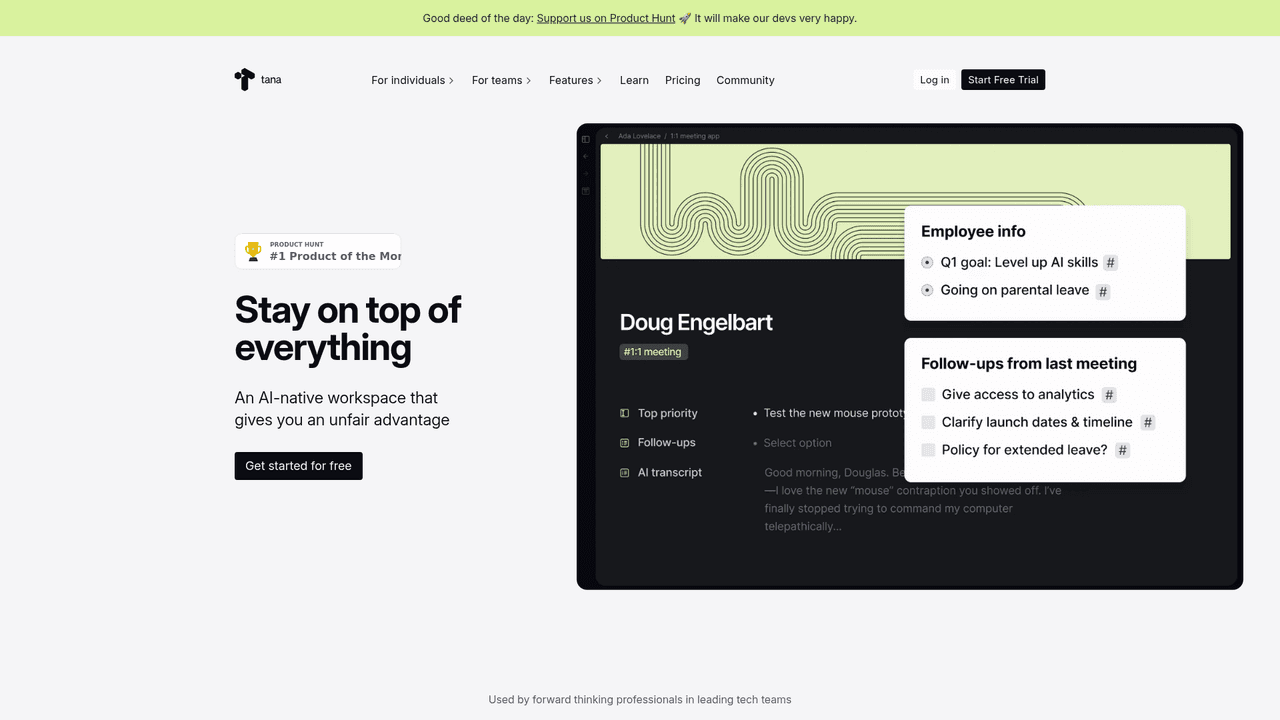

Tana replaces folders with a node-based graph where every bullet point becomes typed, queryable data via Supertags. Power users love the depth. New users spend two weeks confused before anything clicks. Best for knowledge workers who want an AI-native second brain, not a replacement for Notion.
Set up a fresh Tana workspace and your first instinct might be to look for a "new page" button. There is not one. Every line is a node. Every node can become a structured object. That disorientation, lasting days for some users and weeks for others, is the price of entry for what Tana Labs, Inc. calls a knowledge graph: a workspace where a single meeting note can simultaneously appear in your daily log, a project board, and a client file without ever being copied.
Tana opened to the public in 2025 after 9 months of closed beta with 30,000 testers and a 160,000-person waitlist. The Tana Outliner (outliner.tana.inc) is the product under review here: a node-based, AI-native knowledge management tool built by CEO Tarjei Vassbotn and his Oslo-based team. In February 2025, Tana announced a $25M Series A led by Tola Capital at a $100M valuation. This is not a side project. The question is whether its structural philosophy pays off for real knowledge workers, or whether it is a beautiful system that only works once you have already mastered it.
Tana's real role in your workflow (not the marketing version)
The marketing version is "your second brain." The reality is more specific. Tana is a relational database disguised as a bullet-point editor, and understanding that distinction determines whether you will stick with it past week one.
The core mechanic is the Supertag. Apply #meeting to any node and it instantly gains structured fields: date, attendees, action items, status. No separate database creation step. No switching to a different view. The tag arrives with the schema attached. Apply #person to a name and it links to every meeting that person attended, every task assigned to them, every note that references them. Automatically. As one ProductHunt reviewer described it: "I'm not maintaining a system anymore; I'm working inside one that maintains itself."
This is where Tana genuinely earns its reputation among power users. Once Supertags are configured, the workspace becomes self-organizing. New meeting notes auto-populate fields. Search nodes filter across your entire graph in real time. AI command nodes, introduced in 2024 as executable buttons attached to Supertags, fire multi-step workflows with one click: transcribe the audio node, run AI on the transcript, extract action items, write them into structured fields. No tab-switching, no copy-paste.
The catch: setting up those Supertags requires thinking like a database architect. Most users coming from Notion or Apple Notes hit a wall in the first session because the mental model is genuinely different. You are not filing information. You are defining types and relationships before information arrives. Users who persist past the two-week mark describe it as a switch flipping. Users who quit describe it as unnecessarily complex for what they needed.
"I'm still struggling to learn how to use it and make it work for my needs..stuck at the beginning of the learning curve." - Andrei Sedelkov, ProductHunt, 2025
Accuracy, speed, and where it falls short
Tana's meeting transcription runs botless: no ghost participant joins your Zoom call. The desktop app captures audio directly and transcribes in real time. As of April 2026, transcription supports 61 languages. The AI summary generated from a 30-minute meeting takes under 60 seconds post-call. Action item extraction is accurate enough to be useful without manual correction for standard professional meetings, though heavily jargon-dense or fast-paced conversations require review.
Voice memos on iOS and Android work offline, which is the right call for a mobile capture tool. Record a thought on a walk, reconnect, and Tana structures it automatically. In practice the mobile apps are limited in scope: multiple reviewers describe them as "glorified voice recorders" rather than full workspace replacements. If your workflow requires editing complex Supertag structures or running AI commands on the go, the mobile experience disappoints. The web app is where Tana lives.
AI credit consumption is the metric to watch. The Free tier allocates 500 credits per month. A single 30-minute meeting transcription costs roughly 250 credits. Heavy meeting users will burn through Free in two days. The Plus plan's 2,000 monthly credits cover approximately 8 meetings, 10 hours of voice transcription, or 50 AI-generated images, but not simultaneously. Users who rely on Tana as a daily meeting hub should budget for the Plus or Pro tier from day one.
Offline functionality arrived on desktop in November 2025, a meaningful reliability fix. Before that, Tana required an active connection for full editing, a significant gap for anyone working on planes or in areas with unreliable internet.
Integrations that actually matter
Google Calendar sync (Plus and Pro) pulls upcoming meetings into your daily Tana workspace automatically. The meeting node arrives pre-populated with attendee names; post-call, the transcript and summary land in that same node. Readwise integration pulls book and article highlights into Tana as structured nodes that can be Supertagged on arrival.
The Local API and MCP server, launched January 30, 2026, is the integration that changes Tana's ceiling. Developers can connect external AI tools including Claude Code and other MCP-compatible agents directly to their Tana workspace, making the knowledge graph a data source for AI workflows outside Tana. Investor Sheila Gulati of Tola Capital, who uses Tana to run her entire VC firm, captured the broader value: "This is a miraculous experience." Multi-model AI chat (OpenAI, Anthropic, Google Gemini) is available in-workspace with the latest models as of April 2026.
Privacy: where your data goes and who sees it
Tana stores data in the cloud in a proprietary JSON format with no model training on user data. GDPR compliance is active; SOC2 and HIPAA were in progress as of early 2026. Full JSON export exists but requires technical effort to use in another tool. As one user on Tana's community ideas board put it: "Vendor lock-in with my 'second brain' is not acceptable. Without an API this whole app is a trap." The Local API (January 2026) partially addresses this, but full bidirectional portability remains an open community request.
Team pricing reality check
Tana's pricing reflects its positioning as a personal knowledge tool rather than a team platform. Shared workspaces exist on Plus and Pro plans, but there is no team-specific tier with centralized billing, admin controls, or permission management as of April 2026. For a solo knowledge worker running 8-10 meetings per month, Plus at $8/mo billed annually is the correct entry point. Pro makes sense for users running 20+ meetings monthly or combining transcription, AI chat, and image generation. The Free tier functions as a short trial: the credit ceiling arrives within a week of active use.
The frustrations that keep recurring
The learning curve is not marketing copy. It is the primary reason users churn. Reviews across ProductHunt, G2, and community forums consistently describe the same arc: confusion in week one, partial clarity in week two, and either a "click moment" or abandonment by week three. The tool does not ease you in. There is no guided setup that mirrors your existing workflow; you have to build the system from scratch in a new paradigm.
Credit consumption surprises users who signed up expecting to evaluate the tool on Free. A single 30-minute meeting transcription costs 250 of the Free tier's 500 monthly credits. Tana's equivalent capacity breakdown for Plus (2,000 credits = ~8 meetings OR ~10 hours voice transcription OR ~50 images OR ~220 blog posts) makes clear these are not combinable pools: it is a shared budget across all AI features. Users who use multiple features simultaneously hit limits faster than the credit equivalents suggest.
"Lack of Rest API is a huge bummer alongside some other QoL features like notifications, integrated task management, and general UI quirks." - Adam Warsing, ProductHunt, 2025
The mobile gap is improving but not closed. The iOS and Android apps handle voice capture well. They do not replicate the desktop editing experience. Users who primarily work from phones will find Tana frustrating for anything beyond capture and review.
Tana vs. Notion vs. Roam Research / Logseq
These three comparisons are not interchangeable. Notion, Roam, and Logseq represent different ideas about how information should be structured, and Tana's position relative to each reveals what kind of tool it actually is.
Tana vs. Notion: The surface similarity (both handle notes and structured data) masks a deep architectural difference. Notion is page-based: you create pages, nest sub-pages, and build separate database objects with properties. Tana has no pages. Every bullet point in the entire workspace is a node in one giant tree. A Supertag applied to a node adds typed fields to that node in-place, with no separate database creation required. In Notion, adding a "meeting" property to a note requires either using a database view or manually typing in a page. In Tana, typing #meeting on any node triggers that structure immediately.
The AI integration gap is larger than most reviews acknowledge. Notion AI generates and edits text inside blocks. Tana AI command nodes execute structured workflows: one click transcribes audio, runs a language model over the transcript, extracts action items into fields, and populates dates, all within the context of your data. Notion AI cannot reference your own database in its outputs the way Tana AI can. For teams who need collaborative wikis and shared project spaces, Notion wins. For individual knowledge workers who want AI that acts on structured data, Tana's architecture is meaningfully different.
Tana vs. Roam Research and Logseq: These are Tana's closest conceptual peers. All three are outliners built on the networked thought model that Roam popularized in 2020. The mechanical differences matter. Roam is a graph of pages, each containing a block tree, with bi-directional links connecting them. Logseq replicates this model but stores data as local Markdown or Org files: fully open, fully portable, FOSS. Neither Roam nor Logseq has meaningful native AI integration in 2026.
Tana's departure from both: instead of a graph of pages, it uses a single enforced tree where all content lives. Supertags add typed, relational structure that neither Roam nor Logseq supports natively. As one Logseq forum contributor summarized: "Tana is essentially Notion with an outliner interface," meaning it combines the outliner input model with database-style structured data, rather than being a pure networked-thought tool. The AI command nodes are Tana's sharpest edge over both competitors. Roam costs $15/mo with no free tier. Logseq is free and open source. Tana sits between them on price but above both on native AI capability.
For solo users who want local, portable, open-source notes: Logseq. For users willing to trade data portability for a cloud-synced AI-native graph with meeting intelligence: Tana. For teams who need collaboration, permissions, and a gentler learning curve: Notion.
User Reviews
No reviews yet. Be the first to share your experience!
Sign in to write a review.
Related articles
Guides and articles related to Tana.

The Personal AI Productivity Stack (2026): One Tool Per Job, Nothing Extra

Claude Plus Notion: Turn Meeting Transcripts Into Tasks Automatically (2026)

Claude vs Microsoft Copilot in Word, Excel and Outlook: Which Should You Actually Use (2026)
Project Planning With Claude: Dependency Math and the Critical Path (2026)

Replit Pricing Explained (2026): Core vs Pro and Effort-Based Agent Billing
