
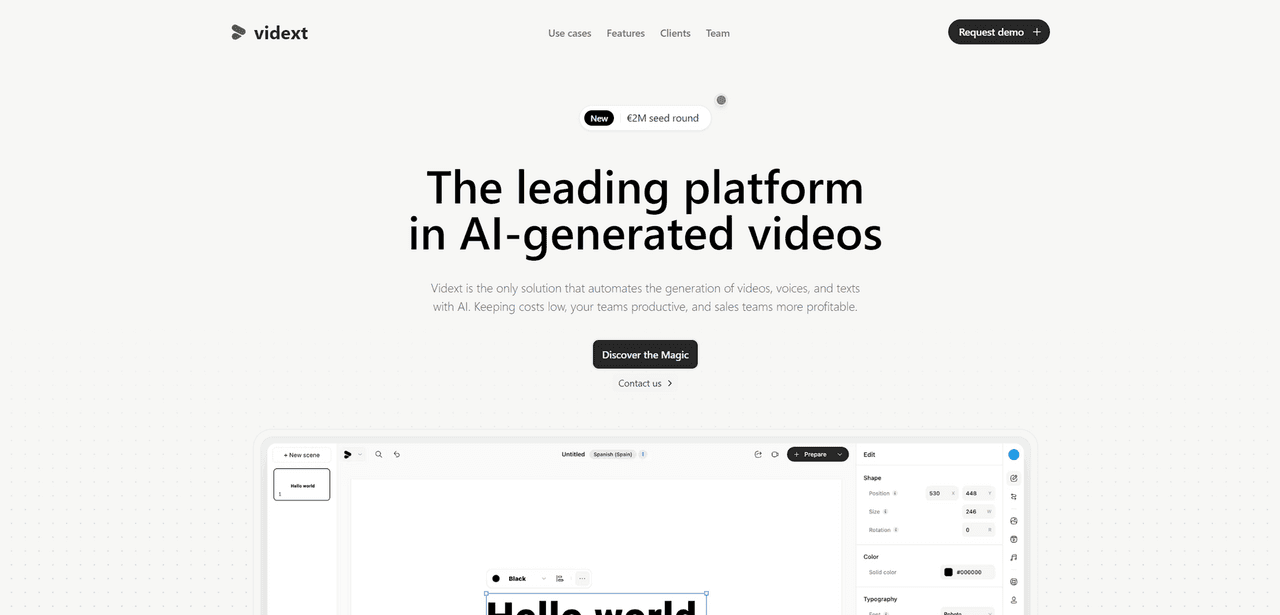

Vidext is an AI video generator that converts text scripts and PowerPoint slides into videos using digital avatars. Pricing requires a sales consultation.
What is Vidext?
Vidext converts text scripts into audio across 40 languages and syncs it to the lip movements of over 50 digital avatars. Developed by Vidext AI S.L., this text-to-video platform generates corporate communications without cameras or actors. The primary audience includes enterprise training departments and marketing teams needing localized video production.
The system replaces standard video shoots with browser-based rendering. Users paste a script or upload a PowerPoint file, and the software outputs an MP4 file featuring a digital presenter. Step back and look at the workflow. The entire process relies entirely on synthetic media generation instead of physical recording equipment or sets.
- Primary Use Case: Converting corporate training manuals and static PowerPoint files into video lessons with digital presenters.
- Ideal For: Global marketing teams and human resources departments needing localized video content.
- Pricing: Starts at $0 (Custom) (Pricing requires a mandatory sales consultation to reveal account limits).
Key Features and How Vidext Works
Avatar and Voice Generation
- Digital Presenters: Users select from 50 pre-built human avatars to narrate scripts. The selection covers various demographics, though body language loops appear repetitive during longer scenes.
- Multilingual Audio: The platform generates text-to-speech audio in over 40 languages. It includes 100 regional accents to match specific geographic target markets.
- Voice Cloning: Users upload audio samples to replicate specific human voices. This applies a consistent brand voice across all generated videos.
Document Conversion
- PPT to Video: The software accepts .ppt and .pptx files directly. It automatically creates corresponding video slides to save hours of layout recreation.
- Auto-Subtitles: The system transcribes the generated audio and places synced captions on the screen. Users manually edit text timings if the automatic placement misses a cue.
Customization and Access
- Custom Avatars: Customers record a five-minute video of a real person to generate a digital twin. This feature incurs an extra setup fee and requires explicit consent.
- API Access: Enterprise users connect to a REST API. This setup allows programmatic video generation directly from internal software platforms.
Vidext Pros and Cons
Pros
- The PowerPoint import feature reduces the time required to digitize legacy training materials into video format.
- Support for 40 languages allows for global content distribution without hiring multiple voice actors.
- Lip-syncing algorithms accurately match avatar mouth movements to the generated audio tracks.
- The browser-based interface allows staff to produce videos on standard laptops without expensive GPU hardware.
Cons
- Lack of public pricing forces users into a mandatory sales consultation just to evaluate costs.
- Avatar gestures feel repetitive and mechanical in videos lasting longer than two minutes.
- The timeline interface offers limited control over fine-grained animation details compared to desktop video editors.
- Rendering queues cause wait times during periods of high server traffic (a common frustration when rushing to export a final draft).
Who Should Use Vidext?
- Corporate Trainers: Human resources staff can update compliance videos simply by editing text scripts. They avoid scheduling new physical video shoots.
- Localization Teams: Marketing professionals translating one campaign into ten languages save days of production time using the automated translation tools.
- Independent Creators: Solo YouTubers or vloggers should look elsewhere. The lack of transparent pricing and focus on corporate avatars makes this a poor fit for highly creative or low-budget projects.
Vidext Pricing and Plans
Vidext hides its pricing model entirely behind a sales wall. The website lists a Custom Plan starting at $0, but there is no functional free trial available for immediate testing. What actually happens: prospective users must submit their contact information and wait for a sales representative to schedule a demonstration.
Practically speaking, this approach signals an enterprise software model. Buyers negotiate exact limits regarding monthly video generation minutes, the number of user seats, and digital storage space. So, smaller teams cannot quickly swipe a credit card to start creating videos today.
How Vidext Compares to Alternatives
Synthesia is the most direct competitor in the AI avatar space. Synthesia clearly lists its starting price at $22 per month and offers a highly refined user interface. Vidext matches Synthesia in language count but creates friction with its opaque sales process.
HeyGen focuses heavily on highly expressive, casual avatars for social media content. HeyGen offers a free tier with daily credits for immediate testing. Then again, Vidext prioritizes formal corporate training environments with its direct PowerPoint conversion tools.
A Solid Option for Global Training Departments
The gap shows up when you evaluate the buying process. Vidext offers a highly capable text-to-video engine for digitizing corporate documents. Human resources and enterprise marketing teams benefit greatly from the 40 available languages and direct PowerPoint integration. These features cut down weeks of video production time. Buyers who require upfront pricing or want to generate highly stylized creative content should avoid this platform. Instead, independent creators or small businesses should test HeyGen to access clear pricing and immediate account creation.
User Reviews
No reviews yet. Be the first to share your experience!
Sign in to write a review.
Related articles
Guides and articles related to Vidext.
Faceless YouTube AI Channel: $5,000+/Month Tutorial (2026)

How to Get an AI Model Wearing Your Clothes (Step by Step)

How to Make Money Selling AI UGC Content for Brands (2026)

AI Video Generator Prompting: The Filmmaker's Real Workflow
