n8n vs Make vs GoHighLevel: Which Fits Your Workflow?
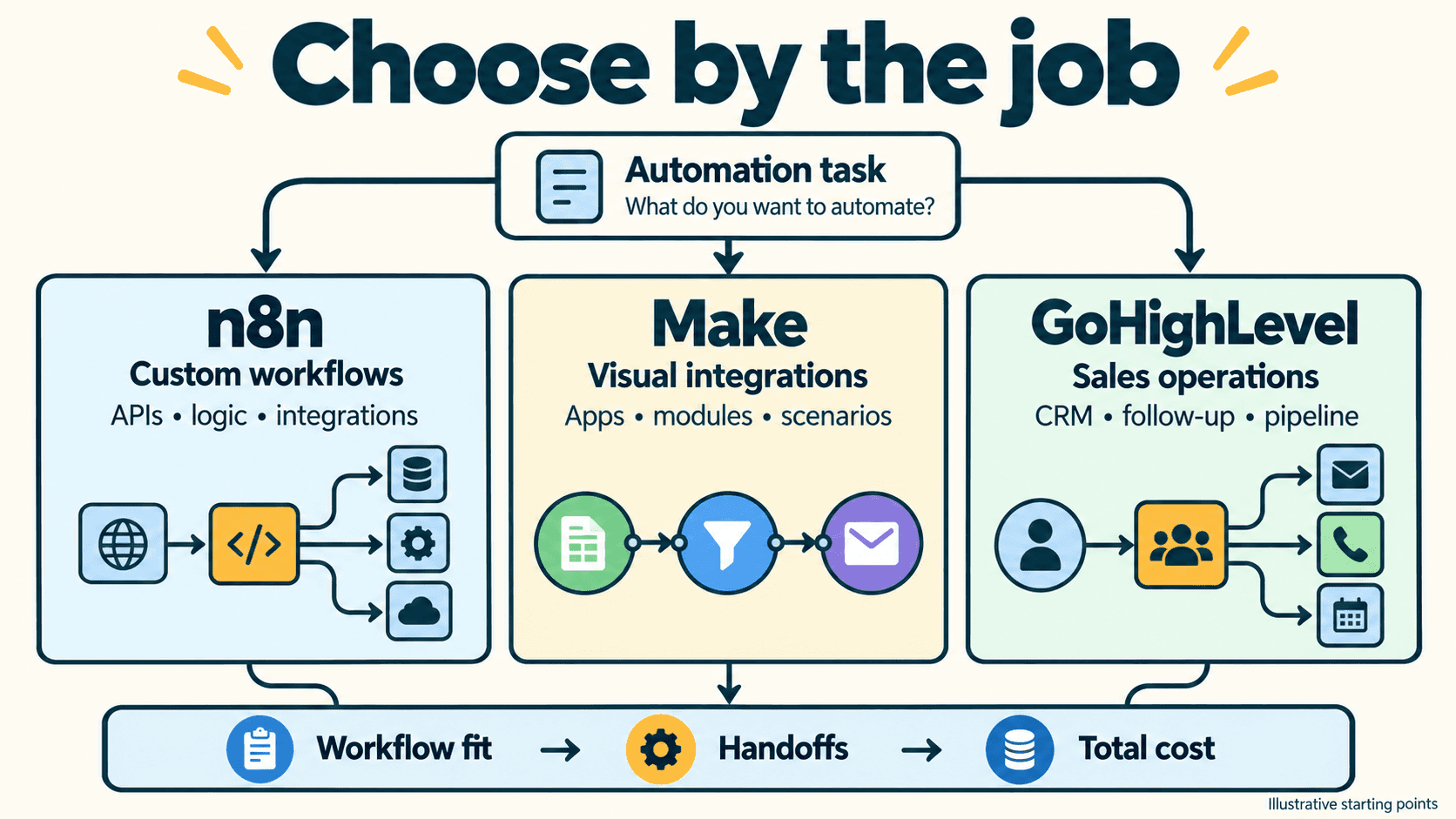
Start with GoHighLevel when the missing piece is a customer-management system. Start with n8n or Make when the missing piece is a workflow between systems. If you need both, connect them around a clear boundary: one system owns the customer record, another handles work that is awkward to maintain inside the CRM.
That distinction matters more than counting integrations. A visual sales pipeline, a place to read customer conversations and an appointment-booking experience solve a different problem from transforming data, calling APIs and coordinating services.
This guide compares those jobs, explains current code and billing options, and gives you a lead-to-booking blueprint you can adapt. The blueprint and workload examples are illustrative; they are not a three-platform benchmark.
Quick answer: choose by the job
| Your main requirement | Start by evaluating | Check before choosing |
|---|---|---|
| Run a service business's contacts, follow-up and bookings in one place | GoHighLevel | Selected plan, sub-account needs, messaging and premium-action charges |
| Build workflows around APIs, custom logic and infrastructure you control | n8n | Cloud versus self-hosted operation, license, credentials and team controls |
| Connect business applications in a managed visual environment | Make | Scenario design, credit consumption, code requirements and error recovery |
| Keep an existing CRM and automate adjacent work | n8n or Make alongside that CRM | Whether an additional CRM would add useful capability or duplicate it |
| Give clients a CRM experience while maintaining specialized processing | GoHighLevel plus an orchestration tool | Record ownership, integration permissions and who supports failures |
For an agency that needs the first or last row, HighLevel is worth a close look. If you only need to move records between applications, evaluate the workflow tools first.
Vantaige may earn a commission if you choose GoHighLevel or Make through our links.
Check GoHighLevel plans and current trial or compare Make.com plans and current pricing. Compare the GoHighLevel listing and Make.com listing on Vantaige first.
What each product replaces—and what it leaves you to build
GoHighLevel brings the customer-facing workspace
HighLevel combines CRM and pipelines, conversations, forms, funnels, calendars and workflow automation. Its official plan page distinguishes subscription tiers, sub-account allowances and separately charged services.
The useful question is whether your team needs that combined workspace. Can a salesperson find a contact, understand the conversation, update a deal and manage the next appointment without switching between several products? For a small service business or an agency building repeatable client systems, that can be the deciding factor.
It does not follow that every feature or usage charge is included in every subscription. Select the plan around the required capabilities and number of client accounts, then price the services the workflow will actually consume.
n8n and Make connect and operate workflows
Both can receive an event, transform data, branch on conditions and call other services. They can also retain workflow state: n8n Data Tables and Make Data Stores are documented built-in options.
That is different from a complete sales CRM. A small lookup table can hold an event marker or a contact reference without giving a sales team a conversation inbox, deal-management interface and booking experience.
You therefore do not always need an external database for an automation. You may still need an external CRM or another user-facing application, depending on what people must do with the records. If you already own those tools, compare the incremental cost of connecting them rather than assuming you must buy them again.
Before adding another product: write down which system owns contacts, opportunities, appointments and message history. Two applications independently creating the same records is a maintenance problem, even when both offer excellent automation.
Compare the capabilities that change the decision
| Capability | GoHighLevel | n8n | Make |
|---|---|---|---|
| Customer-management interface | CRM, pipelines and conversations are central to the product | Connect a CRM or build the interface your users need | Connect a CRM or another front-end application |
| Lightweight workflow state | Can work with its customer records and workflow data | Native Data Tables, within documented limits | Native Data Stores, within documented limits |
| Code inside workflows | Premium Custom Code action; verify the selected action's language and limits | Code node with environment-specific language and library limits | Make Code supports JavaScript and Python on paid plans |
| Deployment choice | Managed platform | n8n Cloud or self-hosting | Managed platform |
| Agency/client structure | Plan-specific sub-accounts and agency capabilities | Projects and permissions are not a substitute for a client CRM | Organizations/teams are not a substitute for a client CRM |
| Integration with HighLevel | The customer system itself | Documented HighLevel node | Documented GoHighLevel app |
Code support is no longer a useful yes-or-no shortcut
Make is not limited to expression formulas. Its Make Code app supports JavaScript and Python, with plan-dependent runtime and library restrictions. Make's 2025 release archive lists that release on 2 October 2025.
HighLevel also documents a premium Custom Code action. Its Build with AI guide, modified in July 2026, describes generating and testing JavaScript for an individual workflow step. HighLevel documentation varies across code-action pages, so confirm the actual action, language and account options before designing around them.
n8n's Code node documentation explains its own execution environment and restrictions. Self-hosting can provide additional configuration choices; it does not make every library or system operation available automatically.
Compare the code you need to run: its inputs, dependencies, runtime, debugging, permissions and cost. All three having a code feature does not make their operating models equivalent.
Deployment control is a responsibility, too
n8n offers Cloud and self-hosted deployment choices. Operating your own runtime gives you control over that environment, along with responsibility for updates, credentials, availability, backups and recovery.
It does not mean data never leaves your network. A workflow that calls an external model, CRM or email service sends the selected data to that service. Draw the data path before making a privacy or residency decision.
For team use, check the exact plan's permissions and change-management features. Do not assume a free self-hosted installation has every paid team feature, or that project permissions provide the same client experience as HighLevel sub-accounts.
Price the whole workflow, not just the subscription
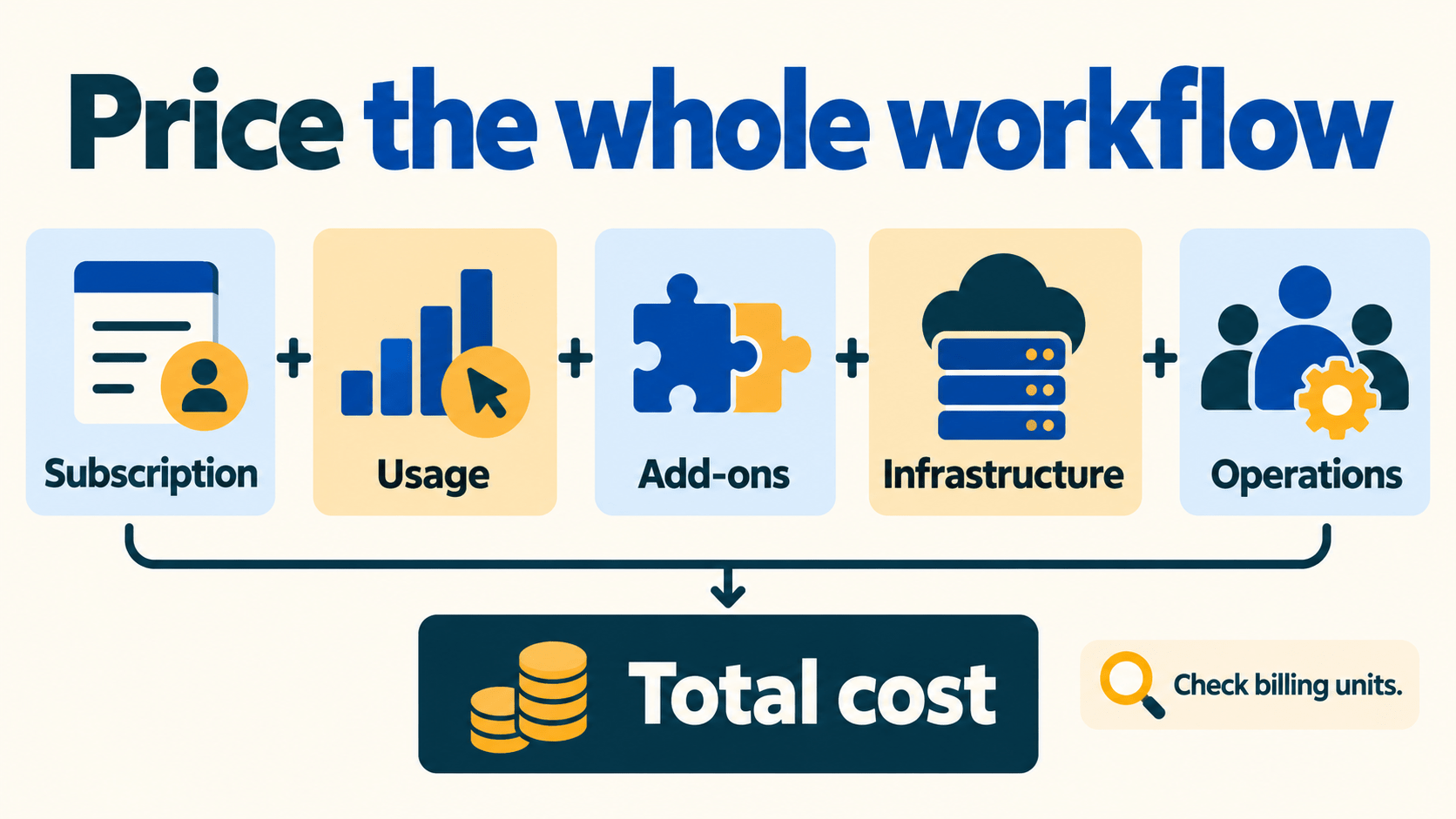
The billing units differ. A workflow with six boxes on the screen does not necessarily generate six billable units on every platform.
| Platform | Billing model to understand | Costs to add to the comparison |
|---|---|---|
| GoHighLevel | Subscription plus applicable services and premium workflow usage | Messaging, AI, premium actions and any other selected add-ons |
| n8n Cloud | Plan based on workflow executions | External services, retries or additional executions, and human operations |
| n8n self-hosted | Chosen edition/license plus infrastructure | Hosting, storage, maintenance, external services and team time |
| Make | Credits; consumption depends on modules and execution behavior | Dynamic code/AI usage, external services and operational work |
HighLevel's public page lists monthly base plans at USD 97, USD 297 and USD 497. Those tiers reflect different capabilities and account allowances, not an automatic progression based on lead volume. Use its current pricing page to select the required tier.
Its premium-workflow billing guide distinguishes standard actions from charged premium executions and optional bundles. The documented initial allowance of 100 free premium executions is lifetime, not a new allowance every month.
n8n's pricing page explains execution-based billing. Its Sustainable Use License matters when evaluating Community Edition for a commercial or customer-facing service. Free software access does not remove infrastructure costs or grant every possible redistribution use.
For Make, consult both pricing and the credits guide. Standard operations, code and AI activity can have different consumption rules. A token or code-heavy scenario needs its own estimate.
A useful workload comparison
Start with the same synthetic workload and an explicit assumption sheet:
| Monthly leads | n8n executions if each lead starts one workflow | Make credits if the measured design averages six per lead | HighLevel premium executions if the design uses one premium action per lead |
|---|---|---|---|
| 100 | 100 | 600 | 100 |
| 1,000 | 1,000 | 6,000 | 1,000 |
| 10,000 | 10,000 | 60,000 | 10,000 |
These are illustrative unit calculations, not measured bills or promises about a particular implementation. Branches, retries, batch processing, polling, AI and code can change them. Count premium actions, not just HighLevel workflow starts.
Then calculate, in one chosen currency:
Monthly operating cost =
  selected subscription/license
  + usage charges
  + incremental CRM and other application costs
  + messaging and model charges
  + hosting
  + human operating time
Keep EUR and USD separate unless you record the exchange rate and date. Use zero for an incremental cost only when you genuinely do not incur it. The cost worksheet leaves unknown inputs for your own quotes; it does not invent current SMS, model or hosting rates.
Walk through a lead-to-booking workflow
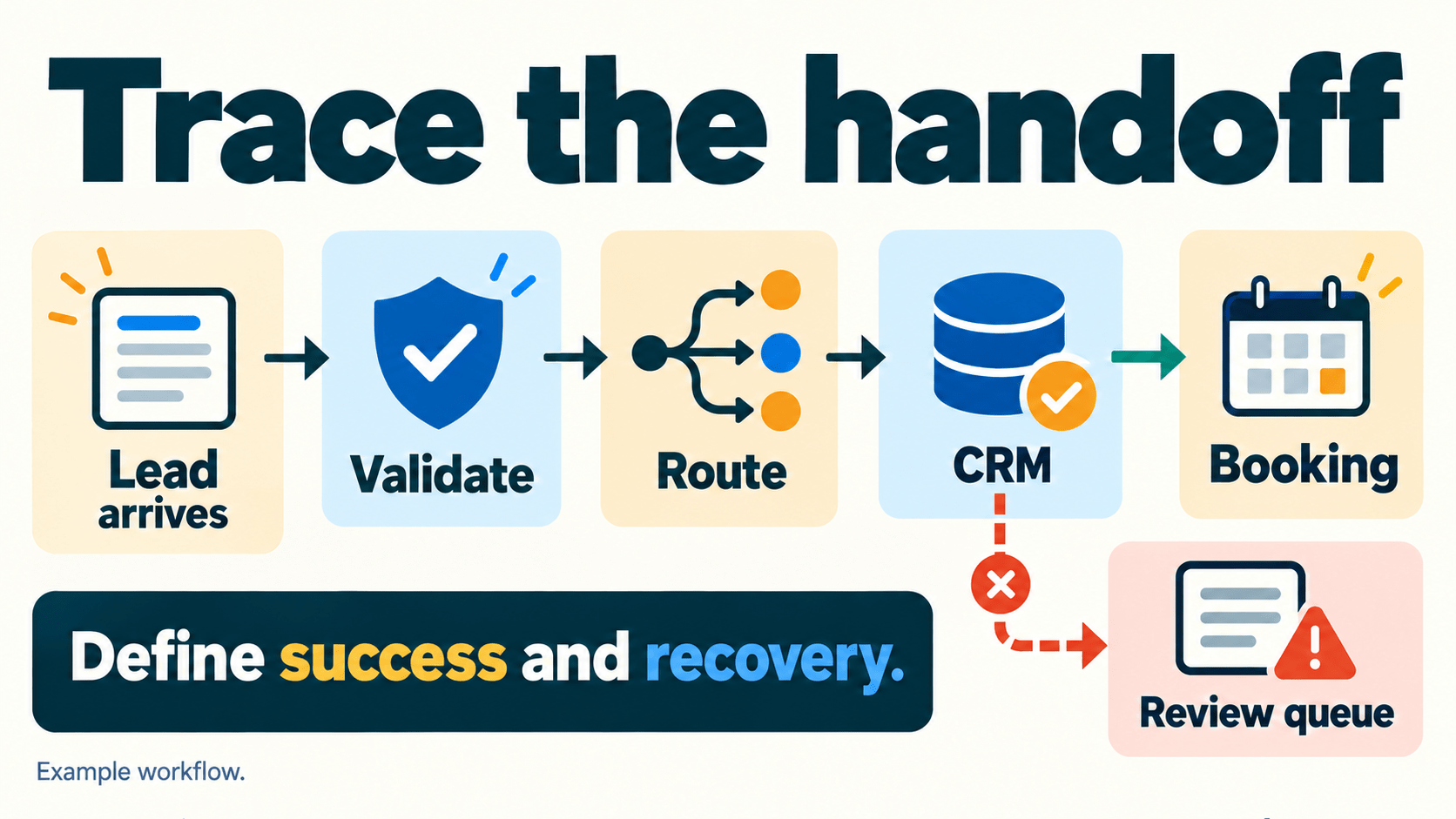
Consider a hypothetical service business receiving enquiries from a form. Its goal is to turn a suitable enquiry into a reviewed next action and, when appropriate, a booking.
Use the same acceptance criteria across tools
- Receive a stable event ID. Keep the original submission identifier so a retry can be recognized.
- Validate and normalize fields. Distinguish missing or invalid data from a poor-fit lead. Do not silently discard either.
- Check whether the event has been handled. Choose state storage appropriate to concurrency and retention needs.
- Qualify against an explicit rule. If an AI step is used, preserve its structured output and route uncertain cases to a person.
- Update the customer system. Reuse the contact/opportunity identifiers returned by that system.
- Review and perform the next action. Confirm the intended recipient and booking state before sending messages or creating appointments.
A passing workflow creates the expected record once, preserves the right state and exposes failures to an owner. A nice-looking canvas is not an acceptance test.
Decide what belongs in each layer
For a straightforward CRM-led process, keeping more work inside HighLevel can reduce integration boundaries. If qualification needs specialized APIs, transformations or infrastructure controls, an upstream n8n or Make workflow may be useful.
Do not add that extra layer merely because a template exists. Every new connection introduces credentials, mappings and failure modes to maintain.
Check failures before increasing volume
Test these three cases in an appropriate sandbox before using the workflow with real customer actions:
| Case | What you want to observe | Practical design tip |
|---|---|---|
| The same event arrives twice | One intended business action, with the duplicate visible | Track event identity; do not assume matching an email address proves an event was processed |
| A downstream request times out | A known state and a clear retry/reconciliation path | Check whether the first request succeeded before blindly repeating a booking or message |
| A person rejects the next action | No send or booking, with the decision retained | Separate drafting/qualification from approval and execution |
An upsert operation does not by itself prove the whole workflow is race-free. When concurrent events can produce expensive side effects, evaluate the storage and action semantics explicitly.
For recovery, inspect the current n8n error-handling documentation and Make error handlers, alongside the relevant HighLevel action's documentation. Read what a retry actually repeats and what is billed; do not infer it from a generic retry icon.
A small log is more useful than a silent retry: retain event ID, business-record ID, attempt number, status and the action owner. Keep sensitive payloads out of logs where they are not needed.
What public implementations show about combined stacks
n8n plus HighLevel: classification before the CRM handoff
Rahul Joshi's published lead-classification template retrieves HighLevel opportunities, enriches them with contact information and uses an Azure-hosted model step to classify intent before routing the enquiry.
The useful pattern is separating interpretation from record ownership. You can inspect the proposed mapping and routing logic without concluding that it delivers a particular conversion lift. This is a community-authored template, not an independent performance study.
A second form-to-HighLevel-and-Slack template by iamvaar shows another sequence: form intake, contact lookup/update, classification, opportunity handling and team notification. Its third-party model and Slack connections are additional dependencies, not free capabilities supplied by the CRM.
Make plus HighLevel: cross-application coordination
Make's GoHighLevel app documentation documents connections and modules for working with HighLevel records. Use that supported interface when it covers the action you need; verify current connection requirements and event modules before copying an older tutorial.
A reasonable blueprint is form or business-app event → validation and state check → HighLevel record update → a team notification. This proposed design illustrates the sequence; verify connector field support and test the flow in a sandbox before deploying.
A CRM-led agency example
HighLevel's Business Done Better case study describes an agency combining platform-based services, snapshots, pipeline design and operational support. It is vendor-published reporting, not a controlled comparison with n8n or Make.
The transferable lesson is to map the client journey and the service you will maintain before choosing automation features. A client's need for a daily CRM interface can matter more than which engine has the most flexible transformation step.
Choose for your situation
An agency or local service business
Start with HighLevel if contacts, conversations, calendars and client workspaces are the missing foundation. Confirm the required account tier, recurring service charges and who will support the system after setup.
If you already have a satisfactory CRM, compare replacing it with connecting it. Migration, staff training and message-history continuity are real work, even when the new subscription looks attractive.
Check GoHighLevel plans and current trial
A solo automator or product engineering team
Start with Make when a managed visual environment and the relevant app connections fit the job. Include its code options and credit behavior in your pilot.
Start with n8n when its deployment choices and workflow-development model fit your technical team. Treat the operating burden and required plan features as part of the decision.
For a closer two-product comparison, read n8n versus Make. Our HighLevel, n8n and Make profiles provide further product context; verify volatile terms with the official sources linked here.
Your next step
Write a one-page requirement list: who uses the system, which application owns each record, what code or integrations are required, what must happen after a failure, and which costs you need to quote.
Then inspect the smallest useful workflow against those requirements. Choose HighLevel for a CRM-led fit, n8n or Make for the orchestration fit, or a combined stack when it removes a specific constraint worth maintaining another connection.
Check GoHighLevel plans and current trial
Download the capability matrix · Read the proposed architecture diagrams.
Get the best new AI tools and guides, weekly
One short email a week. The tools worth trying, the guides worth reading, nothing else.
No spam. Unsubscribe anytime.
Aymen B
Contributing writer at Vantaige, covering the AI tools ecosystem.
Similar articles
Vantaige Launches the LLM VRAM Calculator: A Free GPU Compatibility Finder for Open-source and Open-Weight AI
Xiaomi MiMo-V2.6 Deep Dive: The 1-Trillion-Parameter Open-Source Titan Disrupting the Frontier