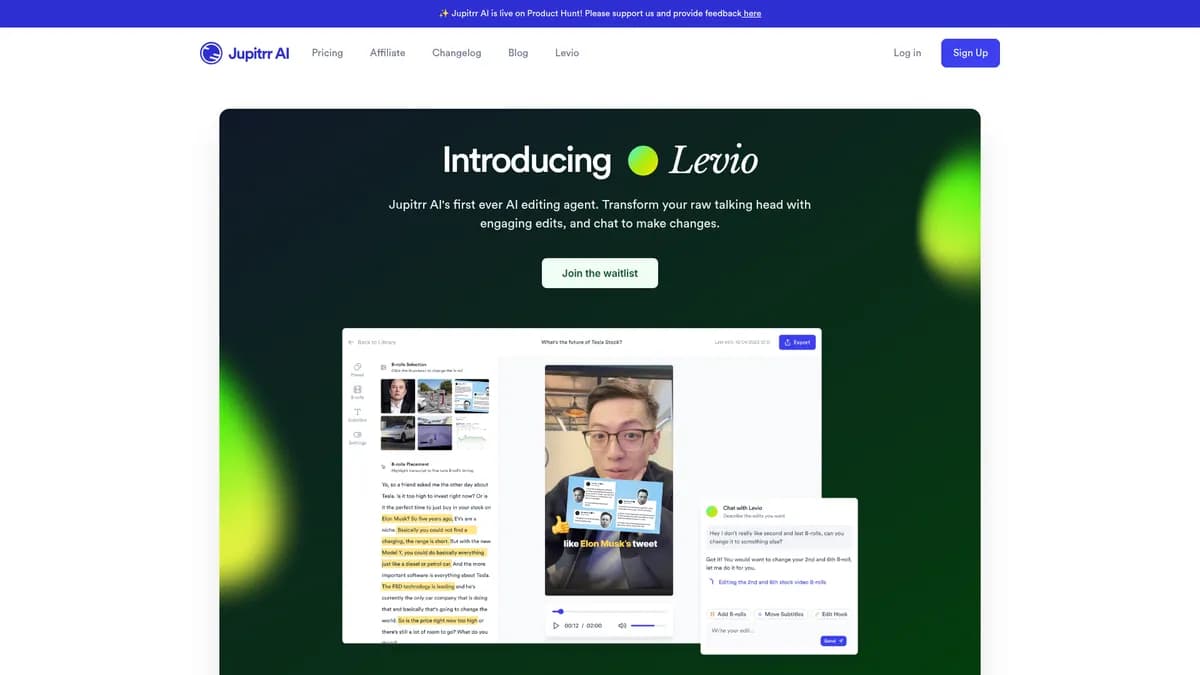

Levio is an AI video generation platform that converts text scripts into professional videos using 80 digital avatars. It helps content creators and corporate teams produce multilingual videos quickly. While the lip-syncing supports 40 languages, the digital humans lack natural hand gestures.
What is Levio?
Levio is a text-to-video generation platform that replaces human actors with digital avatars. Users type a script, select a digital human, and the software generates a narrated video with synchronized lip movements.
Jupitrr developed this AI video tool to solve the high cost of traditional video production. It targets corporate trainers, marketers, and YouTube creators who need to produce content at scale. A single user can generate a one-minute video in under five minutes.
- Primary Use Case: Converting text scripts into narrated videos using digital avatars and automated stock footage.
- Ideal For: Corporate HR teams and faceless YouTube channel creators.
- Pricing: Starts at $23 (Creator) – provides 15 minutes of Full HD video generation.
Traditional video production requires expensive cameras, complex lighting, and human actors.
Key Features and How Levio Works
Digital Avatars and Voice Cloning
- AI Avatars: Access 80 diverse digital humans with realistic facial expressions. Avatars remain static from the neck down.
- Voice Cloning: Create a digital voice double using a 30-second audio sample. This feature requires a paid subscription.
- Multi-language Support: Generate audio in 40 languages with localized accents. Lip-syncing adapts automatically to the chosen language.
Video Assembly and Editing
- Text-to-Video Generation: A script-based engine matches visuals to text automatically. Users must manually adjust pacing if the AI reads too quickly (a common issue with technical scripts).
- Scene Editor: A drag-and-drop storyboard interface allows users to reorder scenes. Each scene holds a maximum of 500 characters of text.
- Auto-Captions: Generate burnt-in subtitles with one click. Users can edit font styles but cannot animate individual words.
Asset Management and Export
- Stock Library: Built-in integration with Storyblocks and Pexels provides royalty-free clips. Users cannot upload their own stock libraries in bulk.
- Background Removal: Isolate avatars automatically to place them in virtual environments. Complex hair textures occasionally show green screen artifacts.
- 4K Resolution: High-definition video export provides crisp visuals. This feature is restricted to the $125 per month Team plan.
Levio Pros and Cons
Pros
- Generates a one-minute professional video in under five minutes.
- Replaces expensive camera gear, lighting setups, and human actors.
- Mouth movements remain synchronized across 40 different languages.
- Built-in Storyblocks access saves users from paying for external stock subscriptions.
Cons
- The one-minute monthly limit on the free tier prevents meaningful project testing.
- Digital humans lack natural hand gestures and dynamic body movement.
- High-resolution 4K exports often take over 15 minutes during peak server times.
Who Should Use Levio?
- Corporate HR Teams: Managers can convert dry policy documents into engaging training videos without hiring a production crew.
- Faceless YouTube Creators: Channel owners can pair AI narration with automated stock footage to publish multiple videos per week.
- International Marketers: Advertisers can produce multilingual marketing ads with localized lip-syncing for different regions.
- Not for High-End Commercial Producers: Brands needing dynamic actor movements or cinematic emotional range should hire real actors.
Levio Pricing and Plans
The Free plan costs $0 per month for one user (though the one-minute limit makes it practically useless for real work). It includes 80 avatars but restricts generation heavily. This acts as a limited trial rather than a usable free tier.
The Creator plan costs $29 per month, or $23 per month when billed annually. It provides one user with 15 minutes of Full HD video generation per month.
The Team plan costs $125 per month, or $100 per month on an annual contract. It supports three users, allows 50 minutes of generation, and enables 4K video exports.
The Enterprise plan offers custom pricing. It includes unlimited seats, custom minute allocations, and dedicated support.
How Levio Compares to Alternatives
Similar to HeyGen, Levio offers a large library of digital humans and voice cloning capabilities. HeyGen provides more dynamic avatar movements and better micro-expressions. Levio counters with a more intuitive storyboard interface and built-in Storyblocks integration, which HeyGen lacks on its base tiers.
Unlike Synthesia, which focuses heavily on enterprise training, Levio caters equally to solo content creators. Synthesia charges $22 per month for 10 minutes of video, making Levio slightly more cost-effective at $23 for 15 minutes. Synthesia offers superior enterprise security features, while Levio provides faster rendering times for standard HD videos.
The Best AI Video Generator for Solo Creators
Levio delivers high value for solo creators and small marketing teams who need to produce talking-head videos quickly. The built-in stock footage and reliable lip-syncing make it a highly efficient production tool.
Users who require dynamic body language will find the static avatars limiting.
If you need expressive hand gestures and cinematic avatar movement, HeyGen remains a better alternative. Within 12 months, Levio will likely introduce full-body motion tracking to close the gap with its competitors.
User Reviews
No reviews yet. Be the first to share your experience!
Sign in to write a review.
Related articles
Guides and articles related to Levio.

How to Get an AI Model Wearing Your Clothes (Step by Step)

AI Video Generator Prompting: The Filmmaker's Real Workflow

Best AI Fashion Model Generators for Clothing Brands (2026)
One Product Photo, Full Fashion Campaign: AI Images and Video That Sell (2026)

Faceless YouTube AI Channel: $5,000+/Month Tutorial (2026)