
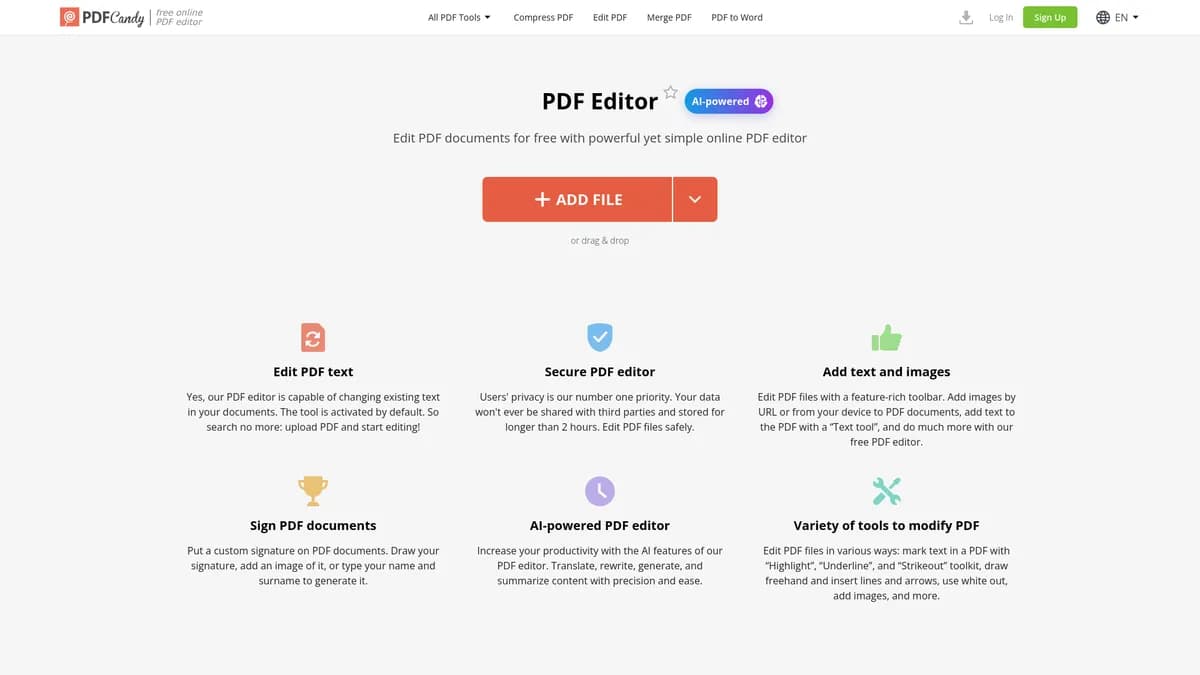

PDF Candy Editor is a web-based document tool for users who need to modify text, add signatures, and manage pages. It handles massive files up to 2GB with ease. But the free tier restricts users to just one task per hour, forcing most professionals to upgrade.
What is PDF Candy Editor?
Most online document editors crash when you upload a 2GB file. PDF Candy Editor handles these massive blueprints and technical manuals without freezing your browser. You can edit text, add signatures, and rearrange pages directly in the cloud. The interface loads fast (I tested a 1.5GB blueprint and it loaded in seconds) and presents all tools in a simple grid.
Icecream Apps Ltd built this tool for professionals who need fast document fixes without installing heavy desktop software. It solves the common problem of receiving a finalized report with a glaring typo. You just upload the file, click the text, and type the correction. But the web-based approach means you need a fast internet connection to upload those 2GB files. If your connection drops, you lose your progress.
- Primary Use Case: Correcting typos and redacting sensitive data in finalized documents without the source file.
- Ideal For: Freelancers and small teams who process large technical documents.
- Pricing: Starts at $11.99/mo (paid) – A steep entry price considering the severe free tier limits.
Key Features and How PDF Candy Editor Works
Direct Text and Image Modification
- Text Editing: Modify existing text or add new blocks with font control. It struggles with non-standard embedded fonts.
- Image Insertion: Upload JPG, PNG, or SVG files into documents. You can resize images, but exact pixel positioning is difficult.
- Whiteout Tool: Hide sensitive financial data by overlaying opaque blocks. This action cannot be undone after saving.
Document Annotation and Review
- Annotation Suite: Highlight, underline, and strikeout text. Color choices are limited to a standard palette.
- Shape Drawing: Add rectangles, circles, and lines to emphasize sections. Line thickness options are basic.
- Electronic Signatures: Draw, type, or upload an image to sign contracts. It lacks advanced cryptographic certificate tracking.
File Processing and Security
- OCR Technology: Convert scanned images into searchable text. It supports over 20 languages but requires high-resolution scans for accuracy.
- Cloud Integration: Save directly to Google Drive and Dropbox. You must authenticate your accounts each session (which adds friction to daily workflows).
- Privacy Protection: The server deletes files after two hours. You cannot extend this timer.
PDF Candy Editor Pros and Cons
Pros
- You can process basic tasks without creating an account.
- The 2GB file size limit accommodates massive architectural blueprints.
- Integrated OCR technology recognizes text in over 20 different languages.
- Paid users get a clean interface with zero display ads.
Cons
- The free version enforces a strict one-task-per-hour limit.
- Text editing breaks complex layouts when you add long sentences.
- Web-based processing requires a fast internet connection for large file uploads.
Who Should Use PDF Candy Editor?
- Architects and Engineers: The 2GB file limit makes this perfect for handling large technical drawings.
- Remote Freelancers: You can sign contracts and fix typos fast without installing software.
- Budget-Conscious Students: This is not a good fit. The free tier only allows one task per hour, which ruins study workflows.
PDF Candy Editor Pricing and Plans
The free tier is a trial in disguise. It restricts you to one task every 60 minutes.
The Premium plan costs $11.99 per month when billed yearly. This tier allows 2,500 pages per document and 50 documents per day. You also get 1,200 AI questions per day to summarize text.
The Pro plan costs $14.99 per month when billed yearly. It increases limits to 6,000 pages per document and 150 documents per day. You can ask 100,000 AI questions per day.
The Enterprise plan requires custom pricing. It offers unlimited pages, 1,000 documents per day, and unlimited AI questions for large corporate teams.
How PDF Candy Editor Compares to Alternatives
Similar to Smallpdf, PDF Candy Editor offers a wide range of web-based document tools. Smallpdf provides a modern interface and better mobile apps. But PDF Candy Editor handles much larger files, supporting up to 2GB compared to Smallpdf limits. Smallpdf also forces users into a paid plan faster for basic editing tasks.
Unlike iLovePDF, this tool includes a dedicated Windows desktop version for offline editing. iLovePDF focuses on batch processing and offers a generous free tier. Yet PDF Candy Editor provides superior OCR language support for scanned documents. iLovePDF is better for merging files, while PDF Candy excels at direct text modification.
The Best Choice for Heavy Document Users
Professionals who handle massive 2GB files get the most value here. The high file limits and offline Windows app justify the subscription cost. If you only need to merge a few small files, look elsewhere. The strict one-task-per-hour free limit will frustrate you. You should try iLovePDF instead for basic, infrequent document tasks.
User Reviews
No reviews yet. Be the first to share your experience!
Sign in to write a review.
Related articles
Guides and articles related to PDF Editor.

Wix Logo Maker Review (2026): Real Costs, the Edit Catch, and AI Alternatives
Undetectable AI Review (2026): What It Does, What It Costs, and 7 Alternatives

Perplexity AI Tutorial: Maximize Your Research Workflows

Google Vision AI Explained (2026): Pricing Per 1,000 Units, Free Tier, and Alternatives
The AI Content Automation Stack: 7 Tools That Run a Full Blog Without a Team
