
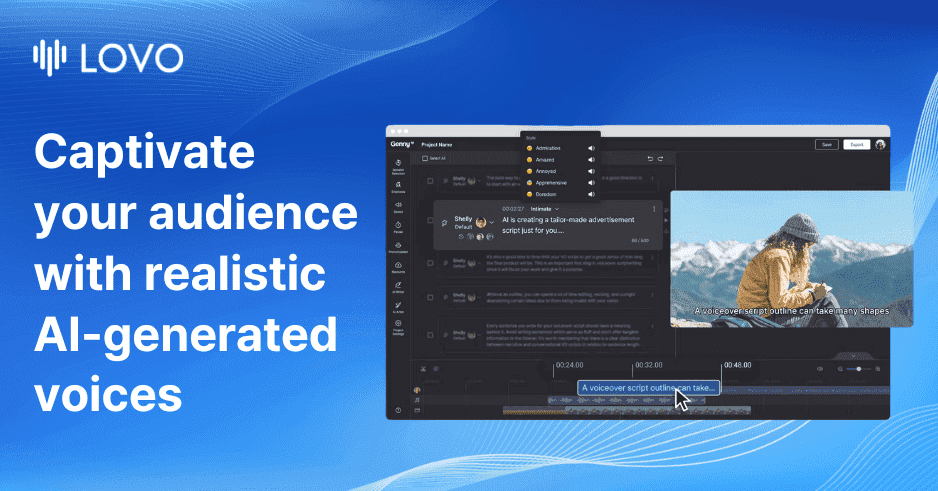

LOVO AI (branded as Genny) is an all-in-one voice generation and content production studio. It packs 500+ voices across 100+ languages, voice cloning from short audio samples, a timeline-based video editor, auto-subtitles, and an AI script writer into a single browser workspace.
LOVO AI is a Los Angeles-based AI voice generation company that ships its product under the name Genny: a browser-based studio where text-to-speech, voice cloning, video editing, auto-subtitles, and AI scriptwriting all live in one workspace. Founded in 2019 by Charlie Choi and Tom Lee, the company raised a $4.5 million Pre-Series A round in August 2021 led by Kakao Entertainment and LG CNS, and has grown to serve over 2 million professionals. The core pitch is straightforward: instead of generating audio in one tool, editing video in another, and writing scripts in a third, Genny handles all three, which removes the file-passing friction that slows down solo creators and small production teams.
The voice library sits at 500+ AI voices spanning 100+ languages and 30+ emotional styles, with commercial usage rights included on every paid plan. Voice cloning works from as little as one minute of recorded audio. The May 2025 launch of Pro V2 voices added natural-language direction: wrap instructions in square brackets directly in your script (something like [speak warmly, as if reassuring a nervous client]) and the model adjusts delivery accordingly, covering emotion, pace, accent, and non-verbal cues like laughter. The built-in Genny video editor uses a timeline layout with voice, video, and music tracks, pulls stock media from Pixabay and Unsplash, and generates subtitles in 20+ languages automatically. A developer API is available at $0.03 per 1,000 characters for teams that want to integrate TTS into their own products.
What Genny produces in mid-2026
Genny's TTS engine currently offers two voice modes. Standard voices cover the 500+ library with regional accents, gender variety, and preset emotion tags. Pro V2 voices, launched May 23, 2025, accept free-form natural language direction inside the script itself rather than requiring separate parameter sliders. The model can interpret commands for embarrassment, urgency, whisper, sobbing, or complex character directions, and generates multiple takes so editors can pick the best reading. Language coverage reaches 100+ languages across 30+ countries, with English voices drawing the strongest quality marks from reviewers and some non-English voices still showing a detectable synthetic quality at this point.
The video editor inside Genny uses a standard multi-track timeline: one lane for the generated voiceover, one for background video or screen recordings, one for music. Subtitle generation is automatic and exports in SRT or burned-in formats. The AI script writer accepts a topic and length prompt and returns a structured draft, which you can paste directly into the TTS editor. An AI art generator is bundled in, producing background visuals for video projects without leaving the browser tab. Exports go up to 1080p for video; audio exports in WAV and MP3. Rendering speed is cloud-dependent and reviewers note that 10-minute 1080p videos can take 10 to 15 minutes during peak hours.
"The emotion controls were better than I expected. I used the 'warm' and 'professional' tones for training videos and the results were solid for that use case." - reviewer, FahimAI.com, February 2026
Where Genny sits versus ElevenLabs and Murf
These three tools share the AI voice generation category but serve different primary workflows, and the mechanical differences matter before you pick one.
ElevenLabs is the voice-quality leader. Its Eleven v3 model produces speech that reviewers consistently rate as more human-like than Genny, with better handling of emotional nuance and natural breathing patterns. The critical structural difference is scope: ElevenLabs is a voice and audio tool only. It has no video editor, no subtitle generator, and no script writer. Its dubbing feature covers 29 languages with lip-sync, which Genny does not offer at all. Voice cloning on ElevenLabs starts at the Starter plan ($5/month); on Genny it requires the Basic plan at $25/month or above. For a creator whose workflow is audio-only, ElevenLabs delivers better fidelity at a lower entry price. For someone building faceless YouTube videos, Genny's integrated editing is worth the premium because it eliminates a separate video tool from the stack.
Murf occupies a different lane. It targets corporate and business presentation use cases, with deep Google Slides integration, pitch control sliders, and a voice library tuned for professional clarity rather than creator expressiveness. Murf's voice count sits at 120+ across 20 languages compared to Genny's 500+ across 100+. Murf has no video timeline editor; its output is embedded audio for slides and documents. The fundamental split is: Murf for internal corporate training and slide narration, Genny for external creator content that needs to ship as a finished video. Also worth comparing: PlayHT and WellSaid Labs both offer strong TTS-only alternatives for teams that want API access without the bundled video tools.
The licensing and copyright reality
In May 2024, voice actors Paul Skye Lehrman and Linnea Sage filed a federal class action lawsuit against LOVO Inc. in Manhattan (case no. 1:24-cv-03770). The complaint alleged that in 2019 and 2020, LOVO employees hired them through Fiverr under the premise that recordings were for "internal research" only, then used those recordings to train Genny's voice engine and cloned their voices for commercial products: Lehrman's voice was marketed as "Kyle Snow," Sage's as "Sally Coleman." LOVO filed a motion to dismiss, characterizing the complaint as a "kitchen-sink" approach. As of late 2025, the court allowed Sage's direct copyright claim relating to LOVO's use of her actual recording in investor presentations and YouTube videos, finding that use exceeded the Fiverr license scope. The broader class-action claims are ongoing. The case represents one of the first right-of-publicity claims against an AI voice company to survive a motion to dismiss in part, and it highlights the legal exposure the AI voice sector carries around training data sourcing.
For users, the practical licensing position is cleaner: all paid Genny plans include commercial rights to the generated audio and video, meaning you can publish ad-supported YouTube content or use output in paid client projects. The API terms also grant commercial use at the character-level billing rate. LOVO does not provide content credentials or watermarking by default, so there is no built-in disclosure mechanism if you need to indicate AI-generated audio to audiences or platforms that require it.
Where Genny reliably falls short
The most documented complaint across Trustpilot, Capterra, and review sites is voice library instability. Voices are removed from the library without notice, without explanation, and without warning to users who have already built projects around them. A production team that records a 20-episode podcast series using a specific voice can find that voice gone on episode 10, requiring either a rebuilt workflow or a renegotiated client deliverable. This is not a hypothetical: multiple Capterra reviewers in 2024 and 2025 described exactly this scenario in detail.
"They DELETE voices without warning, with no explanation and no apology at all. We use voices for specific characters in our case studies, but then Lovo deletes the voices." - verified reviewer, Capterra, 2024
Trustpilot compounds this picture. LOVO holds a 2.3-star overall score despite 69% of reviewers giving five stars, which indicates a long tail of serious complaints pulling the average down sharply. The most severe documented case in early 2026 involved a user who paid $449.86 for a Lifetime Pro subscription in January 2025, was silently downgraded to the free plan in late April 2026 with no notice, received no response to support requests, and ultimately filed a formal complaint with the US Federal Trade Commission (FTC Report #201182578). The user's summary: "If you're considering a Lifetime plan with LOVO, think twice. 'Lifetime' apparently has an expiration date."
Additional patterns worth noting: credit rollover does not exist, meaning unused minutes expire at the end of each billing period rather than carrying forward. Non-English voice quality is inconsistent, with Spanish Mexican regional accents specifically called out as sounding robotic compared to the English library. Rendering queues during peak hours add latency that breaks real-time creative workflows. Customer support response times average one to two weeks per multiple reviewer accounts, which is slow relative to the support SLAs competitors like ElevenLabs and Murf advertise.
Who Genny is for
Genny earns its place most clearly for solo creators building faceless YouTube channels, TikTok content, or e-learning modules where the workflow benefit of having script, voice, video, and subtitles in one browser tab outweighs the quality gap versus ElevenLabs. A creator who would otherwise pay for Descript or CapCut separately, then export audio to a separate TTS tool, saves real time and subscription costs by consolidating into Genny. YouTube automation channels in particular often cite Genny as their primary production tool because the AI writer handles the script, the TTS handles the narration, and the video editor handles the assembly without switching apps.
The API at $0.03 per 1,000 characters is competitive for developers who want broad language coverage and do not need ElevenLabs-tier realism. At roughly 10x cheaper than ElevenLabs per character (per LOVO's own marketing comparison), it suits production-volume scenarios like bulk localization or auto-generated product descriptions in 100+ languages where per-character costs matter more than subtle voice quality differences.
Skip Genny when your use case depends on a specific voice being available six months from now: the library stability issue is real and documented. Skip it for professional podcast production where voice realism must be indistinguishable from a human recording; ElevenLabs is the correct tool for that tier. Skip it if your budget starts at zero: the 14-day trial with 20 minutes of generation is not enough to validate a long-term workflow, and there is no permanent free tier once the trial ends. Marketing agencies with multiple active client accounts should also factor in the customer support response lag before committing to Genny as a production dependency.
For teams comparing broader options in the AI voice space, PlayHT offers a strong API-first alternative, and WellSaid Labs is worth evaluating for enterprise-grade voice consistency and compliance needs.
User Reviews
No reviews yet. Be the first to share your experience!
Sign in to write a review.
Related articles
Guides and articles related to LOVO AI (Genny).

OpenAI GPT-Realtime-2 (May 2026): Pricing, Latency & 30-Min Voice Agent
Build a 70-Language Live Voice Agent With GPT-Realtime-Translate (2026)

AI Video Generator Prompting: The Filmmaker's Real Workflow

Wix Logo Maker Review (2026): Real Costs, the Edit Catch, and AI Alternatives

How to Train AI to Write in Your Brand Voice (Complete Setup Guide)
