
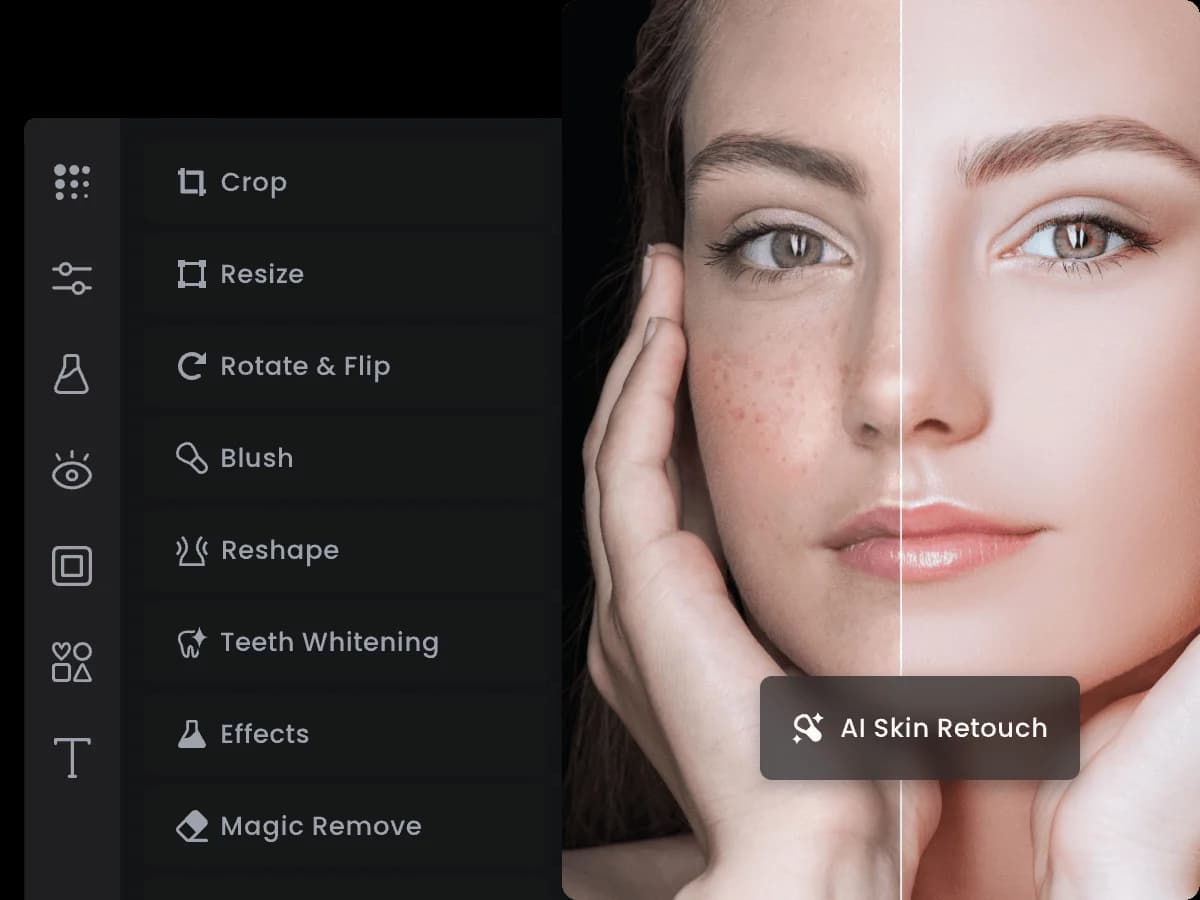

Fotor is a long-running AI photo editing and design platform serving over 800 million users worldwide. It combines background removal, AI image generation, batch editing, and portrait retouching in a web-first tool that competes with Canva on price and Picsart on photo depth.
Fotor is an AI-powered photo editor and graphic design platform founded in 2012 by Tony Duan in Chengdu, China, and operated by Chengdu Everimaging Science and Technology Co., Ltd. After a decade as a conventional photo editor, the company made a decisive AI pivot in October 2022, deploying generative AI tools on Amazon Bedrock and SageMaker. Today it reports 800 million users across 200+ countries, making it one of the largest photo editing platforms by raw user count. The core problem Fotor solves is accessibility: it gives people without Photoshop skills the ability to enhance images, generate visuals, and build graphics quickly, without a steep learning curve.
The feature set spans AI text-to-image generation, one-tap photo enhancement, background removal and replacement, AI portrait retouching with 20+ dedicated controls, face swapping, batch processing for multiple images simultaneously, a 100,000+ template library for social media and marketing, and an AI headshot generator that produces 20-80 professional portraits from a single selfie upload. In August 2025, Fotor launched "Sisi," a conversational AI agent that accepts voice and text prompts and maintains editing memory across sessions. The platform runs on Web, iOS, Android, and Desktop. A developer API program launched in 2025 for teams that need programmatic access.
What Fotor creates in April 2026
Fotor's generative output in 2026 covers three main production areas: enhanced photos, original AI-generated images, and designed graphics. On the enhancement side, the AI photo enhancer sharpens and clarifies uploaded images automatically; the upscaler increases resolution for low-quality source files; and the portrait retouching tools handle skin smoothing, eye enhancement, and face reshaping. Background removal is fully automated and runs without manual selection, with replacement options using stock scenes or custom uploads.
For original generation, the text-to-image tool accepts natural language prompts and outputs images in styles ranging from photorealistic to illustration. The AI headshot generator, launched in June 2023, uses GAN-based modeling to analyze facial geometry from 10-20 selfies and produce professional portrait variations suitable for LinkedIn or corporate headshots. The Sisi agent, launched August 19, 2025, wraps all of these tools in a conversational interface: users describe what they want in plain language or by voice, and Sisi routes the request to the appropriate underlying tool, maintaining context across multiple edits in the same session.
On the design side, Fotor's template library covers social media posts, presentations, marketing banners, and collages. Batch processing lets Pro and Pro+ users apply consistent edits across dozens of images simultaneously, a feature Canva lacks. The AI slide generator, available at Pro+ tier, converts text outlines into formatted presentation decks. Sister products extend Fotor's reach into art effects (GoArt), dedicated portrait work (PortraitMe), and AI video generation (Clipfly).
"Great result. It satisfy the idea for my game project." - Verified Reviewer (game developer), Capterra, July 2025
Where Fotor sits versus Canva and Picsart
The three tools serve overlapping but distinct use cases, and the differences come down to workflow architecture, not just feature lists.
Fotor vs. Canva: Canva is a design platform that puts photo editing second. Users start with a template, choose a layout, and drop in content. Fotor starts with your photo and modifies it outward. This means Canva's template library (especially for multi-element documents, pitch decks, and brand materials) is far broader and more refined, while Fotor's photo-specific tooling, including batch processing, portrait retouching controls, and dedicated AI enhancement, is deeper. Canva requires editing each image individually; Fotor's batch editor processes many images in one pass. Canva has real-time collaboration and team management features Fotor lacks entirely. On AI generation, Canva's Magic Media and Fotor's text-to-image sit at comparable quality levels, but Fotor's portrait-specific tooling (20+ retouching sliders, the AI headshot generator) has no equivalent in Canva. Fotor Pro at $3.33/month annual undercuts Canva Pro at $6.50/month annual for users who need photo work more than design templates.
Fotor vs. Picsart: Picsart is mobile-first in its design DNA, built from the ground up around touch interactions and app-native workflows. Fotor is web-first, with apps as capable companions rather than the primary surface. Picsart includes a fully featured native video editor with timeline controls; Fotor's video output runs through the separate Clipfly product, which is less integrated into the core editing flow. Picsart's AI tools lean toward artistic and creative transformation: sticker creation, style-transfer effects, community-created filter packs. Fotor's AI skews toward photo enhancement and realistic output. Picsart's community is larger and more creatively driven; Fotor's 100,000+ template library is more commercially oriented. Picsart charges $5/month annually vs Fotor's $3.33/month.
For users choosing among all three: Canva wins on design templates and team work. Picsart wins on mobile editing and video. Fotor wins on photo enhancement depth, batch processing, and price. Users who primarily need to fix or generate photos, not design documents from scratch, will find Fotor the most efficient path. Those wanting comparisons with other AI image tools should also look at Topaz Labs for professional-grade upscaling and Freepik's AI image generator for stock-quality outputs.
The credit and pricing reality
Fotor's pricing structure involves two separate currencies: the subscription tier (which unlocks features and concurrent generation slots) and credits (which are consumed per AI operation). This dual-layer system trips up a significant number of users.
At the free tier, credits are limited and depleted quickly. Each AI image generation, enhancement, or background removal typically consumes credits. Credits roll over up to five months while subscribed, but users on monthly plans report running out well before the month ends on heavy use. The Pro plan at $3.33/month annual includes 100 AI credits monthly. Pro+ at $7.49/month annual includes 300 credits.
The billing complaints visible on Capterra and Trustpilot in 2025-2026 cluster around two issues: unexpected annual charges (users clicking what appeared to be a monthly signup found themselves charged for a full year), and refund difficulty. One Capterra reviewer noted in March 2026 that the refund process was "extremely difficult even if the service does not meet expectations." A separate reviewer flagged in March 2026 that annual billing was not clearly disclosed before checkout.
The advertised $3.99/month starting price refers to the annual Pro plan at approximately that rate depending on regional pricing. Monthly billing for the same plan runs $8.99/month. For users doing light editing, the free tier with limited credits is workable. For regular content creators, Pro at $3.33/month annually is competitive against peers. The credit system becomes a real cost factor only when running AI generation heavily; batch editing and template-based work does not consume credits at the same rate as generative features.
"For what you get, the fotor cost is hard to beat. It delivers 80% of what Photoshop does at 15% of the price." - Softlist.io reviewer, 2025
Where Fotor consistently disappoints
The most documented quality failure is AI prompt reliability on complex requests. One Capterra reviewer (Gernot W., February 2025) tracked 38 generation attempts and reported text was rendered correctly only five times. Users consistently note that prompts involving multiple specific objects, exact positioning, or text overlays produce unreliable results. The consensus from multiple review platforms: Fotor's AI generation is reliable for simple subjects (single portrait, basic product shot, clean background) but degrades on complexity.
Image output size and quality is the second recurring issue. Elena I. on Capterra (April 2025) noted that "AI generated images are a bit too small and the texture for the photorealistic images is too smooth," pointing to a gap between Fotor's output and dedicated generation tools like Luminar Neo for photo-realistic results. Users seeking high-resolution outputs for print or large-format display frequently hit limitations.
Performance on large files is a structural weakness of the web-based architecture. Multiple reviewers report browser freezing and crashes when editing high-resolution source photos. Fotor processes files server-side, which introduces latency and makes the experience dependent on network conditions. The AWS case study noted inference latency of 7-8 seconds per request even after optimization, which is perceptible in real-time editing workflows.
Customer support receives consistently poor marks. Tekpon's aggregated reviews across G2, Capterra, and Trustpilot characterize support as "rude, slow, unhelpful." Combined with the difficult refund policy, this creates a high-risk situation for users who encounter billing errors or product failures.
The free tier's ad interruptions break workflow, and the lack of offline editing means any connectivity issues halt work entirely. There is also no photo organization or folder system, which makes managing large image libraries cumbersome.
Who Fotor is built for
Fotor works best for content creators, small business owners, and social media managers who need a fast, affordable way to produce polished photos and graphics without professional design skills. The template library and AI enhancement pipeline significantly reduce production time: one tester reported cutting per-photo editing time from 15-20 minutes down to 3-5 minutes, with weekly output tripling. For e-commerce sellers who need product photo cleanup and background replacement at scale, the batch processing feature at Pro tier justifies the subscription alone.
The AI headshot generator is genuinely useful for professionals who need LinkedIn or business profile photos without booking a studio. Since its June 2023 launch, this feature has attracted a consistent user base of job seekers, freelancers, and corporate employees updating their profiles.
Game developers and indie creators who need fast concept art iteration rather than publication-quality output will find Fotor's AI generator serviceable. The Sisi agent, launched in August 2025, lowers the barrier further by removing the need to learn individual tool interfaces.
Skip Fotor if you are a professional photographer who needs non-destructive RAW editing, advanced masking, or layer-based workflows. Lightroom and Photoshop serve that use case and Fotor does not come close. Skip it if you need AI art at the quality level of Midjourney or DALL-E 3 for creative or commercial illustration. Skip it if your team needs real-time collaboration on design assets. And skip it if you have had bad experiences with subscription billing practices at other tools; Fotor's documented billing issues suggest this is a systemic problem, not an edge case.
User Reviews
No reviews yet. Be the first to share your experience!
Sign in to write a review.
Related articles
Guides and articles related to Fotor.

Best AI Fashion Model Generators for Clothing Brands (2026)

AI Fashion Prompts That Stay Consistent: The Working Formula (2026)

Freepik AI Is Now Magnific: What Changed, What It Costs, and Whether to Stay (2026)
AI Clothing Photoshoot: What It Really Costs vs a Studio Shoot (2026)

Wix Logo Maker Review (2026): Real Costs, the Edit Catch, and AI Alternatives
